Bibliothèque

Bibliothèque

Bibliothèque
Bibliothèque
Bibliothèque
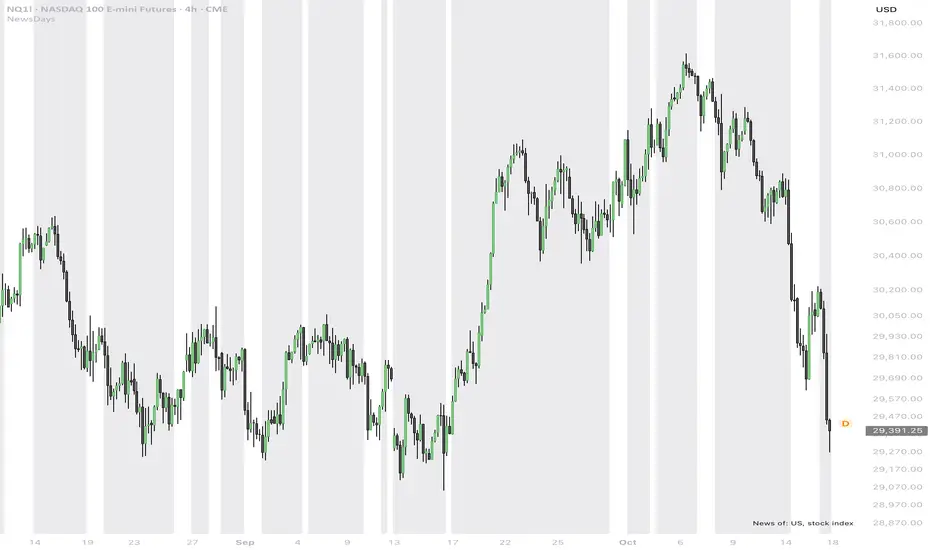
FT_TV_MRFT_TV_MR is a Pine Script® v6 library developed to provide reusable tools for evaluating the practical manual replicability of systematic trading strategies and for visualizing time-sensitive trade-management events.
Its core Manual Replicability engine analyzes completed strategy trades against a configurable operating-time window. It distinguishes entry and exit events, classifies different exit types and measures how frequently strategy actions occur inside or outside the time period in which a trader is available to manage the strategy.
The library also includes complementary visualization utilities for maximum trade-duration limits, scheduled entry/exit events and SMA-based trailing logic.
Manual Replicability Engine
The engine maintains a persistent MRState containing registered order IDs, event classifications, trade counters, time-window statistics and visualization state.
For each completed trade it can evaluate:
Whether the entry occurred inside the configured operating window.
Whether the exit occurred inside the configured operating window.
Whether both entry and exit were manageable within that window.
Whether an out-of-window exit was generated by a fixed or dynamic exit mechanism.
The distribution of strategy entries across the 24 hours of the day.
A synthetic Manual Replicability score designed to highlight strategies that require less intervention outside the trader's available hours.
Main exported functionality
new() — Creates and initializes a new MRState object used by the Manual Replicability engine.
add_id() — Registers additional strategy order IDs and classifies them by entry/exit role and exit type, allowing the replicability analysis to be extended beyond the default order identifiers.
reset() — Resets accumulated statistics and removes the associated Manual Replicability visual objects.
run() — Main Manual Replicability analyzer. It processes completed strategy trades, compares entry and exit timestamps with the configured operating window, updates statistics and optionally displays the complete analysis panel and hourly entry distribution.
role_entry() , role_exit() , exit_none() , exit_fixed() and exit_dynamic() — Helper constants used to classify registered order IDs and distinguish fixed from dynamic exit mechanisms.
Trade-Timing Visualization Utilities
Z_MaxDaysLimit_BarsLeft() — Calculates the estimated number of chart bars remaining before a configured maximum-duration closing time.
Z_MaxDaysLimit_BgColor() and Z_MaxDaysLimit_BgColorEx() — Generate progressively stronger background warnings as the maximum-duration closing event approaches.
Z_MaxDaysLimit_CountdownLabels() — Creates a bar-by-bar visual countdown toward the maximum-duration exit.
Z_Bias_BarsLeftToEvent() — Calculates the number of bars remaining until a specified day-of-week and time event.
Z_Bias_BgColor() and Z_Bias_BgColorEx() — Provide position-aware chart highlighting for upcoming long/short entry and exit timing events and selected gap conditions.
Z_SmaTrailPlot() — Calculates an SMA trailing reference together with a distance-sensitive display color and normalized distance measure, allowing the chart visualization to intensify as price approaches the trailing reference.
Purpose
FT_TV_MR is primarily designed as a shared trade-management and manual-replicability dependency for other strategies.
It helps distinguish strategy performance from operational feasibility by showing when entries and exits actually require trader availability, while also providing reusable visual tools for time-dependent exits and trailing mechanisms.
Usage, attribution and intellectual property
This Pine Script® library is published open-source in accordance with TradingView's requirements for public Pine libraries.
Under TradingView's Script Publishing Rules, functions or code from a public Pine library may be reused in open-source publications without prior permission from the author. When publishing work that reuses this library, the original author must be properly credited in accordance with TradingView's rules.
Reuse of this library's functions or source code in a public Protected or Invite-only publication requires explicit permission from us.
The source code is provided under the license specified in the script header. TradingView's Script Publishing Rules govern reuse within the TradingView platform. Bibliothèque

FT_TV_ELFT_TV_EL is a Pine Script® v6 library which provides a reusable framework for calculating configurable long and short entry levels in systematic trading strategies.
The library works with the OHLC and pre-calculated market-context structures, allowing entry prices to be derived consistently from current market data, previous Day/Session periods and broader volatility or price-structure references.
Entry Level Framework
The available entry-level calculations cover several categories, including:
Current and historical Day/Session Open, High, Low and Close references.
Rolling highest-high and lowest-low levels.
Moving-average and average-range based price levels.
ATR-based volatility extensions using multiple ATR lengths and multipliers.
Current-bar and historical-bar High/Low references.
Session-start High, Low and range-based extensions.
Percentage-based price offsets.
Day/Session range-based extensions.
Classic pivot-point support and resistance levels.
Current weekly High and Low.
Extrema calculated across the previous five Day/Session periods.
Main exported functionality
long_entry_level() — Calculates the selected long-side entry price. The function provides a large catalog of configurable entry-level formulas using OHLC structures, volatility, recent extrema, pivot calculations, percentage offsets, session references and other price-derived methods.
short_entry_level() — Calculates the corresponding short-side entry price using the same modular framework and a dedicated set of short-oriented level definitions.
plot_long_entry_level_info() — Displays an optional chart information panel for the selected long entry level, including the chosen definition, a human-readable explanation of its logic and the OHLC calculation mode being used.
plot_short_entry_level_info() — Provides the equivalent information panel for the selected short entry level.
Framework integration
The main entry-level functions use two shared data structures:
FT_OHLC — Provides the current and previous Day/Session OHLC periods.
PtnCtx — Provides pre-calculated contextual information including recent extrema, ranges, bodies and session-state references.
This architecture allows individual strategies to change their entry-price methodology without duplicating the underlying market-context calculations.
Purpose
FT_TV_EL is primarily designed as a shared entry-level dependency for other strategies. It separates entry-price generation from signal generation and trade-management logic, providing a consistent and reusable framework for testing and deploying different entry methodologies across multiple strategies.
Usage, attribution and intellectual property
This Pine Script® library is published open-source in accordance with TradingView's requirements for public Pine libraries.
Under TradingView's Script Publishing Rules, functions or code from a public Pine library may be reused in open-source publications without prior permission from the author. When publishing work that reuses this library, the original author must be properly credited in accordance with TradingView's rules.
Reuse of this library's functions or source code in a public Protected or Invite-only publication requires explicit permission from us.
The source code is provided under the license specified in the script header. TradingView's Script Publishing Rules govern reuse within the TradingView platform.
Bibliothèque

FT_TV_CondFT_TV_Cond is a Pine Script® v6 library which provides reusable market-condition filters for systematic and algorithmic trading strategies.
The library operates on the structured OHLC and pre-calculated market context used by other strategies framework. It evaluates configurable conditions across the current Day/Session, previous completed periods and a broader five-period market context.
Available conditions cover a wide range of price-action concepts, including directional movement, OHLC relationships, breakouts, range and body expansion or contraction, recent extrema, crossovers, gaps, session development and multi-period market structure.
Main exported functionality
condition_day0() — Evaluates conditions primarily related to the current Day/Session and current chart bars. Available filters include intraday directional movement, current OHLC relationships, new highs/lows, breakouts, range/body comparisons, session-start relationships and other current-period price-action structures.
condition_day1() — Evaluates conditions centered on the previous completed Day/Session , comparing its Open, High, Low, Close, range and body with the current period and earlier historical periods.
condition_day2() — Extends the same condition framework to the OHLC period two Day/Sessions back , allowing strategies to incorporate additional historical market structure.
condition_W() — Evaluates broader five-period market conditions , including directional displacement, body-to-range relationships, position within recent extrema and other multi-period structures.
condition_day0_meaning() , condition_day1_meaning() , condition_day2_meaning() and condition_W_meaning() — Convert supported condition identifiers into human-readable explanations, making the selected trading logic easier to understand and inspect.
plot_condition_day0_info() , plot_condition_day1_info() , plot_condition_day2_info() and plot_condition_W_info() — Display optional information panels describing the selected condition, its practical meaning and whether OHLC calculations are based on calendar-day or custom-session data.
Framework integration
The condition evaluators are designed to work with the OHLC framework through two shared data structures:
FT_OHLC — Contains the current and previous Day/Session OHLC periods.
PtnCtx — Contains pre-calculated contextual values such as ranges, bodies, recent extrema and session-state information.
This architecture allows individual strategies to select and evaluate complex market filters without duplicating the underlying OHLC and contextual calculations.
Purpose
FT_TV_Cond is primarily intended as a shared condition-filtering dependency for other strategies. It separates reusable market-context conditions from the strategy's entry and trade-management logic, providing a consistent and modular filtering framework across multiple Pine Script® strategies.
Usage, attribution and intellectual property
This Pine Script® library is published open-source in accordance with TradingView's requirements for public Pine libraries.
Under TradingView's Script Publishing Rules, functions or code from a public Pine library may be reused in open-source publications without prior permission from the author. When publishing work that reuses this library, the original author must be properly credited in accordance with TradingView's rules.
Reuse of this library's functions or source code in a public Protected or Invite-only publication requires explicit permission from us.
The source code is provided under the license specified in the script header. TradingView's Script Publishing Rules govern reuse within the TradingView platform. Bibliothèque

FT_TV_OHLCFT_TV_OHLC is a Pine Script® v6 library which provides a reusable OHLC context, pattern-evaluation engine and entry-level framework for systematic trading strategies.
The library builds and maintains structured Open, High, Low and Close data for the current market period and the previous five completed periods. On intraday charts, these periods can represent either calendar days or custom trading sessions, allowing the same strategy logic to work with session-aware market data.
This OHLC history is combined with a pre-calculated market context containing candle ranges and bodies, recent extrema, multi-period measurements and session-start references. The resulting data is used by other libraries pattern and entry-level engines.
Main exported functionality
Z_FT_OHLC() — Builds and maintains the OHLC data structure used by the library. It supports both Day and custom Session aggregation modes, configurable session times and timezone-aware processing.
ZPattern_Mir_PreCalc() — Pre-calculates the common market context used by the pattern engine, including OHLC ranges and bodies, multi-period extrema, session bar state and session-start price references. This avoids repeatedly calculating the same data across individual pattern evaluations.
ZEntryLevel_Mir() — Generates long and short entry-price levels from a broad collection of configurable methods. Available calculations include OHLC-derived levels, ATR and range extensions, moving-average references, recent extrema, session-start levels, percentage offsets, weekly levels and other price-based structures. A reversal mode can also swap the resulting long and short levels.
ZPattern_Mir() — Main interface to the extended pattern catalog. It evaluates more than 480 directional market conditions based on current price action, Day/Session OHLC structures, multi-period relationships, breakouts, compression/expansion, candle characteristics and session context. Positive and negative pattern IDs select the corresponding directional variants of each condition.
ZPattern_MostUsed() — Provides a compact subset of frequently used OHLC and price-action conditions for strategies that do not require the complete pattern catalog.
Z_OHLC_PatternsPanel() — Provides an optional visual diagnostic panel for selected OHLC patterns, including their current verification state, descriptions and occurrence counters, with optional chart highlighting.
Purpose
FT_TV_OHLC is designed primarily as a shared analytical dependency for other strategies. It separates OHLC aggregation, market-context calculations, pattern evaluation and entry-level generation from the individual strategy logic, providing a consistent framework that can be reused across multiple Pine Script® strategies.
Usage, attribution and intellectual property
This Pine Script® library is published open-source in accordance with TradingView's requirements for public Pine libraries.
Under TradingView's Script Publishing Rules, functions or code from a public Pine library may be reused in open-source publications without prior permission from the author. When publishing work that reuses this library, the original author must be properly credited in accordance with TradingView's rules.
Reuse of this library's functions or source code in a public Protected or Invite-only publication requires explicit permission from us.
The source code is provided under the license specified in the script header. TradingView's Script Publishing Rules govern reuse within the TradingView platform. Bibliothèque

FT_TV_libFT_TV_lib is a Pine Script® v6 utility library which provides reusable components for systematic and algorithmic trading strategies.
The library centralizes a range of commonly required operations, including trading-session management, session-based OHLC calculations, strategy and position monitoring, trade-management utilities, futures rollover handling, technical calculations, alerts, and chart visualization tools.
Main exported functionality
Session and OHLC utilities — Functions for identifying session and day transitions and retrieving session-aware Open, High, Low and Close values, including previous sessions. Main functions include sessionstart() , isNewDay() , isLastBarOfDay() , openD() , highD() , lowD() , closeD() and their related session utilities.
Strategy and trade management — Utilities for detecting position state, counting daily entries, measuring bars since entry, limiting trade duration and calculating dynamic trailing-stop levels. Relevant functions include mp() , BarsSinceLastEntry() , entriestoday() , MaxTradeDuration() and TrailingStop() .
Intraday market analysis — Session-aware Body Factor calculations and related OHLC components for analyzing directional price movement inside configurable intraday periods through functions such as IntradayBodyFactor_v2() and the related IntradayBF_Open() , IntradayBF_High() , IntradayBF_Low() and IntradayBF_Close() .
Trade and order visualization — VisualTrades() and DrawEntryOrdersHistorySeries() provide reusable chart components for displaying entries, exits, stop-loss, trailing-stop, take-profit and pending order levels.
Futures rollover utilities — Functions for resolving active futures expiries and symbols and supporting rollover notifications, including active_expiry() , active_symbol() and check_and_build_alert() .
Technical-analysis utilities — Reusable implementations of commonly used calculations including Average, Average True Range, MACD, Rate of Change, Standard Deviation, Bollinger Bands, Momentum, Stochastic, CCI, RSI, ADX and Inside Bar detection.
Alerts and interface utilities — Additional exported functions support strategy trade alerts and reusable chart information displays, including AlertMessages() and Badge() .
Purpose
This library is primarily designed as a shared dependency for other Pine Script® strategies, allowing common trading, analytical and visualization components to remain consistent across multiple strategy implementations.
Usage, attribution and intellectual property
This Pine Script® library is published open-source in accordance with TradingView's requirements for public Pine libraries.
Under TradingView's Script Publishing Rules, functions or code from a public Pine library may be reused in open-source publications without prior permission from the author. When publishing work that reuses this library, the original author must be properly credited in accordance with TradingView's rules.
Reuse of this library's functions or source code in a public Protected or Invite-only publication requires explicit permission from us.
The source code is provided under the license specified in the script header. TradingView's Script Publishing Rules govern reuse within the TradingView platform.
Bibliothèque

XGBoostMiniThis advanced library implements a fully functional, optimized, and native XGBoost (Extreme Gradient Boosting) binary classification model, allowing you to train an ensemble of decision trees and perform real-time inference directly on price data and technical indicators.
🔷 XGBoost Extreme Gradient Boosting
XGBoost is one of the most famous, powerful, and widely used machine learning libraries in the world. Is an ensemble learning model. It works by sequentially combining many weak decision trees (weak learners), where each new tree is specifically trained to correct the errors (residuals) made by the preceding trees. It has become the gold standard for solving tabular data problems and is renowned for dominating competitions on the Kaggle platform for years thanks to its extraordinary combination of speed and precision.
🔹 Key Features That Make It Unique
Speed and Efficiency (Parallelization): Unlike traditional Gradient Boosting, which builds trees in a strictly sequential manner, XGBoost leverages multithreading to parallelize tree construction, drastically reducing computation time.
Built-in Regularization (L1 and L2): It includes penalties for model complexity, which helps prevent overfitting (the phenomenon where the model memorizes training data but fails on unseen data).
Missing Values Handling: It features built-in internal logic to automatically determine how to handle missing or NaN data during the splitting phase, without requiring mandatory upfront preprocessing.
Approximate Split Algorithms: For massive datasets, it uses intelligent techniques to find optimal split points without having to evaluate every single value, further accelerating the process.
🔹 What is XGBoost and Where Did It Come From?
XGBoost (eXtreme Gradient Boosting) is one of the most powerful and widely used machine learning algorithms in the world, particularly for structured and tabular data.
It was created in 2014 by Tianqi Chen (then a researcher at the University of Washington) as an open-source research project, and it became a global phenomenon in 2016 following the publication of its landmark paper presented at the SIGKDD conference. Chen aimed to push the concept of Gradient Boosting (sequentially combining weak decision trees, where each new tree corrects the errors of previous ones) beyond the limitations of traditional software at the time. The goal was to build a system that combined extreme computational speed (leveraging parallel hardware) with extraordinary predictive accuracy, introducing advanced techniques such as mathematical regularization to prevent overfitting.
🔹 Why XGBoost is a Brilliant Choice for Financial Time Series Trading
In quantitative trading, financial market data (prices, volumes, and technical indicators like RSI, MACD, and moving averages) almost always comes in a tabular format. Here is why XGBoost frequently outperforms more complex models (such as Neural Networks or Transformers) when analyzing financial time series:
Tabular Data Dominance : Unlike images or text, historical time series structured as indicators and extracted features benefit immensely from decision trees. XGBoost excels at discovering complex threshold rules (e.g., "if the RSI is below 30 and volatility exceeds X, then...").
Noise Management and Regularization: Financial markets are notoriously noisy. XGBoost’s regularization parameters penalize tree complexity, preventing the model from memorizing past data and forcing it to uncover generalizable patterns.
Robustness to Outliers: Flash crashes, sudden volume spikes, or data anomalies do not throw decision trees off balance—unlike linear models or neural networks, which are often sensitive to extreme values.
Interpretability via Feature Importance: In trading, guessing direction is not enough; you must understand why. XGBoost natively computes the importance of each variable (via structural gain), allowing you to discover which technical indicators are genuinely driving strategy performance versus those that are just noise.
Real-Time Inference Speed: Because it relies on simple sequential logical comparisons (inference across shallow decision trees), it is ideal for real-time execution directly on platforms like TradingView without excessive latency.
🔷 1. User-Defined Types (UDTs)
The code leverages Pine Script v6 data structures to define the model architecture:
XGBTreeDepth3: Represents a single weak learner with a fixed depth of 3 levels. It stores feature indices, split thresholds, information gains for each node, and the terminal leaf weights (w0 through w7) for all 8 possible leaf regions.
XGBModel: Encapsulates the entire trained tree ensemble, the best recorded validation loss (best_val_loss), and the optimal number of trees to retain (best_tree_count).
SplitCandidate: An internal helper structure used to evaluate optimal split points during tree growth.
🔷 2. Inference & Analysis Methods
predict_tree: Traverses the depth-3 decision tree by sequentially evaluating feature values against stored thresholds until a terminal leaf node is reached.
predict_probability: Aggregates the raw scores (logits) across all trees in the ensemble, applies the learning rate, and maps the final output to a logistic probability ranging from 0.0 to 1.0 via the Sigmoid function (including numerical protection against overflow/underflow).
calculate_feature_importance: Computes relative feature importance (0.0 to 1.0) by aggregating the structural gain accumulated by each variable across the entire ensemble.
🔷 3. Static Quantile Pre-Binning
The find_split_subset_fast function and the initial training phase implement Static Quantile Pre-Binning: prior to boosting, historical feature values are sorted and binned into quantitative buckets. This dramatically accelerates the search for optimal split points during tree construction, significantly reducing computational overhead.
🔷 4. The Training Pipeline
This is the core of the library, executing an iterative boosting loop that includes:
1. Row and Column Subsampling: Supports random sampling of instances and features to mitigate overfitting.
2. Gradient Computation: Computes first-order gradients and second-order Hessians based on binary cross-entropy loss.
3. Depth-3 Tree Construction: Progressively identifies optimal splits level by level using XGBoost regularization criteria.
4. Early Stopping & Validation: Automatically carves out a validation subset and halts training if the validation loss fails to improve over a specified number of rounds, subsequently rolling back to the optimal tree count.
🔷 Constraints to Consider
🔹 Architectural & Complexity Limitations (Fixed Depth of 3)
The tree is hardcoded with a fixed depth of 3 (XGBTreeDepth3), meaning it can evaluate a maximum of 3 levels of decisions (up to 8 terminal leaves). This can result in an inability to capture complex interactions. In financial markets, complex patterns often require deeper trees to combine multiple simultaneous conditions. A depth of 3 severely limits the learning capacity for advanced non-linear relationships.
🔹 Computational & Execution Limitations
Training a Gradient Boosting model requires a high volume of computations (nested loops for scanning matrices, calculating quantiles, sorting arrays, and evaluating gradients). Increasing the number of trees, feature matrix size, or number of bins too much will cause the script to abort due to exceeding the maximum execution loop limit allowed per single script (typically a few tens of thousands of operations before timing out).
Validation splits data by simply taking a portion of the rows. In financial time series, this can cause Data Leakage if training and validation data mix without strictly respecting the chronological sequence (the model might "peek" into the future if a Walk-Forward or Time-Series Split approach is not used).
Without a rigorous Out-Of-Sample (OOS) test set, a model trained directly on past prices will easily tend to find spurious correlations (market "noise" rather than real signals), failing miserably when applied to future real-time data.
🔹 Technical Rationale for Design Choices
There are very specific technical reasons why advanced features like dynamic Walk-Forward or continuous Rolling Retraining have not been natively integrated into this library:
The Computational Bottleneck
A true Walk-Forward or Rolling Retraining (retraining the model bar-by-bar or across rolling time blocks) requires repeating the entire training process—quantile calculation, matrix scanning, iterative tree construction—hundreds or thousands of times on massive historical datasets. Continuous retraining would immediately trigger an Execution Timeout error.
Memory & Historical Data Architecture
Managing matrices and historical arrays carries strict performance constraints. Accessing past data from hundreds of bars while applying complex temporal slicing logic rapidly consumes the heap memory allocated for the script, slowing down or freezing the chart.
This is why a "static and lightweight" approach was chosen for this library. The script trains the model once (or on a fixed portion of data) and leverages the speed of pre-compiled trees to perform real-time inference without exceeding computational limits.
---------------------------------------------------------------
Library "XGBoostMini"
XGBoost Mini Library featuring Static Quantile Pre-Binning, Early Stopping, Subsampling, and Feature Importance.
method predict_tree(self, features)
Evaluates the raw score (logit sum contribution) of a single depth-3 tree on a feature vector.
Traverses the binary decision tree hardcoded for 3 levels (up to 8 terminal leaves).
Namespace types: XGBTreeDepth3
Parameters:
self (XGBTreeDepth3)
features (array)
predict_probability(model, features, learning_rate)
Computes the final Sigmoid probability (0.0 to 1.0) by aggregating the boosted ensemble.
Applies learning rate scaling and numerical overflow/underflow clamping to the raw accumulated score.
Parameters:
model (XGBModel)
features (array)
learning_rate (float)
calculate_feature_importance(model, n_features)
Calculates relative Feature Importance (0.0 - 1.0) based on accumulated structural gain across the ensemble.
Parameters:
model (XGBModel)
n_features (int)
train_model(X_matrix, y_target, num_trees, learning_rate, lambda_reg, quantile_bins, min_samples_split, subsample, colsample_bytree, val_ratio, patience)
Main entry point to train the XGBoost ensemble.
Implements Static Quantile Pre-Binning, Row/Column Subsampling, Binary Cross-Entropy Loss, and Early Stopping.
Parameters:
X_matrix (matrix)
y_target (array)
num_trees (int)
learning_rate (float)
lambda_reg (float)
quantile_bins (int)
min_samples_split (int)
subsample (float)
colsample_bytree (float)
val_ratio (float)
patience (int)
XGBTreeDepth3
XGBTreeDepth3
Fields:
f_r (series int)
t_r (series float)
g_r (series float)
f_l (series int)
t_l (series float)
g_l (series float)
f_right (series int)
t_right (series float)
g_right (series float)
f_ll (series int)
t_ll (series float)
g_ll (series float)
f_lr (series int)
t_lr (series float)
g_lr (series float)
f_rl (series int)
t_rl (series float)
g_rl (series float)
f_rr (series int)
t_rr (series float)
g_rr (series float)
w0 (series float) : to w7 Leaf node terminal weights (predictions) for all 8 possible regions of a depth-3 tree.
w1 (series float)
w2 (series float)
w3 (series float)
w4 (series float)
w5 (series float)
w6 (series float)
w7 (series float)
XGBModel
XGBModel
Fields:
ensemble (array) : Array storing all trained XGBTreeDepth3 weak learners.
best_val_loss (series float) : Lowest validation loss achieved (used for tracking convergence).
best_tree_count (series int) : Optimal number of trees retained after early stopping. Bibliothèque

Bibliothèque

CatalystCalendarDataData component of the Catalyst economic calendar indicator.
WHAT THIS CONTAINS
A compiled release schedule for economic and commodity events across US, Euro
Area, UK, Japan, Australia, New Zealand, Canada, Switzerland and China, plus
energy and agricultural reports, Treasury auctions and market-structure dates.
Roughly 24 months of history and 12 months of forward schedule.
The schedule is compiled offline from official agency calendars: the Federal
Reserve, FRED, the US Bureau of Labor Statistics, the US Energy Information
Administration, and the published policy meeting calendars of the ECB, Bank of
England, Bank of Canada, Reserve Bank of Australia, Reserve Bank of New Zealand,
Bank of Japan and Swiss National Bank.
This library holds dates only. Released values are read separately through
request.economic().
EXPORTS
monthChunk(year, month) the encoded occurrence records for one UTC month
keyTable() event metadata, one record per line
buildStamp() UTC milliseconds at which this data was generated
horizon() the first and last timestamp covered
FORMAT
Each occurrence is a fixed-width 10-character record, DDHHMMKKKI. The encoding is
documented inline in the source in enough detail to decode a record by hand.
UPDATE CADENCE
Regenerated and republished quarterly. Scripts pin a version number, so an
existing import keeps working until it is deliberately updated.
``` Bibliothèque

CryptonianEWFibLibrary "CryptonianEWFib"
Cryptonian Elliott Wave Fib /1. Stage-aware Fibonacci model, corrective projection geometry and Fresh-FVG lifecycle/confluence. Extracted from the proven 11.8c/11.8d host without methodology changes.
evaluate(goldProfile, ticker, chartTimeframeSeconds, fvgMinAtr, fvgMaxAgeBars, fibEngineOn, fvgEngineOn, fvgRequireSourceLeg, maxStoredFvgs, fvgMinRemainingPct, atrValue, mintick, currentBar, currentHigh, currentLow, currentClose, p0, p1, p2, p3, p4, pb0, pb1, pb2, pb3, primaryKey, primaryLockedCount, primaryDirection, primaryW2Depth, primaryW3Extension, primaryW4Depth, primaryW5Ratio, primaryQuality, correctionSourceKey, correctionCommittedCount, correctionOriginPrice, correctionSourceDirection, c1, cp1, c2, cp2, cb2, correctionConfirmed, correctionHasProvisional, fvgOriginalTops, fvgOriginalBottoms, fvgLiveTops, fvgLiveBottoms, fvgDirections, fvgBirthBars)
Parameters:
goldProfile (bool)
ticker (string)
chartTimeframeSeconds (int)
fvgMinAtr (float)
fvgMaxAgeBars (int)
fibEngineOn (bool)
fvgEngineOn (bool)
fvgRequireSourceLeg (bool)
maxStoredFvgs (int)
fvgMinRemainingPct (float)
atrValue (float)
mintick (float)
currentBar (int)
currentHigh (float)
currentLow (float)
currentClose (float)
p0 (float)
p1 (float)
p2 (float)
p3 (float)
p4 (float)
pb0 (int)
pb1 (int)
pb2 (int)
pb3 (int)
primaryKey (string)
primaryLockedCount (int)
primaryDirection (int)
primaryW2Depth (float)
primaryW3Extension (float)
primaryW4Depth (float)
primaryW5Ratio (float)
primaryQuality (float)
correctionSourceKey (string)
correctionCommittedCount (int)
correctionOriginPrice (float)
correctionSourceDirection (int)
c1 (float)
cp1 (bool)
c2 (float)
cp2 (bool)
cb2 (int)
correctionConfirmed (bool)
correctionHasProvisional (bool)
fvgOriginalTops (array)
fvgOriginalBottoms (array)
fvgLiveTops (array)
fvgLiveBottoms (array)
fvgDirections (array)
fvgBirthBars (array) Bibliothèque

CryptonianEWViewLibrary "CryptonianEWView"
Cryptonian Elliott Wave View /1. Dedicated presentation-policy layer for Minimal Trader, Balanced, Full Audit and Custom chart modes. Presentation only; no Elliott, Forecast, Trade, Runtime or Audit methodology.
resolve(mode, cleanChart, primaryDegreeLinesOn, secondaryDegreeLinesOn, subSecondaryDegreeLinesOn, alternateCountLinesOn, correctionLinesOn, showPivotSkeleton, showElliottChannels, showPrimaryCount, secondaryDegreeLabelsOn, subSecondaryDegreeLabelsOn, showAlternateCount, showCorrection, showPivotIds, showDevelopingPivot, showCorrectionLevels, showFibModel, showFreshFvg, showInvalidationLevel, showInvalidationTags, showRevisionTags, showTradeLevels, showTradeSignals, showPotentialForecast, forecastAuditOn, forecastAuditLabelsOn, contextForecastRoadmapOn, contextForecastMainLabelOn, contextForecastTargetLabelsOn, htfTradeBridgeGeometryOn, maxTradeLifecycleLabels)
Parameters:
mode (string)
cleanChart (bool)
primaryDegreeLinesOn (bool)
secondaryDegreeLinesOn (bool)
subSecondaryDegreeLinesOn (bool)
alternateCountLinesOn (bool)
correctionLinesOn (bool)
showPivotSkeleton (bool)
showElliottChannels (bool)
showPrimaryCount (bool)
secondaryDegreeLabelsOn (bool)
subSecondaryDegreeLabelsOn (bool)
showAlternateCount (bool)
showCorrection (bool)
showPivotIds (bool)
showDevelopingPivot (bool)
showCorrectionLevels (bool)
showFibModel (bool)
showFreshFvg (bool)
showInvalidationLevel (bool)
showInvalidationTags (bool)
showRevisionTags (bool)
showTradeLevels (bool)
showTradeSignals (bool)
showPotentialForecast (bool)
forecastAuditOn (bool)
forecastAuditLabelsOn (bool)
contextForecastRoadmapOn (bool)
contextForecastMainLabelOn (bool)
contextForecastTargetLabelsOn (bool)
htfTradeBridgeGeometryOn (bool)
maxTradeLifecycleLabels (int)
drawActiveZone(boxStore, labelStore, enabled, startBar, projectionBars, zoneTop, zoneBottom, zoneName, zoneColor, panelColor, labelSize)
Parameters:
boxStore (array)
labelStore (array)
enabled (bool)
startBar (int)
projectionBars (int)
zoneTop (float)
zoneBottom (float)
zoneName (string)
zoneColor (color)
panelColor (color)
labelSize (string) Bibliothèque

CryptonianEWAuditLibrary "CryptonianEWAudit"
Cryptonian Elliott Wave Audit /1. Owns production integrity auditing, compact event-state construction, universal-event aggregation and alert deduplication for the library-first Elliott architecture. The audit rules are migrated from Elliott Wave Engine 11.8b2 without changing Elliott or trade methodology.
addUniqueLimited(values, value, maximumSize)
Adds one unique string and caps the registry size.
Parameters:
values (array)
value (string)
maximumSize (int)
eventOnce(eventRegistry, eventCondition, eventName, sourceKey, maximumSize, deduplicate)
Generic event de-duplication helper. This preserves the 11.8b2 event
key contract: eventName | sourceKey | time.
Parameters:
eventRegistry (array)
eventCondition (bool)
eventName (string)
sourceKey (string)
maximumSize (int)
deduplicate (bool)
eventState(lastEvent, currentCountKey, lastInvalidCountKey, forecastKey, tradeId, countStarted, countRevised, countInvalidated, forecastNew, forecastRevised, forecastInvalidated, tradeWaiting, tradeActivated, tradeResolved, tradeCountInvalidExit)
Creates the shared Model.EventState. The code field is a bit-mask for
future audit/UI use; the named booleans remain the authoritative contract.
Parameters:
lastEvent (string)
currentCountKey (string)
lastInvalidCountKey (string)
forecastKey (string)
tradeId (string)
countStarted (bool)
countRevised (bool)
countInvalidated (bool)
forecastNew (bool)
forecastRevised (bool)
forecastInvalidated (bool)
tradeWaiting (bool)
tradeActivated (bool)
tradeResolved (bool)
tradeCountInvalidExit (bool)
tradeLifecycleEvent(resolution)
True when Trade's per-bar resolution contains any lifecycle event.
TP1 is intentionally included even when the trade remains live because 11.8b2
treats TP1 as an alert-worthy lifecycle event.
Parameters:
resolution (TradeResolution type from AYEHAN/CryptonianEWModel/1)
productionAudit(pivotPrices, pivotBars, pivotTimes, pivotTypes, pivotIds, nestedPivotPrices, nestedPivotTimes, fvgOriginalTops, fvgOriginalBottoms, fvgLiveTops, fvgLiveBottoms, fvgDirections, fvgBirthBars, tradeActivationCount, tradeResolutionCount, tradeProfitableResolutions, tradeLosingResolutions, tradeFlatResolutions, tradeCancelled, tradeWaitingCancellationCount, tradeTp1ReachedCount, tradeTp2ReachedCount, tradeLive, tradeSetupId, tradeDirection, tradeEntry, tradeStop, tradeTp1)
Runs the original 11.8b2 production audit and owns persistent issue
history internally. Call this once per host bar.
Parameters:
pivotPrices (array)
pivotBars (array)
pivotTimes (array)
pivotTypes (array)
pivotIds (array)
nestedPivotPrices (array)
nestedPivotTimes (array)
fvgOriginalTops (array)
fvgOriginalBottoms (array)
fvgLiveTops (array)
fvgLiveBottoms (array)
fvgDirections (array)
fvgBirthBars (array)
tradeActivationCount (int)
tradeResolutionCount (int)
tradeProfitableResolutions (int)
tradeLosingResolutions (int)
tradeFlatResolutions (int)
tradeCancelled (int)
tradeWaitingCancellationCount (int)
tradeTp1ReachedCount (int)
tradeTp2ReachedCount (int)
tradeLive (bool)
tradeSetupId (string)
tradeDirection (int)
tradeEntry (float)
tradeStop (float)
tradeTp1 (float)
universalEventRaw(events, committedPivotNow, impulseCompletedNow, correctionCompletedNow, freshFvgConfluenceNow, mtfContextChangedNow, mtfPrimaryGateReadyNow, tradeLifecycleNow, forecastAuditTargetHit, primaryW5TargetHitNow, productionStructuralGate, productionTradeActivationGate, productionAuditChangedNow)
Reproduces the 11.8b2 universal-event OR tree using the compact shared
EventState plus the few event families not represented by Model /1.
Parameters:
events (EventState type from AYEHAN/CryptonianEWModel/1)
committedPivotNow (bool)
impulseCompletedNow (bool)
correctionCompletedNow (bool)
freshFvgConfluenceNow (bool)
mtfContextChangedNow (bool)
mtfPrimaryGateReadyNow (bool)
tradeLifecycleNow (bool)
forecastAuditTargetHit (bool)
primaryW5TargetHitNow (bool)
productionStructuralGate (bool)
productionTradeActivationGate (bool)
productionAuditChangedNow (bool)
universalAlert(rawEvent, maximumSize, deduplicate)
Stateful universal alert. The registry lives in Audit /1 rather than
the indicator host. This preserves 11.8b2's ANY_EW_EVENT | bar_index | time key.
Call once per host bar, then feed .fire to the single alertcondition().
Parameters:
rawEvent (bool)
maximumSize (int)
deduplicate (bool)
processUniversalAlert(events, committedPivotNow, impulseCompletedNow, correctionCompletedNow, freshFvgConfluenceNow, mtfContextChangedNow, mtfPrimaryGateReadyNow, tradeLifecycleNow, forecastAuditTargetHit, primaryW5TargetHitNow, productionStructuralGate, productionTradeActivationGate, productionAuditChangedNow, maximumSize, deduplicate)
Convenience wrapper: aggregate + deduplicate in one host call.
Parameters:
events (EventState type from AYEHAN/CryptonianEWModel/1)
committedPivotNow (bool)
impulseCompletedNow (bool)
correctionCompletedNow (bool)
freshFvgConfluenceNow (bool)
mtfContextChangedNow (bool)
mtfPrimaryGateReadyNow (bool)
tradeLifecycleNow (bool)
forecastAuditTargetHit (bool)
primaryW5TargetHitNow (bool)
productionStructuralGate (bool)
productionTradeActivationGate (bool)
productionAuditChangedNow (bool)
maximumSize (int)
deduplicate (bool)
ProductionAuditState
Complete production-integrity result. Individual checks are retained so
Fields:
pass (series bool)
status (series string)
currentIssue (series string)
signature (series string)
unresolvedActivations (series int)
issueCount (series int)
lastIssue (series string)
changedNow (series bool)
pivotArraysAligned (series bool)
nestedArraysAligned (series bool)
fvgArraysAligned (series bool)
tradeAccounting (series bool)
tradeResultAccounting (series bool)
cancellationAccounting (series bool)
liveIdentity (series bool)
liveOrdering (series bool)
tp1Accounting (series bool)
UniversalEventState
Compact result from the universal Elliott event aggregator.
Fields:
raw (series bool)
fire (series bool)
key (series string) Bibliothèque

CryptonianEWRuntimeLibrary "CryptonianEWRuntime"
Cryptonian Elliott Wave Runtime /1. Owns adaptive MTF profile selection, compact context/bridge request expressions, lower-timeframe confirmation processing, MTF trade gates, bottom-up bootstrap assembly, Context EW forecast assembly, HTF trade-bridge request expressions, nested-pivot request expressions, production gates and final engine-state packing. Methodology is preserved from Elliott Wave Engine 11.8b2; this library is an architecture migration, not a rules rewrite.
autoContextTimeframe(chartSeconds)
Parameters:
chartSeconds (int)
autoConfirmationTimeframe(chartSeconds)
Parameters:
chartSeconds (int)
autoBridgeTimeframe(chartSeconds)
Parameters:
chartSeconds (int)
profileState(enabled, autoProfile, manualContextTimeframe, manualExecutionTimeframe, manualConfirmationTimeframe, chartTimeframe, chartSeconds)
Builds the timeframe/profile portion of Model.MtfState.
It deliberately does not perform any data request.
Parameters:
enabled (bool)
autoProfile (bool)
manualContextTimeframe (string)
manualExecutionTimeframe (string)
manualConfirmationTimeframe (string)
chartTimeframe (string)
chartSeconds (int)
bridgeTimeframe(autoProfile, manualConfirmationTimeframe, chartSeconds)
Returns the active lower bridge timeframe used by the existing
bottom-up Elliott bootstrap. This remains separate because Model /1 MtfState
intentionally stores only Context / Execution / Confirmation.
Parameters:
autoProfile (bool)
manualConfirmationTimeframe (string)
chartSeconds (int)
bridgeTimeframeValid(bridgeTf, chartSeconds)
Parameters:
bridgeTf (string)
chartSeconds (int)
contextPack(mtfPivotStrength, atrLength, mtfMinimumSwingAtr, allowDiagonals, allowTruncation, truncationMinimumPct, contextPivotStrength, contextMinimumSwingAtr, candidateStarts, minimumNewCandidateScore, extensionThreshold, diagonalTolerance, invalidationMode)
Exact 11.8b2 higher-timeframe context packet.
mtfConfirmedSnapshot() retains the old trade-context methodology while
contextConfirmedSnapshot() retains the separate Context-EW forecast geometry.
Parameters:
mtfPivotStrength (int)
atrLength (simple int)
mtfMinimumSwingAtr (float)
allowDiagonals (bool)
allowTruncation (bool)
truncationMinimumPct (float)
contextPivotStrength (int)
contextMinimumSwingAtr (float)
candidateStarts (int)
minimumNewCandidateScore (float)
extensionThreshold (float)
diagonalTolerance (float)
invalidationMode (string)
mtfContextState(pack)
Converts ContextPack's MTF branch into the shared DegreeState contract.
Parameters:
pack (ContextPack)
contextForecastDegreeState(pack)
Converts ContextPack's full Context-EW branch into DegreeState.
Parameters:
pack (ContextPack)
bridgeDegreeState(pivotStrength, atrLength, minimumSwingAtr, candidateStarts, minimumNewScore, allowDiagonals, allowTruncation, truncationMinimumPct, extensionThreshold, diagonalTolerance, invalidationMode)
Exact lower-bridge structural expression, object form.
Parameters:
pivotStrength (int)
atrLength (simple int)
minimumSwingAtr (float)
candidateStarts (int)
minimumNewScore (float)
allowDiagonals (bool)
allowTruncation (bool)
truncationMinimumPct (float)
extensionThreshold (float)
diagonalTolerance (float)
invalidationMode (string)
ltfMomentumSignal(fastLength, slowLength)
Exact lower-timeframe momentum expression used by 11.8b2.
Parameters:
fastLength (simple int)
slowLength (simple int)
nestedPivotEvent(strength, atrLength)
Exact Part 9.2 lower-degree confirmed pivot event expression.
Parameters:
strength (int)
atrLength (simple int)
htfTradeBridgeState(enabled, degreeEngineOn, secondaryEnabled, subSecondaryEnabled, primaryPivotStrength, secondaryPivotStrength, subSecondaryPivotStrength, atrLength, primaryMinimumSwingAtr, secondaryMinimumSwingAtr, subSecondaryMinimumSwingAtr, candidateStarts, minimumNewScore, allowDiagonals, allowTruncation, truncationMinimumPct, extensionThreshold, diagonalTolerance, invalidationMode, minimumModelScore, stopBufferAtr)
Native HTF trade bridge request expression. Candidate discovery,
first-seen geometry freezing and W2/W3/W4/W5 classification remain in Trade /13.
Parameters:
enabled (bool)
degreeEngineOn (bool)
secondaryEnabled (bool)
subSecondaryEnabled (bool)
primaryPivotStrength (int)
secondaryPivotStrength (int)
subSecondaryPivotStrength (int)
atrLength (simple int)
primaryMinimumSwingAtr (float)
secondaryMinimumSwingAtr (float)
subSecondaryMinimumSwingAtr (float)
candidateStarts (int)
minimumNewScore (float)
allowDiagonals (bool)
allowTruncation (bool)
truncationMinimumPct (float)
extensionThreshold (float)
diagonalTolerance (float)
invalidationMode (string)
minimumModelScore (float)
stopBufferAtr (float)
updateMtfState(previous, enabled, autoProfile, manualContextTimeframe, manualExecutionTimeframe, manualConfirmationTimeframe, chartTimeframe, chartSeconds, gateMode, requireExecutionTimeframe, ltfConfirmationMaximumAge, realtimeBar, context, ltfSignalValues, ltfSignalTimes, primaryDirection, correctionDirection)
Updates one persistent Model.MtfState object from the current profile,
requested context packet and request.security_lower_tf() signal/time arrays.
Pass a persistent initialized object from the host, then assign the returned object
back to it on every bar. The function intentionally ignores the realtime chart
bar's final LTF intrabar, exactly as 11.8b2 did.
Parameters:
previous (MtfState type from AYEHAN/CryptonianEWModel/1)
enabled (bool)
autoProfile (bool)
manualContextTimeframe (string)
manualExecutionTimeframe (string)
manualConfirmationTimeframe (string)
chartTimeframe (string)
chartSeconds (int)
gateMode (string)
requireExecutionTimeframe (bool)
ltfConfirmationMaximumAge (int)
realtimeBar (bool)
context (ContextPack)
ltfSignalValues (array)
ltfSignalTimes (array)
primaryDirection (int)
correctionDirection (int)
runtimeEvents(current, previous, primaryDirection, correctionDirection)
Small event helper that replaces host history expressions with object
history applied correctly by the caller: pass current and previous Runtime states.
Parameters:
current (MtfState type from AYEHAN/CryptonianEWModel/1)
previous (MtfState type from AYEHAN/CryptonianEWModel/1)
primaryDirection (int)
correctionDirection (int)
bootstrapState(chartPrimaryMissing, bridge, context, chartClose, chartAtr)
Parameters:
chartPrimaryMissing (bool)
bridge (DegreeState type from AYEHAN/CryptonianEWModel/1)
context (DegreeState type from AYEHAN/CryptonianEWModel/1)
chartClose (float)
chartAtr (float)
contextForecastState(enabled, contextTimeframeValid, context, armScore)
Parameters:
enabled (bool)
contextTimeframeValid (bool)
context (ContextPack)
armScore (float)
processNested(eventTypes, eventPrices, eventTimes, eventAtrs, barTimes, pivotPrices, pivotTimes, pendingType, pendingPrice, pendingTime, pendingAtr, lastEventTime, coverageStartTime, coverageEndTime, minimumSwingAtr, enabled)
Parameters:
eventTypes (array)
eventPrices (array)
eventTimes (array)
eventAtrs (array)
barTimes (array)
pivotPrices (array)
pivotTimes (array)
pendingType (int)
pendingPrice (float)
pendingTime (int)
pendingAtr (float)
lastEventTime (int)
coverageStartTime (int)
coverageEndTime (int)
minimumSwingAtr (float)
enabled (bool)
nestedLeg(pivotPrices, pivotTimes, coverageStartTime, coverageEndTime, engineOn, timeframeValid, t0, y0, t1, y1, direction, motive, diagonal, confirmed)
Parameters:
pivotPrices (array)
pivotTimes (array)
coverageStartTime (int)
coverageEndTime (int)
engineOn (bool)
timeframeValid (bool)
t0 (int)
y0 (float)
t1 (int)
y1 (float)
direction (int)
motive (bool)
diagonal (bool)
confirmed (bool)
structuralProductionGate(productionMode, confirmOnClose, barConfirmed)
Parameters:
productionMode (bool)
confirmOnClose (bool)
barConfirmed (bool)
tradeActivationProductionGate(productionMode, confirmOnClose, barConfirmed)
Parameters:
productionMode (bool)
confirmOnClose (bool)
barConfirmed (bool)
packEngineState(primary, secondary, subSecondary, correction, bootstrap, parent, degreeResolution, forecast, contextForecast, mtf, htfTrade, events)
Parameters:
primary (DegreeState type from AYEHAN/CryptonianEWModel/1)
secondary (DegreeState type from AYEHAN/CryptonianEWModel/1)
subSecondary (DegreeState type from AYEHAN/CryptonianEWModel/1)
correction (CorrectionState type from AYEHAN/CryptonianEWModel/1)
bootstrap (BootstrapState type from AYEHAN/CryptonianEWModel/1)
parent (ParentHypothesis type from AYEHAN/CryptonianEWModel/1)
degreeResolution (DegreeResolutionState type from AYEHAN/CryptonianEWModel/1)
forecast (ForecastState type from AYEHAN/CryptonianEWModel/1)
contextForecast (ContextForecastState type from AYEHAN/CryptonianEWModel/1)
mtf (MtfState type from AYEHAN/CryptonianEWModel/1)
htfTrade (TradeBridgePack type from AYEHAN/CryptonianEWModel/1)
events (EventState type from AYEHAN/CryptonianEWModel/1)
ContextPack
One request-safe higher-timeframe packet containing both legacy MTF
Fields:
mtfDirection (series int)
mtfStage (series int)
mtfQuality (series float)
mtfInvalidation (series float)
mtfDiagonal (series bool)
forecastDirection (series int)
forecastStage (series int)
forecastScore (series float)
forecastInvalidation (series float)
forecastDiagonal (series bool)
p0 (series float)
p1 (series float)
p2 (series float)
p3 (series float)
p4 (series float)
p5 (series float)
confirmedClose (series float)
RuntimeEvents
Small host-facing diagnostic packet for runtime transitions.
Fields:
contextChanged (series bool)
motiveGateReady (series bool)
correctionGateReady (series bool) Bibliothèque

Bibliothèque
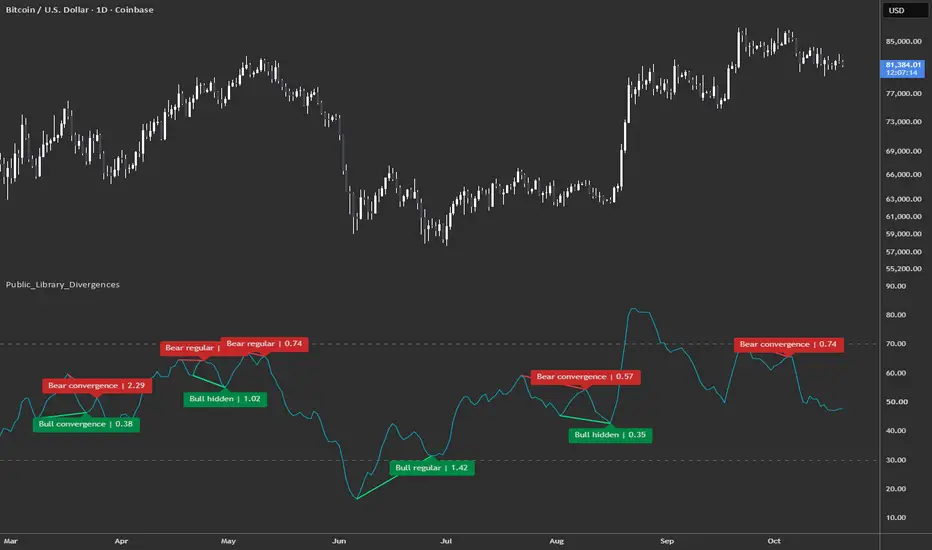
OMSF_Education_LibTo keep the codebase of the OMSF Learning Space indicator cleanly structured, easy to read, and as concise as possible, I have extracted core calculations and logic functions into this reusable library. This keeps the main script lightweight while allowing you to flexibly utilize these individual building blocks for your own custom scripts and quantitative experiments.
Extracted Functions & Modules
1. pivot_fun – Pivot Analytics & Trend State
Derivatives of the classic Pivot High/Low concept to identify key structural highs and lows using configurable confirmation lookback windows.
Provides continuously updated persistent pivot levels, running extreme levels, and a clean trend state machine (1 = Long, -1 = Short) along with standard pivot lag metrics (avg_std_delay).
2. dir_kaufman_eff_ratio – Directional Kaufman Efficiency Ratio (KER)
Computes directional trend efficiency ranging from -1.0 (strong downward efficiency) to +1.0 (strong upward efficiency), featuring built-in protection against division by zero.
3. ker_marketstructure_validation – KER Market Structure Validation
Accumulates and averages KER metrics separately for Long and Short market regimes to evaluate overall structural trend quality.
4. max_excurs_ratio – MFE / MAE Analytics
Tracks ATR-normalized Maximum Favorable Excursion (MFE) and Maximum Adverse Excursion (MAE) values for individual trend segments.
Computes running aggregate ratios and stores historical trade metrics in float arrays—ideal for statistical distribution and percentile analysis.
5. vis_mfe_mae_ratio_long & vis_mfe_mae_ratio_short – Visualization Components
Renders dynamic chart overlays featuring break-even levels, stop-loss excursion bounds, color fills, and informational labels displaying real-time or locked segment performance.
📌 Coming next:
OMSF Learning Space Update: Chapter 5 MFE/MAE. ()
Best regards, arni Bibliothèque

XZ_Research_UtilitiesLibrary "XZ_Research_Utilities"
Generic descriptive-statistics and two-column research-table utilities. Contains no XZ trading methodology or analytical authority.
resolvePosition(key)
Resolves a normalized table-position key.
Parameters:
key (string) : Position key.
Returns: Pine table position constant.
resolveTextSize(key)
Resolves a normalized text-size key.
Parameters:
key (string) : Size key.
Returns: Pine size constant.
countEqual(values, target)
Counts values equal to a target.
Parameters:
values (array) : Integer observations.
target (int) : Target value.
Returns: Matching observation count.
countPositive(values)
Counts values greater than zero.
Parameters:
values (array) : Integer observations.
Returns: Positive observation count.
countAtLeast(values, threshold)
Counts values at or above a threshold.
Parameters:
values (array) : Integer observations.
threshold (int) : Inclusive threshold.
Returns: Observation count at/above threshold.
sumInt(values)
Sums integer observations.
Parameters:
values (array) : Integer observations.
Returns: Sum.
selectedStat(values, mode)
Returns Median or Mean from float observations.
Parameters:
values (array) : Float observations.
mode (string) : "Median" or "Mean".
Returns: Selected descriptive statistic or na for an empty sample.
number(value, suffix)
Formats a numeric result with an optional suffix.
Parameters:
value (float) : Numeric result.
suffix (string) : Suffix such as d or %.
Returns: Formatted number or em dash for na.
percent(numerator, denominator)
Formats numerator/denominator as a percentage.
Parameters:
numerator (int) : Numerator.
denominator (int) : Denominator.
Returns: Percentage or em dash when denominator is zero.
createTable(positionKey, rows, backgroundColor, lineColor, showLines)
Creates a two-column research table.
Parameters:
positionKey (string) : Normalized table-position key.
rows (int) : Row count.
backgroundColor (color) : Background colour.
lineColor (color) : Frame/border colour.
showLines (bool) : Whether frame and borders are visible.
Returns: Table handle.
header(id, leftText, rightText, accentColor, textColor, backgroundColor, textSize, leftTooltip, rightTooltip)
Writes the two-column research header.
Parameters:
id (table) : Table handle.
leftText (string) : Left header text.
rightText (string) : Right header text.
accentColor (color) : Accent colour.
textColor (color) : Neutral text colour.
backgroundColor (color) : Shared background.
textSize (string) : Normalized text-size key.
leftTooltip (string) : Left-cell tooltip.
rightTooltip (string) : Right-cell tooltip.
Returns: True after rendering.
row(id, row, labelText, valueText, textColor, accentColor, backgroundColor, textSize, tooltipText, accentValue)
Writes one label/value research row.
Parameters:
id (table) : Table handle.
row (int) : Row index.
labelText (string) : Left label.
valueText (string) : Right value.
textColor (color) : Neutral text colour.
accentColor (color) : Optional emphasized value colour.
backgroundColor (color) : Shared background.
textSize (string) : Normalized text-size key.
tooltipText (string) : Shared metric-definition tooltip.
accentValue (bool) : Whether the right value uses accent colour.
Returns: True after rendering. Bibliothèque

XZ_Table_PrimitivesLibrary "XZ_Table_Primitives"
Generic Pine table construction and cell-rendering primitives for XZ scripts. Contains no trading methodology or analytical authority.
resolvePosition(key)
Resolves a normalized position key to a Pine table position.
Parameters:
key (string) : Position key: top_left, top_center, top_right, middle_left, middle_center, middle_right, bottom_left, bottom_center or bottom_right.
Returns: Pine position constant.
resolveTextSize(key)
Resolves a normalized text-size key to a Pine size constant.
Parameters:
key (string) : Text-size key: tiny, small, normal, large or huge.
Returns: Pine size constant.
create(positionKey, columns, rows, backgroundColor, frameColor, frameWidth)
Creates a table using caller-supplied presentation values.
Parameters:
positionKey (string) : Normalized table position key.
columns (int) : Number of columns.
rows (int) : Number of rows.
backgroundColor (color) : Table background color.
frameColor (color) : Table frame color.
frameWidth (int) : Table frame width.
Returns: New table handle.
clearRegion(id, firstColumn, firstRow, lastColumn, lastRow)
Clears a rectangular region of an existing table.
Parameters:
id (table) : Table handle.
firstColumn (int) : First column index.
firstRow (int) : First row index.
lastColumn (int) : Last column index.
lastRow (int) : Last row index.
Returns: True after clearing.
cell(id, column, row, cellText, textColor, backgroundColor, textSize, horizontalAlign, tooltipText)
Writes one fully specified table cell.
Parameters:
id (table) : Table handle.
column (int) : Column index.
row (int) : Row index.
cellText (string) : Cell text.
textColor (color) : Text color.
backgroundColor (color) : Cell background color.
textSize (string) : Pine text size constant.
horizontalAlign (string) : Pine text alignment constant.
tooltipText (string) : Cell tooltip text.
Returns: True after writing.
twoColumnRow(id, row, labelText, valueText, labelColor, valueColor, backgroundColor, textSize, labelTooltip, valueTooltip)
Writes one two-column label/value row.
Parameters:
id (table) : Table handle.
row (int) : Row index.
labelText (string) : Left-cell text.
valueText (string) : Right-cell text.
labelColor (color) : Left text color.
valueColor (color) : Right text color.
backgroundColor (color) : Shared cell background color.
textSize (string) : Shared Pine text size constant.
labelTooltip (string) : Left-cell tooltip.
valueTooltip (string) : Right-cell tooltip.
Returns: True after writing both cells.
twoColumnHeader(id, row, leftText, rightText, leftColor, rightColor, backgroundColor, textSize, leftTooltip, rightTooltip)
Writes one two-column header/decoder row.
Parameters:
id (table) : Table handle.
row (int) : Row index.
leftText (string) : Left-cell text.
rightText (string) : Right-cell text.
leftColor (color) : Left text color.
rightColor (color) : Right text color.
backgroundColor (color) : Shared background color.
textSize (string) : Shared Pine text size constant.
leftTooltip (string) : Left-cell tooltip.
rightTooltip (string) : Right-cell tooltip.
Returns: True after writing both cells.
mergedSection(id, row, firstColumn, lastColumn, sectionText, textColor, backgroundColor, textSize, tooltipText)
Writes one merged full-width section row.
Parameters:
id (table) : Table handle.
row (int) : Row index.
firstColumn (int) : First column to merge.
lastColumn (int) : Last column to merge.
sectionText (string) : Section text.
textColor (color) : Text color.
backgroundColor (color) : Cell background color.
textSize (string) : Pine text size constant.
tooltipText (string) : Cell tooltip.
Returns: True after writing and merging. Bibliothèque

XZ_Display_PrimitivesLibrary "XZ_Display_Primitives"
Generic bar-time drawing primitives for Pine scripts. Creates, updates or deletes lines, labels and boxes from caller-supplied presentation facts. Contains no trading methodology or analytical authority.
horizontalLine(id, visible, leftTime, rightTime, price, extendRight, lineColor, lineStyle, lineWidth)
Creates, updates or deletes one horizontal bar-time line.
Parameters:
id (line) : Existing line handle, or na.
visible (bool) : Whether the line should exist.
leftTime (int) : Left endpoint time.
rightTime (int) : Right endpoint time used when the line is finite and as the current anchor when projected.
price (float) : Horizontal price.
extendRight (bool) : True to project with extend.right, false for a finite segment.
lineColor (color) : Line color.
lineStyle (string) : Pine line style.
lineWidth (int) : Line width.
Returns: Updated line handle, or na when hidden/invalid.
segmentLine(id, visible, firstTime, firstPrice, secondTime, secondPrice, lineColor, lineStyle, lineWidth)
Creates, updates or deletes one finite bar-time line segment.
Parameters:
id (line) : Existing line handle, or na.
visible (bool) : Whether the line should exist.
firstTime (int) : First endpoint time.
firstPrice (float) : First endpoint price.
secondTime (int) : Second endpoint time.
secondPrice (float) : Second endpoint price.
lineColor (color) : Line color.
lineStyle (string) : Pine line style.
lineWidth (int) : Line width.
Returns: Updated line handle, or na when hidden/invalid.
priceLabel(id, visible, xTime, price, labelText, textColor, backgroundColor, labelStyle, labelSize, tooltipText, textAlign)
Creates, updates or deletes one price-anchored bar-time label.
Parameters:
id (label) : Existing label handle, or na.
visible (bool) : Whether the label should exist.
xTime (int) : Label time coordinate.
price (float) : Label price coordinate.
labelText (string) : Visible label text.
textColor (color) : Label text color.
backgroundColor (color) : Label background color.
labelStyle (string) : Pine label style.
labelSize (string) : Pine label size.
tooltipText (string) : Tooltip text.
textAlign (string) : Pine text alignment.
Returns: Updated label handle, or na when hidden/invalid.
timeBox(id, visible, leftTime, rightTime, top, bottom, extendRight, fillColor, borderColor, borderStyle, borderWidth)
Creates, updates or deletes one bar-time box.
Parameters:
id (box) : Existing box handle, or na.
visible (bool) : Whether the box should exist.
leftTime (int) : Left box time.
rightTime (int) : Right box time used when finite and as the current anchor when projected.
top (float) : Top price.
bottom (float) : Bottom price.
extendRight (bool) : True to project with extend.right, false for finite geometry.
fillColor (color) : Box fill color. May be na.
borderColor (color) : Box border color. May be na.
borderStyle (string) : Pine line style for the border.
borderWidth (int) : Border width.
Returns: Updated box handle, or na when hidden/invalid.
setBoxColors(id, fillColor, borderColor)
Applies fill and border colors to an existing box without changing geometry.
Parameters:
id (box) : Box handle.
fillColor (color) : New fill color.
borderColor (color) : New border color.
Returns: True after the no-op or update.
setBoxBorderColor(id, borderColor)
Applies only a border color to an existing box without changing geometry.
Parameters:
id (box) : Box handle.
borderColor (color) : New border color.
Returns: True after the no-op or update.
setLabelTextColor(id, textColor)
Applies text color to an existing label without changing its geometry or text.
Parameters:
id (label) : Label handle.
textColor (color) : New text color.
Returns: True after the no-op or update.
clearBoxText(id)
Clears box text without changing geometry or styling.
Parameters:
id (box) : Box handle.
Returns: True after the no-op or update. Bibliothèque

XZ_Core_UtilitiesLibrary "XZ_Core_Utilities"
Generic formatting, identifier parsing and neutral geometry helpers for XZ scripts. Contains no XZ methodology or analytical authority.
csvContainsPositiveInt(objectId, csvIds)
Returns true when a positive integer ID occurs as a comma-separated token.
Parameters:
objectId (int) : Positive integer to search for.
csvIds (string) : Comma-separated integer text. Spaces are ignored.
Returns: True when objectId occurs as an exact parsed token.
csvFirstPositiveInt(csvIds)
Returns the first positive integer token in comma-separated text.
Parameters:
csvIds (string) : Comma-separated integer text. Spaces are ignored.
Returns: First parsed positive integer, or 0 when none exists.
nearDuplicateBounds(lowA, highA, lowB, highB, tolerancePct)
Tests whether two low/high geometries are near-duplicates under a supplied percentage tolerance.
Parameters:
lowA (float) : First lower bound.
highA (float) : First upper bound.
lowB (float) : Second lower bound.
highB (float) : Second upper bound.
tolerancePct (float) : Tolerance as a percentage of the wider geometry.
Returns: True when both corresponding boundaries fall within the calculated tolerance.
formatDate(eventTime, timezone)
Formats a timestamp as yyyy-MM-dd in the supplied timezone.
Parameters:
eventTime (int) : UNIX timestamp in milliseconds.
timezone (string) : Timezone string accepted by str.format_time().
Returns: Formatted date, or an em dash for na.
formatPercent(value)
Formats a percentage value with up to two decimals.
Parameters:
value (float) : Percentage value.
Returns: Percentage text, or an em dash for na.
formatSignedPercent(value)
Formats a signed percentage value with up to two decimals.
Parameters:
value (float) : Percentage value.
Returns: Signed percentage text, or an em dash for na.
timeframeLabel(tf)
Converts common TradingView timeframe strings into compact readable labels.
Parameters:
tf (string) : TradingView timeframe string.
Returns: Compact label such as 1D, 1W, 4H or 15m.
formatDistance(distance, useTicks, minTick)
Formats an absolute price distance as points or ticks. Unit policy is supplied by the caller.
Parameters:
distance (float) : Raw price distance.
useTicks (bool) : True to convert distance to ticks.
minTick (float) : Instrument minimum tick.
Returns: Formatted absolute distance with explicit unit.
directionalMovePct(fromPrice, toPrice, minTick)
Calculates signed percentage move from one price to another.
Parameters:
fromPrice (float) : Chronological starting price.
toPrice (float) : Chronological ending price.
minTick (float) : Instrument minimum tick used to reject a near-zero denominator.
Returns: Signed percentage move, or na when unavailable.
normalizedPositionPct(currentValue, lowPrice, highPrice)
Calculates normalized position of a value within low-to-high geometry.
Parameters:
currentValue (float) : Value being located.
lowPrice (float) : Geometry lower bound.
highPrice (float) : Geometry upper bound.
Returns: Position percentage where 0 is the lower bound and 100 is the upper bound. Values may fall outside 0-100.
formatElapsedDays(fromTime, toTime)
Formats elapsed milliseconds between two timestamps as fractional days.
Parameters:
fromTime (int) : Starting timestamp.
toTime (int) : Ending timestamp.
Returns: Day text with singular/plural unit, or an em dash when invalid.
quartilePrice(low, high, levelIndex)
Returns one of five equally spaced 0/25/50/75/100 geometry levels.
Parameters:
low (float) : Lower geometry bound.
high (float) : Upper geometry bound.
levelIndex (int) : Integer level index from 0 to 4.
Returns: Price at the requested quartile level.
quartileText(levelIndex)
Returns the display text for quartile level index 0-4.
Parameters:
levelIndex (int) : Integer level index from 0 to 4.
Returns: 0%, 25%, 50%, 75% or 100%.
appendUniqueToken(current, token, separator)
Appends a token only when it is not already present in a separator-delimited string.
Parameters:
current (string) : Existing token string.
token (string) : Token to append.
separator (string) : Delimiter between tokens.
Returns: Original or extended token string. Bibliothèque