
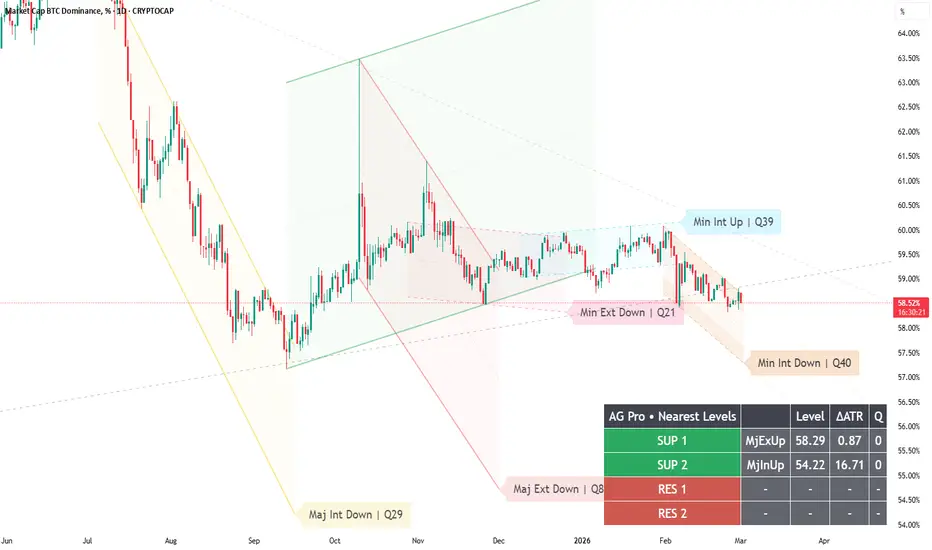
Two Alert Profiles — Conservative vs Reactive (Confirm + Buffer + Cooldown + Min‑Q)
Most traders set alerts like this:
“Turn everything on and hope for the best.”
Then they get spammed, ignore alerts, and lose the whole benefit.
Dynamic Channels Elite is designed for professional alert hygiene:
- Confirm mode (Auto / Intrabar / Close)
- Trigger Buffer (Off / ATR / Ticks)
- Cooldown (bars)
- Min Q gating (quality threshold)
- Optional de‑clutter affecting alerts (consistency)
Here are two clean profiles you can use depending on your temperament:
Profile A — Conservative (recommended baseline)
- Confirm: Close
- Buffer: ATR-based (small)
- Cooldown: ON (moderate)
- Min Q: mid/high threshold
Result: fewer alerts, more meaningful checkpoints.
Profile B — Reactive (for active monitoring)
- Confirm: Intrabar or Auto
- Buffer: Ticks-based (or small ATR)
- Cooldown: ON (shorter)
- Min Q: moderate threshold
Result: earlier warnings, but more noise. You must be disciplined.
How to use alerts correctly:
- Breakout alerts = “structure invalidation → reassess context.”
- Reaction alerts = “structure respected → observe continuation/failure.”
Alerts automate attention, not execution.
Pro tip:
If you use de‑clutter, enable “De‑Clutter Affects Alerts” so you never receive alerts from hidden levels.
Limitations:
No alert configuration can remove regime risk. Choppy regimes will always create more triggers.
Risk disclosure:
Educational content only. Not financial advice.
Most traders set alerts like this:
“Turn everything on and hope for the best.”
Then they get spammed, ignore alerts, and lose the whole benefit.
Dynamic Channels Elite is designed for professional alert hygiene:
- Confirm mode (Auto / Intrabar / Close)
- Trigger Buffer (Off / ATR / Ticks)
- Cooldown (bars)
- Min Q gating (quality threshold)
- Optional de‑clutter affecting alerts (consistency)
Here are two clean profiles you can use depending on your temperament:
Profile A — Conservative (recommended baseline)
- Confirm: Close
- Buffer: ATR-based (small)
- Cooldown: ON (moderate)
- Min Q: mid/high threshold
Result: fewer alerts, more meaningful checkpoints.
Profile B — Reactive (for active monitoring)
- Confirm: Intrabar or Auto
- Buffer: Ticks-based (or small ATR)
- Cooldown: ON (shorter)
- Min Q: moderate threshold
Result: earlier warnings, but more noise. You must be disciplined.
How to use alerts correctly:
- Breakout alerts = “structure invalidation → reassess context.”
- Reaction alerts = “structure respected → observe continuation/failure.”
Alerts automate attention, not execution.
Pro tip:
If you use de‑clutter, enable “De‑Clutter Affects Alerts” so you never receive alerts from hidden levels.
Limitations:
No alert configuration can remove regime risk. Choppy regimes will always create more triggers.
Risk disclosure:
Educational content only. Not financial advice.

Trading Suite | Flagship Workflow :
tradingview.com/script/XJmX3p98-Trading-Suite-AGPro-Series/
Crypto Setup Planner | Multi-Symbol Analysis :
tradingview.com/script/LgVRo7Ql-Crypto-Setup-Planner-AGPro-Series/
tradingview.com/script/XJmX3p98-Trading-Suite-AGPro-Series/
Crypto Setup Planner | Multi-Symbol Analysis :
tradingview.com/script/LgVRo7Ql-Crypto-Setup-Planner-AGPro-Series/
Pernyataan Penyangkalan
Informasi dan publikasi ini tidak dimaksudkan, dan bukan merupakan, saran atau rekomendasi keuangan, investasi, trading, atau jenis lainnya yang diberikan atau didukung oleh TradingView. Baca selengkapnya di Ketentuan Penggunaan.
Trading Suite | Flagship Workflow :
tradingview.com/script/XJmX3p98-Trading-Suite-AGPro-Series/
Crypto Setup Planner | Multi-Symbol Analysis :
tradingview.com/script/LgVRo7Ql-Crypto-Setup-Planner-AGPro-Series/
tradingview.com/script/XJmX3p98-Trading-Suite-AGPro-Series/
Crypto Setup Planner | Multi-Symbol Analysis :
tradingview.com/script/LgVRo7Ql-Crypto-Setup-Planner-AGPro-Series/
Pernyataan Penyangkalan
Informasi dan publikasi ini tidak dimaksudkan, dan bukan merupakan, saran atau rekomendasi keuangan, investasi, trading, atau jenis lainnya yang diberikan atau didukung oleh TradingView. Baca selengkapnya di Ketentuan Penggunaan.