
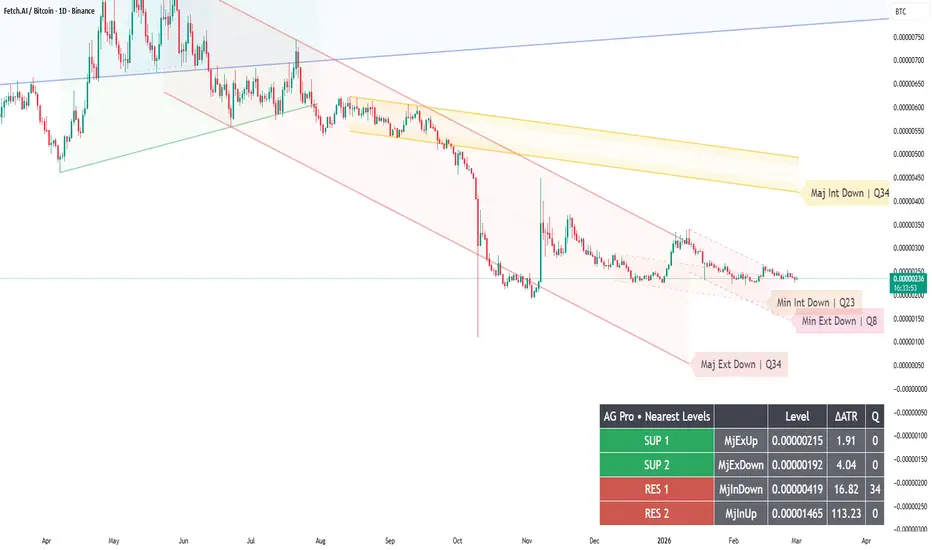
Diagnostics + Settings Audit — How to Debug “Nothing Is Drawing” (and Verify Preset Overrides)
When a structure script “draws nothing,” most users assume it’s broken.
In reality, it is usually one of three causes:
1) Not enough pivots confirmed yet (pivot logic needs bars).
2) Visibility toggles are off (or preset overrides them).
3) The market/timeframe combination has insufficient structure for the chosen sensitivity.
Dynamic Channels Elite includes two professional debug aids:
- Diagnostics (pivot/engine counters on the last bar)
- Settings Audit (post-preset effective toggles + key UI states)
A clean debug workflow:
Step 1 — Enable Diagnostics
Confirm the engine is detecting pivots and producing candidates.
Step 2 — Enable Settings Audit
If Visual Preset is Clean/Rich, remember it can override manual toggles.
Audit shows what is actually effective after the preset logic.
Step 3 — If pivots are low, adjust sensitivity carefully
- Pivot Lookback: lower = more responsive (more noise), higher = cleaner (more lag).
- Max Scan Bars: lower = faster, higher = more accurate (heavier).
Step 4 — Return to normal mode
Debug tools are for verification, not for constant display.
Once the chart behaves as expected, turn them off to keep the screen clean.
Why this is “professional”:
Trust comes from auditability.
If you can’t explain why something is on/off, you will eventually stop trusting the tool.
Limitations:
Pivot-based structure is inherently confirmatory (lagging). Some markets will not produce clean channels at all times.
Risk disclosure:
Educational content only. Not financial advice.
When a structure script “draws nothing,” most users assume it’s broken.
In reality, it is usually one of three causes:
1) Not enough pivots confirmed yet (pivot logic needs bars).
2) Visibility toggles are off (or preset overrides them).
3) The market/timeframe combination has insufficient structure for the chosen sensitivity.
Dynamic Channels Elite includes two professional debug aids:
- Diagnostics (pivot/engine counters on the last bar)
- Settings Audit (post-preset effective toggles + key UI states)
A clean debug workflow:
Step 1 — Enable Diagnostics
Confirm the engine is detecting pivots and producing candidates.
Step 2 — Enable Settings Audit
If Visual Preset is Clean/Rich, remember it can override manual toggles.
Audit shows what is actually effective after the preset logic.
Step 3 — If pivots are low, adjust sensitivity carefully
- Pivot Lookback: lower = more responsive (more noise), higher = cleaner (more lag).
- Max Scan Bars: lower = faster, higher = more accurate (heavier).
Step 4 — Return to normal mode
Debug tools are for verification, not for constant display.
Once the chart behaves as expected, turn them off to keep the screen clean.
Why this is “professional”:
Trust comes from auditability.
If you can’t explain why something is on/off, you will eventually stop trusting the tool.
Limitations:
Pivot-based structure is inherently confirmatory (lagging). Some markets will not produce clean channels at all times.
Risk disclosure:
Educational content only. Not financial advice.

Crypto Setup Planner: agprolabs.com/product/crypto-setup-planner/
Dynamic Channels Elite: agprolabs.com/product/dynamic-channels-elite/
Trading Suite: agprolabs.com/product/trading-suite-agpro-series/
Dynamic Channels Elite: agprolabs.com/product/dynamic-channels-elite/
Trading Suite: agprolabs.com/product/trading-suite-agpro-series/
Pernyataan Penyangkalan
Informasi dan publikasi ini tidak dimaksudkan, dan bukan merupakan, saran atau rekomendasi keuangan, investasi, trading, atau jenis lainnya yang diberikan atau didukung oleh TradingView. Baca selengkapnya di Ketentuan Penggunaan.
Crypto Setup Planner: agprolabs.com/product/crypto-setup-planner/
Dynamic Channels Elite: agprolabs.com/product/dynamic-channels-elite/
Trading Suite: agprolabs.com/product/trading-suite-agpro-series/
Dynamic Channels Elite: agprolabs.com/product/dynamic-channels-elite/
Trading Suite: agprolabs.com/product/trading-suite-agpro-series/
Pernyataan Penyangkalan
Informasi dan publikasi ini tidak dimaksudkan, dan bukan merupakan, saran atau rekomendasi keuangan, investasi, trading, atau jenis lainnya yang diberikan atau didukung oleh TradingView. Baca selengkapnya di Ketentuan Penggunaan.