Diupdate
Retest Defense Planner [AGPro Series]
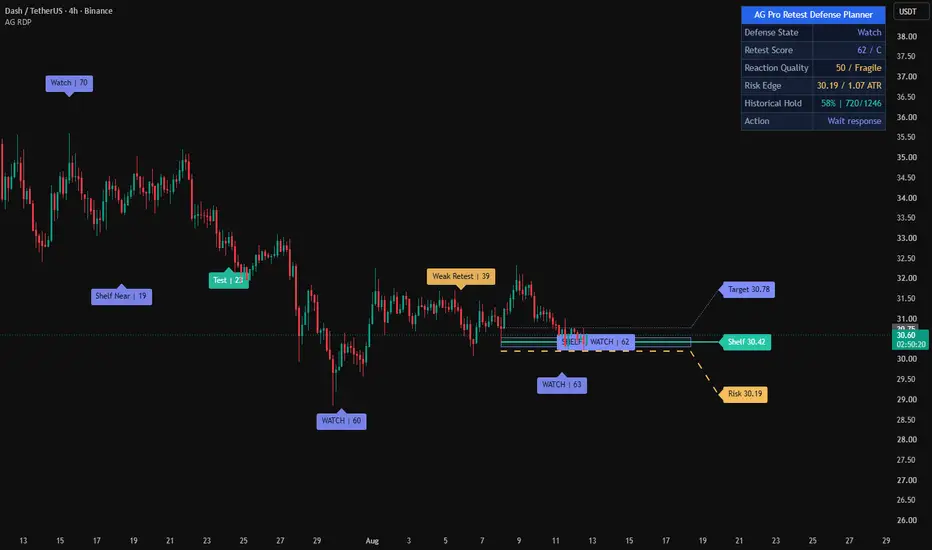
Retest Defense Planner [AGPro Series]
🧠 Core Idea
Is a retested level still being defended strongly enough to keep the planning context alive?
📌 Overview / What it does
Retest Defense Planner [AGPro Series] is a chart-first decision tool built for traders who review how price behaves after returning to an active defense shelf.
Instead of treating every level touch as meaningful, the script evaluates whether the shelf is actually being protected. It measures retest depth, wick defense, close response, time at level, volume support, target room, and risk-edge distance, then converts that evidence into a 0-100 Retest Score and a clear next-action state.
The default view is tuned for clear 4H-style retest review, where shelf defense, reaction quality, and short-term follow-through are usually easier to read than on very compressed timeframes. The script still works across timeframes, but users should adjust shelf age, projection bars, and sensitivity when changing market rhythm.
The script produces a defense zone, active defense rail, risk edge, target-room guide, follow-through guide, compact chart labels, alerts, and a clean AGPro planning panel. It does not predict price movement, automate execution, or provide guaranteed outcomes.
🎯 Purpose & Design Philosophy
This script was built to fill the gap between simple level plotting and full structure scanners.
Many traders can identify that price has returned to a level, but the harder question is whether the level is still being defended cleanly enough to deserve attention. Retest Defense Planner focuses on that decision layer.
The design supports a planning mindset: read the defense state, check the score, locate the risk edge, compare target room, and decide what deserves review next.
⚡ Why This Script Is Different
Most retest tools focus on structure breaks, swing-leg pullbacks, support/resistance maps, or broad breakout retest signals.
This script does NOT clone Structure Retest Planner, Swing Retest Quality, Breakout Retest Readiness, Break-Retest Quality, Breaker Block Engine, or a generic S/R zone map.
Instead, it evaluates one active defense shelf and asks whether the shelf is surviving the retest. The main output is not a signal. It is a decision state: DEFENDED, WATCH, WEAK RETEST, APPROACH, DEFENSE LOST, WAIT, or SCAN.
⚙️ Methodology
1. Context Detection
The script identifies fresh support-side or resistance-side defense shelves using confirmed pivot behavior and optional automatic side selection.
2. Reference Mapping
It maps one active defense zone, a shelf rail, a risk edge, and a target-room guide. These are planning references, not trade instructions.
3. Reaction Evaluation
The 0-100 model scores retest depth, wick defense, close response, time at level, and volume support.
4. Visual Output
The chart shows the active defense zone with centered text, event labels, guide lines, and the AGPro decision panel.
🗺️ How to Read the Chart
Defense Zone = the active shelf area being evaluated after price returns to it.
Defense Rail = the exact reference shelf the model is monitoring.
Risk Edge = the planning line where the active defense context is considered lost.
Target-Room Guide = a forward context guide based on the current shelf-to-risk distance.
Labels = compact TEST, DEFENDED, WATCH, WEAK, LOST, and context labels.
Colors = teal marks bullish support-defense context, pink marks bearish resistance-defense context, amber marks caution/review, indigo marks watch/transition, and red marks lost defense.
Panel = the AGPro panel summarizes Defense State, Retest Score, Reaction Quality, Risk Edge, and Action.
🚦 Signals & States
• DEFENDED → the shelf has been retested and the defense score is strong enough for structured review.
• WATCH → the response is developing, but confirmation or room is still incomplete.
• WEAK RETEST → price touched the shelf, but response quality is not strong enough.
• APPROACH → price is near the active defense shelf and a retest review may be forming.
• DEFENSE LOST → price crossed the risk edge and the active shelf context should be rebuilt.
• WAIT → an active shelf exists, but price is not close enough for a useful review.
• SCAN → no fresh defense shelf is active yet.
🔔 Alerts Logic
Alerts trigger when price touches the active defense zone, when a defended retest appears, when watch context appears, when a weak retest is detected, and when the risk edge is crossed.
Alerts are attention markers only. They are not trade instructions, automated strategy commands, or outcome promises.
🧩 Confluence Logic
The strongest context appears when a controlled retest probe, visible wick defense, constructive close response, enough hold time, supportive relative volume, and usable target room align.
When those components conflict, the panel moves toward WATCH, WEAK RETEST, RISK REVIEW, or DEFENSE LOST.
📊 When to Use
• Pullbacks into a defended support shelf
• Retests of a resistance shelf after bearish pressure
• 4H retest reviews where shelf defense and reaction candles are visually readable
• Continuation planning where the level has already been identified by price action
• Risk planning where invalidation and target room matter
• Liquid markets where candles, pivots, and volume behavior are readable
⚠️ When NOT to Use
• Very low-liquidity symbols with irregular candles
• Extremely noisy micro-timeframes
• News-driven spikes where shelf behavior becomes distorted
• Markets where pivot structure is too compressed to form useful shelves
• Situations where the user expects a signal-only tool
🎛️ Key Inputs
• Defense Side → selects Auto, Bullish Defense, or Bearish Defense.
• Defense Pivot Length → controls how confirmed shelves are detected.
• Max Shelf Age → controls how long a shelf remains eligible.
• Sensitivity → adjusts activation distance and zone tolerance.
• Response Window Bars → controls how long the retest response remains active.
• Risk Edge ATR → controls the planning risk edge behind the shelf.
• DEFENDED Score → sets the score threshold for stronger review states.
• Label and Panel Font Size → controls chart-label and panel readability.
• Panel Location and Theme → adjusts the AGPro panel layout.
🖥️ Interface & Visual Design
The interface is designed to stay chart-first and decision-led.
The defense zone is the main visual object. The centered label keeps the zone readable without adding extra floating text. The risk edge and target guide explain where the planning context weakens and how much room remains.
The AGPro panel uses a merged blue title row and five compact rows so the user can read state, score, reaction quality, risk, and next action quickly.
🧪 Practical Usage Workflow
1. Read the panel state and Retest Score.
2. Check whether price is approaching or touching the defense zone.
3. Compare the shelf rail with the risk edge.
4. Review whether the label says TEST, DEFENDED, WATCH, WEAK, or LOST.
5. Confirm the broader market context before making any decision.
🔍 Interpretation Guidelines
Think in terms of defense quality, not prediction.
A higher score means multiple defense components align inside the script's rule set. A weaker score means the retest may be too shallow, too deep, too fast, too noisy, or missing a constructive close response.
The script helps organize the review process. It does not replace judgment.
🚫 What This Script Is NOT
• Not a prediction engine
• Not financial advice
• Not an auto-trading system
• Not a guaranteed signal tool
• Not a BOS / CHOCH scanner
• Not a breakout retest scanner
• Not a swing-leg retest tool
• Not an order block, FVG, or supply/demand map
• Not a generic support/resistance zone map
⚠️ Limitations & Transparency
• Pivot-based shelf references appear only after pivots are confirmed.
• Scores can vary across symbols, sessions, and timeframes.
• Volume scoring depends on exchange-provided volume data.
• Fast volatility can cross a shelf before a clean defense can be measured.
• In Live Updating mode, active-bar values can change before the bar closes.
🧠 Market Context Notes
Retest defense is easiest to interpret when liquidity, volatility, and trend context are readable.
A defended shelf is not enough by itself. The reaction, close location, hold time, risk edge, and target room all matter.
🧾 Use Case Examples
When price returns to a support shelf, probes the defense zone, forms a visible lower wick, and closes back above the shelf with enough target room, the planner may mark DEFENDED.
When price touches the shelf but closes weakly with poor reaction quality, the planner may show WEAK RETEST or WATCH.
When price crosses the risk edge, DEFENSE LOST indicates that the active context should be rebuilt.
🧱 System Philosophy
Retest Defense Planner follows the AGPro decision-engine approach: map the context, score the quality, show the risk reference, show the target room, and summarize the next action without issuing trade commands.
🔐 Non-Promise Statement
No indicator can provide certainty.
The script does not guarantee that a retest will hold, continue, reverse, or produce any specific outcome.
📉 Risk Disclosure
Trading involves risk.
Users are responsible for their own analysis, risk management, and trading decisions.
This script is provided for educational and analytical purposes only and does not constitute financial advice.
📚 Educational Note
Use the script as a structured retest-defense review framework. The best results come from combining the panel, zones, labels, and alerts with broader chart context and disciplined risk evaluation.
🧠 Core Idea
Is a retested level still being defended strongly enough to keep the planning context alive?
📌 Overview / What it does
Retest Defense Planner [AGPro Series] is a chart-first decision tool built for traders who review how price behaves after returning to an active defense shelf.
Instead of treating every level touch as meaningful, the script evaluates whether the shelf is actually being protected. It measures retest depth, wick defense, close response, time at level, volume support, target room, and risk-edge distance, then converts that evidence into a 0-100 Retest Score and a clear next-action state.
The default view is tuned for clear 4H-style retest review, where shelf defense, reaction quality, and short-term follow-through are usually easier to read than on very compressed timeframes. The script still works across timeframes, but users should adjust shelf age, projection bars, and sensitivity when changing market rhythm.
The script produces a defense zone, active defense rail, risk edge, target-room guide, follow-through guide, compact chart labels, alerts, and a clean AGPro planning panel. It does not predict price movement, automate execution, or provide guaranteed outcomes.
🎯 Purpose & Design Philosophy
This script was built to fill the gap between simple level plotting and full structure scanners.
Many traders can identify that price has returned to a level, but the harder question is whether the level is still being defended cleanly enough to deserve attention. Retest Defense Planner focuses on that decision layer.
The design supports a planning mindset: read the defense state, check the score, locate the risk edge, compare target room, and decide what deserves review next.
⚡ Why This Script Is Different
Most retest tools focus on structure breaks, swing-leg pullbacks, support/resistance maps, or broad breakout retest signals.
This script does NOT clone Structure Retest Planner, Swing Retest Quality, Breakout Retest Readiness, Break-Retest Quality, Breaker Block Engine, or a generic S/R zone map.
Instead, it evaluates one active defense shelf and asks whether the shelf is surviving the retest. The main output is not a signal. It is a decision state: DEFENDED, WATCH, WEAK RETEST, APPROACH, DEFENSE LOST, WAIT, or SCAN.
⚙️ Methodology
1. Context Detection
The script identifies fresh support-side or resistance-side defense shelves using confirmed pivot behavior and optional automatic side selection.
2. Reference Mapping
It maps one active defense zone, a shelf rail, a risk edge, and a target-room guide. These are planning references, not trade instructions.
3. Reaction Evaluation
The 0-100 model scores retest depth, wick defense, close response, time at level, and volume support.
4. Visual Output
The chart shows the active defense zone with centered text, event labels, guide lines, and the AGPro decision panel.
🗺️ How to Read the Chart
Defense Zone = the active shelf area being evaluated after price returns to it.
Defense Rail = the exact reference shelf the model is monitoring.
Risk Edge = the planning line where the active defense context is considered lost.
Target-Room Guide = a forward context guide based on the current shelf-to-risk distance.
Labels = compact TEST, DEFENDED, WATCH, WEAK, LOST, and context labels.
Colors = teal marks bullish support-defense context, pink marks bearish resistance-defense context, amber marks caution/review, indigo marks watch/transition, and red marks lost defense.
Panel = the AGPro panel summarizes Defense State, Retest Score, Reaction Quality, Risk Edge, and Action.
🚦 Signals & States
• DEFENDED → the shelf has been retested and the defense score is strong enough for structured review.
• WATCH → the response is developing, but confirmation or room is still incomplete.
• WEAK RETEST → price touched the shelf, but response quality is not strong enough.
• APPROACH → price is near the active defense shelf and a retest review may be forming.
• DEFENSE LOST → price crossed the risk edge and the active shelf context should be rebuilt.
• WAIT → an active shelf exists, but price is not close enough for a useful review.
• SCAN → no fresh defense shelf is active yet.
🔔 Alerts Logic
Alerts trigger when price touches the active defense zone, when a defended retest appears, when watch context appears, when a weak retest is detected, and when the risk edge is crossed.
Alerts are attention markers only. They are not trade instructions, automated strategy commands, or outcome promises.
🧩 Confluence Logic
The strongest context appears when a controlled retest probe, visible wick defense, constructive close response, enough hold time, supportive relative volume, and usable target room align.
When those components conflict, the panel moves toward WATCH, WEAK RETEST, RISK REVIEW, or DEFENSE LOST.
📊 When to Use
• Pullbacks into a defended support shelf
• Retests of a resistance shelf after bearish pressure
• 4H retest reviews where shelf defense and reaction candles are visually readable
• Continuation planning where the level has already been identified by price action
• Risk planning where invalidation and target room matter
• Liquid markets where candles, pivots, and volume behavior are readable
⚠️ When NOT to Use
• Very low-liquidity symbols with irregular candles
• Extremely noisy micro-timeframes
• News-driven spikes where shelf behavior becomes distorted
• Markets where pivot structure is too compressed to form useful shelves
• Situations where the user expects a signal-only tool
🎛️ Key Inputs
• Defense Side → selects Auto, Bullish Defense, or Bearish Defense.
• Defense Pivot Length → controls how confirmed shelves are detected.
• Max Shelf Age → controls how long a shelf remains eligible.
• Sensitivity → adjusts activation distance and zone tolerance.
• Response Window Bars → controls how long the retest response remains active.
• Risk Edge ATR → controls the planning risk edge behind the shelf.
• DEFENDED Score → sets the score threshold for stronger review states.
• Label and Panel Font Size → controls chart-label and panel readability.
• Panel Location and Theme → adjusts the AGPro panel layout.
🖥️ Interface & Visual Design
The interface is designed to stay chart-first and decision-led.
The defense zone is the main visual object. The centered label keeps the zone readable without adding extra floating text. The risk edge and target guide explain where the planning context weakens and how much room remains.
The AGPro panel uses a merged blue title row and five compact rows so the user can read state, score, reaction quality, risk, and next action quickly.
🧪 Practical Usage Workflow
1. Read the panel state and Retest Score.
2. Check whether price is approaching or touching the defense zone.
3. Compare the shelf rail with the risk edge.
4. Review whether the label says TEST, DEFENDED, WATCH, WEAK, or LOST.
5. Confirm the broader market context before making any decision.
🔍 Interpretation Guidelines
Think in terms of defense quality, not prediction.
A higher score means multiple defense components align inside the script's rule set. A weaker score means the retest may be too shallow, too deep, too fast, too noisy, or missing a constructive close response.
The script helps organize the review process. It does not replace judgment.
🚫 What This Script Is NOT
• Not a prediction engine
• Not financial advice
• Not an auto-trading system
• Not a guaranteed signal tool
• Not a BOS / CHOCH scanner
• Not a breakout retest scanner
• Not a swing-leg retest tool
• Not an order block, FVG, or supply/demand map
• Not a generic support/resistance zone map
⚠️ Limitations & Transparency
• Pivot-based shelf references appear only after pivots are confirmed.
• Scores can vary across symbols, sessions, and timeframes.
• Volume scoring depends on exchange-provided volume data.
• Fast volatility can cross a shelf before a clean defense can be measured.
• In Live Updating mode, active-bar values can change before the bar closes.
🧠 Market Context Notes
Retest defense is easiest to interpret when liquidity, volatility, and trend context are readable.
A defended shelf is not enough by itself. The reaction, close location, hold time, risk edge, and target room all matter.
🧾 Use Case Examples
When price returns to a support shelf, probes the defense zone, forms a visible lower wick, and closes back above the shelf with enough target room, the planner may mark DEFENDED.
When price touches the shelf but closes weakly with poor reaction quality, the planner may show WEAK RETEST or WATCH.
When price crosses the risk edge, DEFENSE LOST indicates that the active context should be rebuilt.
🧱 System Philosophy
Retest Defense Planner follows the AGPro decision-engine approach: map the context, score the quality, show the risk reference, show the target room, and summarize the next action without issuing trade commands.
🔐 Non-Promise Statement
No indicator can provide certainty.
The script does not guarantee that a retest will hold, continue, reverse, or produce any specific outcome.
📉 Risk Disclosure
Trading involves risk.
Users are responsible for their own analysis, risk management, and trading decisions.
This script is provided for educational and analytical purposes only and does not constitute financial advice.
📚 Educational Note
Use the script as a structured retest-defense review framework. The best results come from combining the panel, zones, labels, and alerts with broader chart context and disciplined risk evaluation.
Catatan Rilis
🔧 UPDATE NOTES - V1.1This update focuses on premium visual polish, cleaner chart storytelling, and stronger public-release presentation.
The core purpose of the script remains unchanged.
This release improves how retest defense quality, shelf protection, risk edge, target room, and next-action context are presented on the chart.
This script continues to function as an analytical and visualization tool.
It does not attempt to predict price direction or provide guaranteed outcomes.
------------------------
What Changed
------------------------
• Refined public-release naming
The script title keeps the clean "Retest Defense Planner [AGPro Series]" format, while the panel keeps the AG Pro brand identity.
• Added a filled centered defense badge
The active defense zone now uses a separate filled badge for state and score instead of relying on transparent zone text.
• Added right-side reference tags
Defense Shelf, Risk Edge, and Target Room references can now appear as clean filled right-side tags for faster chart reading.
• Improved chart label language
Labels now use readable publication-style wording such as Defense Test, Defended, Defense Watch, Weak Retest, and Defense Lost.
• Preserved the merged panel header standard
The panel header remains a single merged blue title row with the AG Pro brand identity.
------------------------
Visual Improvements
------------------------
• Improved first-glance readability by keeping important zone text inside contrast-safe filled badges.
• Reduced the risk of light text appearing directly on transparent chart objects.
• Refined visual hierarchy between defense shelf, risk edge, target room, and active retest response.
• Improved chart label positioning so labels stay away from candle bodies.
------------------------
Interface & Usability
------------------------
• Kept panel location, theme, show/hide, and font controls intact.
• Kept label, badge, and right-side tag font-size control unified for consistent presentation.
• Improved right-side tag cleanup when the tag layer is disabled.
• Enhanced overall user experience without changing core analytical logic.
------------------------
Behavior Notes
------------------------
This update does not change the core analytical model.
The goal is to improve first-glance clarity, screenshot quality, and interpretation flow.
Users should interpret outputs the same way as before, but with cleaner chart emphasis and stronger visual structure.
------------------------
Limitations Reminder
------------------------
The script remains a rule-based analytical tool.
Market conditions such as volatility, liquidity, shelf quality, and timeframe differences may affect how states appear.
Outputs should always be interpreted within broader market context.
------------------------
Risk Reminder
------------------------
This script is for educational and analytical purposes only.
It does not provide financial advice or guaranteed trading outcomes.
Users remain responsible for their own decisions.
Catatan Rilis
🔧 UPDATE NOTES - v1.2This update focuses on readability and decision transparency.
The core purpose of the script remains unchanged.
This release separates clustered labels and adds an honest follow-through
statistic so the strength of defense retests is easier to judge at a glance.
This script continues to function as an analytical and visualization tool.
It does not attempt to predict price direction or provide guaranteed outcomes.
------------------------
What Changed
------------------------
• Stop-Aware Target-Room Hit Rate
A new "Hold Rate" panel row reports how often a defense touch went on to reach
the target-room guide before the risk edge was crossed. A win means the target
room was reached first and a loss means the risk edge was crossed first, which
reuses the planner's own target and risk levels, now measured across history.
Touches that resolve neither way inside the window are left uncounted, and the
row shows the sample size and reads "Building" until enough touches have
completed. This adds context to the live retest score without changing how the
score or any state is calculated.
• Overlap-Free Event Labels
Test, Defended, Watch, Weak Retest, Lost, and context labels are now separated
by a vertical anti-collision pass, so clustered events no longer stack their
labels on top of one another, even when several retests happen close together.
------------------------
Visual Improvements
------------------------
• Reduced visual clutter by separating clustered event labels
• Refined visual hierarchy so defense events stand out more clearly
• Preserved the existing defense zone, centered badge, guide, and tag layout
• Maintained contrast-safe label and tag text as before
------------------------
Interface & Usability
------------------------
• Optimized panel layout with a new defense follow-through row
• Improved label readability for better chart interaction
• Adjusted default visual presentation for a more balanced appearance
• Enhanced overall user experience without changing core logic
------------------------
Behavior Notes
------------------------
This update does not change the core analytical logic of the script.
The shelf detection, defense zone, scoring, risk edge, and target-room logic
behave the same as before. The Hold Rate is an observational statistic only.
Users should interpret outputs the same way as before, but with improved visual
structure and added follow-through context.
------------------------
Limitations Reminder
------------------------
The script remains a rule-based analytical tool.
Market conditions such as volatility, liquidity, and timeframe differences may
affect how defense shelves, retests, and the hold rate appear.
The hold rate is a historical observation on the current chart and does not
predict future retests. Outputs should always be interpreted within broader
market context.
------------------------
Risk Reminder
------------------------
This script is for educational and analytical purposes only.
It does not provide financial advice or guaranteed trading outcomes.
Users remain responsible for their own decisions.
Catatan Rilis
Version 1.3 – Owned Defense Plan LifecycleThis release strengthens the active shelf workflow, historical hold evidence, and chart readability while preserving the confirmed-pivot shelf engine and the existing retest depth, wick defense, close response, hold-time, volume, and target-room score model.
• The active zone now uses one horizontally and vertically centered `SHELF | STATE | SCORE` badge, while current event badges are positioned outside the zone and historical badge density is controlled by both count and bar age.
• Shelf, Risk, and Target badges now use font-aware ATR separation, configurable forward offset, exact price text, and owned connector segments so nearby references remain readable without losing their source levels.
• Guide rails and their badges now share one atomic lifecycle, and the redundant ownerless follow-through guide was removed.
• A confirmed risk-edge breach now latches the current shelf as lost, freezes the breached price for panel and event context, and retires the active rail family until a genuinely new shelf becomes active.
• Historical Hold episodes now freeze direction, target, and risk references, prevent overlapping samples, resolve same-bar target and risk contact conservatively as risk first, and count unresolved windows as non-hold timeouts.
• The Historical Hold panel row now withholds its rate until the configurable minimum sample count is reached and then reports both wins and resolved episodes.
• Retest hold time now starts on zone entry instead of resetting on every bar that remains inside the shelf, making the time-at-level component reflect elapsed response bars.
• Conflicting probe and score inputs are normalized safely so the deep-probe boundary remains beyond the ideal probe and the defended threshold remains above the watch threshold.
• The panel header now uses a create-once merged lifecycle, and semantic panel colors receive stronger contrast in the light theme.

Pernyataan Penyangkalan
Informasi dan publikasi ini tidak dimaksudkan, dan bukan merupakan, saran atau rekomendasi keuangan, investasi, trading, atau jenis lainnya yang diberikan atau didukung oleh TradingView. Baca selengkapnya di Ketentuan Penggunaan.
Pernyataan Penyangkalan
Informasi dan publikasi ini tidak dimaksudkan, dan bukan merupakan, saran atau rekomendasi keuangan, investasi, trading, atau jenis lainnya yang diberikan atau didukung oleh TradingView. Baca selengkapnya di Ketentuan Penggunaan.