Futures VWAP Suite - NY / Globex / Weekly / Monthly
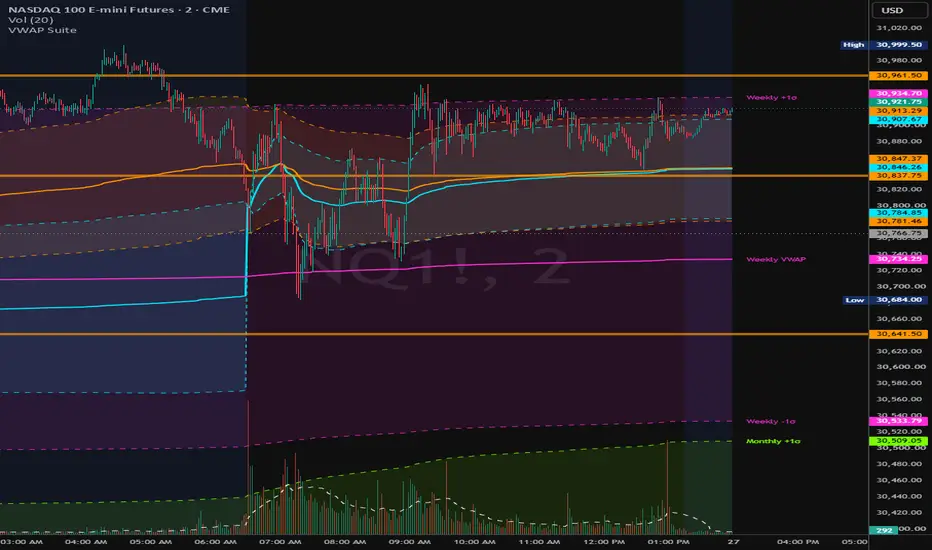
Futures VWAP Suite
Four anchored VWAPs in one indicator, built for CME-style futures (ES, NQ, CL, GC, etc.). Each VWAP has an optional volume-weighted standard deviation band so you can see value and extension for the cash session, the full Globex session, the week and the month on one chart.
WHAT IT PLOTS
• NY VWAP — anchored to the 09:30 ET cash open. Runs until the next day's 09:30 open, so overnight trade is measured against the prior RTH value.
• Globex VWAP — anchored to the 18:00 ET session open and runs through 17:00 ET. It is blank during the daily maintenance break.
• Weekly VWAP — resets on the first bar of each trading week.
• Monthly VWAP — resets on the first bar of each month.
Each VWAP can show one band above and below it. The bands are the VWAP ± (multiplier × volume-weighted standard deviation of the source since the anchor). The multiplier is shared by all four VWAPs.
HOW THE ANCHORS WORK
Session times are fixed to New York time, including daylight saving time changes. They land on the same bars whatever time zone your chart is set to.
• The NY and Globex VWAPs work on intraday timeframes only. The Weekly and Monthly VWAPs also work on daily charts.
• RTH-only charts are supported. When the 18:00 ET open is not on the chart, the Globex VWAP resets on the first bar of the new trading day.
• If a bar does not start exactly at 09:30 (for example, 1-hour bars starting on the hour), the NY VWAP resets on the first bar that opens at or after 09:30.
• Each VWAP waits for its first full anchor before it draws, so you never see a misleading partial period at the start of the chart's history.
SETTINGS
General
• Source — price used in the calculation (default hlc3).
• Band Multiplier — how many standard deviations the bands sit from the VWAP (default 1.0).
• Label Size — size of the optional line labels.
Per VWAP (NY, Globex, Weekly, Monthly)
• Show — turns the VWAP on or off.
• Bands — turns its upper and lower bands (and band fill) on or off.
• Labels — adds a text label for the VWAP and bands at the right edge of the chart, in the color you choose.
Line colors, widths, styles and fill opacity are all set in the Style tab, just like the built-in VWAP. To hide a band fill but keep the band lines, set that fill's opacity to 0.
NOTES
• Requires volume data. The script stops with an error on symbols with no volume.
• The Weekly and Monthly resets follow the exchange's trading calendar. For CME futures, the week starts at the Sunday evening open.
• This indicator is for information only and is not a trading signal.
Four anchored VWAPs in one indicator, built for CME-style futures (ES, NQ, CL, GC, etc.). Each VWAP has an optional volume-weighted standard deviation band so you can see value and extension for the cash session, the full Globex session, the week and the month on one chart.
WHAT IT PLOTS
• NY VWAP — anchored to the 09:30 ET cash open. Runs until the next day's 09:30 open, so overnight trade is measured against the prior RTH value.
• Globex VWAP — anchored to the 18:00 ET session open and runs through 17:00 ET. It is blank during the daily maintenance break.
• Weekly VWAP — resets on the first bar of each trading week.
• Monthly VWAP — resets on the first bar of each month.
Each VWAP can show one band above and below it. The bands are the VWAP ± (multiplier × volume-weighted standard deviation of the source since the anchor). The multiplier is shared by all four VWAPs.
HOW THE ANCHORS WORK
Session times are fixed to New York time, including daylight saving time changes. They land on the same bars whatever time zone your chart is set to.
• The NY and Globex VWAPs work on intraday timeframes only. The Weekly and Monthly VWAPs also work on daily charts.
• RTH-only charts are supported. When the 18:00 ET open is not on the chart, the Globex VWAP resets on the first bar of the new trading day.
• If a bar does not start exactly at 09:30 (for example, 1-hour bars starting on the hour), the NY VWAP resets on the first bar that opens at or after 09:30.
• Each VWAP waits for its first full anchor before it draws, so you never see a misleading partial period at the start of the chart's history.
SETTINGS
General
• Source — price used in the calculation (default hlc3).
• Band Multiplier — how many standard deviations the bands sit from the VWAP (default 1.0).
• Label Size — size of the optional line labels.
Per VWAP (NY, Globex, Weekly, Monthly)
• Show — turns the VWAP on or off.
• Bands — turns its upper and lower bands (and band fill) on or off.
• Labels — adds a text label for the VWAP and bands at the right edge of the chart, in the color you choose.
Line colors, widths, styles and fill opacity are all set in the Style tab, just like the built-in VWAP. To hide a band fill but keep the band lines, set that fill's opacity to 0.
NOTES
• Requires volume data. The script stops with an error on symbols with no volume.
• The Weekly and Monthly resets follow the exchange's trading calendar. For CME futures, the week starts at the Sunday evening open.
• This indicator is for information only and is not a trading signal.

Pernyataan Penyangkalan
Informasi dan publikasi ini tidak dimaksudkan, dan bukan merupakan, saran atau rekomendasi keuangan, investasi, trading, atau jenis lainnya yang diberikan atau didukung oleh TradingView. Baca selengkapnya di Ketentuan Penggunaan.
Pernyataan Penyangkalan
Informasi dan publikasi ini tidak dimaksudkan, dan bukan merupakan, saran atau rekomendasi keuangan, investasi, trading, atau jenis lainnya yang diberikan atau didukung oleh TradingView. Baca selengkapnya di Ketentuan Penggunaan.