PbD Impulse, Volume Profile & Setup Alerts
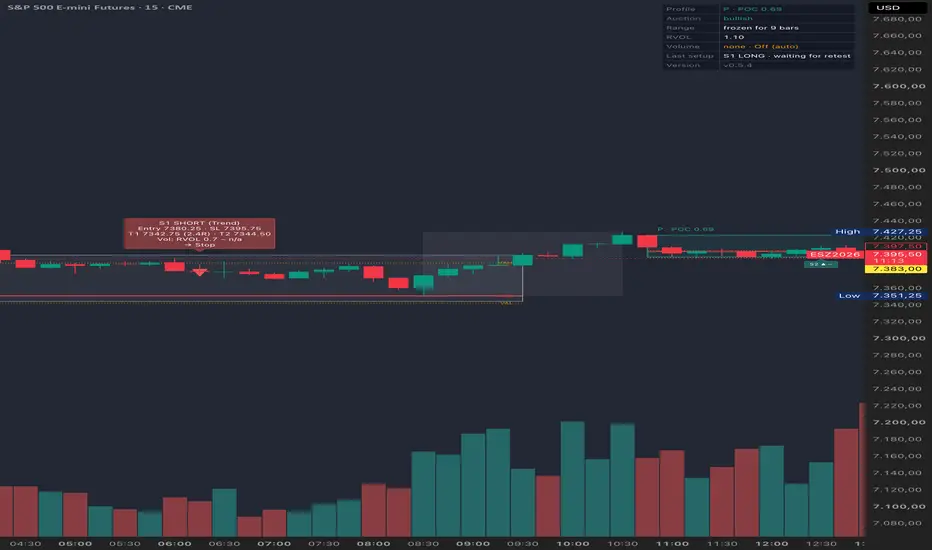
PbD reads the market the way an auction does: a strong directional move
(an impulse) is followed by a period of consolidation (a range). Once the
range has enough bars, the indicator builds a volume profile for it (POC,
VAH, VAL) and classifies it as:
P — bullish range after an up-impulse, volume sits high in the range
b — bearish range after a down-impulse, volume sits low in the range
D — balance, no clear directional bias
From there it watches for four recurring setups and marks them on the
chart with labels, boxes and, optionally, alerts:
S1 Break-in — re-entry into the value area after a brief excursion
S2 Breakout + Retest — continuation after a confirmed breakout
S3 Failed Breakout — counter-trend fade of a failed breakout
S4 Reversal — counter-trend reversal after a confirmed breakout
Each setup comes with entry, stop-loss and target levels, plus an optional
volume confirmation (RVOL) check.
This is a pure notification tool: no strategy(), no backtest equity curve,
no automated execution. It only draws levels and, optionally, fires
alerts — all trading decisions and order placement are up to you.
Quick start:
1. Add the indicator to a chart. Default settings are tuned for H1;
see the tooltips under Range & Profile for suggested tweaks on
faster intraday timeframes.
2. Adjust thresholds under Impulse / Range & Profile / Setups / Volume
to the instrument's volatility if needed.
3. To receive alerts, create one alert with condition "PbD" → "Any
alert() function call", interval "Once Per Bar Close", and leave the
message field empty — the text is generated by the script.
(an impulse) is followed by a period of consolidation (a range). Once the
range has enough bars, the indicator builds a volume profile for it (POC,
VAH, VAL) and classifies it as:
P — bullish range after an up-impulse, volume sits high in the range
b — bearish range after a down-impulse, volume sits low in the range
D — balance, no clear directional bias
From there it watches for four recurring setups and marks them on the
chart with labels, boxes and, optionally, alerts:
S1 Break-in — re-entry into the value area after a brief excursion
S2 Breakout + Retest — continuation after a confirmed breakout
S3 Failed Breakout — counter-trend fade of a failed breakout
S4 Reversal — counter-trend reversal after a confirmed breakout
Each setup comes with entry, stop-loss and target levels, plus an optional
volume confirmation (RVOL) check.
This is a pure notification tool: no strategy(), no backtest equity curve,
no automated execution. It only draws levels and, optionally, fires
alerts — all trading decisions and order placement are up to you.
Quick start:
1. Add the indicator to a chart. Default settings are tuned for H1;
see the tooltips under Range & Profile for suggested tweaks on
faster intraday timeframes.
2. Adjust thresholds under Impulse / Range & Profile / Setups / Volume
to the instrument's volatility if needed.
3. To receive alerts, create one alert with condition "PbD" → "Any
alert() function call", interval "Once Per Bar Close", and leave the
message field empty — the text is generated by the script.

Pernyataan Penyangkalan
Informasi dan publikasi ini tidak dimaksudkan, dan bukan merupakan, saran atau rekomendasi keuangan, investasi, trading, atau jenis lainnya yang diberikan atau didukung oleh TradingView. Baca selengkapnya di Ketentuan Penggunaan.
Pernyataan Penyangkalan
Informasi dan publikasi ini tidak dimaksudkan, dan bukan merupakan, saran atau rekomendasi keuangan, investasi, trading, atau jenis lainnya yang diberikan atau didukung oleh TradingView. Baca selengkapnya di Ketentuan Penggunaan.