OPEN-SOURCE SCRIPT
Diupdate Binance Futures All-in-One Info Panel
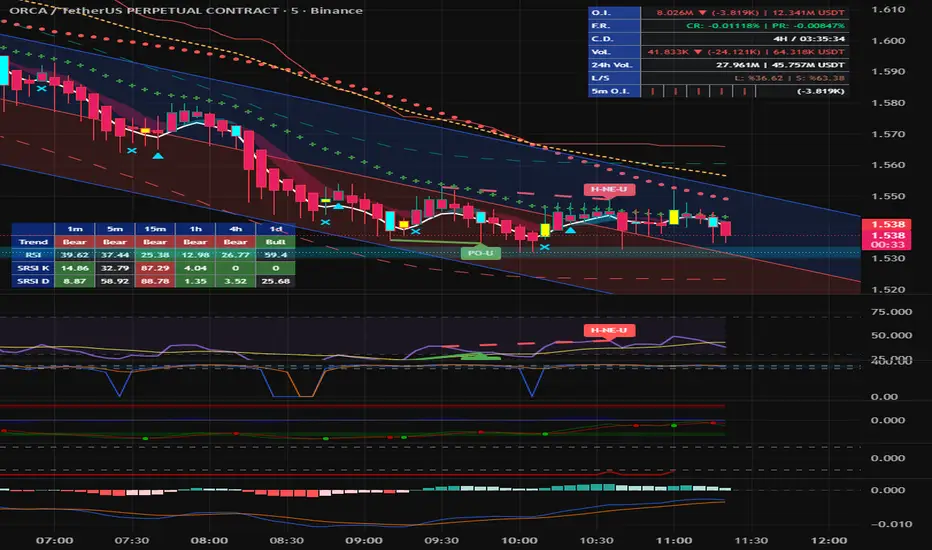
Trading Binance Futures requires keeping an eye on multiple critical metrics simultaneously. The Ultimate Binance Futures Data Hub consolidates the most essential on-chain and exchange data—Open Interest, Funding Rates, Long/Short Ratios, and Rolling Volumes—into a single, sleek, and highly customizable dashboard directly on your chart. Stop switching tabs and get all the actionable insights you need at a glance.
🔥 Key Features:
📊 Lightning-Fast Open Interest (O.I.):
We bypassed the standard chart timeframe delays. The O.I. data updates every 1 minute regardless of the timeframe you are on. It displays the absolute value, the dynamic change (▲/▼) compared to the previous bar, and the total notional value in USDT.
💸 Funding Rates (F.R.):
Displays both the Current Rate (CR) and the Previous Rate (PR) to help you gauge market sentiment and premium index shifts instantly.
⏱️ Dynamic Countdown (C.D.):
A precise countdown timer to the next funding fee. Since Binance occasionally changes funding intervals for highly volatile coins, this indicator supports 1H, 4H, and standard 8H intervals (easily selectable in settings).
📈 Real-Time Volume (Vol.):
Tracks the volume of the current active candle, highlighting the difference from the previous candle alongside its USDT equivalent.
🌍 24h Rolling Volume (24h Vol.):
Automatically calculates the true rolling 24-hour volume and its USDT value based on your current chart's timeframe.
⚖️ Official Long/Short Ratio (L/S):
Instead of relying on volume estimations, this dashboard pulls the official Binance Accounts Long/Short Ratio (_LSR) data. It features a dynamic red-to-green color gradient for quick visual sentiment analysis.
🔍 5-Minute O.I. Micro-Trend:
A unique mini-histogram embedded in the table! It displays the Open Interest trend of the last five 5-minute bars. This allows you to spot micro O.I. trends instantly, even if you are viewing a 1-Hour or 4-Hour chart.
⚙️ Customization & Settings:
We know every trader's chart layout is unique. This indicator is built to adapt to your style:
Positioning: Move the panel to any corner or middle section of your screen (Top-Right, Bottom-Left, etc.).
Size: Choose between Small, Normal, or Large text sizes to fit your resolution.
Colors: Fully customizable background colors for the left-side labels to match your specific chart theme (Dark or Light mode).
💡 How to use the Funding Interval Setting:
By default, most Binance coins use an 8-Hour funding interval. However, for highly volatile assets, Binance may lower this to 4H or 1H. TradingView cannot automatically detect this shift. If you are trading a coin with a modified schedule, simply go to the indicator settings and change the "Funding Interval" to 1H or 4H to keep the countdown perfectly synced.
If you find this tool helpful for your daily trading, please leave a 👍 boost and share your feedback in the comments!
#Binance #Futures #OpenInterest #FundingRate #Volume #Dashboard #LSRatio #Crypto
🔥 Key Features:
📊 Lightning-Fast Open Interest (O.I.):
We bypassed the standard chart timeframe delays. The O.I. data updates every 1 minute regardless of the timeframe you are on. It displays the absolute value, the dynamic change (▲/▼) compared to the previous bar, and the total notional value in USDT.
💸 Funding Rates (F.R.):
Displays both the Current Rate (CR) and the Previous Rate (PR) to help you gauge market sentiment and premium index shifts instantly.
⏱️ Dynamic Countdown (C.D.):
A precise countdown timer to the next funding fee. Since Binance occasionally changes funding intervals for highly volatile coins, this indicator supports 1H, 4H, and standard 8H intervals (easily selectable in settings).
📈 Real-Time Volume (Vol.):
Tracks the volume of the current active candle, highlighting the difference from the previous candle alongside its USDT equivalent.
🌍 24h Rolling Volume (24h Vol.):
Automatically calculates the true rolling 24-hour volume and its USDT value based on your current chart's timeframe.
⚖️ Official Long/Short Ratio (L/S):
Instead of relying on volume estimations, this dashboard pulls the official Binance Accounts Long/Short Ratio (_LSR) data. It features a dynamic red-to-green color gradient for quick visual sentiment analysis.
🔍 5-Minute O.I. Micro-Trend:
A unique mini-histogram embedded in the table! It displays the Open Interest trend of the last five 5-minute bars. This allows you to spot micro O.I. trends instantly, even if you are viewing a 1-Hour or 4-Hour chart.
⚙️ Customization & Settings:
We know every trader's chart layout is unique. This indicator is built to adapt to your style:
Positioning: Move the panel to any corner or middle section of your screen (Top-Right, Bottom-Left, etc.).
Size: Choose between Small, Normal, or Large text sizes to fit your resolution.
Colors: Fully customizable background colors for the left-side labels to match your specific chart theme (Dark or Light mode).
💡 How to use the Funding Interval Setting:
By default, most Binance coins use an 8-Hour funding interval. However, for highly volatile assets, Binance may lower this to 4H or 1H. TradingView cannot automatically detect this shift. If you are trading a coin with a modified schedule, simply go to the indicator settings and change the "Funding Interval" to 1H or 4H to keep the countdown perfectly synced.
If you find this tool helpful for your daily trading, please leave a 👍 boost and share your feedback in the comments!
#Binance #Futures #OpenInterest #FundingRate #Volume #Dashboard #LSRatio #Crypto
Catatan Rilis
OverviewTrading Binance Futures requires keeping an eye on multiple critical metrics simultaneously. The Ultimate Binance Futures Data Hub consolidates the most essential on-chain and exchange data—Open Interest, Funding Rates, Long/Short Ratios, and Rolling Volumes—into a single, sleek, and highly customizable dashboard directly on your chart. Stop switching tabs and get all the actionable insights you need at a glance.
🔥 Key Features:
📊 Lightning-Fast Open Interest (O.I.):
We bypassed the standard chart timeframe delays. The O.I. data updates every 1 minute regardless of the timeframe you are on. It displays the absolute value, the dynamic change (▲/▼) compared to the previous bar, and the total notional value in USDT.
💸 Funding Rates (F.R.):
Displays both the Current Rate (CR) and the Previous Rate (PR) to help you gauge market sentiment and premium index shifts instantly.
⏱️ Dynamic Countdown (C.D.):
A precise countdown timer to the next funding fee. Since Binance occasionally changes funding intervals for highly volatile coins, this indicator supports 1H, 4H, and standard 8H intervals (easily selectable in settings).
📈 Real-Time Volume (Vol.):
Tracks the volume of the current active candle, highlighting the difference from the previous candle alongside its USDT equivalent.
🌍 24h Rolling Volume (24h Vol.):
Automatically calculates the true rolling 24-hour volume and its USDT value based on your current chart's timeframe.
⚖️ Official Long/Short Ratio (L/S):
Instead of relying on volume estimations, this dashboard pulls the official Binance Accounts Long/Short Ratio (_LSR) data. It features a dynamic red-to-green color gradient for quick visual sentiment analysis.
🔍 5-Minute O.I. Micro-Trend:
A unique mini-histogram embedded in the table! It displays the Open Interest trend of the last five 5-minute bars. This allows you to spot micro O.I. trends instantly, even if you are viewing a 1-Hour or 4-Hour chart.
⚙️ Customization & Settings:
We know every trader's chart layout is unique. This indicator is built to adapt to your style:
Positioning: Move the panel to any corner or middle section of your screen (Top-Right, Bottom-Left, etc.).
Size: Choose between Small, Normal, or Large text sizes to fit your resolution.
Colors: Fully customizable background colors for the left-side labels to match your specific chart theme (Dark or Light mode).
💡 How to use the Funding Interval Setting:
By default, most Binance coins use an 8-Hour funding interval. However, for highly volatile assets, Binance may lower this to 4H or 1H. TradingView cannot automatically detect this shift. If you are trading a coin with a modified schedule, simply go to the indicator settings and change the "Funding Interval" to 1H or 4H to keep the countdown perfectly synced.
If you find this tool helpful for your daily trading, please leave a 👍 boost and share your feedback in the comments!
Skrip open-source
Dengan semangat TradingView yang sesungguhnya, pembuat skrip ini telah menjadikannya sebagai sumber terbuka, sehingga para trader dapat meninjau dan memverifikasi fungsinya. Salut untuk penulisnya! Meskipun Anda dapat menggunakannya secara gratis, perlu diingat bahwa penerbitan ulang kode ini tunduk pada Tata Tertib kami.

Pernyataan Penyangkalan
Informasi dan publikasi ini tidak dimaksudkan, dan bukan merupakan, saran atau rekomendasi keuangan, investasi, trading, atau jenis lainnya yang diberikan atau didukung oleh TradingView. Baca selengkapnya di Ketentuan Penggunaan.
Skrip open-source
Dengan semangat TradingView yang sesungguhnya, pembuat skrip ini telah menjadikannya sebagai sumber terbuka, sehingga para trader dapat meninjau dan memverifikasi fungsinya. Salut untuk penulisnya! Meskipun Anda dapat menggunakannya secara gratis, perlu diingat bahwa penerbitan ulang kode ini tunduk pada Tata Tertib kami.
Pernyataan Penyangkalan
Informasi dan publikasi ini tidak dimaksudkan, dan bukan merupakan, saran atau rekomendasi keuangan, investasi, trading, atau jenis lainnya yang diberikan atau didukung oleh TradingView. Baca selengkapnya di Ketentuan Penggunaan.