OPEN-SOURCE SCRIPT
[WW_AM] UTC Week Day Sessions
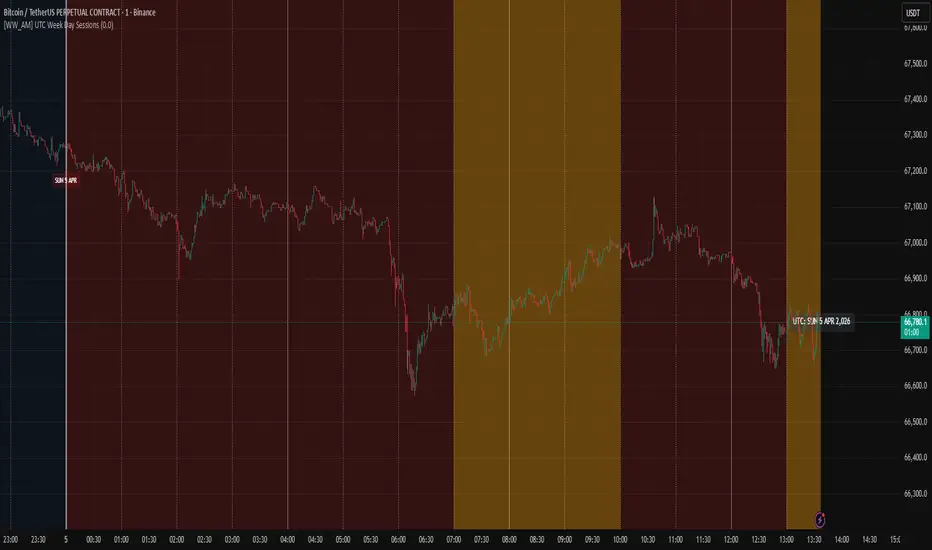
UTC Week Day Sessions – What it does
This indicator helps you understand the market context based on UTC time, regardless of your local timezone or the chart's timezone.
Main features:
Coloured weekdays – Each weekday gets a different background shade (Monday to Saturday). Sunday turns red if you wish. This makes it easy to spot day transitions at a glance.
Active session highlight – London (07:00–10:00 UTC) and NY/Overlap (13:00–17:00 UTC) are highlighted in yellow, so you know when liquidity typically picks up.
Time boundaries – Draws vertical lines at the start of every hour, 4‑hour block, day, and week. You can toggle each level on/off. The line thickness increases with importance (thickest for weekly boundaries).
Date labels – A small label appears below the chart at 00:00 UTC showing the day, date, and month. Hover to see the full weekday and year.
UTC watermark – Displays the current UTC date in the top‑right corner, so you always know the reference time.
Price % calculator – Enter a target price (click the crosshair icon to pick a level from the chart). The script then shows a dashed line at that price and a label with the percentage difference from the current close. Very handy for measuring potential targets or stop distances.
How to use it:
Add the indicator to any intraday chart (it works best on minute or hourly timeframes).
Adjust the toggles in the settings to show/hide backgrounds, lines, labels, and the watermark.
For the price calculator: go to the indicator’s settings → "Price % Calculator" → click the crosshair icon next to "Target Price Level", then click any price on the chart.
The indicator uses UTC exclusively – no need to change your chart’s timezone.
Note: All session times and boundaries are based on UTC, not your broker’s time or local time. This ensures consistency across different platforms and regions.
This indicator helps you understand the market context based on UTC time, regardless of your local timezone or the chart's timezone.
Main features:
Coloured weekdays – Each weekday gets a different background shade (Monday to Saturday). Sunday turns red if you wish. This makes it easy to spot day transitions at a glance.
Active session highlight – London (07:00–10:00 UTC) and NY/Overlap (13:00–17:00 UTC) are highlighted in yellow, so you know when liquidity typically picks up.
Time boundaries – Draws vertical lines at the start of every hour, 4‑hour block, day, and week. You can toggle each level on/off. The line thickness increases with importance (thickest for weekly boundaries).
Date labels – A small label appears below the chart at 00:00 UTC showing the day, date, and month. Hover to see the full weekday and year.
UTC watermark – Displays the current UTC date in the top‑right corner, so you always know the reference time.
Price % calculator – Enter a target price (click the crosshair icon to pick a level from the chart). The script then shows a dashed line at that price and a label with the percentage difference from the current close. Very handy for measuring potential targets or stop distances.
How to use it:
Add the indicator to any intraday chart (it works best on minute or hourly timeframes).
Adjust the toggles in the settings to show/hide backgrounds, lines, labels, and the watermark.
For the price calculator: go to the indicator’s settings → "Price % Calculator" → click the crosshair icon next to "Target Price Level", then click any price on the chart.
The indicator uses UTC exclusively – no need to change your chart’s timezone.
Note: All session times and boundaries are based on UTC, not your broker’s time or local time. This ensures consistency across different platforms and regions.
Skrip open-source
Dengan semangat TradingView yang sesungguhnya, pembuat skrip ini telah menjadikannya sebagai sumber terbuka, sehingga para trader dapat meninjau dan memverifikasi fungsinya. Salut untuk penulisnya! Meskipun Anda dapat menggunakannya secara gratis, perlu diingat bahwa penerbitan ulang kode ini tunduk pada Tata Tertib kami.

Pernyataan Penyangkalan
Informasi dan publikasi ini tidak dimaksudkan, dan bukan merupakan, saran atau rekomendasi keuangan, investasi, trading, atau jenis lainnya yang diberikan atau didukung oleh TradingView. Baca selengkapnya di Ketentuan Penggunaan.
Skrip open-source
Dengan semangat TradingView yang sesungguhnya, pembuat skrip ini telah menjadikannya sebagai sumber terbuka, sehingga para trader dapat meninjau dan memverifikasi fungsinya. Salut untuk penulisnya! Meskipun Anda dapat menggunakannya secara gratis, perlu diingat bahwa penerbitan ulang kode ini tunduk pada Tata Tertib kami.
Pernyataan Penyangkalan
Informasi dan publikasi ini tidak dimaksudkan, dan bukan merupakan, saran atau rekomendasi keuangan, investasi, trading, atau jenis lainnya yang diberikan atau didukung oleh TradingView. Baca selengkapnya di Ketentuan Penggunaan.