OPEN-SOURCE SCRIPT
Hourly High/Low Lines
Here is a detailed and professional description you can copy and paste directly into the "Describe your script..." box on your screen:
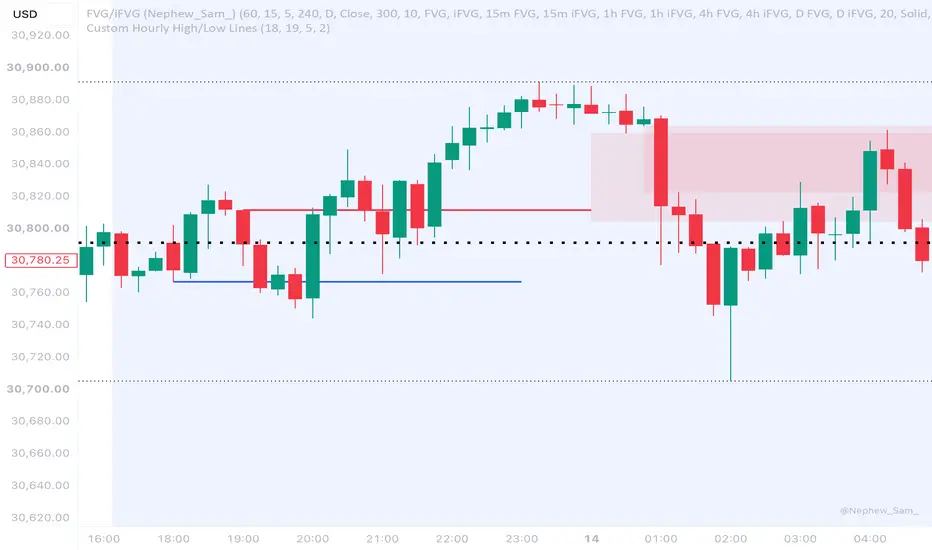
Custom Hourly High/Low Lines
This indicator is designed for intraday traders who need to track and visualize the highest and lowest price points of specific hours throughout the day. Instead of extending lines indefinitely, this script draws clean, fixed-length horizontal lines from your target hours, keeping your chart clutter-free.
Key Features:
Customizable Target Hours: Select exactly which hour to track for the High, and which hour to track for the Low (0-23 format). By default, it is set to track the 6 PM Low and 7 PM High.
Anchored to New York Time: The script forces the time check to "America/New_York" (EST/EDT). This ensures your lines always anchor to the correct time regardless of what time zone your chart or exchange is set to (perfect for Crypto or Forex charts running on UTC).
Adjustable Line Length: Choose exactly how many hours the line should extend across your chart. By default, it draws a 3-hour line starting from the targeted hour.
Fully Customizable Styling: Easily change the colors and thickness of both the High and Low lines directly from the indicator's settings menu without touching the code.
Use Case:
Ideal for visualizing session liquidity, tracking opening range highs/lows, or highlighting key intraday levels (like the 6 PM opening low) for a specific duration of your trading session.
Once you paste that in, the Continue button at the bottom of your screen will become clickable!
Custom Hourly High/Low Lines
This indicator is designed for intraday traders who need to track and visualize the highest and lowest price points of specific hours throughout the day. Instead of extending lines indefinitely, this script draws clean, fixed-length horizontal lines from your target hours, keeping your chart clutter-free.
Key Features:
Customizable Target Hours: Select exactly which hour to track for the High, and which hour to track for the Low (0-23 format). By default, it is set to track the 6 PM Low and 7 PM High.
Anchored to New York Time: The script forces the time check to "America/New_York" (EST/EDT). This ensures your lines always anchor to the correct time regardless of what time zone your chart or exchange is set to (perfect for Crypto or Forex charts running on UTC).
Adjustable Line Length: Choose exactly how many hours the line should extend across your chart. By default, it draws a 3-hour line starting from the targeted hour.
Fully Customizable Styling: Easily change the colors and thickness of both the High and Low lines directly from the indicator's settings menu without touching the code.
Use Case:
Ideal for visualizing session liquidity, tracking opening range highs/lows, or highlighting key intraday levels (like the 6 PM opening low) for a specific duration of your trading session.
Once you paste that in, the Continue button at the bottom of your screen will become clickable!
Skrip open-source
Dengan semangat TradingView yang sesungguhnya, pembuat skrip ini telah menjadikannya sebagai sumber terbuka, sehingga para trader dapat meninjau dan memverifikasi fungsinya. Salut untuk penulisnya! Meskipun Anda dapat menggunakannya secara gratis, perlu diingat bahwa penerbitan ulang kode ini tunduk pada Tata Tertib kami.

Pernyataan Penyangkalan
Informasi dan publikasi ini tidak dimaksudkan, dan bukan merupakan, saran atau rekomendasi keuangan, investasi, trading, atau jenis lainnya yang diberikan atau didukung oleh TradingView. Baca selengkapnya di Ketentuan Penggunaan.
Skrip open-source
Dengan semangat TradingView yang sesungguhnya, pembuat skrip ini telah menjadikannya sebagai sumber terbuka, sehingga para trader dapat meninjau dan memverifikasi fungsinya. Salut untuk penulisnya! Meskipun Anda dapat menggunakannya secara gratis, perlu diingat bahwa penerbitan ulang kode ini tunduk pada Tata Tertib kami.
Pernyataan Penyangkalan
Informasi dan publikasi ini tidak dimaksudkan, dan bukan merupakan, saran atau rekomendasi keuangan, investasi, trading, atau jenis lainnya yang diberikan atau didukung oleh TradingView. Baca selengkapnya di Ketentuan Penggunaan.