Diupdate
Unicorn Model [Pro+] (Juno)
Introduction
Unicorn Model° [Pro+] (Juno) is a fully customizable charting tool designed to track ICT Breaker Block formations that occur after liquidity sweeps and structural failure, paired with displacement signatures. Built in collaboration with Juno, who has spent hundreds of hours trading this model, the tool encompasses his methods for qualification and detection of both Breaker Blocks, as well as Unicorn Setups (Breaker Block + Fair Value Gap).
The model focuses on moments where price violates prior highs or lows which qualify as relevant liquidity pools, to then track a potential reversal signature that causes a shift in orderflow, and establishes a new point of reference for continuations and reversals.
Inspired by ICT-based concepts, this tool provides a clean, rules-based framework for identifying confirmed breaker structures, projecting mechanical targets, and tracking model invalidation. It is designed for traders who already understand liquidity, displacement, structural failure, and want consistent visual plotting across sessions, timeframes, and assets.
This indicator does not predict direction or generate trade signals. It operates strictly on confirmed, mechanical, and deterministic price events to produce logic-bound visuals for studying model behaviour and understanding the engineering of price pivots.
Key Terms and Definitions
Description
Unicorn Model° [Pro+] follows a structured three-step logic sequence:
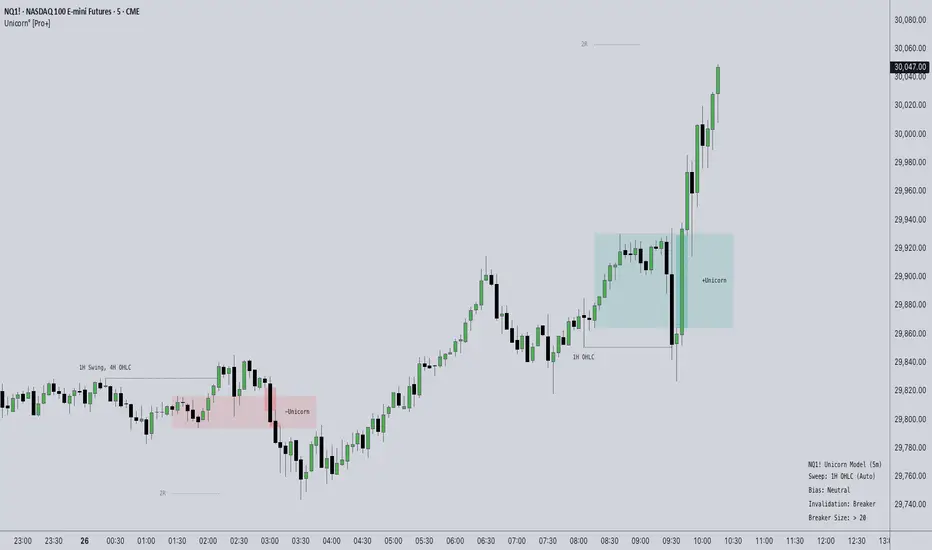
Consider the following example on NQ1!
NQ1!
The tool does not rely on wick interaction alone for activation. Only full-body closures through qualifying structures are recognized. Once active, the model begins tracking price delivery using a predefined risk-to-reward framework:

Target projections are automatically plotted based on the user-defined invalidation, R:R, and additional projection multiples. These serve as mechanical objectives, allowing traders to observe whether price delivers efficiently, stalls, or fails:

The breaker or unicorn remains active until either the main R:R target is reached (completion) or invalidation conditions are met. The script also has an additional mechanic which checks for a retest of the breaker’s zone before reaching the R:R target; this showcases the difference between violent displacements through breaker areas, and breakers which actually hold price and display a more tangible orderflow shift:

Upon invalidation, the breaker transitions into an inactive state, visually indicating that the structure is no longer valid for tracking:

Key Features
How Traders Can Use the Indicator Effectively
Unicorn Model° [Pro+] (Juno) is not designed for blindly following entries or signals. It is best used as a structural tracking and confluence tool coupled with user’s discernment.
The indicator is particularly effective for:
Usage Guidance
For best results, combine with your own narrative, liquidity model, and execution framework.
Unicorn Model° [Pro+] (Juno) is a fully customizable charting tool designed to track ICT Breaker Block formations that occur after liquidity sweeps and structural failure, paired with displacement signatures. Built in collaboration with Juno, who has spent hundreds of hours trading this model, the tool encompasses his methods for qualification and detection of both Breaker Blocks, as well as Unicorn Setups (Breaker Block + Fair Value Gap).
The model focuses on moments where price violates prior highs or lows which qualify as relevant liquidity pools, to then track a potential reversal signature that causes a shift in orderflow, and establishes a new point of reference for continuations and reversals.
Inspired by ICT-based concepts, this tool provides a clean, rules-based framework for identifying confirmed breaker structures, projecting mechanical targets, and tracking model invalidation. It is designed for traders who already understand liquidity, displacement, structural failure, and want consistent visual plotting across sessions, timeframes, and assets.
This indicator does not predict direction or generate trade signals. It operates strictly on confirmed, mechanical, and deterministic price events to produce logic-bound visuals for studying model behaviour and understanding the engineering of price pivots.
Key Terms and Definitions
- Swing High / Swing Low
A swing high is a local peak with lower highs on both sides of the highest high, and a swing low is a local trough with higher lows on both sides of the lowest low. These levels represent resting liquidity and are part of confirming the initial raid condition. - OHLC Liquidity
A candle’s points of reference, with a special focus on the candle’s high and low. These levels represent resting liquidity points, which can be categorized as a type of liquidity raid, or initial raid condition. - Liquidity Sweep (Raid)
Occurs when price trades through a prior swing high or low (or OHLC Liquidity), triggering resting liquidity. This is the first requirement for breaker formation. The model will not evaluate a breaker unless liquidity has been swept. - Breaker Blocks (BB)
They form when price takes out liquidity at a previous swing high or low and then reverses, using the area of that move as a new structural anchor. In a bearish scenario, the breaker block is the last down-close or series of down closes at the most recent swing low before price pushes above an old high. When the breakout above the high triggers buy stops and price then reverses lower, the down closed candle or candles become the breaker block. In a bullish scenario, it is the last up-close candle or series of up-closes at the most recent swing high before price pushes below an old low. When sell stops are triggered and price reverses higher, that up candle or series of up candles becomes the breaker block. - Fair Value Gap (FVG)
A form of price delivery imbalance, which leaves behind an area of one-sided delivery, manifested as a candle creating a gap between the previous and following candle's wicks. - Displacement
A strong directional move that creates imbalances in the form of FVGs, confirms intent, and displays a willingness to move away from a key level. Displacement provides the context for both the initial structure and its failure. - Breaker Confirmation
A breaker is only confirmed when a candle body fully closes through the originating structure’s range after a liquidity sweep. Wick interaction alone is not sufficient. - Risk Range (R)
The distance between the breaker zone and its invalidation point. This range is used to calculate projected targets (R multiples). - Target Projections (R Multiples)
Predefined extensions (e.g., 1R, 1.5R, 2R, 3R) are derived from the breaker’s risk range. These act as mechanical delivery objectives. - Invalidation
A breaker is invalidated when price violates either of the user defined conditions: Trading back past the breaker range in the opposite direction of its confirmation; or trading beyond the swing formed between the sweep and the activation.
Description
Unicorn Model° [Pro+] follows a structured three-step logic sequence:
- Liquidity is taken (high/low is swept)
- Structure fails (prior structure is closed through)
- Breaker is confirmed and plotted
Consider the following example on
NQ1!The tool does not rely on wick interaction alone for activation. Only full-body closures through qualifying structures are recognized. Once active, the model begins tracking price delivery using a predefined risk-to-reward framework:
Target projections are automatically plotted based on the user-defined invalidation, R:R, and additional projection multiples. These serve as mechanical objectives, allowing traders to observe whether price delivers efficiently, stalls, or fails:
The breaker or unicorn remains active until either the main R:R target is reached (completion) or invalidation conditions are met. The script also has an additional mechanic which checks for a retest of the breaker’s zone before reaching the R:R target; this showcases the difference between violent displacements through breaker areas, and breakers which actually hold price and display a more tangible orderflow shift:
Upon invalidation, the breaker transitions into an inactive state, visually indicating that the structure is no longer valid for tracking:
Key Features
- Unicorn Model Alerts
Enable Alerts? to receive TradingView alerts for key Unicorn Model events, including early breaker interaction, setup activation, target delivery, invalidation warnings, and full invalidation. Available alert conditions:‣ Potential Breaker: Alerts when Price first wicks beyond a breaker level before the close as confirmation/activation.
‣ Activation: Alerts when a Unicorn or Breaker setup becomes fully active upon candle close confirmation.
‣ Target Reached: Alerts when an active Unicorn or Breaker reaches its projected R:R target.
‣ Invalidation Warning: Alerts when an active Unicorn or Breaker is approaching invalidation.
‣ Invalidation Hit: Alerts when an active Unicorn or Breaker is fully invalidated.
Alerts are managed from the indicator settings and must be selected before creating the TradingView alert.
- Bias Control
This setting allows traders to display:‣ Bullish models only
‣ Bearish models only
‣ Neutral (Bullish and Bearish)
‣ Automatic (Higher Timeframe Trend Filtering)
This enables analysts to focus their analysis directionally and filters setups that are not aligned to their higher timeframe bias.
 EURUSD on a downtrend, difference of Bullish vs. Bearish Bias:
- R:R and Target Projection System
‣ Define a base R:R (e.g., 2R)
‣ Customize any projection multiples (e.g., 1, 1.5, 2, 3)
‣ Automatically plot mechanical delivery targets
These projections provide a consistent framework for evaluating price delivery.NQ1! with multiple R Projections:
- Breaker Filtering & Quality Control
‣ History: limits the number of previous and currently active breaker structures displayed to reduce chart clutter or to increase the model visibility for backtesting.
‣ Unicorn Mode: traders can enable stricter internal conditions to filter for higher-quality breaker formations. This mode detects Breaker Blocks that overlap with FVGs, prioritizing cleaner, displacement-driven setups. ES1! difference of Breaker and Unicorn Model (without and with FVG overlap):
‣ Use Swing as Invalidation: instead of invalidating breakers at the zone extreme, this mode switches invalidation logic to the swing created post liquidity raid. This allows the model to remain active until deeper structural retracement occurs.
 6A1! showcase of how Swing As Invalidation visually changes Projections and Breakers:
‣ Discard Invalidated Setups: To keep charts cleaner, this setting deletes invalidated setups that were plotted, allowing for a more focused and active view.
 CL1! cleaner chart for tape reading or journaling:
- Liquidity Source Configuration
The model can use multiple data inputs for identifying liquidity. Choose to track Single or Multiple liquidity sources in three forms: Swing Liquidity and OHLC Liquidity, or both.
The Source A/B/C customization is gated by the master Sources settings.‣ Automatic Mode: pre-defined Single or Multiple liquidity sources based on Juno’s studies and model refinement over the years. Users can decide to bypass this with Manual mode and set their own liquidity preferences.
 YM1! OHLC Liquidity vs Swing Liquidity:
- Breaker Size Filter
Traders can choose from a pre-tuned set of options to only show Small, Medium and Large breakers. The sizes are dynamic between per asset volatility, and specific to their innate characteristics.
Users can also filter breaker zones based on Custom size constraints:‣ Min Zone Size in points or pips
‣ Max Zone Size in points or pips
This helps refine setups and maintain consistency across different market conditions, as well as discarding unwanted setups and refining them into smaller/larger ranges. BTC1! Daily chart with and without a $5000 Minimum Breaker Size Filter:
- Time Filter
Users have the option to display model activations up to three customizable sessions in their own custom timezone. Time filters are defaulted to New York EST.
This is particularly useful for intraday traders focusing on specific market windows and eliminating setups that plot outside their trading hours. GBPUSD Time Filter set to London Session at 02:00 - 05:00:
- Info Table
Users will find two modes for the Info Table: Simple retains the most important elements of the model while Detailed introduces more active settings enabled filters. You can customize the table position and size for optimal chart style preferences.
The table provides a structured overview of:‣ Asset
‣ Chart Timeframe
‣ Current Active Setup Liquidity
‣ Bias Mode
‣ Invalidation Type
‣ Breaker Size Filter (if enabled)
‣ Time Filter (if enabled)
How Traders Can Use the Indicator Effectively
Unicorn Model° [Pro+] (Juno) is not designed for blindly following entries or signals. It is best used as a structural tracking and confluence tool coupled with user’s discernment.
The indicator is particularly effective for:
- Studying failed structure and orderflow shifts
- Tracking liquidity-driven continuation setups
- Reviewing breaker performance across sessions
- Aligning execution with higher-timeframe narrative
Usage Guidance
- Add Unicorn Model° [Pro+] (Juno) to any TradingView chart. The model is fractal and functions across all timeframes and instruments.
- Use breaker zones to identify potential structural flips.
- Monitor projected targets for delivery behaviour.
- Observe invalidation to understand failed setups.
For best results, combine with your own narrative, liquidity model, and execution framework.
Terms and Conditions
Our charting tools are products provided for informational and educational purposes only and do not constitute financial, investment, or trading advice. Our charting tools are not designed to predict market movements or provide specific recommendations. Users should be aware that past performance is not indicative of future results and should not be relied upon for making financial decisions. By using our charting tools, the purchaser agrees that the seller and the creator are not responsible for any decisions made based on the information provided by these charting tools. The purchaser assumes full responsibility and liability for any actions taken and the consequences thereof, including any loss of money or investments that may occur as a result of using these products. Hence, by purchasing these charting tools, the customer accepts and acknowledges that the seller and the creator are not liable nor responsible for any unwanted outcome that arises from the development, the sale, or the use of these products. Finally, the purchaser indemnifies the seller from any and all liability. If the purchaser was invited through the Friends and Family Program, they acknowledge that the provided discount code only applies to the first initial purchase of any Toodegrees product. The purchaser is therefore responsible for cancelling – or requesting to cancel – their subscription in the event that they do not wish to continue using the product at full retail price. If the purchaser no longer wishes to use the products, they must unsubscribe from the membership service, if applicable. We hold no reimbursement, refund, or chargeback policy. Once these Terms and Conditions are accepted by the Customer, before purchase, no reimbursements, refunds or chargebacks will be provided under any circumstances.
By continuing to use these charting tools, the user acknowledges and agrees to the Terms and Conditions outlined in this legal disclaimer.
Catatan Rilis
- Fixed Activation alert not always firing
- Fixed Auto Bias inconsistency
- Minor performance optimizations
Catatan Rilis
- Breaker + Unicorn model option: shows all Breakers, and automatically upgrades them to Unicorn when conditions are met
- Session Liquidity Sources
- Projection Calculation options: "Breaker Range" or "Confirmation Close"
- 50% of Breaker + Customization
- FVG CE + Extend FVG option
- "Show Potential Model" showcasing potential models prior to activation confirmation
Catatan Rilis
Minor Bug FixesTersedia di Paid Space
Indikator ini hanya tersedia untuk pelanggan Toodegrees Elite Collection. Bergabunglah untuk mengakses skrip ini dan skrip lainnya dari toodegrees.

homo faber fortunæ suæ
Pernyataan Penyangkalan
Informasi dan publikasi ini tidak dimaksudkan, dan bukan merupakan, saran atau rekomendasi keuangan, investasi, trading, atau jenis lainnya yang diberikan atau didukung oleh TradingView. Baca selengkapnya di Ketentuan Penggunaan.
Tersedia di Paid Space
Indikator ini hanya tersedia untuk pelanggan Toodegrees Elite Collection. Bergabunglah untuk mengakses skrip ini dan skrip lainnya dari toodegrees.
homo faber fortunæ suæ
Pernyataan Penyangkalan
Informasi dan publikasi ini tidak dimaksudkan, dan bukan merupakan, saran atau rekomendasi keuangan, investasi, trading, atau jenis lainnya yang diberikan atau didukung oleh TradingView. Baca selengkapnya di Ketentuan Penggunaan.