Diupdate
VWAP EMA Signals [UgurTash]
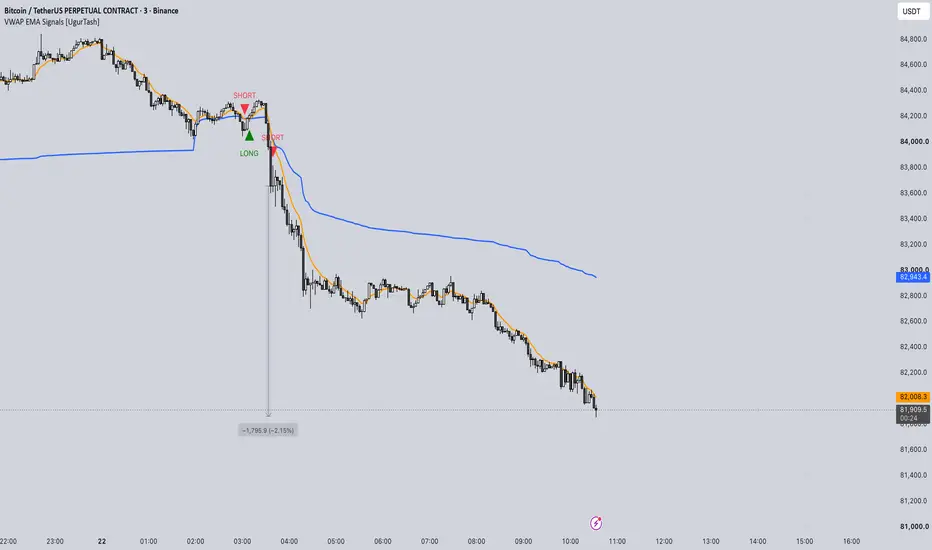
VWAP EMA Signals [UgurTash]
OVERVIEW
VWAP EMA Signals combines anchored Volume Weighted Average Price (VWAP) and an Exponential Moving Average (EMA) in one chart overlay. It adds candle-close crossover signals and separate exit markers while retaining VWAP bands and EMA smoothing controls.
SIGNAL LOGIC
The direction rules are intentionally defined as follows:
- LONG: VWAP crosses below EMA. A green upward triangle appears below the closed candle.
- SHORT: VWAP crosses above EMA. A red downward triangle appears above the closed candle.
- EXIT LONG: After a long signal, VWAP crosses above EMA.
- EXIT SHORT: After a short signal, VWAP crosses below EMA.
An opposite signal marks both the exit of the previously indicated direction and entry into the new direction. No exit is marked before an initial entry has been identified in the loaded history. These markers track signal direction; the script does not place or manage orders.
DEFAULT SETTINGS
- Timeframe: follows the chart, including 3-minute charts.
- VWAP source: OHLC4, calculated as (Open + High + Low + Close) / 4. The source remains editable.
- VWAP anchor: Session.
- VWAP line: blue.
- EMA: length 9, source Close, orange line.
- EMA smoothing: None.
- First VWAP band enabled at multiplier 1.0; second and third bands disabled.
CUSTOMIZATION
VWAP controls include anchor period, source, offset, the daily-and-higher visibility option, and three independently enabled bands. Band distances can use standard deviation or percentage calculations.
EMA controls include length, source, offset, and optional SMA, SMA with Bollinger Bands, EMA, SMMA (RMA), WMA, or VWMA smoothing. Smoothing affects the additional smoothing plots; signals compare the base EMA with VWAP.
Entry triangles and exit markers can be enabled independently. Long and short colors are configurable. Plot appearance can be adjusted in the Style tab.
ALERTS
Separate conditions are available for Long Entry, Short Entry, Long Exit, and Short Exit. Signals require the calculation candle to close. Use Once Per Bar Close when configuring alerts.
CALCULATION NOTES
Signals compare the underlying VWAP and EMA values. Plot offsets shift only the displayed lines and do not shift signal calculations; keep both offsets at zero when visually checking crossovers. VWAP anchor resets can also produce a crossover signal. VWAP requires volume data, and event-based anchors require applicable corporate-action data.
The script combines standard VWAP and EMA calculations based on TradingView's built-in indicator source scripts, with custom crossover direction rules, signal-state tracking, markers, and alert conditions by UgurTash.
This is a visual indicator, not a backtested strategy. It makes no claim about trading performance.
OVERVIEW
VWAP EMA Signals combines anchored Volume Weighted Average Price (VWAP) and an Exponential Moving Average (EMA) in one chart overlay. It adds candle-close crossover signals and separate exit markers while retaining VWAP bands and EMA smoothing controls.
SIGNAL LOGIC
The direction rules are intentionally defined as follows:
- LONG: VWAP crosses below EMA. A green upward triangle appears below the closed candle.
- SHORT: VWAP crosses above EMA. A red downward triangle appears above the closed candle.
- EXIT LONG: After a long signal, VWAP crosses above EMA.
- EXIT SHORT: After a short signal, VWAP crosses below EMA.
An opposite signal marks both the exit of the previously indicated direction and entry into the new direction. No exit is marked before an initial entry has been identified in the loaded history. These markers track signal direction; the script does not place or manage orders.
DEFAULT SETTINGS
- Timeframe: follows the chart, including 3-minute charts.
- VWAP source: OHLC4, calculated as (Open + High + Low + Close) / 4. The source remains editable.
- VWAP anchor: Session.
- VWAP line: blue.
- EMA: length 9, source Close, orange line.
- EMA smoothing: None.
- First VWAP band enabled at multiplier 1.0; second and third bands disabled.
CUSTOMIZATION
VWAP controls include anchor period, source, offset, the daily-and-higher visibility option, and three independently enabled bands. Band distances can use standard deviation or percentage calculations.
EMA controls include length, source, offset, and optional SMA, SMA with Bollinger Bands, EMA, SMMA (RMA), WMA, or VWMA smoothing. Smoothing affects the additional smoothing plots; signals compare the base EMA with VWAP.
Entry triangles and exit markers can be enabled independently. Long and short colors are configurable. Plot appearance can be adjusted in the Style tab.
ALERTS
Separate conditions are available for Long Entry, Short Entry, Long Exit, and Short Exit. Signals require the calculation candle to close. Use Once Per Bar Close when configuring alerts.
CALCULATION NOTES
Signals compare the underlying VWAP and EMA values. Plot offsets shift only the displayed lines and do not shift signal calculations; keep both offsets at zero when visually checking crossovers. VWAP anchor resets can also produce a crossover signal. VWAP requires volume data, and event-based anchors require applicable corporate-action data.
The script combines standard VWAP and EMA calculations based on TradingView's built-in indicator source scripts, with custom crossover direction rules, signal-state tracking, markers, and alert conditions by UgurTash.
This is a visual indicator, not a backtested strategy. It makes no claim about trading performance.
Catatan Rilis
VWAP EMA Signals [UgurTash] - Update NotesThis update adds three optional entry filters while preserving the original crossover direction rules:
- LONG when EMA crosses above VWAP.
- SHORT when EMA crosses below VWAP.
- Signals are confirmed at candle close. Exits remain based on the opposite crossover.
NEW: OPTIONAL ENTRY FILTERS
1. Require Close Beyond EMA and VWAP
Long entries require the crossover candle to close above both EMA and VWAP. Short entries require it to close below both lines.
2. Require EMA Slope Confirmation
Long entries require the current EMA to be higher than its value a configurable number of bars ago. Short entries require it to be lower. The default lookback is 1 bar. This compares two EMA values; it does not require a continuous rise or fall throughout the lookback.
3. Skip Entries on VWAP Anchor Reset
Prevents new entries on the bar where VWAP resets according to the selected Anchor Period. Opposite crossover exits remain active.
FILTER BEHAVIOR
All three filters are disabled by default. With filters disabled and matching calculation settings, entry and exit signals follow the original published logic. Filters can be enabled independently or combined.
Filters apply only on the crossover candle. If an entry is rejected, the indicator waits for a new crossover rather than entering later when the filter conditions change. Exit signals are independent of entry filters, so an exit can occur without a new entry in the opposite direction.
DISPLAY
VWAP bands are now hidden by default for a clearer chart. All three bands and their settings remain available. The blue VWAP line, orange EMA line, triangle entry markers, and chart-following timeframe behavior are retained.
These filters provide additional control over entry selection. Their effect on profitability has not been established through backtesting.

For more you can follow me on X. @UgurTash
Pernyataan Penyangkalan
Informasi dan publikasi ini tidak dimaksudkan, dan bukan merupakan, saran atau rekomendasi keuangan, investasi, trading, atau jenis lainnya yang diberikan atau didukung oleh TradingView. Baca selengkapnya di Ketentuan Penggunaan.
For more you can follow me on X. @UgurTash
Pernyataan Penyangkalan
Informasi dan publikasi ini tidak dimaksudkan, dan bukan merupakan, saran atau rekomendasi keuangan, investasi, trading, atau jenis lainnya yang diberikan atau didukung oleh TradingView. Baca selengkapnya di Ketentuan Penggunaan.