Diupdate
Gold Lot Size Calculator (MT5)
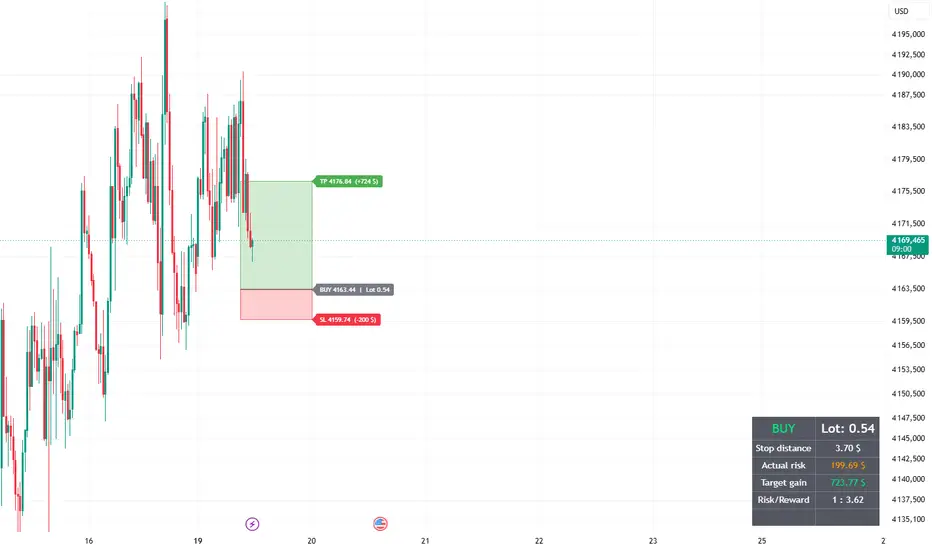
Gold Lot Size Calculator (MT5)
A simple position sizing tool for Gold (XAUUSD). You click the start candle, your entry and your stop loss on the chart, and the script tells you which lot size to enter in MetaTrader so that a loss at your stop equals the percentage of your account you chose to risk.
How it works
The script uses the standard formula:
lot = risk in $ / (stop distance in $ x ounces per lot)
Example: account 10,000 $, risk 2 % (200 $), stop 10 $ away from entry, 100 oz per lot. The lot is 200 / (10 x 100) = 0.20 lot.
How to use it
1. Add the script to a Gold chart (XAUUSD).
2. When prompted, click three times on the chart: first the candle where your trade starts, then your entry price, then your stop loss.
3. Read the lot size in the table at the bottom right of the chart, and enter it in MetaTrader.
4. To start a new trade, open the script settings and change the start candle, the entry and the stop prices (or remove the script and add it again).
What you see on the chart
- A green zone from the entry to the take profit
- A red zone from the entry to the stop loss
- Labels with the target gain and the loss in dollars
- A table with the lot size, the stop distance, the actual risk, the target gain and the risk/reward ratio
The zones are anchored to the candle you clicked, so they move with the chart when you scroll or zoom.
Settings
- Account size ($)
- Max risk per trade (%)
- Risk/Reward ratio (places the take profit)
- Ounces per 1.00 lot (100 for Gold at most brokers, check the symbol specification in your platform)
- Zone width (bars)
- Start candle, entry price and stop loss price
Good to know
- Buy or sell is detected automatically: stop below entry means a long trade, stop above entry means a short trade.
- The lot is rounded down to 2 decimals, so the real risk never goes above your limit.
- The calculation assumes a contract size of 100 ounces per lot. Some brokers use a different size, so check it and adjust the setting.
- The script does not account for spread, commission, swap or slippage.
- Prices on TradingView can differ slightly from your broker's prices. Always check the lot, the stop and the target in your trading platform before placing an order.
Disclaimer
This script is a calculation tool only. It is not financial advice and it does not generate trading signals. Trading leveraged products involves a high risk of loss.
A simple position sizing tool for Gold (XAUUSD). You click the start candle, your entry and your stop loss on the chart, and the script tells you which lot size to enter in MetaTrader so that a loss at your stop equals the percentage of your account you chose to risk.
How it works
The script uses the standard formula:
lot = risk in $ / (stop distance in $ x ounces per lot)
Example: account 10,000 $, risk 2 % (200 $), stop 10 $ away from entry, 100 oz per lot. The lot is 200 / (10 x 100) = 0.20 lot.
How to use it
1. Add the script to a Gold chart (XAUUSD).
2. When prompted, click three times on the chart: first the candle where your trade starts, then your entry price, then your stop loss.
3. Read the lot size in the table at the bottom right of the chart, and enter it in MetaTrader.
4. To start a new trade, open the script settings and change the start candle, the entry and the stop prices (or remove the script and add it again).
What you see on the chart
- A green zone from the entry to the take profit
- A red zone from the entry to the stop loss
- Labels with the target gain and the loss in dollars
- A table with the lot size, the stop distance, the actual risk, the target gain and the risk/reward ratio
The zones are anchored to the candle you clicked, so they move with the chart when you scroll or zoom.
Settings
- Account size ($)
- Max risk per trade (%)
- Risk/Reward ratio (places the take profit)
- Ounces per 1.00 lot (100 for Gold at most brokers, check the symbol specification in your platform)
- Zone width (bars)
- Start candle, entry price and stop loss price
Good to know
- Buy or sell is detected automatically: stop below entry means a long trade, stop above entry means a short trade.
- The lot is rounded down to 2 decimals, so the real risk never goes above your limit.
- The calculation assumes a contract size of 100 ounces per lot. Some brokers use a different size, so check it and adjust the setting.
- The script does not account for spread, commission, swap or slippage.
- Prices on TradingView can differ slightly from your broker's prices. Always check the lot, the stop and the target in your trading platform before placing an order.
Disclaimer
This script is a calculation tool only. It is not financial advice and it does not generate trading signals. Trading leveraged products involves a high risk of loss.
Catatan Rilis
Update: free take profit- The take profit is now set by clicking on the chart, at any distance. The fixed Risk/Reward ratio setting has been removed.
- The Risk/Reward ratio is now calculated automatically from your entry, stop loss and take profit, and shown in the table.
- The target gain is calculated from the real take profit distance.
- A warning appears in the table if the take profit is on the wrong side of the entry.
- How to use: click 4 times on the chart when adding the script: start candle, entry, stop loss, take profit.
Catatan Rilis
Minor update and clean chart preview. 
canal de trading t.me/+-63BzUANSQY0NWI0
Pernyataan Penyangkalan
Informasi dan publikasi ini tidak dimaksudkan, dan bukan merupakan, saran atau rekomendasi keuangan, investasi, trading, atau jenis lainnya yang diberikan atau didukung oleh TradingView. Baca selengkapnya di Ketentuan Penggunaan.
canal de trading t.me/+-63BzUANSQY0NWI0
Pernyataan Penyangkalan
Informasi dan publikasi ini tidak dimaksudkan, dan bukan merupakan, saran atau rekomendasi keuangan, investasi, trading, atau jenis lainnya yang diberikan atau didukung oleh TradingView. Baca selengkapnya di Ketentuan Penggunaan.