Diupdate
EMA Momentum Cloud - VWAP
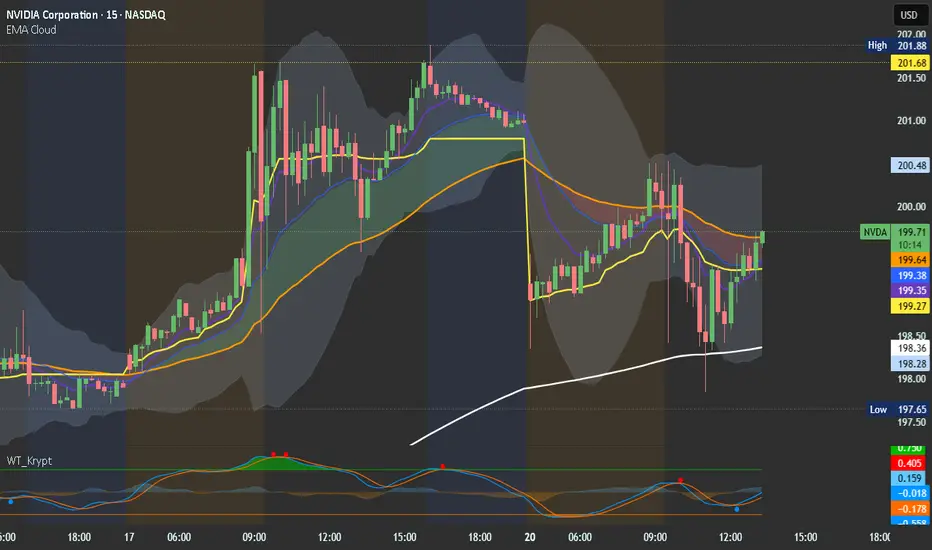
A clean, fully customizable trend-following indicator that combines multiple EMAs with a dynamic momentum cloud to help you quickly identify trend direction and strength at a glance.
What it includes:
4 Configurable EMAs — Plot up to four EMAs with individually adjustable lengths, colors, and visibility toggles. Defaults to the classic 9, 21, 50, and 200 but can be set to anything you need.
Momentum Cloud — A shaded fill between any two of your four EMAs. The cloud turns green when the upper EMA is above the lower (bullish momentum) and red when it flips below (bearish momentum). Great for spotting trend shifts at a glance without cluttering your chart.
VWAP — An intraday Volume Weighted Average Price line with a customizable color and width. Automatically hides itself on Daily and higher timeframes where VWAP is not meaningful, so you never have to toggle it manually when switching timeframes.
How to use it:
Fully customizable — all colors, lengths, and visibility options are accessible directly from the settings panel.
What it includes:
4 Configurable EMAs — Plot up to four EMAs with individually adjustable lengths, colors, and visibility toggles. Defaults to the classic 9, 21, 50, and 200 but can be set to anything you need.
Momentum Cloud — A shaded fill between any two of your four EMAs. The cloud turns green when the upper EMA is above the lower (bullish momentum) and red when it flips below (bearish momentum). Great for spotting trend shifts at a glance without cluttering your chart.
VWAP — An intraday Volume Weighted Average Price line with a customizable color and width. Automatically hides itself on Daily and higher timeframes where VWAP is not meaningful, so you never have to toggle it manually when switching timeframes.
How to use it:
Fully customizable — all colors, lengths, and visibility options are accessible directly from the settings panel.
Catatan Rilis
EMA Momentum CloudA multi-component technical analysis overlay combining EMAs, a dynamic momentum cloud, VWAP, and Bollinger Bands into a single clean indicator.
Components
EMA Lines (×4)
Four exponential moving averages plotted directly on the chart. Defaults are set to the 9, 21, 50, and 200 periods — covering short, medium, and long-term trend context. Each EMA can be toggled on or off independently, and colors/line styles are customizable via the Style tab.
Momentum Cloud
A filled cloud rendered between any two of the four EMAs. The cloud changes color dynamically based on which EMA is on top — green when the faster EMA is above (bullish momentum) and red when it falls below (bearish momentum). Useful for quickly reading trend bias at a glance.
VWAP
Volume Weighted Average Price, displayed only on intraday timeframes where it is meaningful. Can be toggled on or off. Color and line width are adjustable via the Style tab.
Bollinger Bands
A standard Bollinger Band overlay with an EMA-based centerline. The upper and lower bands, centerline, and band fill are all individually styleable via the Style tab.
Settings
EMA Settings
EMA 1–4 Length — period for each of the four EMAs
Show EMA 1–4 — toggle each EMA line on or off individually
Cloud Settings
Cloud EMA 1 & 2 — select which two EMAs form the cloud boundary (any combination of the four)
Show Cloud — toggle the cloud fill on or off
Positive Momentum Color — cloud color when EMA 1 is above EMA 2
Negative Momentum Color — cloud color when EMA 1 is below EMA 2
VWAP Settings
Show VWAP — toggle VWAP on or off (only renders on intraday charts)
Bollinger Band Settings
Show Bollinger Bands — toggle all BB components on or off
Source — price source for BB calculation (default: close)
BB Length — lookback period for the standard deviation calculation
StdDev Mult — multiplier for the band width (default: 2.0)
Centerline EMA Period — EMA period used for the BB centerline
Style Tab
EMA line colors, VWAP color and width, and Bollinger Band colors (upper/lower bands, centerline, and fill) are all controlled through the Style tab in the indicator settings rather than the inputs panel, keeping the settings menu clean and uncluttered.

Pernyataan Penyangkalan
Informasi dan publikasi ini tidak dimaksudkan, dan bukan merupakan, saran atau rekomendasi keuangan, investasi, trading, atau jenis lainnya yang diberikan atau didukung oleh TradingView. Baca selengkapnya di Ketentuan Penggunaan.
Pernyataan Penyangkalan
Informasi dan publikasi ini tidak dimaksudkan, dan bukan merupakan, saran atau rekomendasi keuangan, investasi, trading, atau jenis lainnya yang diberikan atau didukung oleh TradingView. Baca selengkapnya di Ketentuan Penggunaan.