Aggregated Liquidations WW [BLZRtek]
Aggregated Liquidations WW [BLZRtek]
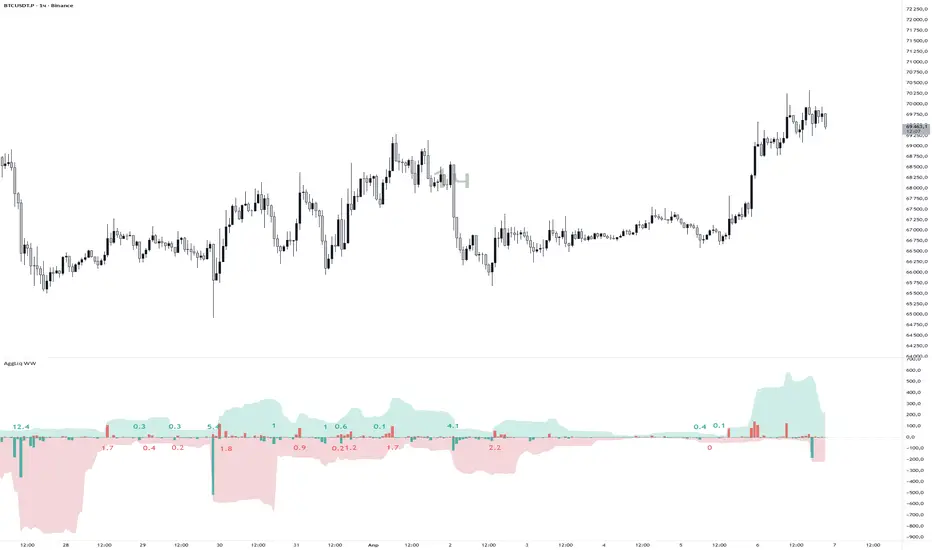
This indicator aggregates perpetual futures liquidation data from six major exchanges into a single histogram panel, and overlays wave liquidation labels — showing cumulative forced-close volume at each structural wave pivot.
What it shows
🔴 Red columns — long liquidations (longs getting stopped out / price moving up through stops)
🟢 Green columns — short liquidations (shorts getting squeezed / price moving down through stops)
Wave labels — total liquidation volume accumulated during each completed wave, placed directly on the histogram
Supported Exchanges
Exchange Contract Type Margin
Binance Linear + Inverse USDT + USD
Bybit Linear + Inverse USDT + USD
OKX Linear USDT + USDC
BitMEX Inverse USD
Deribit Linear + Inverse USDC + USD
HTX Linear USDT (tick volume)
All exchanges can be toggled individually. Inverse (USD-margined) contracts are automatically converted to base currency using the bar’s open price for accuracy on volatile moves.
Two Wave Detection Modes
WWVN (default) — ATR-Renko
Fires immediately when price moves more than one ATR from the last Renko level. No confirmation delay. Labels mark the last bar of each completed wave. Best for: active monitoring, frequent wave structure.
HHLL — Structural Pivot Waves (Variant B)
Uses ta.pivothigh / ta.pivotlow to detect confirmed structural highs and lows. Key feature: liquidation totals are calculated between the real pivot bars, not between confirmation bars. When a pivot is confirmed at bar N (after Right Bars bars), the actual accumulation window ends at bar N − Right Bars.
The calculation uses running cumulative sums:
wave_volume = runningSum[Right Bars] − previousPivotBaseline
This gives an exact liquidation total between two actual market structure points — not a delayed approximation.
Wave Label Features
Auto Color: label color automatically matches the Short / Long column color. Change the histogram color → labels update instantly.
Label on Peak Liq. Bar: when enabled, the label moves to the bar with the highest single-bar liquidation spike inside the wave, rather than the last/pivot bar. Useful for identifying exact flush points.
Label Offset: adjustable vertical spacing from the zero line to prevent overlap with tall columns.
Scale Down Factor: displays large numbers as 12.5K or 1.2M for readability.
Settings Overview
Timeframe & Accumulation
Custom timeframe for data source (default: chart timeframe)
Accumulation window in bars (for smoother histogram)
Currency Mode: Base (native coin units) or Quote (USDT equivalent)
Exchanges
Toggle each of the six exchanges on/off independently.
Display
Column colors, accumulation cloud (with separate window and color settings).
Thresholds
Two configurable horizontal levels on the panel (set to 0 to hide).
Wave Volume
Full wave label configuration: mode, ATR period, pivot bars, scale, color, size, offset, peak bar mode.
Notes
Requires Pine Script® v6
dynamic_requests enabled for series-string symbol construction
max_labels_count = 500, max_bars_back = 500
Zigzag filter in HHLL mode ensures strictly alternating pivot highs and lows
The label placement block executes before the accumulator reset on each bar — ensuring labels always reference the just-completed wave, not the incoming one
© BLZRtek — MPL-2.0
This indicator aggregates perpetual futures liquidation data from six major exchanges into a single histogram panel, and overlays wave liquidation labels — showing cumulative forced-close volume at each structural wave pivot.
What it shows
🔴 Red columns — long liquidations (longs getting stopped out / price moving up through stops)
🟢 Green columns — short liquidations (shorts getting squeezed / price moving down through stops)
Wave labels — total liquidation volume accumulated during each completed wave, placed directly on the histogram
Supported Exchanges
Exchange Contract Type Margin
Binance Linear + Inverse USDT + USD
Bybit Linear + Inverse USDT + USD
OKX Linear USDT + USDC
BitMEX Inverse USD
Deribit Linear + Inverse USDC + USD
HTX Linear USDT (tick volume)
All exchanges can be toggled individually. Inverse (USD-margined) contracts are automatically converted to base currency using the bar’s open price for accuracy on volatile moves.
Two Wave Detection Modes
WWVN (default) — ATR-Renko
Fires immediately when price moves more than one ATR from the last Renko level. No confirmation delay. Labels mark the last bar of each completed wave. Best for: active monitoring, frequent wave structure.
HHLL — Structural Pivot Waves (Variant B)
Uses ta.pivothigh / ta.pivotlow to detect confirmed structural highs and lows. Key feature: liquidation totals are calculated between the real pivot bars, not between confirmation bars. When a pivot is confirmed at bar N (after Right Bars bars), the actual accumulation window ends at bar N − Right Bars.
The calculation uses running cumulative sums:
wave_volume = runningSum[Right Bars] − previousPivotBaseline
This gives an exact liquidation total between two actual market structure points — not a delayed approximation.
Wave Label Features
Auto Color: label color automatically matches the Short / Long column color. Change the histogram color → labels update instantly.
Label on Peak Liq. Bar: when enabled, the label moves to the bar with the highest single-bar liquidation spike inside the wave, rather than the last/pivot bar. Useful for identifying exact flush points.
Label Offset: adjustable vertical spacing from the zero line to prevent overlap with tall columns.
Scale Down Factor: displays large numbers as 12.5K or 1.2M for readability.
Settings Overview
Timeframe & Accumulation
Custom timeframe for data source (default: chart timeframe)
Accumulation window in bars (for smoother histogram)
Currency Mode: Base (native coin units) or Quote (USDT equivalent)
Exchanges
Toggle each of the six exchanges on/off independently.
Display
Column colors, accumulation cloud (with separate window and color settings).
Thresholds
Two configurable horizontal levels on the panel (set to 0 to hide).
Wave Volume
Full wave label configuration: mode, ATR period, pivot bars, scale, color, size, offset, peak bar mode.
Notes
Requires Pine Script® v6
dynamic_requests enabled for series-string symbol construction
max_labels_count = 500, max_bars_back = 500
Zigzag filter in HHLL mode ensures strictly alternating pivot highs and lows
The label placement block executes before the accumulator reset on each bar — ensuring labels always reference the just-completed wave, not the incoming one
© BLZRtek — MPL-2.0

Pernyataan Penyangkalan
Informasi dan publikasi ini tidak dimaksudkan, dan bukan merupakan, saran atau rekomendasi keuangan, investasi, trading, atau jenis lainnya yang diberikan atau didukung oleh TradingView. Baca selengkapnya di Ketentuan Penggunaan.
Pernyataan Penyangkalan
Informasi dan publikasi ini tidak dimaksudkan, dan bukan merupakan, saran atau rekomendasi keuangan, investasi, trading, atau jenis lainnya yang diberikan atau didukung oleh TradingView. Baca selengkapnya di Ketentuan Penggunaan.