OPEN-SOURCE SCRIPT
% of ATR
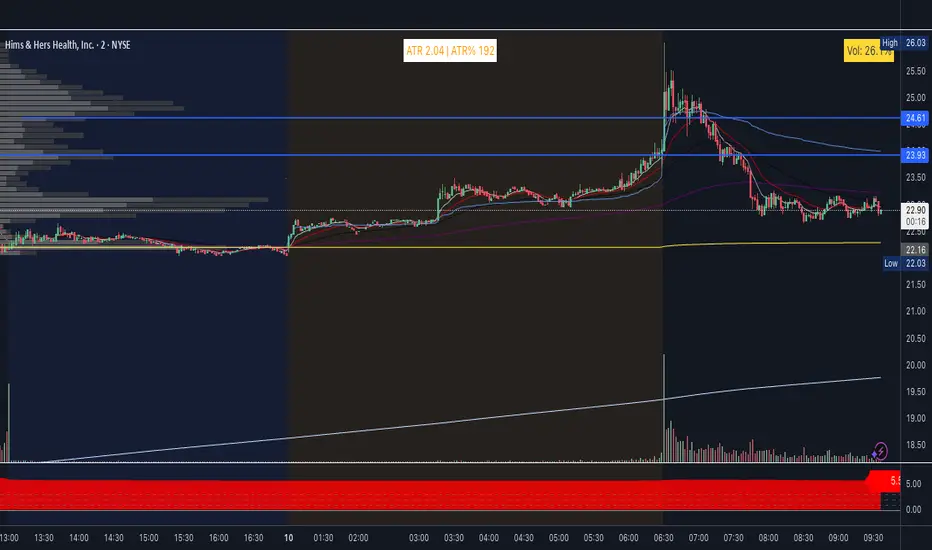
ATR and extended hours
ATR now shows a value in pre-market and after-hours. The indicator uses the last completed daily bar’s ATR (via ta.atr(length)[1] and lookahead_on) so it no longer returns empty when the 1D EOD feed has no “current” bar outside RTH.
High of day / Low of day
HOD and LOD are now updated on all intraday bars (pre-market, regular session, and after-hours). The previous 9:30 AM filter was removed so the day’s high and low are tracked correctly from the first bar of the day.
Label format
Table text format: ATR ##.## | H ##.## L ##.## | ATR% ##
ATR and H/L use two decimals; ATR% is a whole number.
Settings
Show High/Low (H/L) – Toggle to include or hide H and L in the label.
ATR % Thresholds – Four configurable levels (defaults 25, 100, 200, 300) define the five ATR% bands for coloring.
ATR % Colors – Five colors (Color 1 = lowest %, Color 5 = highest %) in a dedicated group; band logic uses the threshold inputs above.
Color logic
Color bands are driven by the new threshold inputs (no more hardcoded 25/100/200/300. Band boundaries are fully user-configurable.
ATR now shows a value in pre-market and after-hours. The indicator uses the last completed daily bar’s ATR (via ta.atr(length)[1] and lookahead_on) so it no longer returns empty when the 1D EOD feed has no “current” bar outside RTH.
High of day / Low of day
HOD and LOD are now updated on all intraday bars (pre-market, regular session, and after-hours). The previous 9:30 AM filter was removed so the day’s high and low are tracked correctly from the first bar of the day.
Label format
Table text format: ATR ##.## | H ##.## L ##.## | ATR% ##
ATR and H/L use two decimals; ATR% is a whole number.
Settings
Show High/Low (H/L) – Toggle to include or hide H and L in the label.
ATR % Thresholds – Four configurable levels (defaults 25, 100, 200, 300) define the five ATR% bands for coloring.
ATR % Colors – Five colors (Color 1 = lowest %, Color 5 = highest %) in a dedicated group; band logic uses the threshold inputs above.
Color logic
Color bands are driven by the new threshold inputs (no more hardcoded 25/100/200/300. Band boundaries are fully user-configurable.
Skrip open-source
Dengan semangat TradingView yang sesungguhnya, pembuat skrip ini telah menjadikannya sebagai sumber terbuka, sehingga para trader dapat meninjau dan memverifikasi fungsinya. Salut untuk penulisnya! Meskipun Anda dapat menggunakannya secara gratis, perlu diingat bahwa penerbitan ulang kode ini tunduk pada Tata Tertib kami.

Pernyataan Penyangkalan
Informasi dan publikasi ini tidak dimaksudkan, dan bukan merupakan, saran atau rekomendasi keuangan, investasi, trading, atau jenis lainnya yang diberikan atau didukung oleh TradingView. Baca selengkapnya di Ketentuan Penggunaan.
Skrip open-source
Dengan semangat TradingView yang sesungguhnya, pembuat skrip ini telah menjadikannya sebagai sumber terbuka, sehingga para trader dapat meninjau dan memverifikasi fungsinya. Salut untuk penulisnya! Meskipun Anda dapat menggunakannya secara gratis, perlu diingat bahwa penerbitan ulang kode ini tunduk pada Tata Tertib kami.
Pernyataan Penyangkalan
Informasi dan publikasi ini tidak dimaksudkan, dan bukan merupakan, saran atau rekomendasi keuangan, investasi, trading, atau jenis lainnya yang diberikan atau didukung oleh TradingView. Baca selengkapnya di Ketentuan Penggunaan.