Session Highs & Lows + BSL / SSL
Session Highs & Lows + BSL / SSL
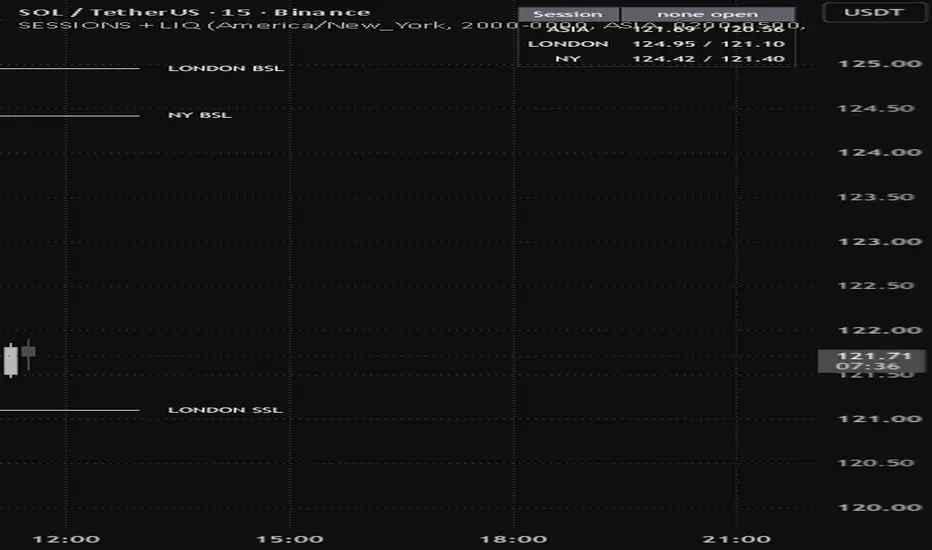
Marks the Asia, London and New York sessions, then turns each one's high and low into labelled liquidity once the session closes.
How it works
While a session is running, its range is boxed and updated live with every new high and low, so you can watch the range build rather than only seeing it after the fact.
The moment the session closes, that range stops being decoration and becomes two levels. The session high is buy-side liquidity, drawn and tagged BSL. The session low is sell-side liquidity, tagged SSL. Both extend to the right until price trades through them.
Once a level is taken, the line dims and stops at the bar that swept it, with an optional marker on the sweep. So at any moment the bright lines are the liquidity still resting on your chart, and the faded ones are the record of what has already been run.
Each session carries its own colour through to its lines, so a level always tells you which session produced it. Tags read ASIA BSL, LONDON SSL and so on.
Timezone handling
All three session windows are read in a timezone you set rather than your chart's exchange timezone. This is the detail that breaks most session indicators.
Because the windows are anchored to a real timezone, they follow daylight saving correctly and stay in the same place when you switch between instruments that quote in different exchange timezones. Set it once to how you think about the market, and the sessions stop drifting.
Defaults
The session windows default to the commonly traded periods in New York time:
Asia, 20:00 to 00:00
London, 02:00 to 05:00
New York, 08:00 to 11:00
These are the concentrated windows rather than full sessions. Every window, name and colour is editable, so if you trade the full Asian range or the whole London day, enter your own times.
Settings
Sweep trigger decides whether a wick through a level counts as taking it, or whether only a body close does. It defaults to wick through, because taking the Asian high is the wick running the stops rather than a close beyond it.
Stop line at the sweep controls whether swept levels terminate where they were taken or keep extending in a dimmed state.
Session boxes can be turned off if you only want the levels. An optional midline draws the 50% of each session range, which is a level price often returns to before continuing.
A panel shows which session is currently open along with each session's high and low.
Alerts are available for every session open and close.
Notes
Levels are created when a session closes, so they appear at the session boundary rather than at the moment the high or low printed. The high and low themselves are tracked from the first bar of the session.
This is a levels and context tool. It does not generate entries, exits or directional signals, and makes no claim about what price will do at any level it draws.
Marks the Asia, London and New York sessions, then turns each one's high and low into labelled liquidity once the session closes.
How it works
While a session is running, its range is boxed and updated live with every new high and low, so you can watch the range build rather than only seeing it after the fact.
The moment the session closes, that range stops being decoration and becomes two levels. The session high is buy-side liquidity, drawn and tagged BSL. The session low is sell-side liquidity, tagged SSL. Both extend to the right until price trades through them.
Once a level is taken, the line dims and stops at the bar that swept it, with an optional marker on the sweep. So at any moment the bright lines are the liquidity still resting on your chart, and the faded ones are the record of what has already been run.
Each session carries its own colour through to its lines, so a level always tells you which session produced it. Tags read ASIA BSL, LONDON SSL and so on.
Timezone handling
All three session windows are read in a timezone you set rather than your chart's exchange timezone. This is the detail that breaks most session indicators.
Because the windows are anchored to a real timezone, they follow daylight saving correctly and stay in the same place when you switch between instruments that quote in different exchange timezones. Set it once to how you think about the market, and the sessions stop drifting.
Defaults
The session windows default to the commonly traded periods in New York time:
Asia, 20:00 to 00:00
London, 02:00 to 05:00
New York, 08:00 to 11:00
These are the concentrated windows rather than full sessions. Every window, name and colour is editable, so if you trade the full Asian range or the whole London day, enter your own times.
Settings
Sweep trigger decides whether a wick through a level counts as taking it, or whether only a body close does. It defaults to wick through, because taking the Asian high is the wick running the stops rather than a close beyond it.
Stop line at the sweep controls whether swept levels terminate where they were taken or keep extending in a dimmed state.
Session boxes can be turned off if you only want the levels. An optional midline draws the 50% of each session range, which is a level price often returns to before continuing.
A panel shows which session is currently open along with each session's high and low.
Alerts are available for every session open and close.
Notes
Levels are created when a session closes, so they appear at the session boundary rather than at the moment the high or low printed. The high and low themselves are tracked from the first bar of the session.
This is a levels and context tool. It does not generate entries, exits or directional signals, and makes no claim about what price will do at any level it draws.

Pernyataan Penyangkalan
Informasi dan publikasi ini tidak dimaksudkan, dan bukan merupakan, saran atau rekomendasi keuangan, investasi, trading, atau jenis lainnya yang diberikan atau didukung oleh TradingView. Baca selengkapnya di Ketentuan Penggunaan.
Pernyataan Penyangkalan
Informasi dan publikasi ini tidak dimaksudkan, dan bukan merupakan, saran atau rekomendasi keuangan, investasi, trading, atau jenis lainnya yang diberikan atau didukung oleh TradingView. Baca selengkapnya di Ketentuan Penggunaan.