Diupdate
Reversal Strategy
🍀Overview
🍀Features
🍀Inputs
General Settings
Trade Management
Risk Management
Execution and Conditions
🍀Usage
Getting started
Note: A setup (long or short) requires both active conditions to support a reversal: RSI must cross the selected level, and the NATR oscillator must satisfy its volatility threshold. The resulting score must meet the configured threshold before the strategy can place an order. The strategy then uses the selected limit-entry method and ATR-based stop and target distances.
Optional alert setup:
🍀Visualization
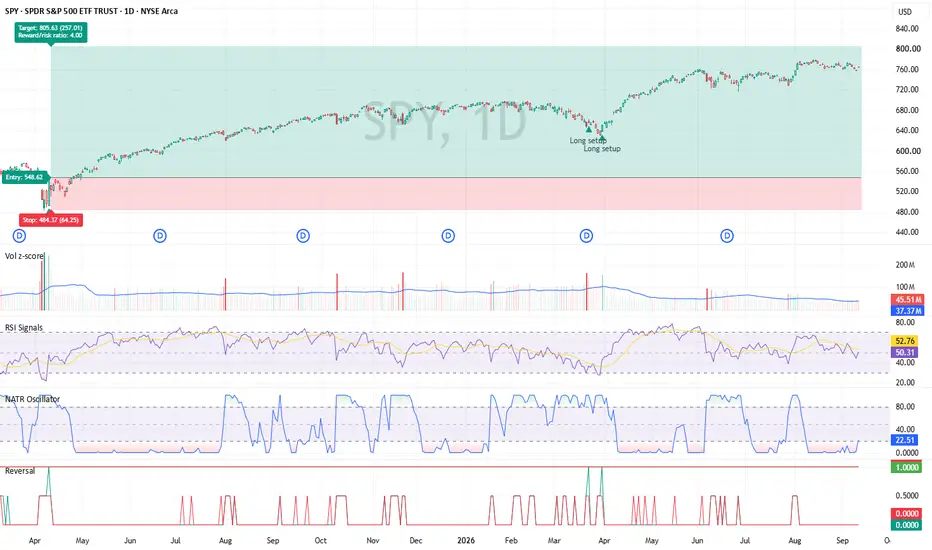
Price chart trade visualization
The strategy displays a simplified bracket-order visualization on the price chart for filled trades.
This visualization provides a simplified view of the trade’s entry, risk, and reward structure compared with TradingView’s Long Position and Short Position drawing tools.
Score pane
The strategy displays a separate score pane (the bottom pane in the chart screenshot) to help visualize setup strength and the current directional bias.
Static lines
Dynamic lines
Peaks
Table
🍀Disclaimer
- Reversal Strategy is a long-only, rules-based strategy developed for the daily timeframe. It combines an RSI reversal trigger and a normalized-volatility filter using NATR Oscillator in a weighted scoring model, then manages qualifying trades with a limit entry, daily ATR-based stop loss, and daily ATR-based profit target.
- For clearer visualization, the custom RSI and NATR Oscillator used by this strategy are also publicly published and freely available as separate indicators. Users may use those indicators and the strategy rules to review or manually execute setups without using the strategy script. This strategy combines the same components into one workflow for convenience.
Assumption - This is a long-only strategy. The underlying assumption is that these instruments are likely to grow over time.
- The strategy tries to take advantage of price fluctuations by entering a long position when the stock is at a discount.
- If this assumption does not hold, I don't expect the strategy to work well.
🍀Features
- Designed for long-only use on the daily timeframe. However, both trade directions are available in settings.
- Condition 1 requires RSI to cross the configured RSI levels.
- Condition 2 requires the NATR Oscillator to meet or exceed the configured volatility threshold.
- Uses a weighted scoring system with a configurable minimum scoring thresholds.
- Conditions 3 through 6 are placeholders for future development and are not currently active trading conditions.
- Supports limit entries based on the signal-bar close or VWAP (placeholder used with other intraday timeframe strategies).
- Calculates stop-loss and profit-target distances from the previous completed daily ATR.
- Includes optional tick offsets for entry, stop-loss, and target prices.
- Can automatically cancel an unfilled limit order if price reaches its target before the entry fills.
- Provides optional trade-review drawings for entry, stop-loss, target, risk, and reward areas.
- Includes optional session and news-time filters (for intraday timeframe).
- Includes daily trade-count and R-based limits to restrict further entries after configured limits are reached (for intraday timeframe).
- Support standard entry and exit strategy alerts and extra informational alerts.
- Supports strategy order-alert messages for compatible alert and automation workflows (this is an experimental feature, use at your own risk).
🍀Inputs
General Settings
- Contracts per Trade sets the fixed quantity used for each entry.
- Timezone is used by the session and news-window filters.
- Show Reason Strings adds score components and calculated trade prices to strategy order comments.
- Trade Drawings and Labels control the optional on-chart trade-review visuals.
- Number of Trades to Draw sets how many completed trades remain visible on the chart.
Trade Management
- Limit Entry Price selects either Close or VWAP as the base limit-entry price.
- Entry Workflow selects bracket-order alerts or separate entry and exit signals.
- Auto-Cancel Pending Orders cancels an unfilled order if its target is reached first.
- Enable exit alerts in bracket orders.
- Enable extra setup alerts while still in a position.
- Entry Price Offset applies an optional tick-based adjustment to the entry price.
Risk Management
- Stop = % of Daily ATR defines the stop-loss distance as a percentage of daily ATR.
- Target = % of Daily ATR defines the profit-target distance as a percentage of daily ATR.
- Stop/Target Offsets apply optional tick offsets to the ATR-derived stop and target distances.
- Daily Trade Limits stop additional entries after configured winning-trade, losing-trade, winning-R, or losing-R limits are reached (for intraday timeframe).
Execution and Conditions
- Thresholds are the minimum normalized scores required for entry.
- Weight: Condition 1 and Weight: Condition 2 control the contribution of the active RSI and NATR conditions.
- Weight: Conditions 3–6 are placeholders reserved for future conditions. Leave these at 0 because the current placeholders always evaluate as true.
- RSI Length and RSI Cross Levels configure the RSI reversal condition.
- NATR Length, Normalization Lookback, and NATR Oscillator Threshold configure the volatility filter.
🍀Usage
Getting started
- Change the chart timeframe to 1D / Daily.
- Add the strategy to the chart.
- Start with the default settings or adjust parameters to suit the instrument and your testing requirements.
- Review results in TradingView’s Strategy Tester before relying on any configuration.
- Optionally, add the custom RSI and NATR Oscillator indicators and synchronize their settings with the strategy for clearer visualization.
Note: A setup (long or short) requires both active conditions to support a reversal: RSI must cross the selected level, and the NATR oscillator must satisfy its volatility threshold. The resulting score must meet the configured threshold before the strategy can place an order. The strategy then uses the selected limit-entry method and ATR-based stop and target distances.
Optional alert setup:
- To create an optional TradingView strategy alert, use the following exactly in the Message field:
Pine Script® - If not using webhook, it works as standard alerts.
- If using webhook, this passes the strategy’s generated order-alert message to the configured alert destination. The message format is tightly coupled to a specific vendor. Test alerts carefully before using them in any live or automated workflow.
- Again, this is an experimental feature, use at your own risk.
🍀Visualization
Price chart trade visualization
The strategy displays a simplified bracket-order visualization on the price chart for filled trades.
- Green zone: Profit-target area.
- Red zone: Stop-loss or risk area.
- Middle gray line: Entry price.
This visualization provides a simplified view of the trade’s entry, risk, and reward structure compared with TradingView’s Long Position and Short Position drawing tools.
Score pane
The strategy displays a separate score pane (the bottom pane in the chart screenshot) to help visualize setup strength and the current directional bias.
Static lines
- Green line: Long setup threshold.
- Red line: Short setup threshold.
Dynamic lines
- Green line: Long setup score for the current candle.
- Red line: Short setup score for the current candle.
Peaks
- A green peak indicates that the long setup score has reached or crossed the long threshold.
- A red peak indicates that the short setup score has reached or crossed the short threshold.
- A score reaching its threshold identifies a qualifying setup score; an actual entry can still be blocked by the strategy’s direction setting, session filter, news filter, pending-order state, position state, or daily risk limits.
Table
- It only shows up after the candle closes completely. For stocks, this happens when the post-market trading session ends.
- Ticker: Displays the chart ticker and current contract, where available.
- Bias: Long Bias when the long setup score is greater than the short setup score; Short Bias when the short setup score is greater; Tie when both scores are equal.
- L/S Scores (Thres): Displays the latest candle’s long and short setup scores, followed by their respective thresholds.
- Stop/Target Dist: Displays the calculated stop-loss and profit-target distances that would be used for a new position.
🍀Disclaimer
- This strategy is provided for educational and informational purposes only. It is not financial, investment, or trading advice, and it is not a recommendation to buy or sell any asset.
- The strategy was developed for the daily timeframe. Results may differ substantially on other timeframes, symbols, market conditions, data feeds, or parameter settings. Historical and backtested results are hypothetical and do not guarantee future performance.
- Limit orders, alerts, stop losses, profit targets, and risk limits do not guarantee execution or profitability. Real-world performance can be affected by liquidity, spreads, slippage, partial fills, commissions, market gaps, connectivity failures, and execution differences. Always perform independent testing and use appropriate risk management before trading with real capital.
Catatan Rilis
Updating Author's instructionsCatatan Rilis
Changed process_orders_on_close to false.New orders are now processed from the following bar rather than being eligible for execution on the signal bar’s close. This provides a more conservative backtesting assumption for daily signals confirmed at candle close.
Catatan Rilis
Updated Author's instructionsCatatan Rilis
Fixed: Final Score Double Normalization- Removed the redundant normalization from the final long and short score calculations.
- Condition contributions are already normalized by the total weight.
- Final scores now correctly equal the sum of normalized condition contributions.
- Scores remain within the expected 0.0–1.0 range when individual condition scores are normalized.
- Prevents incorrect score inflation or reduction when configured weights do not total exactly 1.0.
Catatan Rilis
Fixed: Inconsistent displays in bracket order labels- Fixed inconsistent displays of stop and target distances, stop and target prices
Added: Setup Markers
- Added an optional Show setup markers on main chart setting.
- Displays long and short setup markers when their respective long setups or short setups conditions are met.
Catatan Rilis
Improved: news-window order handling- Improved news-window order handling to ensure all pending orders are cancelled and open positions are closed consistently.
- Added a single, one-time exit trigger when a news window begins to prevent duplicate exit actions.
- Improved consistency between simulated strategy state and live execution when positions are already flat or out of sync.
Catatan Rilis
Updated the chartCatatan Rilis
Changed:- Strategy calculations now refresh after order fills.
- Changed alert messages.

buymeacoffee: buymeacoffee.com/flukefluke_
Stay lucky!🍀
Stay lucky!🍀
Pernyataan Penyangkalan
Informasi dan publikasi ini tidak dimaksudkan, dan bukan merupakan, saran atau rekomendasi keuangan, investasi, trading, atau jenis lainnya yang diberikan atau didukung oleh TradingView. Baca selengkapnya di Ketentuan Penggunaan.
buymeacoffee: buymeacoffee.com/flukefluke_
Stay lucky!🍀
Stay lucky!🍀
Pernyataan Penyangkalan
Informasi dan publikasi ini tidak dimaksudkan, dan bukan merupakan, saran atau rekomendasi keuangan, investasi, trading, atau jenis lainnya yang diberikan atau didukung oleh TradingView. Baca selengkapnya di Ketentuan Penggunaan.