FCP | Money Management Indicator | Position Size & DCA Entries
Money Management Indicator sizes a trade from the risk you choose. You click your entry, your stop and your take profit, and the script sizes every order so that, if all of them fill and the stop is hit, the loss equals that risk. With one entry it is a position size calculator. With two to five entries it becomes a DCA (stepped entry) planner. It works on crypto, sized in USDT or coins, and on forex pairs and CFDs, sized in lots, and shows every amount in USD.
Most traders decide the stop first and the size second, then reach for a calculator, a spreadsheet or the exchange's own tool. When the entry is split into several limit orders, the job gets harder: every order has a different distance to the stop, so the real risk of the whole plan is rarely the risk the trader had in mind. This script puts that calculation on the chart, next to the levels it depends on.
🧩 What Makes It Original
Position size calculators and DCA ladders already exist, but they usually do one of two things. A calculator sizes a single entry from the stop. A ladder splits a fixed budget across several orders and reports whatever risk results. This script works the other way round: it solves the total size of a multi-entry plan from the risk, then spreads that size across the entries with the weighting you choose. On top of the sizing it runs the checks a broker or exchange would apply later:
🧮 How It Works
Let R be the risk amount, E(i) the price of entry i, S the stop, PV the USD value of a 1.0 price move on one unit, and w(i) the weight of entry i, with W the sum of the weights. The total size Q and the size of each entry q(i) are:
Q = R / sum over i of [ w(i) / W x |E(i) - S| x PV ]
q(i) = w(i) / W x Q
PV is the symbol's point value times the rate from the symbol's currency to USD (request.currency_rate). USDT, USDC and other stablecoins count as USD. On symbols traded in lots, each q(i) is rounded down to 0.01 lot, so the risk shown is never above your target. Entries are numbered in fill order, E1 being the closest to the price. Leverage does not change the size, because the risk and the stop set it. Leverage only changes the margin you need and the liquidation price, which for crypto is estimated as average entry x (1 - 1 / leverage + 0.5%) for a long, mirrored for a short.
🎯 How to Use It
Until the three prices are set, an example long plan is drawn from ATR around the current price, so the chart is never empty. The example lines cannot be dragged: remove the indicator, add it again and click your three prices.
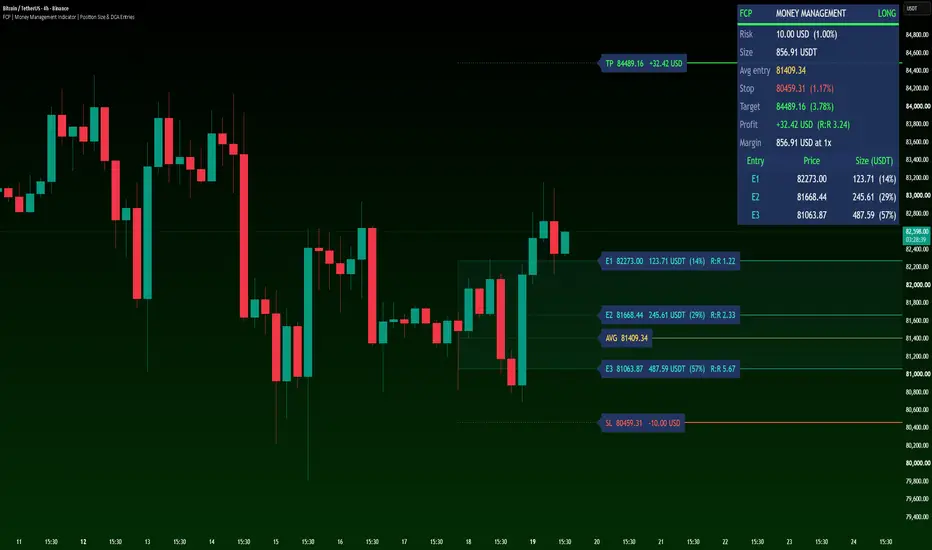
The main chart shows a 3-entry long plan with the 1-2-4 split at 1x leverage, with Text size set to Large for readability. Every other setting is at its default.
A single-entry plan on EURUSD with 100x leverage. The size is in lots and the stop distance in pips:

📊 What You See
A 3-entry plan on a BTCUSDT perpetual at 10x leverage, with the risk and reward zones on. The panel adds the approximate liquidation price:

💱 Crypto, Forex and CFDs
Gold with "Contract size" set to 100 and a 10,000 USD balance, so the size is shown in lots:

⚠️ Limitations
Disclaimer
This indicator is for planning and educational purposes only. It does not give trade signals or financial advice, and it makes no claim about future results.
This indicator was designed and developed by Forex City Pro.
Most traders decide the stop first and the size second, then reach for a calculator, a spreadsheet or the exchange's own tool. When the entry is split into several limit orders, the job gets harder: every order has a different distance to the stop, so the real risk of the whole plan is rarely the risk the trader had in mind. This script puts that calculation on the chart, next to the levels it depends on.
🧩 What Makes It Original
Position size calculators and DCA ladders already exist, but they usually do one of two things. A calculator sizes a single entry from the stop. A ladder splits a fixed budget across several orders and reports whatever risk results. This script works the other way round: it solves the total size of a multi-entry plan from the risk, then spreads that size across the entries with the weighting you choose. On top of the sizing it runs the checks a broker or exchange would apply later:
- the real risk after every order is rounded down to 0.01 lot
- the risk the plan would need when it is too small for that minimum
- an approximate liquidation price, with a warning when it comes before the stop
- a margin check against the balance
🧮 How It Works
Let R be the risk amount, E(i) the price of entry i, S the stop, PV the USD value of a 1.0 price move on one unit, and w(i) the weight of entry i, with W the sum of the weights. The total size Q and the size of each entry q(i) are:
Q = R / sum over i of [ w(i) / W x |E(i) - S| x PV ]
q(i) = w(i) / W x Q
PV is the symbol's point value times the rate from the symbol's currency to USD (request.currency_rate). USDT, USDC and other stablecoins count as USD. On symbols traded in lots, each q(i) is rounded down to 0.01 lot, so the risk shown is never above your target. Entries are numbered in fill order, E1 being the closest to the price. Leverage does not change the size, because the risk and the stop set it. Leverage only changes the margin you need and the liquidation price, which for crypto is estimated as average entry x (1 - 1 / leverage + 0.5%) for a long, mirrored for a short.
🎯 How to Use It
- Add the indicator to the chart. It asks for three clicks: Entry, Stop loss and Take profit. A stop below the entry makes a long plan, a stop above it a short plan.
- Set the balance, the risk % and, for crypto futures, the leverage in the Account group.
- For a DCA plan, raise "Entries" (1 by default, up to 5) and choose the size split: Equal, 1-2-3 or 1-2-4. Extra entries split the distance from Entry 1 to the stop evenly, so they follow when you move Entry 1 or the stop.
- To put an extra entry at your own price, type it in the "Extra entries" group. That entry then stays where you put it and its line becomes draggable.
- Select the indicator to drag the entry, stop and target lines. Every number updates as you drag.
Until the three prices are set, an example long plan is drawn from ATR around the current price, so the chart is never empty. The example lines cannot be dragged: remove the indicator, add it again and click your three prices.
The main chart shows a 3-entry long plan with the 1-2-4 split at 1x leverage, with Text size set to Large for readability. Every other setting is at its default.
A single-entry plan on EURUSD with 100x leverage. The size is in lots and the stop distance in pips:
📊 What You See
- Panel: risk in USD and as a percent of the balance, total size, average entry, stop and target with their distance (pips on currency pairs, percent elsewhere), profit at the target with R:R, margin at your leverage and, for crypto, the approximate liquidation price.
- Entries table: the price, size and share of every entry.
- Labels: every entry shows its price, size, share and its own R:R. The stop label shows the loss and the target label the profit, both in USD.
- A gold AVG line for the average entry of the full plan.
- Optional red and green zones that shade the risk and the reward.
- Warnings at the top of the panel when the stop sits between the entries, the target is on the wrong side, the plan is below the minimum size, the margin exceeds the balance or liquidation comes before the stop.
A 3-entry plan on a BTCUSDT perpetual at 10x leverage, with the risk and reward zones on. The panel adds the approximate liquidation price:
💱 Crypto, Forex and CFDs
- Forex pairs are sized in lots of 100,000 units, rounded down to 0.01 lot.
- Gold, silver, indices, oil and other CFDs have no contract size common to all brokers, so the script never guesses it. Type your broker's value in "Contract size" to size them in lots (in MT4/MT5: Market Watch, right-click the symbol, Specification). Until then the panel asks for it.
- Crypto sizes are shown in USDT by default, the way most exchanges ask for the order size. Switch "Crypto size in" to Coins to see the number of coins.
- Inputs are kept when you change the symbol, so check "Contract size" on every new symbol.
Gold with "Contract size" set to 100 and a 10,000 USD balance, so the size is shown in lots:
⚠️ Limitations
- The script does not place, modify or cancel orders. It is a planning tool.
- Balance and results are in USD.
- The liquidation price is an approximation for an isolated, USDT-margined position with every entry filled and a 0.5% maintenance margin. Exchanges use tiered margins, so check your exchange's own calculator. Inverse (coin-margined) contracts are not supported.
- Fees, commissions, spread, funding, swap and slippage are not included.
- The minimum size is fixed at 0.01 lot. Brokers with a different minimum may round differently.
Disclaimer
This indicator is for planning and educational purposes only. It does not give trade signals or financial advice, and it makes no claim about future results.
This indicator was designed and developed by Forex City Pro.

Pernyataan Penyangkalan
Informasi dan publikasi ini tidak dimaksudkan, dan bukan merupakan, saran atau rekomendasi keuangan, investasi, trading, atau jenis lainnya yang diberikan atau didukung oleh TradingView. Baca selengkapnya di Ketentuan Penggunaan.
Pernyataan Penyangkalan
Informasi dan publikasi ini tidak dimaksudkan, dan bukan merupakan, saran atau rekomendasi keuangan, investasi, trading, atau jenis lainnya yang diberikan atau didukung oleh TradingView. Baca selengkapnya di Ketentuan Penggunaan.