Power of Three Entry Engine [tradewsamet]
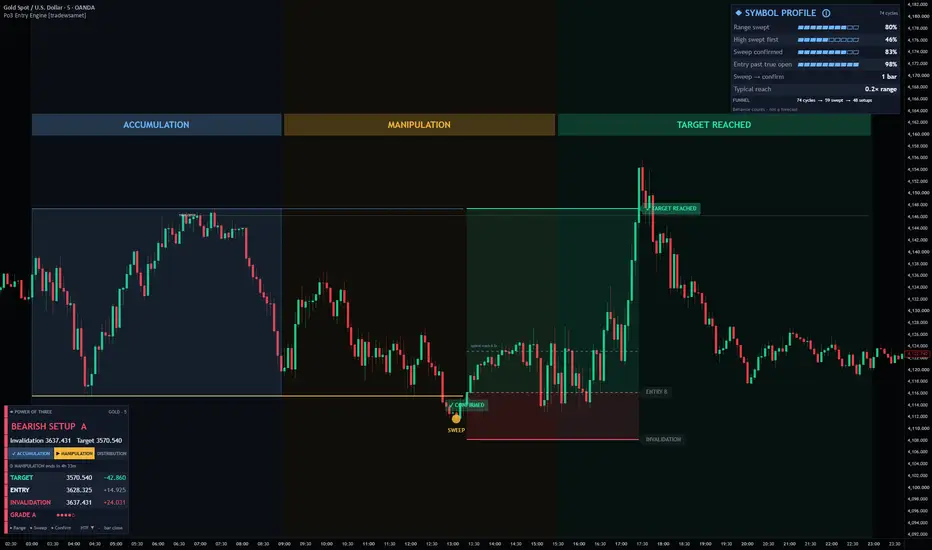
🔺 Power of Three Entry Engine is an overlay indicator that maps one daily cycle as accumulation, manipulation and distribution, and only marks a setup after the manipulation has been confirmed. It builds the accumulation range, watches for a sweep of one side during the manipulation window, waits for price to close back inside the range, and then draws an entry, an invalidation level and a target on the opposite side of the range. A built-in profile measures how the current symbol has actually behaved across the cycles loaded on the chart.
Most Power of Three tools draw three session boxes and leave the interpretation to the trader. The boxes show when each phase happens, but not whether a manipulation actually took place. A move beyond the range can be a sweep that is about to reverse, or the start of a genuine breakout. This script answers a narrower question: did price take one side of the range and then return inside it, within a defined time, with a real candle body?
The core idea: a manipulation only counts after it is confirmed. A sweep that keeps closing outside the range is treated as continuation, not as a setup.
📊 OVERVIEW
Every cycle moves through the same states, and every state change is decided on bar close:
— Building Range: the high and low of the accumulation session are recorded
— Armed: the range is complete and passes the width filter; both edges are watched
— Sweep Detected: price trades beyond one edge during the manipulation window
— Setup: price closes back inside the range with a body of at least 30% of the candle range, within the time limit
— Resolved: the setup reaches its target, reaches its invalidation, or the distribution session ends
If a cycle cannot produce a clean setup, the card shows the reason instead: the range was too wide or too narrow, both sides were taken, price stayed outside the range, there was not enough room to the target, the grade was below the chosen minimum, or that direction is turned off in the settings.
At most one setup is drawn per cycle.
🧩 WHY THESE COMPONENTS WORK TOGETHER
The range, the sweep, the confirmation, the levels and the profile all come from the same cycle and the same state machine, so they cannot contradict each other. The target is the opposite side of the same range that was swept, and the invalidation sits beyond the same sweep extreme that started the setup.
The chain is:
Accumulation range → Width filter → Sweep beyond one edge → Close back inside (optional CISD) → Entry, invalidation, target → Grade → Outcome → Symbol profile
The profile runs alongside the engine and counts what the symbol did in every cycle, whether or not a setup was drawn. It is the part of the script that tells you how often this pattern actually appears on the current symbol and timeframe.
🔍 WHAT MAKES THIS MODEL ORIGINAL
1️⃣ Confirmation instead of session boxes
A setup requires three things in order: a sweep beyond the range by more than 0.05 ATR, a close back inside the range, and a candle body of at least 30% of its high-low range. If both edges are taken, the cycle is skipped. If price does not close back inside within the time limit, the move is labeled continuation.
2️⃣ A time limit measured in minutes
The maximum wait between the sweep and the confirmation is set in minutes (default 120) and converted to bars for the current chart. The rule therefore stays the same on a 1-minute, 5-minute or 15-minute chart.
3️⃣ A range quality filter
The accumulation range is compared with the previous day's ATR. Ranges wider than 0.9 daily ATR or narrower than 0.06 daily ATR are skipped, because a very wide range leaves little room for a distribution move and a very narrow one cannot be measured reliably.
4️⃣ A transparent five-point grade
Every confirmed setup receives one point for each of the following:
— Clean sweep depth (between 0.15 and 1.5 ATR beyond the edge)
— Fast confirmation (within half of the maximum wait)
— Higher timeframe agreement (closed higher timeframe candles above or below their 50 EMA)
— A CISD close (a close through the open of the move that made the sweep)
— An entry on the far side of the True Day Open (00:00 New York): below it for a bullish setup, above it for a bearish one
A = four or five points, B = three, C = two or fewer. The tooltip on the entry badge and on the grade row lists which points were met. The grade is descriptive: it shows how many conditions lined up, not how a setup will finish.
5️⃣ A profile of the symbol, not of the setups
Instead of a results table, the profile panel counts how the symbol behaves in each cycle: how often the range is swept, which side is taken first, how often a sweep is confirmed, how often the confirmation closes on the far side of the True Day Open, how many bars confirmation usually takes, and how far price has typically traveled after a confirmation.
🧠 HOW IT WORKS — CALCULATION FLOW
Step 1 — Sessions: session hours follow New York time, including daylight saving. With the Auto preset, metals, forex and crypto use 20:00–02:00 for accumulation, 02:00–08:30 for manipulation and 08:30–16:00 for distribution. Indices and other symbols use 18:00–08:30, 08:30–10:30 and 10:30–16:00. Custom sessions can be entered manually.
Step 2 — Range: the highest high and lowest low of the accumulation session form the range. When the session ends, the range is checked against the previous day's ATR.
Step 3 — Sweep: during the manipulation window, a high above the range high or a low below the range low by more than 0.05 ATR marks the sweep. The sweep extreme keeps updating while price extends beyond the edge.
Step 4 — Confirmation: a close back inside the range with a body of at least 30% of the candle range confirms the setup. With Close Inside + CISD, the close must also pass through the open of the run of candles that made the sweep.
Step 5 — Levels: the entry is the confirmation close. The invalidation sits beyond the sweep extreme by the Invalidation Buffer (default 1.0 ATR). The target is the opposite side of the range, extended by the Target Projection multiple of the range height if it is set above 0. The setup is only drawn if the distance to the target is at least the Minimum Room multiple of the distance to the invalidation.
Step 6 — Outcome: the setup ends when price reaches the target, reaches the invalidation, or the distribution session closes. If the target and the invalidation are both reached inside the same bar, the invalidation is recorded.
Step 7 — Profile: after every confirmation, the script follows price until the invalidation is reached or the session ends and stores the furthest distance in multiples of the range height. The median of these distances is the typical reach.
📖 HOW TO USE
🎯 Quick start:
1. Add the indicator to a chart between 1 and 30 minutes. The Auto preset selects the session hours.
2. Watch the status card through the day: Building Range, Armed, Sweep Detected, then a setup or the reason no setup formed.
3. When a setup appears, read the levels on the Price Rail and check the grade dots. Hover the grade for the conditions that were met.
4. Use the Symbol Profile to judge how often the pattern appears on this symbol before relying on it.
5. Raise the Minimum Grade to B or A to keep only setups where more conditions lined up.
👁️ Reading the chart:
— Accumulation range: blue box with its high and low extended through the manipulation window
— Sweep: amber dot and SWEEP label at the sweep extreme; the swept edge turns amber
— Confirmation: CONFIRMED badge on the swept edge
— Levels: target and invalidation zones with TARGET, ENTRY and INVALIDATION badges; hover a badge for its price
— Outcome: the level that ended the setup stays bright with TARGET REACHED, INVALIDATED or SESSION CLOSE, the other badges fade
— True Day Open: dotted line at the 00:00 New York open; the accumulation range usually contains it, so the grade checks the entry against it rather than the sweep
— Typical reach: dashed blue line showing the median distance measured on this symbol
— Phase shading and ribbon: blue for accumulation, amber for manipulation, the setup color for distribution
📋 Status card:
— The current state as a headline, with a one-line explanation
— A phase strip showing which phase is finished, active or still ahead, and the time left in the active phase
— While a setup is live: target, entry and invalidation with their distance from the current price
— The grade with five dots, one for each condition
— Range, Sweep and Confirm steps and the higher timeframe direction
📊 Symbol Profile:
— Range swept, high swept first, sweep confirmed and entry past true open, each with a filled meter
— Median bars from sweep to confirmation
— Typical reach in multiples of the range height
— A funnel from cycles to sweeps to setups
🎨 VISUALS
The theme follows the chart background automatically or can be set to Dark or Light, with optional custom bullish and bearish colors. Phase shading, the phase ribbon, the typical reach line, the Price Rail and the profile panel can each be turned off. Focus Mode softens candles outside the active setup. Reels Mode enlarges the text and switches to a compact card for vertical recordings. Recent cycles are drawn in full, and past setups can be kept on the chart for review (up to 50). The status card and the profile can be placed in six positions with three text sizes.
⚙️ KEY SETTINGS
🎯 Setup:
— Market Preset: Auto (default), Gold, Indices, Forex, Crypto, Custom
— Confirmation: Close Inside (default) or Close Inside + CISD
— Max Wait To Confirm: default 120 minutes
— Target Projection: default 0 (the opposite side of the range)
— Minimum Room: default 1.0
— Invalidation Buffer: default 1.0 ATR
— True Day Open: on by default
— Minimum Grade: C (default), B or A
— Direction: Both (default), Bullish Only, Bearish Only
— Higher Timeframe Bias: default 4 hours
🕒 Custom Sessions:
— Accumulation, Manipulation and Distribution session hours in New York time, used with the Custom preset
🔔 ALERTS
— Range Set: the accumulation range is complete and armed
— Sweep: one side of the range was swept
— Confirmed: a setup was confirmed, with its entry, invalidation, target and grade
— Invalidated, Target Reached and Session Close: how a setup ended
— Optional "Any alert() function call" messages in JSON with the event, side, symbol, timeframe, levels and grade
Alerts describe a change in the script's state. They are not trade instructions.
⚠️ IMPORTANT NOTES & LIMITATIONS
— ✅ Every state change is decided on bar close. Higher timeframe and daily values use closed candles only, so drawn setups do not change after the bar closes.
— ⏱️ The engine runs on charts from 1 to 30 minutes. On other timeframes the card asks for a supported timeframe.
— 🕒 Session hours follow New York time. Symbols that trade around the clock, such as crypto, have less defined sessions, and the phases may describe them less well.
— 🎯 Only one setup is drawn per cycle. A second sweep in the same cycle is not used.
— 📐 Level touches are checked with the bar's high and low. If the target and the invalidation are both reached inside one bar, the script cannot know which came first and records the invalidation.
— 🔁 Close Inside confirms earlier than Close Inside + CISD and produces more setups, including more that reach their invalidation. The CISD point in the grade helps separate them.
— 📊 The profile counts behavior on the history loaded on the chart. It needs at least 20 cycles, and the timing and reach values need at least 10 confirmations. Different timeframes and history lengths give different counts.
— 📏 The typical reach is a median of past distances. It describes past behavior and is not a forecast.
— 🛠️ Changing the sessions, the confirmation mode or the filters changes which setups appear. A setting that produces more setups does not make any setup more likely to reach its target.
🛡️ DISCLAIMER
This script is provided for educational and analytical purposes. It does not provide financial advice or guarantee any trading outcome.
The phases, setups, levels, grades, profile values and alerts describe the script's internal rules only. They should be checked against your own analysis and risk tolerance before any decision is made.

🎯 | Free & PRO+ trading tools 📈
tradewsamet.com
discord.com/invite/WeunuuvjBG
tradewsamet.com
discord.com/invite/WeunuuvjBG
כתב ויתור
המידע והפרסומים אינם מיועדים להיות, ואינם מהווים, ייעוץ או המלצה פיננסית, השקעתית, מסחרית או מכל סוג אחר המסופקת או מאושרת על ידי TradingView. קרא עוד ב־תנאי השימוש.
🎯 | Free & PRO+ trading tools 📈
tradewsamet.com
discord.com/invite/WeunuuvjBG
tradewsamet.com
discord.com/invite/WeunuuvjBG
כתב ויתור
המידע והפרסומים אינם מיועדים להיות, ואינם מהווים, ייעוץ או המלצה פיננסית, השקעתית, מסחרית או מכל סוג אחר המסופקת או מאושרת על ידי TradingView. קרא עוד ב־תנאי השימוש.