OPEN-SOURCE SCRIPT
מעודכן Entry Timing Quality [AGPro Series]
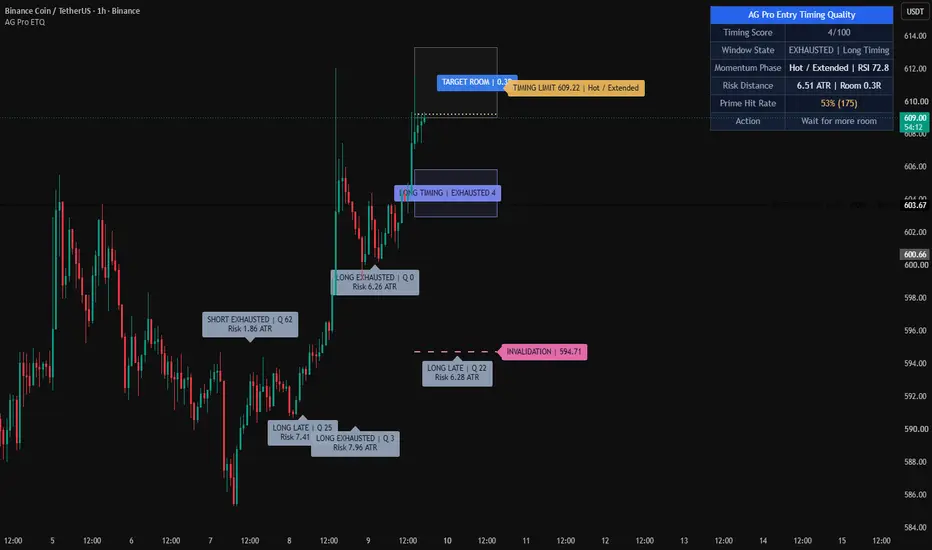
Entry Timing Quality [AGPro Series]
🧠 Core Idea
Is the current setup timing early, improving, in-window, late, or already exhausted?
📌 Overview / What it does
Entry Timing Quality is a chart-first execution timing tool built to evaluate when a setup deserves attention from a timing perspective.
The script produces a 0-100 Timing Score, a timing window, an invalidation rail, target-side room context, early / improving / prime / late / exhausted state labels, a momentum clock marker, alert conditions, and a clean AGPro panel.
It does not predict price direction, automate execution, print directional commands, or replace a trader's own setup model. Its purpose is to organize timing quality after a setup thesis already exists.
🎯 Purpose & Design Philosophy
This script was built for traders who already see a possible setup but need a cleaner way to judge whether the timing is too early, becoming actionable, already extended, or no longer fresh.
The gap it fills is specific: many tools show entries, signals, levels, or broad readiness states, but they do not isolate the timing phase of a setup.
The design supports a disciplined execution-review mindset: timing first, risk context second, action only after independent confirmation.
⚡ Why This Script Is Different
Most tools focus on printing entries, highlighting generic signals, or building full trade plans.
This script does NOT act as a full Entry Execution Readiness system, Position Planner, Reward Room Analyzer, or directional signal indicator.
Instead, it answers a narrower timing question: is the setup still early, improving into a better timing window, in a prime timing phase, late, exhausted, or structurally invalidated?
⚙️ Methodology
1. Context Detection
The script detects the active timing side automatically from trend structure, or lets the user force long-side or short-side timing review.
2. Reference Mapping
It maps a timing window around the active trigger reference, an invalidation rail from recent structure, a late timing rail, and target-side reference room.
3. Reaction Evaluation
The model scores trigger proximity, candle efficiency, pullback maturity, momentum reset, volatility expansion, risk distance, and target-side room.
4. Visual Output
The chart displays the active timing window, target-side room context, invalidation rail, late timing rail, momentum clock marker, event labels, alerts, and the AGPro panel.
🗺️ How to Read the Chart
Zones = the timing window and target-side room context.
Invalidation rail = the structural level that weakens or resets the current timing read.
Late timing rail = the area where timing may become extended rather than fresh.
Labels = compact markers for Early, Improving, Prime, Late, Exhausted, and Invalidated states.
Colors = teal for stronger long-side timing context, pink for short-side or invalidation context, amber for early or late caution, and indigo for improving timing.
Panel = the fast decision cockpit showing Timing Score, Window State, Momentum Phase, Risk Distance, and Action.
🚦 Signals & States
• PRIME -> timing score and confirmation conditions align inside or near the active timing window.
• IMPROVING -> timing is building but has not reached the Prime threshold.
• EARLY -> the setup exists, but timing still needs cleaner proximity, reset, or candle quality.
• LATE -> price has stretched away from the timing window and may be less fresh.
• EXHAUSTED -> extension, pullback damage, or momentum heat suggests the timing phase needs reset.
• INVALIDATED -> price closed beyond the structural invalidation rail.
🔔 Alerts Logic
Prime Timing alerts trigger when the state upgrades into Prime Timing.
Improving Timing alerts trigger when the setup moves into an active monitoring state.
Late / Exhausted alerts trigger when the timing phase becomes stretched or no longer fresh.
Invalidation alerts trigger when price closes beyond the active invalidation rail.
Alerts are attention markers. They are not trading instructions.
🧩 Confluence Logic
Timing quality improves when trigger proximity, candle efficiency, pullback maturity, momentum reset, stable volatility, trend support, and target-side room align.
The score is intentionally multi-factor so a single candle or a single trend condition cannot dominate the timing read.
📊 When to Use
• Pullback timing reviews
• Trend continuation setups that need timing discipline
• Breakout continuation setups after a reset
• Execution-review workflows where a setup thesis already exists
• Charts where the user wants to avoid chasing late movement
⚠️ When NOT to Use
• Very low-liquidity symbols
• Extremely noisy sideways markets
• News-shock volatility spikes
• Charts where no independent setup thesis exists
• Situations where exact broker-level execution rules are required
🎛️ Key Inputs
• Timing Side -> Auto, Long Timing, or Short Timing review mode.
• Sensitivity -> adjusts how early or selective the timing model becomes.
• Timing Lookback -> affects structure references, pullback maturity, risk distance, and target-side room.
• Minimum Prime Timing Score -> sets the threshold required for Prime Timing.
• Confirmation Mode -> controls how much candle, trend, and momentum confirmation is required.
• Label Cooldown / Max Visible Labels -> controls label density and chart cleanliness.
• Visual settings -> control timing window, momentum clock marker, label offsets, and font sizes.
• Panel settings -> control panel visibility, location, theme, and font size.
🖥️ Interface & Visual Design
The panel follows the AGPro public-release standard with one merged blue header row containing only the script name.
The chart is designed to feel active but not crowded. It uses one timing window, one invalidation rail, one late rail, target-side room context, a compact momentum clock marker, and controlled event labels.
Label and panel font sizes are adjustable, with Normal as the default.
🧪 Practical Usage Workflow
1. Read the panel Timing Score and Window State.
2. Check whether price is inside, near, late beyond, or away from the timing window.
3. Review the Momentum Phase to see whether timing is resetting, expanding, hot, or cooling.
4. Compare Risk Distance with target-side room context.
5. Treat Prime Timing as a review state, not as an automatic execution command.
🔍 Interpretation Guidelines
A high Timing Score means the modeled timing conditions are cleaner than usual according to the script's rules.
An Improving state can be useful because it shows timing is building but not yet fully aligned.
A Late or Exhausted state does not mean price must reverse. It means the timing read is no longer fresh and should be reviewed with extra caution.
The best interpretation comes from reading score, state, momentum phase, risk distance, and invalidation together.
🚫 What This Script Is NOT
• Not a prediction engine
• Not financial advice
• Not auto trading
• Not guaranteed signals
• Not a full position-sizing planner
• Not a directional command system
• Not a full reward-room or target-planning tool
⚠️ Limitations & Transparency
The model is rule-based and depends on recent structure, ATR, moving-average context, candle behavior, and RSI-based momentum reset.
Different timeframes can produce different timing windows and invalidation rails.
Fast volatility expansion can move a setup from Improving to Late quickly.
No rule-based tool can know future price behavior, order-book conditions, spreads, or a user's execution plan.
🧠 Market Context Notes
Timing is most useful when read together with broader market structure, liquidity, trend condition, volatility, and session context.
A setup can have good direction but poor timing.
A setup can also have a clean timing window but poor broader context.
🧾 Use Case Examples
When price pulls back near the timing window, momentum resets, candle quality improves, and risk distance remains controlled, the state may move from Early to Improving or Prime.
When price stretches far beyond the late rail while momentum becomes hot, the script may mark Late or Exhausted rather than encouraging the user to chase.
When price closes beyond the invalidation rail, the active timing read is marked as Invalidated.
🧱 System Philosophy
AGPro tools are designed to convert visible chart information into structured decision context.
This script follows that philosophy by separating timing quality from generic signals, full trade planning, or prediction language.
🔐 Non-Promise Statement
No script can provide certainty.
No timing score can guarantee a future outcome.
This tool organizes visible timing conditions so users can perform a more structured review.
📉 Risk Disclosure
Trading involves risk.
Users are responsible for their own analysis, execution, risk management, and decisions.
This script is for educational and analytical purposes only and does not provide financial advice.
📚 Educational Note
Use the script to study how timing improves, becomes prime, stretches late, exhausts, or invalidates around a structured execution window.
🧠 Core Idea
Is the current setup timing early, improving, in-window, late, or already exhausted?
📌 Overview / What it does
Entry Timing Quality is a chart-first execution timing tool built to evaluate when a setup deserves attention from a timing perspective.
The script produces a 0-100 Timing Score, a timing window, an invalidation rail, target-side room context, early / improving / prime / late / exhausted state labels, a momentum clock marker, alert conditions, and a clean AGPro panel.
It does not predict price direction, automate execution, print directional commands, or replace a trader's own setup model. Its purpose is to organize timing quality after a setup thesis already exists.
🎯 Purpose & Design Philosophy
This script was built for traders who already see a possible setup but need a cleaner way to judge whether the timing is too early, becoming actionable, already extended, or no longer fresh.
The gap it fills is specific: many tools show entries, signals, levels, or broad readiness states, but they do not isolate the timing phase of a setup.
The design supports a disciplined execution-review mindset: timing first, risk context second, action only after independent confirmation.
⚡ Why This Script Is Different
Most tools focus on printing entries, highlighting generic signals, or building full trade plans.
This script does NOT act as a full Entry Execution Readiness system, Position Planner, Reward Room Analyzer, or directional signal indicator.
Instead, it answers a narrower timing question: is the setup still early, improving into a better timing window, in a prime timing phase, late, exhausted, or structurally invalidated?
⚙️ Methodology
1. Context Detection
The script detects the active timing side automatically from trend structure, or lets the user force long-side or short-side timing review.
2. Reference Mapping
It maps a timing window around the active trigger reference, an invalidation rail from recent structure, a late timing rail, and target-side reference room.
3. Reaction Evaluation
The model scores trigger proximity, candle efficiency, pullback maturity, momentum reset, volatility expansion, risk distance, and target-side room.
4. Visual Output
The chart displays the active timing window, target-side room context, invalidation rail, late timing rail, momentum clock marker, event labels, alerts, and the AGPro panel.
🗺️ How to Read the Chart
Zones = the timing window and target-side room context.
Invalidation rail = the structural level that weakens or resets the current timing read.
Late timing rail = the area where timing may become extended rather than fresh.
Labels = compact markers for Early, Improving, Prime, Late, Exhausted, and Invalidated states.
Colors = teal for stronger long-side timing context, pink for short-side or invalidation context, amber for early or late caution, and indigo for improving timing.
Panel = the fast decision cockpit showing Timing Score, Window State, Momentum Phase, Risk Distance, and Action.
🚦 Signals & States
• PRIME -> timing score and confirmation conditions align inside or near the active timing window.
• IMPROVING -> timing is building but has not reached the Prime threshold.
• EARLY -> the setup exists, but timing still needs cleaner proximity, reset, or candle quality.
• LATE -> price has stretched away from the timing window and may be less fresh.
• EXHAUSTED -> extension, pullback damage, or momentum heat suggests the timing phase needs reset.
• INVALIDATED -> price closed beyond the structural invalidation rail.
🔔 Alerts Logic
Prime Timing alerts trigger when the state upgrades into Prime Timing.
Improving Timing alerts trigger when the setup moves into an active monitoring state.
Late / Exhausted alerts trigger when the timing phase becomes stretched or no longer fresh.
Invalidation alerts trigger when price closes beyond the active invalidation rail.
Alerts are attention markers. They are not trading instructions.
🧩 Confluence Logic
Timing quality improves when trigger proximity, candle efficiency, pullback maturity, momentum reset, stable volatility, trend support, and target-side room align.
The score is intentionally multi-factor so a single candle or a single trend condition cannot dominate the timing read.
📊 When to Use
• Pullback timing reviews
• Trend continuation setups that need timing discipline
• Breakout continuation setups after a reset
• Execution-review workflows where a setup thesis already exists
• Charts where the user wants to avoid chasing late movement
⚠️ When NOT to Use
• Very low-liquidity symbols
• Extremely noisy sideways markets
• News-shock volatility spikes
• Charts where no independent setup thesis exists
• Situations where exact broker-level execution rules are required
🎛️ Key Inputs
• Timing Side -> Auto, Long Timing, or Short Timing review mode.
• Sensitivity -> adjusts how early or selective the timing model becomes.
• Timing Lookback -> affects structure references, pullback maturity, risk distance, and target-side room.
• Minimum Prime Timing Score -> sets the threshold required for Prime Timing.
• Confirmation Mode -> controls how much candle, trend, and momentum confirmation is required.
• Label Cooldown / Max Visible Labels -> controls label density and chart cleanliness.
• Visual settings -> control timing window, momentum clock marker, label offsets, and font sizes.
• Panel settings -> control panel visibility, location, theme, and font size.
🖥️ Interface & Visual Design
The panel follows the AGPro public-release standard with one merged blue header row containing only the script name.
The chart is designed to feel active but not crowded. It uses one timing window, one invalidation rail, one late rail, target-side room context, a compact momentum clock marker, and controlled event labels.
Label and panel font sizes are adjustable, with Normal as the default.
🧪 Practical Usage Workflow
1. Read the panel Timing Score and Window State.
2. Check whether price is inside, near, late beyond, or away from the timing window.
3. Review the Momentum Phase to see whether timing is resetting, expanding, hot, or cooling.
4. Compare Risk Distance with target-side room context.
5. Treat Prime Timing as a review state, not as an automatic execution command.
🔍 Interpretation Guidelines
A high Timing Score means the modeled timing conditions are cleaner than usual according to the script's rules.
An Improving state can be useful because it shows timing is building but not yet fully aligned.
A Late or Exhausted state does not mean price must reverse. It means the timing read is no longer fresh and should be reviewed with extra caution.
The best interpretation comes from reading score, state, momentum phase, risk distance, and invalidation together.
🚫 What This Script Is NOT
• Not a prediction engine
• Not financial advice
• Not auto trading
• Not guaranteed signals
• Not a full position-sizing planner
• Not a directional command system
• Not a full reward-room or target-planning tool
⚠️ Limitations & Transparency
The model is rule-based and depends on recent structure, ATR, moving-average context, candle behavior, and RSI-based momentum reset.
Different timeframes can produce different timing windows and invalidation rails.
Fast volatility expansion can move a setup from Improving to Late quickly.
No rule-based tool can know future price behavior, order-book conditions, spreads, or a user's execution plan.
🧠 Market Context Notes
Timing is most useful when read together with broader market structure, liquidity, trend condition, volatility, and session context.
A setup can have good direction but poor timing.
A setup can also have a clean timing window but poor broader context.
🧾 Use Case Examples
When price pulls back near the timing window, momentum resets, candle quality improves, and risk distance remains controlled, the state may move from Early to Improving or Prime.
When price stretches far beyond the late rail while momentum becomes hot, the script may mark Late or Exhausted rather than encouraging the user to chase.
When price closes beyond the invalidation rail, the active timing read is marked as Invalidated.
🧱 System Philosophy
AGPro tools are designed to convert visible chart information into structured decision context.
This script follows that philosophy by separating timing quality from generic signals, full trade planning, or prediction language.
🔐 Non-Promise Statement
No script can provide certainty.
No timing score can guarantee a future outcome.
This tool organizes visible timing conditions so users can perform a more structured review.
📉 Risk Disclosure
Trading involves risk.
Users are responsible for their own analysis, execution, risk management, and decisions.
This script is for educational and analytical purposes only and does not provide financial advice.
📚 Educational Note
Use the script to study how timing improves, becomes prime, stretches late, exhausts, or invalidates around a structured execution window.
הערות שחרור
🔧 UPDATE NOTES - 1.2This update focuses on right-side visual spacing, badge separation, label discipline, and chart readability.
The core purpose of the script remains unchanged.
This release improves how the existing entry-timing quality logic is presented, organized, and interpreted on the chart.
This script continues to function as an analytical and visualization tool.
It does not attempt to predict price direction or provide guaranteed outcomes.
------------------------
What Changed
------------------------
• Separated timing and target badges
Timing Window and Target Room badges now use different horizontal lanes instead of sharing the same center point.
• Added badge spacing protection
When Timing Window and Target Room are visually close, the badges apply a small vertical separation so they do not stack on top of each other.
• Cleaner clock placement
Moved the momentum clock marker farther away from the window badges and rails to reduce right-side overlap.
• Optional score tag
Added a Right-Side Score Tag option and disabled it by default because the score is already visible in the panel and event labels.
• More disciplined label defaults
Adjusted default label offset, lane spread, label stagger, and retained label count to reduce clustering around the active timing window.
------------------------
Visual Improvements
------------------------
• Improved chart readability by separating nearby badge elements.
• Reduced overlap between Timing Window, Target Room, Clock, and score context.
• Refined visual hierarchy so the active timing window remains readable without crowding the current price area.
• Kept timing labels informative while making recent label clusters less dense.
------------------------
Interface & Usability
------------------------
• Added a user-facing toggle for the right-side score tag.
• Improved label spacing defaults for cleaner publication screenshots.
• Preserved all existing panel, label-size, and theme controls from the prior update.
• Enhanced overall user experience without changing core logic.
------------------------
Behavior Notes
------------------------
This update does not change the core analytical logic of the script.
The timing score, trigger proximity, candle efficiency, pullback maturity, momentum reset, volatility context, risk distance, target room, event labels, and alerts remain conceptually consistent with the prior release.
The goal is to improve clarity and usability, not to introduce new predictive behavior.
Users should interpret outputs the same way as before, but with improved visual structure.
------------------------
Limitations Reminder
------------------------
The script remains a rule-based analytical tool.
Market conditions such as volatility, liquidity, timeframe differences, and momentum quality may affect how timing windows and states appear.
Outputs should always be interpreted within broader market context.
------------------------
Risk Reminder
------------------------
This script is for educational and analytical purposes only.
It does not provide financial advice or guaranteed trading outcomes.
Users remain responsible for their own decisions.
הערות שחרור
🔧 UPDATE NOTES - 1.3This update adds a prime-hit-rate proof layer and contrast-safe label text to
Entry Timing Quality. The core timing engine, scoring and visuals remain
unchanged. This script continues to function as an analytical, non-instructional
timing tool. It does not predict price direction or provide guaranteed outcomes.
------------------------
What Changed
------------------------
- Prime Hit Rate Proof Layer
The panel now tracks how often a Prime Timing event reached one risk-distance in
the timing direction before closing beyond the invalidation rail, with sample size
shown.
- Balanced One-Risk Statistic
The proof compares a one-risk target against the script's own invalidation rail, so
the rate reflects a fair target-versus-stop test rather than a one-sided measure.
- Honest, Non-Repaint Statistics
Each Prime Timing event is counted once. Samples are confirmed-bar gated, resolve as
a non-win on invalidation or timeout, resolve same-bar ambiguity conservatively, and
use a fixed window to avoid inflation.
- Contrast-Safe Label Text
A luminance helper now sets text color for the timing window badge, target room
badge, invalidation tag, clock marker, score tag and timing labels, so amber, pink
and indigo elements stay clearly readable.
- New Proof Input
A dedicated proof group adds Proof Window Bars so the prime-hit-rate test can be
tuned per market and timeframe.
------------------------
Visual Improvements
------------------------
- Improved readability of badges, tags and timing labels through automatic contrast
- Kept the timing window, target room, rails, clock marker and label anti-overlap
staggering intact
- Preserved moderate, non-overlapping label density
- No added chart clutter from the proof layer
------------------------
Interface & Usability
------------------------
- Added a Prime Hit Rate proof row to the panel
- Improved first-glance trust with a visible track-record context
- Kept all existing settings and defaults backward compatible
- Enhanced overall experience without changing the core engine
------------------------
Behavior Notes
------------------------
This update does not change how timing, the score, rails or the action state are
computed. The goal is added proof context and cleaner text contrast. Outputs should
be interpreted the same way as before.
------------------------
Limitations Reminder
------------------------
The script remains a rule-based analytical tool. Volatility, liquidity and timeframe
differences can affect how timing and statistics appear. Always interpret outputs
within broader market context.
------------------------
Risk Reminder
------------------------
This script is for educational and analytical purposes only. It does not provide
financial advice or guaranteed trading outcomes. Users remain responsible for their
own decisions.
הערות שחרור
Version 1.4 – Timing Map HierarchyThis update clarifies the active timing plan and hardens the panel header while preserving the Timing Score engine, confirmed event logic, alerts, and Prime Hit Rate methodology.
• Replaced generic two-line zone labels with centered, single-line badges that now carry direction, timing state, score, and target-room context.
• Converted abbreviated historical labels into readable side, state, quality, and ATR-risk summaries.
• Added live prices to the Timing Limit and Invalidation tags so each planning rail has explicit meaning.
• Increased the default label cooldown to 50 bars and retained five historical labels for a cleaner but still active chart.
• Rebuilt both panel header cells after every table clear before merging them into the standard single blue title row.
• Reduced object budgets to match the script's bounded two-zone, two-rail, and controlled-label lifecycle.
סקריפט קוד פתוח
ברוח האמיתית של TradingView, יוצר הסקריפט הזה הפך אותו לקוד פתוח, כך שסוחרים יוכלו לעיין בו ולאמת את פעולתו. כל הכבוד למחבר! אמנם ניתן להשתמש בו בחינם, אך זכור כי פרסום חוזר של הקוד כפוף ל־כללי הבית שלנו.

🧠 Trading Suite - Flagship Workflow
tradingview.com/script/XJmX3p98-Trading-Suite-AGPro-Series/
🔷 Crypto Setup Planner - Multi-Symbol Planner
tradingview.com/script/LgVRo7Ql-Crypto-Setup-Planner-AGPro-Series/
tradingview.com/script/XJmX3p98-Trading-Suite-AGPro-Series/
🔷 Crypto Setup Planner - Multi-Symbol Planner
tradingview.com/script/LgVRo7Ql-Crypto-Setup-Planner-AGPro-Series/
כתב ויתור
המידע והפרסומים אינם מיועדים להיות, ואינם מהווים, ייעוץ או המלצה פיננסית, השקעתית, מסחרית או מכל סוג אחר המסופקת או מאושרת על ידי TradingView. קרא עוד ב־תנאי השימוש.
סקריפט קוד פתוח
ברוח האמיתית של TradingView, יוצר הסקריפט הזה הפך אותו לקוד פתוח, כך שסוחרים יוכלו לעיין בו ולאמת את פעולתו. כל הכבוד למחבר! אמנם ניתן להשתמש בו בחינם, אך זכור כי פרסום חוזר של הקוד כפוף ל־כללי הבית שלנו.
🧠 Trading Suite - Flagship Workflow
tradingview.com/script/XJmX3p98-Trading-Suite-AGPro-Series/
🔷 Crypto Setup Planner - Multi-Symbol Planner
tradingview.com/script/LgVRo7Ql-Crypto-Setup-Planner-AGPro-Series/
tradingview.com/script/XJmX3p98-Trading-Suite-AGPro-Series/
🔷 Crypto Setup Planner - Multi-Symbol Planner
tradingview.com/script/LgVRo7Ql-Crypto-Setup-Planner-AGPro-Series/
כתב ויתור
המידע והפרסומים אינם מיועדים להיות, ואינם מהווים, ייעוץ או המלצה פיננסית, השקעתית, מסחרית או מכל סוג אחר המסופקת או מאושרת על ידי TradingView. קרא עוד ב־תנאי השימוש.