מעודכן
EDC Clock Modified
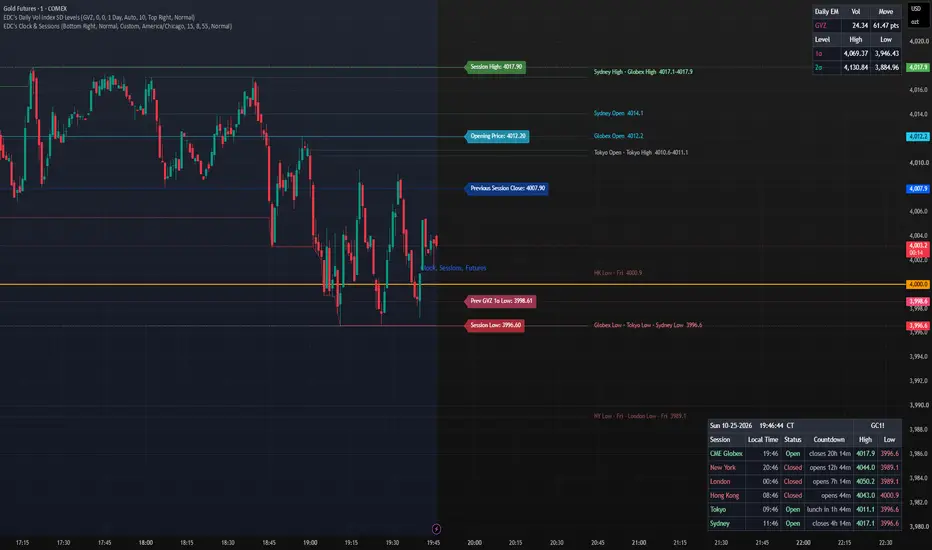
Clock ⌖ – Custom Timezone Clock
A clean and highly customizable clock indicator that displays the current time directly on your chart in your local timezone.
Features:
User-selectable timezone – No more New York time! Choose from 15+ major timezones worldwide (including all US zones)
Real-time updating clock (updates every second)
Optional date display (MM-dd-yyyy)
Optional milliseconds display
Fully customizable:
Position (Top/Middle/Bottom + Left/Center/Right)
Text size (Tiny to Huge)
Text color
Background color
Perfect for:
Traders in different timezones
Session timing (London, NY, Asia)
Keeping track of market close/open times in your local time
Recording trade timestamps accurately
How to use:
Simply add the indicator to your chart and select your timezone in the settings. Everything else is fully adjustable.
Created by © MattSmiggs – Modified for flexible user timezones.
A clean and highly customizable clock indicator that displays the current time directly on your chart in your local timezone.
Features:
User-selectable timezone – No more New York time! Choose from 15+ major timezones worldwide (including all US zones)
Real-time updating clock (updates every second)
Optional date display (MM-dd-yyyy)
Optional milliseconds display
Fully customizable:
Position (Top/Middle/Bottom + Left/Center/Right)
Text size (Tiny to Huge)
Text color
Background color
Perfect for:
Traders in different timezones
Session timing (London, NY, Asia)
Keeping track of market close/open times in your local time
Recording trade timestamps accurately
How to use:
Simply add the indicator to your chart and select your timezone in the settings. Everything else is fully adjustable.
Created by © MattSmiggs – Modified for flexible user timezones.
הערות שחרור
Rebuilt in EDC layout with world session tracking.• New Sessions table: local time, Open/Closed status, and a countdown to the next close or open for CME Globex, New York, London, Frankfurt, Hong Kong, Tokyo and Sydney (Dubai, Mumbai, Singapore and Shanghai are optional).
• Each session runs on its exchange's own timezone, so daylight saving is handled automatically.
• CME Globex follows its real schedule: Sunday 5:00 PM to Friday 4:00 PM CT, with the daily 4:00–5:00 PM break.
• • Main clock now defaults to New York time with a timezone tag, and adds 24-hour time and a seconds toggle on top of the existing milliseconds and date options.
• New 9-spot position picker and Tiny–Huge size options.
• Customizable colors for open, closed, header, background and border.
• The table is now built once and redrawn only on the latest bar, instead of being rebuilt on every bar.
Note: exchange holidays and Asian lunch breaks are not accounted for. The clock refreshes on each price tick, so it pauses while markets are closed.
הערות שחרור
New featuresSession High / Low columns
New High and Low columns show each session's range for the ticker on the chart.
The range updates live while the session is open and stays on the table after the close, until that session opens again the next day.
High is shown in green and Low in red.
New York uses regular hours only (9:30 AM to 4:00 PM ET). CME Globex covers the full ES trading day (5:00 PM to 4:00 PM CT). Tokyo, Hong Kong, and Shanghai include their lunch breaks in the range.
New York Pre-Market and After-Hours
New York shows Pre-Market from 4:00 to 9:30 AM ET and After-Hours from 4:00 to 8:00 PM ET, instead of Closed.
It now shows Closed only from 8:00 PM to 4:00 AM ET and over the weekend. During that time the countdown reads "pre in …".
Lunch breaks
Tokyo (11:30 to 12:30), Hong Kong (12:00 to 13:00), and Shanghai (11:30 to 13:00) show Lunch during their midday breaks, with a countdown to the reopen.
In the morning, these markets count down with "lunch in …" instead of counting to the close.
"Coming soon" highlight
A session turns amber when its next change is within 15 minutes. That includes opens, closes, lunch breaks, and the start or end of extended hours.
The number of minutes is adjustable.
Days in long countdowns
Countdowns of a day or more now read in days and hours, for example "1d 17h" instead of "41h 00m".
New settings
Sessions group
Show Days in Long Countdowns
New York Pre-Market & After-Hours
Lunch Breaks
Highlight Changes Coming Soon, with the minutes next to it (default 15)
Show Session High / Low
Colors group
Pre-Market / After-Hours (light blue)
Lunch (purple)
Change Coming Soon (amber)
Session High (green)
Session Low (red)
All of the new features are on by default.
Known limits
Exchange holidays aren't detected. On a holiday, a market still shows its normal hours, so New York shows Open on Thanksgiving, for example.
High / Low needs an intraday chart. On daily or higher, both columns show "—". Use 15 minutes or lower so every session's open is counted exactly.
High / Low depends on when the ticker trades. ES fills in every row. SPX fills in only New York, because it doesn't trade during the other sessions' hours.
The table only refreshes on new price ticks. When the chart is quiet, the clock and countdowns pause until the next tick.
הערות שחרור
Slight edit to table to include tickerהערות שחרור
New: Session High / Low on the chartEvery session you turn on for the table now draws its high and low on the chart, as dotted green and red lines.
Each line starts at that session's open, updates live while the session is open, and stays on the chart until the session opens again.
No overlapping labels: levels within a few ticks of each other share one label, for example "Tokyo High · HK High 6712.25–6712.50", while each level keeps its own line.
הערות שחרור
Session opens on the chart: each session's opening price is drawn in light blue next to its high and low. You can turn it off under Show Session Opens.Dated levels: closed sessions are tagged with their trading day, for example "London Low · Wed", and drawn fainter, so older levels are easy to tell apart from live ones.
הערות שחרור
You can hide the whole table with Show Table and keep just the chart levels. Settings are split into Table, Clock, Sessions, and Chart Levels, and the clock can use a custom city timezone or the chart’s exchange timezone.clock, sessions, sessi
הערות שחרור
Bug fix on historical dataהערות שחרור
Adjusted the location of the date and clock.
כתב ויתור
המידע והפרסומים אינם מיועדים להיות, ואינם מהווים, ייעוץ או המלצה פיננסית, השקעתית, מסחרית או מכל סוג אחר המסופקת או מאושרת על ידי TradingView. קרא עוד ב־תנאי השימוש.
כתב ויתור
המידע והפרסומים אינם מיועדים להיות, ואינם מהווים, ייעוץ או המלצה פיננסית, השקעתית, מסחרית או מכל סוג אחר המסופקת או מאושרת על ידי TradingView. קרא עוד ב־תנאי השימוש.