OPEN-SOURCE SCRIPT
מעודכן Risk Runway Planner [AGPro Series]
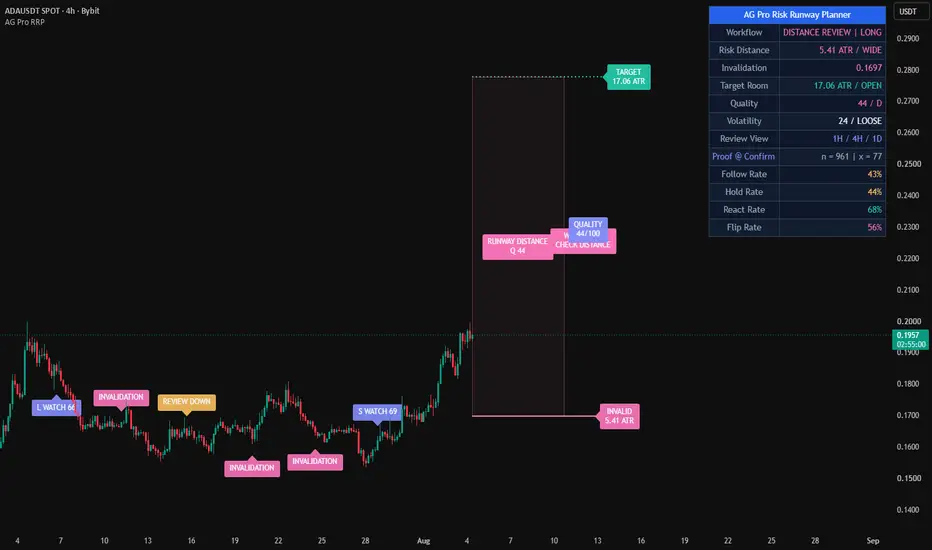
Risk Runway Planner [AGPro Series]
🧠 Core Idea
Is the current setup offering a clean risk runway, or is risk too wide, too blocked, or still too early?
📌 Overview / What it does
Risk Runway Planner [AGPro Series] is a chart-first risk planning and execution readiness tool designed to evaluate whether a setup has enough structure to deserve active attention.
Instead of printing generic buy or sell signals, the script studies stop-distance quality, invalidation clarity, expansion room, volatility state, trend support, and price location. It then converts those factors into a 0-100 quality score and a clear next-action state.
The script produces an active risk runway box, invalidation and target-edge guides, compact chart labels, alerts, and a clean AGPro planning panel. It does not predict future price movement, automate decisions, or guarantee that a setup will follow through.
🎯 Purpose & Design Philosophy
This script was built for traders who want to evaluate setup quality before execution, not after the chart has already moved.
Many tools show signals, volatility compression, or target levels in isolation. Risk Runway Planner is designed to connect the practical planning questions: Where is invalidation? Is stop distance reasonable? Is there enough room before obstruction? Is volatility supportive or unstable? What should the trader pay attention to now?
The design mindset is simple: a cleaner decision framework is more useful than another crowded signal layer.
⚡ Why This Script Is Different
Most tools focus on entries, squeeze conditions, support/resistance zones, or target projections as separate ideas.
This script does NOT try to become a generic compression map, a take-profit ladder, a position-sizing calculator, or a signal generator.
Instead, it evaluates the quality of the risk runway between invalidation and the next target edge. The core output is not a trade command. It is a planning state that helps the user decide whether a setup is READY, still on WATCH, BLOCKED by poor room, or exposed to WIDE RISK.
⚙️ Methodology
1. Context Detection
The script detects the active planning side using trend structure and price location, or allows the user to force long-context or short-context evaluation.
2. Reference Mapping
It maps the current planning range, recent invalidation shelf, nearby obstacle, ATR-normalized stop distance, and projected expansion room.
3. Reaction Evaluation
The model scores stop quality, expansion room, trend support, volatility state, and range location. These components are blended into a 0-100 quality score.
4. Visual Output
The output is shown through a risk runway box, invalidation guide, target-edge guide, compact labels, deterministic alerts, and a premium planning panel.
🗺️ How to Read the Chart
Zones = the active risk runway between invalidation and target edge.
Labels = compact state markers showing READY, WATCH, DOWNGRADE, INVALIDATED, or TARGET EDGE context.
Colors = bullish and bearish context use AGPro state colors, while neutral and warning conditions use controlled accent tones.
Panel = the panel summarizes Risk Compression, Expansion Room, Volatility State, Quality Score, Risk Edge, and Action.
🚦 Signals & States
• READY → the current risk runway has enough quality to justify active attention.
• WATCH → the setup is improving but does not yet meet the stricter readiness threshold.
• WIDE RISK → stop distance or invalidation quality is too weak for clean planning context.
• BLOCKED → expansion room is limited or the nearest obstacle is too close.
• WAIT → the planner does not detect a strong enough structure yet.
• INVALIDATED → a prior active invalidation shelf has been crossed.
• TARGET EDGE → a prior target edge has been reached.
🔔 Alerts Logic
Alerts trigger when the planner enters READY state, enters WATCH state, downgrades from READY, crosses a prior invalidation shelf, or reaches a prior target edge.
These alerts are attention markers. They are not trade instructions, entry signals, or automated strategy commands.
🧩 Confluence Logic
The strongest planning state appears when multiple components align:
Stop-distance quality + expansion room + trend support + controlled volatility + favorable price location.
When these factors align, the script can move from WATCH to READY. If risk widens or room becomes blocked, the state can downgrade.
📊 When to Use
• Before evaluating a discretionary setup
• During trend pauses where invalidation is becoming clearer
• Before breakout or continuation attempts when risk needs structure
• Around pullbacks where stop distance and target room need review
• When comparing whether one setup has cleaner risk than another
⚠️ When NOT to Use
• Extremely low-liquidity symbols
• Very noisy micro-timeframes with unstable wicks
• News-driven volatility spikes
• Markets where recent structure is too distorted to define a useful invalidation shelf
• Situations where the user expects a signal-only entry tool
🎛️ Key Inputs
• Planning Side → controls Auto, Long Context, or Short Context evaluation.
• ATR Length → normalizes stop distance, room, labels, and volatility state.
• Planning Range → defines the broader structure used for price location and range context.
• Invalidation Lookback → controls how the invalidation shelf is mapped.
• Obstacle Lookback → controls how nearby target-edge obstruction is estimated.
• READY / WATCH Thresholds → adjust how selective the planner is.
• Visual settings → control runway boxes, guide lines, memory boxes, labels, panel location, theme, and font sizes.
🖥️ Interface & Visual Design
The interface is built around a clean planning panel and one primary chart object: the risk runway box.
The panel uses a single merged AGPro header row and keeps the key planning information readable without turning the chart into a dashboard-heavy layout.
Labels are intentionally compact, offset away from candles, and controlled with cooldown and maximum-visible settings.
🧪 Practical Usage Workflow
1. Read the panel action state.
2. Check whether the risk runway box has enough room between invalidation and target edge.
3. Review whether the Risk Edge is reasonable in ATR terms.
4. Confirm whether the chart context supports the selected planning side.
5. Treat alerts as attention markers and review the broader market context before making any decision.
🔍 Interpretation Guidelines
A higher score means the planner sees better alignment between risk, room, volatility, trend support, and location.
READY does not mean a trade must be taken. It means the setup has enough planning quality to deserve attention.
WATCH means the structure may be developing, but at least one component still needs improvement.
WIDE RISK and BLOCKED are caution states. They help identify when the chart may be less efficient for planning.
🚫 What This Script Is NOT
This script is not a prediction engine.
It is not financial advice.
It is not an auto-trading system.
It does not provide guaranteed signals.
It does not replace user judgment, risk management, or broader market analysis.
⚠️ Limitations & Transparency
Timeframe differences can change how invalidation shelves and obstacles are detected.
Volatility changes can alter ATR-normalized risk and room conditions.
Market structure can shift quickly after news, low-liquidity movement, or aggressive momentum expansion.
The script is rule-based and should be interpreted as an analytical planning layer, not as certainty.
🧠 Market Context Notes
Risk quality is not only about stop distance. It also depends on whether price has enough clean room to move, whether volatility is controlled, and whether structure supports the active side.
The planner is most useful when it helps the user avoid low-quality setups before they become emotional decisions.
🧾 Use Case Examples
When price is near a constructive invalidation shelf and still has clean room toward the next target edge, the planner may move toward WATCH or READY.
When price is too close to the nearest obstacle, the planner may show BLOCKED even if trend direction looks attractive.
When stop distance becomes too wide relative to ATR, the planner can show WIDE RISK even if the setup still looks visually interesting.
🧱 System Philosophy
Risk Runway Planner follows the AGPro Series decision-engine approach:
Context first.
Risk before reward.
Structure before signal.
Attention markers instead of promises.
🔐 Non-Promise Statement
No indicator can remove uncertainty.
No state, score, label, alert, or visual box should be interpreted as guaranteed market direction.
📉 Risk Disclosure
Trading involves risk.
All decisions remain the responsibility of the user.
This script is for educational and analytical chart review only and does not provide financial advice.
📚 Educational Note
The script is designed to help users think more clearly about setup quality, invalidation, volatility, and available room before reacting to price movement.
🧠 Core Idea
Is the current setup offering a clean risk runway, or is risk too wide, too blocked, or still too early?
📌 Overview / What it does
Risk Runway Planner [AGPro Series] is a chart-first risk planning and execution readiness tool designed to evaluate whether a setup has enough structure to deserve active attention.
Instead of printing generic buy or sell signals, the script studies stop-distance quality, invalidation clarity, expansion room, volatility state, trend support, and price location. It then converts those factors into a 0-100 quality score and a clear next-action state.
The script produces an active risk runway box, invalidation and target-edge guides, compact chart labels, alerts, and a clean AGPro planning panel. It does not predict future price movement, automate decisions, or guarantee that a setup will follow through.
🎯 Purpose & Design Philosophy
This script was built for traders who want to evaluate setup quality before execution, not after the chart has already moved.
Many tools show signals, volatility compression, or target levels in isolation. Risk Runway Planner is designed to connect the practical planning questions: Where is invalidation? Is stop distance reasonable? Is there enough room before obstruction? Is volatility supportive or unstable? What should the trader pay attention to now?
The design mindset is simple: a cleaner decision framework is more useful than another crowded signal layer.
⚡ Why This Script Is Different
Most tools focus on entries, squeeze conditions, support/resistance zones, or target projections as separate ideas.
This script does NOT try to become a generic compression map, a take-profit ladder, a position-sizing calculator, or a signal generator.
Instead, it evaluates the quality of the risk runway between invalidation and the next target edge. The core output is not a trade command. It is a planning state that helps the user decide whether a setup is READY, still on WATCH, BLOCKED by poor room, or exposed to WIDE RISK.
⚙️ Methodology
1. Context Detection
The script detects the active planning side using trend structure and price location, or allows the user to force long-context or short-context evaluation.
2. Reference Mapping
It maps the current planning range, recent invalidation shelf, nearby obstacle, ATR-normalized stop distance, and projected expansion room.
3. Reaction Evaluation
The model scores stop quality, expansion room, trend support, volatility state, and range location. These components are blended into a 0-100 quality score.
4. Visual Output
The output is shown through a risk runway box, invalidation guide, target-edge guide, compact labels, deterministic alerts, and a premium planning panel.
🗺️ How to Read the Chart
Zones = the active risk runway between invalidation and target edge.
Labels = compact state markers showing READY, WATCH, DOWNGRADE, INVALIDATED, or TARGET EDGE context.
Colors = bullish and bearish context use AGPro state colors, while neutral and warning conditions use controlled accent tones.
Panel = the panel summarizes Risk Compression, Expansion Room, Volatility State, Quality Score, Risk Edge, and Action.
🚦 Signals & States
• READY → the current risk runway has enough quality to justify active attention.
• WATCH → the setup is improving but does not yet meet the stricter readiness threshold.
• WIDE RISK → stop distance or invalidation quality is too weak for clean planning context.
• BLOCKED → expansion room is limited or the nearest obstacle is too close.
• WAIT → the planner does not detect a strong enough structure yet.
• INVALIDATED → a prior active invalidation shelf has been crossed.
• TARGET EDGE → a prior target edge has been reached.
🔔 Alerts Logic
Alerts trigger when the planner enters READY state, enters WATCH state, downgrades from READY, crosses a prior invalidation shelf, or reaches a prior target edge.
These alerts are attention markers. They are not trade instructions, entry signals, or automated strategy commands.
🧩 Confluence Logic
The strongest planning state appears when multiple components align:
Stop-distance quality + expansion room + trend support + controlled volatility + favorable price location.
When these factors align, the script can move from WATCH to READY. If risk widens or room becomes blocked, the state can downgrade.
📊 When to Use
• Before evaluating a discretionary setup
• During trend pauses where invalidation is becoming clearer
• Before breakout or continuation attempts when risk needs structure
• Around pullbacks where stop distance and target room need review
• When comparing whether one setup has cleaner risk than another
⚠️ When NOT to Use
• Extremely low-liquidity symbols
• Very noisy micro-timeframes with unstable wicks
• News-driven volatility spikes
• Markets where recent structure is too distorted to define a useful invalidation shelf
• Situations where the user expects a signal-only entry tool
🎛️ Key Inputs
• Planning Side → controls Auto, Long Context, or Short Context evaluation.
• ATR Length → normalizes stop distance, room, labels, and volatility state.
• Planning Range → defines the broader structure used for price location and range context.
• Invalidation Lookback → controls how the invalidation shelf is mapped.
• Obstacle Lookback → controls how nearby target-edge obstruction is estimated.
• READY / WATCH Thresholds → adjust how selective the planner is.
• Visual settings → control runway boxes, guide lines, memory boxes, labels, panel location, theme, and font sizes.
🖥️ Interface & Visual Design
The interface is built around a clean planning panel and one primary chart object: the risk runway box.
The panel uses a single merged AGPro header row and keeps the key planning information readable without turning the chart into a dashboard-heavy layout.
Labels are intentionally compact, offset away from candles, and controlled with cooldown and maximum-visible settings.
🧪 Practical Usage Workflow
1. Read the panel action state.
2. Check whether the risk runway box has enough room between invalidation and target edge.
3. Review whether the Risk Edge is reasonable in ATR terms.
4. Confirm whether the chart context supports the selected planning side.
5. Treat alerts as attention markers and review the broader market context before making any decision.
🔍 Interpretation Guidelines
A higher score means the planner sees better alignment between risk, room, volatility, trend support, and location.
READY does not mean a trade must be taken. It means the setup has enough planning quality to deserve attention.
WATCH means the structure may be developing, but at least one component still needs improvement.
WIDE RISK and BLOCKED are caution states. They help identify when the chart may be less efficient for planning.
🚫 What This Script Is NOT
This script is not a prediction engine.
It is not financial advice.
It is not an auto-trading system.
It does not provide guaranteed signals.
It does not replace user judgment, risk management, or broader market analysis.
⚠️ Limitations & Transparency
Timeframe differences can change how invalidation shelves and obstacles are detected.
Volatility changes can alter ATR-normalized risk and room conditions.
Market structure can shift quickly after news, low-liquidity movement, or aggressive momentum expansion.
The script is rule-based and should be interpreted as an analytical planning layer, not as certainty.
🧠 Market Context Notes
Risk quality is not only about stop distance. It also depends on whether price has enough clean room to move, whether volatility is controlled, and whether structure supports the active side.
The planner is most useful when it helps the user avoid low-quality setups before they become emotional decisions.
🧾 Use Case Examples
When price is near a constructive invalidation shelf and still has clean room toward the next target edge, the planner may move toward WATCH or READY.
When price is too close to the nearest obstacle, the planner may show BLOCKED even if trend direction looks attractive.
When stop distance becomes too wide relative to ATR, the planner can show WIDE RISK even if the setup still looks visually interesting.
🧱 System Philosophy
Risk Runway Planner follows the AGPro Series decision-engine approach:
Context first.
Risk before reward.
Structure before signal.
Attention markers instead of promises.
🔐 Non-Promise Statement
No indicator can remove uncertainty.
No state, score, label, alert, or visual box should be interpreted as guaranteed market direction.
📉 Risk Disclosure
Trading involves risk.
All decisions remain the responsibility of the user.
This script is for educational and analytical chart review only and does not provide financial advice.
📚 Educational Note
The script is designed to help users think more clearly about setup quality, invalidation, volatility, and available room before reacting to price movement.
הערות שחרור
UPDATE NOTES - V1.1This update focuses on visual hierarchy, runway-box clarity, label control, panel conformity, and publication-ready chart presentation.
The core purpose of the script remains unchanged.
This release improves how the existing risk runway logic is presented, organized, and interpreted on the chart.
This script continues to function as an analytical and visualization tool.
It does not attempt to predict price direction or provide guaranteed outcomes.
------------------------
What Changed
------------------------
* Added Engine Presets
Balanced Planner, Cleaner Swing, Active Intraday, and Custom profiles were added so users can tune the planner for cleaner swing charts or faster intraday monitoring.
* Refined active runway box presentation
The main runway box now remains the primary visual object, with centered text showing the active runway score and state.
* Improved label discipline
Event label defaults were tightened, context labels are disabled by default, and label cooldowns were increased to reduce stacking.
* Improved READY memory behavior
Completed READY runway boxes remain available as subtle memory context without dominating the chart.
* Refined panel structure
The panel now follows the standard merged blue header format, includes configurable location, theme, and font size, and adds a Best View row.
* Added alert controls
READY/WATCH alerts and risk-event alerts can now be controlled separately.
* Updated script naming format
The public script title keeps the clean script name with [AGPro Series], while the panel title preserves the AG Pro brand presentation.
------------------------
Visual Improvements
------------------------
* Improved chart readability by refining runway boxes, risk/target guides, event labels, and READY memory boxes.
* Reduced visual clutter by making the centered runway box text the primary information layer.
* Refined visual hierarchy so risk compression, expansion room, volatility state, and action state are easier to separate.
* Adjusted label spacing and defaults to reduce overlap with candles and runway guides.
* Preserved enough visual structure for strong first-glance interpretation without turning the chart into a generic signal board.
------------------------
Interface & Usability
------------------------
* Optimized panel layout for clearer information flow.
* Added configurable panel position, theme, and font size.
* Added configurable chart label font size with Normal as the default.
* Added Best View guidance for intraday, 4H, and daily risk-planning workflows.
* Added separate alert toggles for planning-state events and risk-resolution events.
------------------------
Behavior Notes
------------------------
This update does not change the core analytical purpose of the script.
The model still focuses on stop-distance quality, invalidation clarity, expansion room, volatility load, trend support, and active runway state.
The goal is to improve clarity and usability, not to introduce new predictive behavior.
Users should interpret outputs the same way as before, but with improved visual structure and more disciplined label behavior.
------------------------
Limitations Reminder
------------------------
The script remains a rule-based analytical tool.
Market conditions such as volatility, liquidity, timeframe differences, and sudden expansion may affect runway quality and target-edge behavior.
A clean runway does not guarantee continuation, and a blocked runway does not guarantee rejection.
Outputs should always be interpreted within broader market context.
------------------------
Risk Reminder
------------------------
This script is for educational and analytical purposes only.
It does not provide financial advice or guaranteed trading outcomes.
Users remain responsible for their own decisions.
הערות שחרור
UPDATE NOTES - V1.2This update focuses on chart readability, workflow hierarchy, and risk-planning clarity.
The core purpose of the script remains unchanged.
This release improves how the existing risk runway logic is presented, organized, and interpreted on the chart.
This script continues to function as an analytical and visualization tool.
It does not attempt to predict price direction or provide guaranteed outcomes.
------------------------
What Changed
------------------------
* Rebuilt the dashboard hierarchy around Workflow, Risk Distance, Invalidation, Target Room, Quality, Volatility, and Review View.
The panel now reads more like a structured risk planning dashboard instead of a raw metric list.
* Added clearer action-oriented workflow language.
States such as REVIEW PLAN, TRACK BUILD, CHECK DISTANCE, CHECK TARGET, and WAIT CLEANER are designed to guide review without making directional promises.
* Added live right-edge review tags.
The chart now shows compact tags for review state, quality score, invalidation distance, and target room so the active runway can be understood faster.
* Refined the active runway box.
The box now presents the current runway state and quality score in a cleaner two-line layout, with softer opacity and less visual weight.
* Reduced default memory clutter.
READY memory boxes are now disabled by default, while the option remains available for users who want more historical context.
------------------------
Visual Improvements
------------------------
* Improved chart readability by separating event labels, active runway structure, live review tags, and the planning panel.
* Adjusted label offset and default label count so event markers are less likely to sink into candles.
* Added a thin connector from the live review area back to the active runway context.
* Refined chart text so labels remain uppercase, compact, and suitable for publication screenshots.
------------------------
Interface & Usability
------------------------
* Preserved the single merged blue AG Pro panel header.
* Confirmed Show Panel, Panel Location, Panel Theme, Panel Font Size, and Label Font Size controls.
* Reordered panel rows so risk, invalidation, target room, and review workflow are easier to scan.
* Kept all chart labels and box text tied to the Label Font Size control.
------------------------
Behavior Notes
------------------------
This update does not change the core analytical scoring model of the script.
The goal is to improve clarity and usability, not to introduce new predictive behavior.
Users should interpret outputs the same way as before, but with improved visual structure and cleaner workflow wording.
------------------------
Limitations Reminder
------------------------
The script remains a rule-based analytical tool.
Market conditions such as volatility, liquidity, symbol behavior, and timeframe differences may affect how runway states appear.
Outputs should always be interpreted within broader market context.
------------------------
Risk Reminder
------------------------
This script is for educational and analytical purposes only.
It does not provide financial advice or guaranteed trading outcomes.
Users remain responsible for their own decisions.
הערות שחרור
🔧 UPDATE NOTES - V1.4This update focuses on live-tag spacing, runway badge clarity, and right-edge level anchoring.
The core purpose of the script remains unchanged.
This release improves the visual layout introduced in V1.3 so the active runway badge and live review tags remain separated and easy to read.
This script continues to function as an analytical and visualization tool.
It does not attempt to predict price direction or provide guaranteed outcomes.
------------------------
What Changed
------------------------
• Moved live review tags outside the active runway box
Workflow and quality badges now sit beyond the projected runway area instead of overlapping the centered runway badge.
• Shortened the centered runway badge
The active runway badge now uses a compact RUNWAY + state + quality format for cleaner first-glance readability.
• Extended guide lines to level-based tags
Invalidation and target guide lines now extend to the same x-position as their right-side level tags, keeping the tags visibly attached to real reference levels.
• Preserved V1.3 structure
Separate runway badges, memory badges, live tag offset controls, panel placement options, alerts, and scoring logic remain intact.
------------------------
Visual Improvements
------------------------
• Removed overlap between the centered runway badge and live review tags
• Improved right-edge spacing for publication screenshots
• Reduced ambiguity around which labels are informational badges and which labels belong to actual price levels
• Strengthened the relationship between invalidation/target tags and their guide lines
------------------------
Interface & Usability
------------------------
• Live Tag Offset Bars continues to control the right-side tag stack
• The runway box remains visually focused while the review stack stays readable outside the box
• Panel visibility, theme, location, panel font size, label font size, memory boxes, alerts, and visual controls remain available
------------------------
Behavior Notes
------------------------
This update does not change the core analytical logic of the script.
The goal is to improve clarity and usability, not to introduce new predictive behavior.
Users should interpret outputs the same way as before, but with cleaner spacing and clearer reference labeling.
------------------------
Limitations Reminder
------------------------
The script remains a rule-based analytical tool.
Market conditions such as volatility, liquidity, timeframe differences, and fast structure changes may affect how runway states appear.
Outputs should always be interpreted within broader market context.
------------------------
Risk Reminder
------------------------
This script is for educational and analytical purposes only.
It does not provide financial advice or guaranteed trading outcomes.
Users remain responsible for their own decisions.
הערות שחרור
🔧 UPDATE NOTES - v1.5This update focuses on decision confidence and proof.
The core purpose of the script remains unchanged.
This release adds a confirmation-anchored proof layer that measures how often the
active runway reached its target edge before invalidation on the current symbol.
This script continues to function as an analytical and visualization tool.
It does not attempt to predict price direction or provide guaranteed outcomes.
------------------------
What Changed
------------------------
• Added a Proof Layer (Follow / Hold / React / Flip)
The panel now reports how reliably the active planning direction reached its mapped target
edge on the current symbol and timeframe. Rolling evaluation windows in the planning
direction are tracked forward over a configurable horizon, with the follow target set to one
risk unit (1R) in favor, or the runway target edge if it is closer, and the invalidation
shelf frozen at the start of each window:
- Follow Rate : share of windows that advanced one risk unit in favor (or reached a nearer
target edge) before the invalidation shelf was breached
- Hold Rate : share whose invalidation shelf was not breached through resolution
- React Rate : share that produced an early favorable push toward the target edge
- Flip Rate : share whose invalidation shelf was breached within the horizon
A sample size (n) is shown so the rates are read in context, and they display as
"building" only during the brief warmup before the first window resolves.
• Added rate outputs to the hidden data plots
The Follow / Hold / React / Flip rates join the existing quality, stop-distance, room,
volatility, and trend outputs as hidden plots so they can be referenced by alerts,
screeners, or other tools without changing the chart visuals.
------------------------
Visual Improvements
------------------------
• Grouped the proof metrics into a clean block under a dedicated "Proof @ Confirm" heading,
below the existing planning rows.
• Preserved the existing runway box, centered runway badge, invalidation and target guide
lines, live review tags, and event labels.
• Refined panel structure so the workflow, risk distance, invalidation, target room,
quality, and proof context form a single, scannable decision card.
• Kept the runway badge vertically centered in the clear projection area and all event
labels offset away from candles for clean readability.
------------------------
Interface & Usability
------------------------
• Optimized panel layout for clearer information flow with the new proof block.
• Improved at-a-glance interpretation by reporting how often active runways reached the
target edge before invalidation.
• Adjusted default visual settings for a more balanced appearance.
• Added a Proof input group (show/hide, proof horizon bars, reaction window bars, reaction
progress threshold) so the proof layer is fully configurable without affecting the core
runway-planning logic.
------------------------
Behavior Notes
------------------------
This update does not change the core analytical logic of the script.
The proof rates are descriptive statistics of rolling runway windows on the current symbol
and timeframe. They measure how often price advanced one risk unit in favor (or reached a nearer
target edge) before the invalidation shelf, not trade performance, and they do not change how
the quality score or workflow state is classified.
Users should interpret outputs the same way as before, now with added reliability context.
------------------------
Limitations Reminder
------------------------
The script remains a rule-based analytical tool.
Proof rates depend on the amount of available history and on the current symbol and
timeframe; a small sample (low n) should be treated with caution. Each rolling window is
counted once, with the follow target set to one risk unit in favor (or a nearer target edge)
and the invalidation shelf frozen at the start of the window. Market conditions such as volatility, liquidity, and timeframe
differences may affect how runways and rates appear.
Outputs should always be interpreted within broader market context.
------------------------
Risk Reminder
------------------------
This script is for educational and analytical purposes only.
It does not provide financial advice or guaranteed trading outcomes.
Users remain responsible for their own decisions.
הערות שחרור
Version 1.6 — Runway Reliability, Proof Integrity and Visual HardeningThis update strengthens preset responsiveness, scoring safeguards, proof-layer integrity, prior-runway event handling, live-tag spacing, and runtime efficiency while preserving the indicator’s core risk-runway model, panel structure, input names, alert titles, and AGPro publication styling.
• Corrected the Active Intraday preset so label cooldown and runway projection become genuinely more responsive instead of inheriting slower default values.
• Refined the Cleaner Swing preset to retain a more controlled number of historical labels.
• Added internal hierarchy protection between the READY Threshold and WATCH Threshold. The effective READY threshold now always remains above the WATCH threshold.
• Added ordering safeguards for Minimum, Ideal, and Maximum Stop ATR settings.
• The effective ideal stop distance is automatically constrained inside the valid minimum-to-maximum range.
• Added internal ordering protection between Minimum Room ATR and Strong Room ATR.
• Applied the effective stop-distance and room thresholds consistently across scoring, state classification, projected-room estimation, and panel output.
• Rebuilt the confirmation-anchored Proof layer around qualified READY and WATCH runway contexts.
• Removed Proof sampling during WAIT, WIDE RISK, and BLOCKED conditions.
• Proof evaluations now run as sequential, non-overlapping runway windows.
• A new Proof sample does not begin on the same bar that resolved the previous sample.
• Each evaluation stores its planning direction, entry price, invalidation shelf, and effective follow-through target at activation.
• The follow-through target remains the closer of one risk unit or the mapped target edge, preserving the indicator’s original runway-capture definition.
• Favorable excursion is now measured from the bar’s actual high or low rather than close-only movement.
• Follow requires the stored follow-through target to be reached before invalidation or planning-side replacement.
• Hold requires the runway to remain intact without invalidation or planning-side replacement.
• Flip records an invalidation-shelf touch or replacement of the stored planning direction.
• React records favorable early movement inside the effective reaction window.
• Constrained the effective Reaction Window so it cannot extend beyond the active Proof Horizon.
• Bars where both the follow-through target and invalidation shelf are touched are treated as sequence-ambiguous and excluded from Follow, Hold, React, and Flip rates.
• Bars where the target is reached while the active planning side changes are also treated as sequence-ambiguous.
• Added explicit tracking for excluded ambiguous Proof outcomes.
• The Proof sample now displays excluded outcomes as “x =” alongside the completed sample size when applicable.
• Corrected READY memory-box styling so archived READY runway zones retain the intended bullish visual identity after the live state changes.
• Improved prior-runway event handling so target-edge and invalidation labels use the direction of the runway to which the event belonged.
• Horizontally staggered Workflow, Quality, Invalidation, and Target tags to reduce overlap and improve publication screenshot readability.
• Increased spacing between the Workflow and Quality cards for a cleaner right-side visual hierarchy.
• Added hidden exports for Ambiguous Proof Count, Stop Distance ATR, Target Room ATR, and Planning Direction.
• Reduced drawing-object limits to better match the script’s actual box, line, and label requirements.
• Preserved all existing stop-quality components, room scoring, volatility scoring, trend support, planning-side selection, runway box, guide lines, memory zones, event labels, panel rows, and alert titles.
Existing TradingView alerts should be deleted and recreated after installing Version 1.6 so they use the updated script logic and settings.
סקריפט קוד פתוח
ברוח האמיתית של TradingView, יוצר הסקריפט הזה הפך אותו לקוד פתוח, כך שסוחרים יוכלו לעיין בו ולאמת את פעולתו. כל הכבוד למחבר! אמנם ניתן להשתמש בו בחינם, אך זכור כי פרסום חוזר של הקוד כפוף ל־כללי הבית שלנו.

🧠 Trading Suite - Flagship Workflow
tradingview.com/script/XJmX3p98-Trading-Suite-AGPro-Series/
🔷 Crypto Setup Planner - Multi-Symbol Planner
tradingview.com/script/LgVRo7Ql-Crypto-Setup-Planner-AGPro-Series/
tradingview.com/script/XJmX3p98-Trading-Suite-AGPro-Series/
🔷 Crypto Setup Planner - Multi-Symbol Planner
tradingview.com/script/LgVRo7Ql-Crypto-Setup-Planner-AGPro-Series/
כתב ויתור
המידע והפרסומים אינם מיועדים להיות, ואינם מהווים, ייעוץ או המלצה פיננסית, השקעתית, מסחרית או מכל סוג אחר המסופקת או מאושרת על ידי TradingView. קרא עוד ב־תנאי השימוש.
סקריפט קוד פתוח
ברוח האמיתית של TradingView, יוצר הסקריפט הזה הפך אותו לקוד פתוח, כך שסוחרים יוכלו לעיין בו ולאמת את פעולתו. כל הכבוד למחבר! אמנם ניתן להשתמש בו בחינם, אך זכור כי פרסום חוזר של הקוד כפוף ל־כללי הבית שלנו.
🧠 Trading Suite - Flagship Workflow
tradingview.com/script/XJmX3p98-Trading-Suite-AGPro-Series/
🔷 Crypto Setup Planner - Multi-Symbol Planner
tradingview.com/script/LgVRo7Ql-Crypto-Setup-Planner-AGPro-Series/
tradingview.com/script/XJmX3p98-Trading-Suite-AGPro-Series/
🔷 Crypto Setup Planner - Multi-Symbol Planner
tradingview.com/script/LgVRo7Ql-Crypto-Setup-Planner-AGPro-Series/
כתב ויתור
המידע והפרסומים אינם מיועדים להיות, ואינם מהווים, ייעוץ או המלצה פיננסית, השקעתית, מסחרית או מכל סוג אחר המסופקת או מאושרת על ידי TradingView. קרא עוד ב־תנאי השימוש.