מעודכן
Sullys Sorcery Levels V2 by TenAMTrader
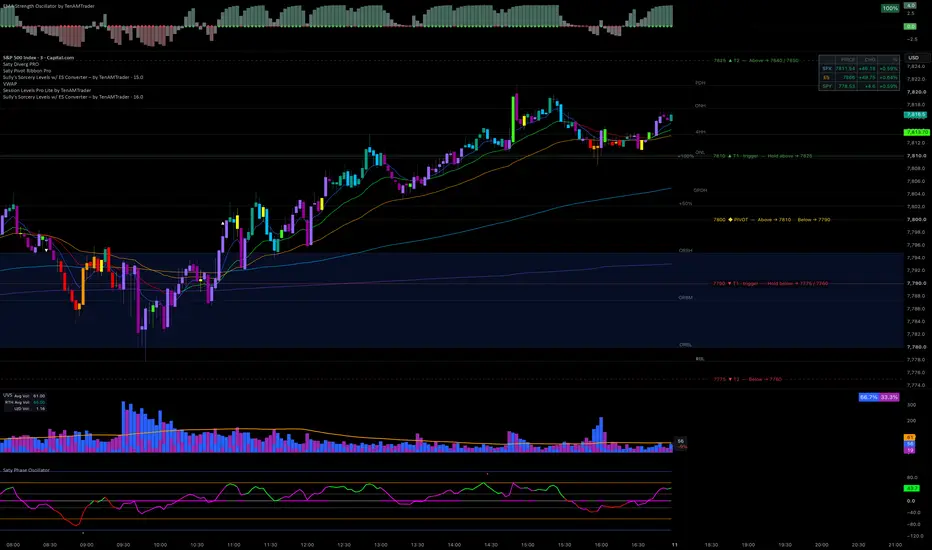
Sully's Sorcery Levels – by TenAMTrader
Paste your morning market notes into the single text box in settings and this indicator automatically plots all your key price levels on the chart — no manual entry needed.
How it works:
Reads your notes and extracts every price level automatically
The first level mentioned near the word "hold" becomes the yellow pivot line
Everything above the pivot plots in green (upside targets)
Everything below plots in red (downside support)
The full sentence from your notes appears as a label on each line so you always know what to do when price approaches that level
Settings:
Paste your notes into the text box — works with any format, bullet points, paragraphs, or all caps
Use Pivot Override if you want to manually force a specific level as the pivot
Customize color, width, and line style separately for pivot, upside, and downside lines
Adjust label size, background color, and horizontal offset to fit your chart layout
Works best on SPX, NQ, ES and similar index charts.
Short version if you just need a one-liner:
"Paste your morning notes and it auto-plots all your levels — yellow pivot, green upside, red downside, with your own notes written right on the lines."
Paste your morning market notes into the single text box in settings and this indicator automatically plots all your key price levels on the chart — no manual entry needed.
How it works:
Reads your notes and extracts every price level automatically
The first level mentioned near the word "hold" becomes the yellow pivot line
Everything above the pivot plots in green (upside targets)
Everything below plots in red (downside support)
The full sentence from your notes appears as a label on each line so you always know what to do when price approaches that level
Settings:
Paste your notes into the text box — works with any format, bullet points, paragraphs, or all caps
Use Pivot Override if you want to manually force a specific level as the pivot
Customize color, width, and line style separately for pivot, upside, and downside lines
Adjust label size, background color, and horizontal offset to fit your chart layout
Works best on SPX, NQ, ES and similar index charts.
Short version if you just need a one-liner:
"Paste your morning notes and it auto-plots all your levels — yellow pivot, green upside, red downside, with your own notes written right on the lines."
הערות שחרור
Now includes:SPX | ES | SPY | NQ | QQQ Converter
A lightweight overlay table that displays real-time price, point change, and percentage change for your key S&P 500 and Nasdaq instruments — all in one glance, right on your chart.
Built to sit cleanly at the top of your SPX chart without cluttering your view. All instruments are pulled from the daily timeframe so change values always reflect the true day's move, regardless of what intraday timeframe your chart is set to.
Always displayed:
SPX (S&P 500 Index)
ES (E-mini S&P 500 Futures)
SPY (S&P 500 ETF)
Optional — toggle on/off in settings:
NQ (E-mini Nasdaq 100 Futures)
QQQ (Nasdaq 100 ETF)
Each row shows:
Live price
Point change vs. prior day's close
Percentage change vs. prior day's close
Color coded green/red on all values for instant readability. Designed for traders who need quick cross-instrument reference without switching charts or windows.
Settings:
Position — Top Right / Top Left / Top Center
Text Size — Tiny / Small / Normal / Large
Instruments — Toggle NQ and QQQ on or off (default off)
הערות שחרור
Table can now include US 500 and can be moved to bottom of chart, both in settings.הערות שחרור
Update — Smarter Level Parsing & Action LabelsThe level reader has been rebuilt. It now works out what each level means in the morning notes, not just where it is.
What’s new
🔹 Action labels. Every level now tells you what to do there and where price goes next:
7810 ▲ T1 · trigger — Hold above → 7825
7800 ◆ PIVOT — Above → 7810 · Below → 7790
7760 ▼ T3 — Last downside target
🔹 Bull/bear from context. Colors come from the wording (“above”, “squeeze”, “reclaim” vs. “under”, “lose”, “sell down”) instead of from where a level sits relative to the pivot. Upside levels are green, downside levels are red, and the pivot is yellow.
🔹 Triggers vs. targets. Levels you need to hold or break are tagged “trigger” and drawn solid. Targets are numbered outward from the pivot: T1, T2, T3 and so on.
🔹 Smarter pivot. The pivot is picked from words like “pivot”, “back tested”, “retest” or “rejecting”, or from a level that acts as both the bull and the bear trigger. Pivot Override still works.
🔹 Reads “there”. Phrases like “hold above there” are applied to the level just mentioned.
🔹 No more repeated text. Levels no longer show the same full sentence. Hover any label to see the original note(s) it came from.
🔹 Better number handling. “7,800”, “7840/7850”, “7840-7850” and decimals like “7812.50” are all read correctly. Levels more than 10% from price are hidden, so stray numbers don’t plot (adjustable).
New settings
Label text: Action / Action + note / Note only / Tag only
Label placement: On line / Above line / Below line
Label size: Auto through Huge
Hover tooltips: on/off
Converter box text size: now set in points (6–40) for finer control
Draw trigger levels solid: on/off
Fixed
A cleanup bug that removed the letter “r” from label text (“wok”, “Unde”).
Paste your morning notes as usual. Nothing changes in how you use it.
TradingView doesn’t allow external links in script descriptions, so keep it as plain text like this.

כתב ויתור
המידע והפרסומים אינם מיועדים להיות, ואינם מהווים, ייעוץ או המלצה פיננסית, השקעתית, מסחרית או מכל סוג אחר המסופקת או מאושרת על ידי TradingView. קרא עוד ב־תנאי השימוש.
כתב ויתור
המידע והפרסומים אינם מיועדים להיות, ואינם מהווים, ייעוץ או המלצה פיננסית, השקעתית, מסחרית או מכל סוג אחר המסופקת או מאושרת על ידי TradingView. קרא עוד ב־תנאי השימוש.