OPEN-SOURCE SCRIPT
Institutional Order Flow Imbalance Matrix PRO
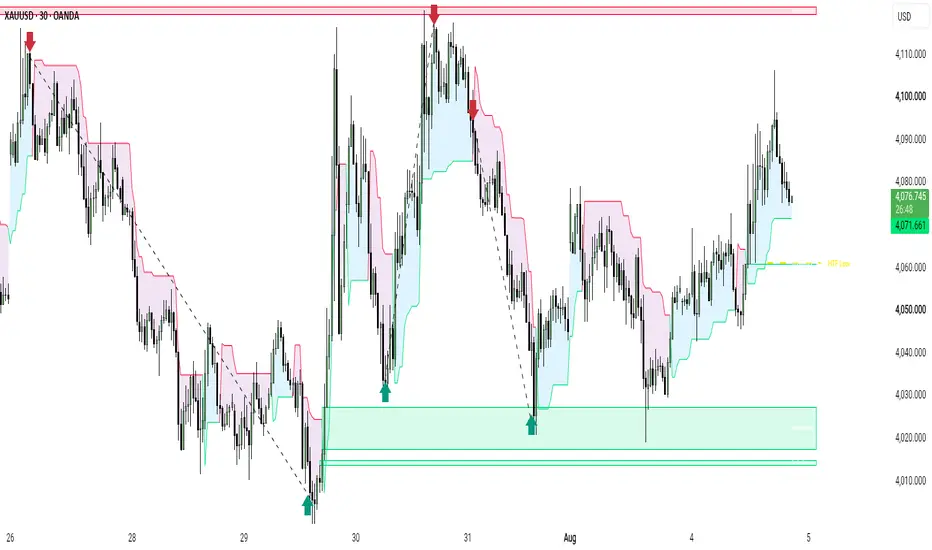
Institutional Order Flow Imbalance Matrix PRO
Institutional Order Flow Imbalance Matrix PRO is a clean, multi timeframe technical analysis tool engineered to track institutional order flow, volume backed inefficiencies, and higher timeframe liquidity context without cluttering the charting interface.
Key Features Overview
1. Higher Timeframe Liquidity Matrix
Projects dynamic higher timeframe high and low liquidity levels directly onto lower timeframe charts. To maintain visual clarity, HTF lines automatically clean up and vanish as soon as price touches or breaks them.
2. Volume Validated Imbalance Engine
Identifies high probability price gaps supported by institutional volume surges. Unmitigated imbalance boxes automatically delete from your chart once price completely fills and mitigates the gap area.
3. Institutional Dynamic ATR Trend Ribbon
Plots a clean, non intrusive dynamic trend ribbon based on smoothed Volatility ATR trailing logic. This helps traders easily identify the overall institutional flow direction and dynamic support or resistance areas.
How to Use
Step 1: Check Institutional Trend Direction
Observe the smooth Trend Ribbon color background to determine whether institutional order flow is currently bullish or bearish.
Step 2: Monitor Higher Timeframe Context
Track how price action interacts with active HTF High and HTF Low lines to spot potential target levels or sweep points.
Step 3: Execute on Imbalance Retests
Identify active volume backed Imbalance zones forming in alignment with the broader ribbon trend, and look for entry setups upon price retesting these dynamic zones.
Settings Overview
HTF Matrix Settings
- Show HTF Structural Levels: Toggle display of higher timeframe boundary lines.
- Higher Timeframe Resolution: Choose your desired HTF lookback (default set to 240 minutes / 4 Hour).
- Colors: Customize line styling and colors for HTF boundaries.
Volume Imbalance Settings
- Show Volume Imbalance Zones: Toggle visibility of active inefficiency boxes.
- Volume Spike Factor: Adjust volume sensitivity for validating dynamic gaps.
- Zone Transparency: Customize color fill opacity for imbalance boxes.
Institutional Trend Ribbon Settings
- Show Dynamic Trend Ribbon: Toggle display of the smooth trailing ATR ribbon.
- ATR Period Length and Multiplier: Adjust the volatility parameters to match your trading timeframe.
Disclaimer
This indicator is created strictly for educational and analytical purposes. It does not provide financial advice, trade recommendations, or guaranteed results. Always apply proper risk management principles.
Institutional Order Flow Imbalance Matrix PRO is a clean, multi timeframe technical analysis tool engineered to track institutional order flow, volume backed inefficiencies, and higher timeframe liquidity context without cluttering the charting interface.
Key Features Overview
1. Higher Timeframe Liquidity Matrix
Projects dynamic higher timeframe high and low liquidity levels directly onto lower timeframe charts. To maintain visual clarity, HTF lines automatically clean up and vanish as soon as price touches or breaks them.
2. Volume Validated Imbalance Engine
Identifies high probability price gaps supported by institutional volume surges. Unmitigated imbalance boxes automatically delete from your chart once price completely fills and mitigates the gap area.
3. Institutional Dynamic ATR Trend Ribbon
Plots a clean, non intrusive dynamic trend ribbon based on smoothed Volatility ATR trailing logic. This helps traders easily identify the overall institutional flow direction and dynamic support or resistance areas.
How to Use
Step 1: Check Institutional Trend Direction
Observe the smooth Trend Ribbon color background to determine whether institutional order flow is currently bullish or bearish.
Step 2: Monitor Higher Timeframe Context
Track how price action interacts with active HTF High and HTF Low lines to spot potential target levels or sweep points.
Step 3: Execute on Imbalance Retests
Identify active volume backed Imbalance zones forming in alignment with the broader ribbon trend, and look for entry setups upon price retesting these dynamic zones.
Settings Overview
HTF Matrix Settings
- Show HTF Structural Levels: Toggle display of higher timeframe boundary lines.
- Higher Timeframe Resolution: Choose your desired HTF lookback (default set to 240 minutes / 4 Hour).
- Colors: Customize line styling and colors for HTF boundaries.
Volume Imbalance Settings
- Show Volume Imbalance Zones: Toggle visibility of active inefficiency boxes.
- Volume Spike Factor: Adjust volume sensitivity for validating dynamic gaps.
- Zone Transparency: Customize color fill opacity for imbalance boxes.
Institutional Trend Ribbon Settings
- Show Dynamic Trend Ribbon: Toggle display of the smooth trailing ATR ribbon.
- ATR Period Length and Multiplier: Adjust the volatility parameters to match your trading timeframe.
Disclaimer
This indicator is created strictly for educational and analytical purposes. It does not provide financial advice, trade recommendations, or guaranteed results. Always apply proper risk management principles.
סקריפט קוד פתוח
ברוח האמיתית של TradingView, יוצר הסקריפט הזה הפך אותו לקוד פתוח, כך שסוחרים יוכלו לעיין בו ולאמת את פעולתו. כל הכבוד למחבר! אמנם ניתן להשתמש בו בחינם, אך זכור כי פרסום חוזר של הקוד כפוף ל־כללי הבית שלנו.

TELEGRAM
t.me/+iAj6deCfF9swNWI8
Telegram 2nd
t.me/+0G4yqhqD3PU1ZGFk
Telegram : Username @Forex_Ace9
t.me/+iAj6deCfF9swNWI8
Telegram 2nd
t.me/+0G4yqhqD3PU1ZGFk
Telegram : Username @Forex_Ace9
כתב ויתור
המידע והפרסומים אינם מיועדים להיות, ואינם מהווים, ייעוץ או המלצה פיננסית, השקעתית, מסחרית או מכל סוג אחר המסופקת או מאושרת על ידי TradingView. קרא עוד ב־תנאי השימוש.
סקריפט קוד פתוח
ברוח האמיתית של TradingView, יוצר הסקריפט הזה הפך אותו לקוד פתוח, כך שסוחרים יוכלו לעיין בו ולאמת את פעולתו. כל הכבוד למחבר! אמנם ניתן להשתמש בו בחינם, אך זכור כי פרסום חוזר של הקוד כפוף ל־כללי הבית שלנו.
TELEGRAM
t.me/+iAj6deCfF9swNWI8
Telegram 2nd
t.me/+0G4yqhqD3PU1ZGFk
Telegram : Username @Forex_Ace9
t.me/+iAj6deCfF9swNWI8
Telegram 2nd
t.me/+0G4yqhqD3PU1ZGFk
Telegram : Username @Forex_Ace9
כתב ויתור
המידע והפרסומים אינם מיועדים להיות, ואינם מהווים, ייעוץ או המלצה פיננסית, השקעתית, מסחרית או מכל סוג אחר המסופקת או מאושרת על ידי TradingView. קרא עוד ב־תנאי השימוש.