MYND Adaptive Parameter Optimizer v1.0
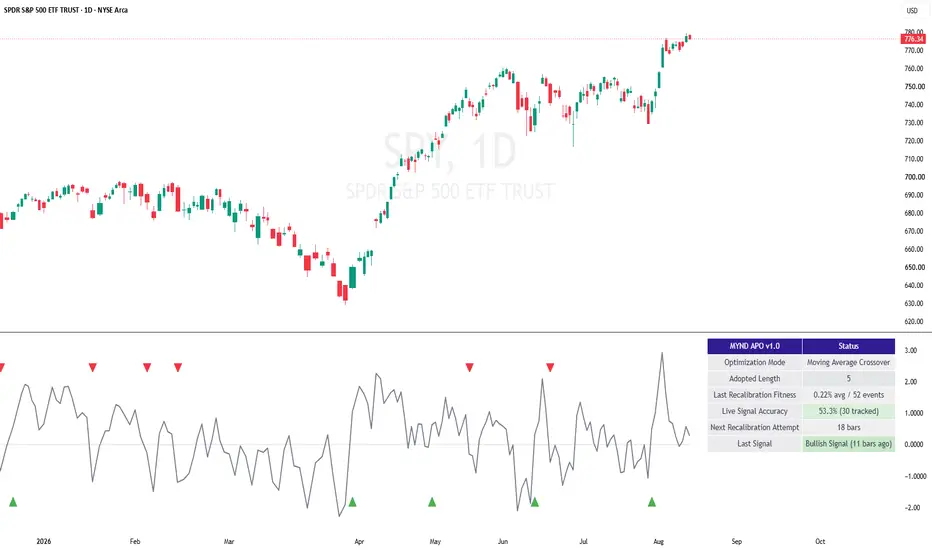
MYND Adaptive Parameter Optimizer [v1.0]
A genuine walk-forward self-tuning engine - it doesn't just use a moving average or RSI length you picked once, it periodically re-tests a range of lengths against recent history and adopts whichever one actually worked best.
WHAT IT DOES
Every N bars (your Recalibration Interval), this indicator tests a range of candidate lengths for either a Moving Average Crossover engine or an RSI Mean-Reversion engine against a bounded recent evaluation window, scores each candidate by how well its historical signal events actually predicted the next move, and adopts whichever length scored best - until the next recalibration. This is real walk-forward re-optimization built into the indicator itself, not a single fixed parameter you set once and hope keeps working.
HOW IT WORKS
Choose one mode per instance: Moving Average Crossover (favors trending behavior) or RSI Mean-Reversion (favors range-bound behavior) - add a second copy of the tool if you want both running side by side. The candidate search only runs periodically, never every bar, and uses efficient techniques (a prefix-sum trick for MA mode, one linear pass per candidate for RSI mode) to stay cheap even while testing up to 25 candidate lengths at once. Once a length is adopted, live plotting and signals use one simple, standard call every bar until the next recalibration.
Beyond the in-sample fitness score each recalibration produces, this tool also grades its own LIVE signals out-of-sample - a genuinely honest check on whether the adopted length is actually working going forward, not just how it looked during the search that chose it.
KEY FEATURES
A live dashboard showing the currently adopted length, the in-sample fitness score and event count from the last recalibration, a rolling out-of-sample Live Signal Accuracy stat, and time until the next recalibration attempt. A dedicated alert the moment the adopted length actually changes. An optional volume-confirmation gate on signals. Light/Dark theme presets plus a colorblind-safe signal color option. Full customization throughout, with tooltips on every setting that benefits from one.
IMPORTANT - this tool always renders in a separate lower pane, in both modes. Pine's overlay setting is fixed at compile time and can't switch between "on the price chart" and "separate pane" based on a runtime mode selection - so rather than a hack, Moving Average mode plots the adaptive MA's %-distance from price (oscillating around a zero line) instead of overlaying the MA line directly on price. RSI mode plots the adaptive RSI itself (0-100). Both modes signal off the same real underlying cross events either way.
HOW TO USE IT
Works out of the box with sensible defaults. Expect a genuine warm-up period after first adding it to a chart - the optimizer needs a meaningful amount of history before its first real recalibration can run, and uses Candidate Length - Min as a placeholder until then. Watch the Adopted Length on the dashboard over time to see how the tool responds to changing market character, and compare the in-sample fitness score against the out-of-sample Live Signal Accuracy for an honest read on whether it's actually working right now.
SETTINGS WORTH TUNING FIRST
Recalibration Interval and Evaluation Window - lengthen either for steadier, less frequent length changes; shorten for faster adaptation. Candidate Length - Min/Max/Step - defines the search range; note the number of tested candidates is capped at 25 for compute-cost reasons. Minimum Events for Valid Score - raise it to require more statistical support before a candidate can win.
ALERTS
The 4 standard alerts (Bullish/Bearish Signal, Live Accuracy Warning, and the ALL Signals combo) use TradingView's normal alertcondition() system. The Adopted Length Changed alert is different - it uses Pine's dynamic alert() function since it announces a changing numeric value, so set it up with Condition -> this script -> "Any alert() function call" rather than a named condition.
This tool can only tell you what would have worked recently on this symbol/timeframe - it is not a guarantee of what will keep working, which is exactly why the out-of-sample Live Signal Accuracy stat exists as a separate, honest check. This tool is provided for informational and educational purposes and does not constitute financial advice. Trading involves risk; past performance and historical patterns do not guarantee future results.
A genuine walk-forward self-tuning engine - it doesn't just use a moving average or RSI length you picked once, it periodically re-tests a range of lengths against recent history and adopts whichever one actually worked best.
WHAT IT DOES
Every N bars (your Recalibration Interval), this indicator tests a range of candidate lengths for either a Moving Average Crossover engine or an RSI Mean-Reversion engine against a bounded recent evaluation window, scores each candidate by how well its historical signal events actually predicted the next move, and adopts whichever length scored best - until the next recalibration. This is real walk-forward re-optimization built into the indicator itself, not a single fixed parameter you set once and hope keeps working.
HOW IT WORKS
Choose one mode per instance: Moving Average Crossover (favors trending behavior) or RSI Mean-Reversion (favors range-bound behavior) - add a second copy of the tool if you want both running side by side. The candidate search only runs periodically, never every bar, and uses efficient techniques (a prefix-sum trick for MA mode, one linear pass per candidate for RSI mode) to stay cheap even while testing up to 25 candidate lengths at once. Once a length is adopted, live plotting and signals use one simple, standard call every bar until the next recalibration.
Beyond the in-sample fitness score each recalibration produces, this tool also grades its own LIVE signals out-of-sample - a genuinely honest check on whether the adopted length is actually working going forward, not just how it looked during the search that chose it.
KEY FEATURES
A live dashboard showing the currently adopted length, the in-sample fitness score and event count from the last recalibration, a rolling out-of-sample Live Signal Accuracy stat, and time until the next recalibration attempt. A dedicated alert the moment the adopted length actually changes. An optional volume-confirmation gate on signals. Light/Dark theme presets plus a colorblind-safe signal color option. Full customization throughout, with tooltips on every setting that benefits from one.
IMPORTANT - this tool always renders in a separate lower pane, in both modes. Pine's overlay setting is fixed at compile time and can't switch between "on the price chart" and "separate pane" based on a runtime mode selection - so rather than a hack, Moving Average mode plots the adaptive MA's %-distance from price (oscillating around a zero line) instead of overlaying the MA line directly on price. RSI mode plots the adaptive RSI itself (0-100). Both modes signal off the same real underlying cross events either way.
HOW TO USE IT
Works out of the box with sensible defaults. Expect a genuine warm-up period after first adding it to a chart - the optimizer needs a meaningful amount of history before its first real recalibration can run, and uses Candidate Length - Min as a placeholder until then. Watch the Adopted Length on the dashboard over time to see how the tool responds to changing market character, and compare the in-sample fitness score against the out-of-sample Live Signal Accuracy for an honest read on whether it's actually working right now.
SETTINGS WORTH TUNING FIRST
Recalibration Interval and Evaluation Window - lengthen either for steadier, less frequent length changes; shorten for faster adaptation. Candidate Length - Min/Max/Step - defines the search range; note the number of tested candidates is capped at 25 for compute-cost reasons. Minimum Events for Valid Score - raise it to require more statistical support before a candidate can win.
ALERTS
The 4 standard alerts (Bullish/Bearish Signal, Live Accuracy Warning, and the ALL Signals combo) use TradingView's normal alertcondition() system. The Adopted Length Changed alert is different - it uses Pine's dynamic alert() function since it announces a changing numeric value, so set it up with Condition -> this script -> "Any alert() function call" rather than a named condition.
This tool can only tell you what would have worked recently on this symbol/timeframe - it is not a guarantee of what will keep working, which is exactly why the out-of-sample Live Signal Accuracy stat exists as a separate, honest check. This tool is provided for informational and educational purposes and does not constitute financial advice. Trading involves risk; past performance and historical patterns do not guarantee future results.

כתב ויתור
המידע והפרסומים אינם מיועדים להיות, ואינם מהווים, ייעוץ או המלצה פיננסית, השקעתית, מסחרית או מכל סוג אחר המסופקת או מאושרת על ידי TradingView. קרא עוד ב־תנאי השימוש.
כתב ויתור
המידע והפרסומים אינם מיועדים להיות, ואינם מהווים, ייעוץ או המלצה פיננסית, השקעתית, מסחרית או מכל סוג אחר המסופקת או מאושרת על ידי TradingView. קרא עוד ב־תנאי השימוש.