[MAD] L5 Riskmanagement MK6.2 Wizard Edition
אינדיקטורים בלעדיים נוספים מאת djmad
הירשם ל-Premium selection תמורת $19.00 לחודש כדי לקבל גישה לאינדיקטורים בלעדיים של היוצר הזה. התשלום מתבצע ישירות ב-TradingView, ואפשר להתחיל להשתמש בהם בגרפים שלך מיד.
חקור Premium selectionFirst of all, this Backtest module comes WITHOUT a Strategy, only Riskmanagement
Modular L6 Backtest
For testing your own Indicators in this backtest use this script snipped below in your indicator Suite
After this you can include every L1 Indicator and test it.
todo this, select Digitalsignal @ your specific indicator as source, so the backtester can see its signals.
To have correct data at the exchange, use alarms after successful backtest on the indicator with "on candle close"
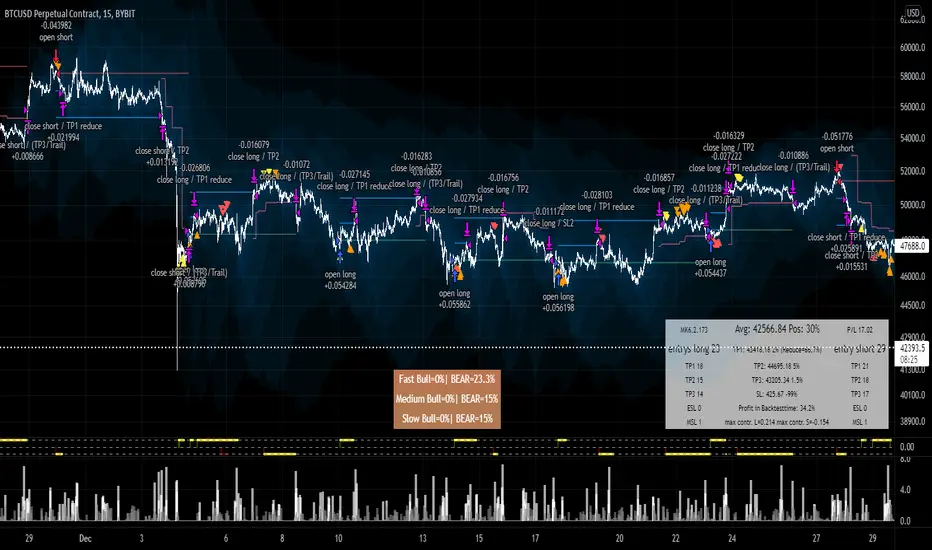
Steps of a entry, which you can see the in the screenshot:
L1 Strategy/Indicator sends "long"
buy of position setting of SL @%
after TP1 SL is set to entry
after TP2 position is closed 100%
If there a running position but in negative P/L each Signal adds up to the position + Growfactor
so a 1.0 would increase the next buy +100% 1, 2, 4, 8 .... (double up)
Shrinkfactor detecs a position is to large. If position is at average price it reduces to allowed percentage and continues
-------------------
Where to buy and how often.... has to come from your own indicator
This is the codesnipped for a external indicator to plot the signal as needed
<CODE>
signalout = 0
signalout := (signal_buy? 1: signal_sell? -1: 0)
BM_color_signal = signal_buy? #4C9900 : signal_sell? #CC0000: color.black
L_digital_signal = plot(signalout, title ="Digitalsignal", color=BM_color_signal, transp=0, style=plot.style_columns, display=display.none)
Modular L6 Backtest
For testing your own Indicators in this backtest use this script snipped below in your indicator Suite
After this you can include every L1 Indicator and test it.
todo this, select Digitalsignal @ your specific indicator as source, so the backtester can see its signals.
To have correct data at the exchange, use alarms after successful backtest on the indicator with "on candle close"
Steps of a entry, which you can see the in the screenshot:
L1 Strategy/Indicator sends "long"
buy of position setting of SL @%
after TP1 SL is set to entry
after TP2 position is closed 100%
If there a running position but in negative P/L each Signal adds up to the position + Growfactor
so a 1.0 would increase the next buy +100% 1, 2, 4, 8 .... (double up)
Shrinkfactor detecs a position is to large. If position is at average price it reduces to allowed percentage and continues
-------------------
Where to buy and how often.... has to come from your own indicator
This is the codesnipped for a external indicator to plot the signal as needed
<CODE>
signalout = 0
signalout := (signal_buy? 1: signal_sell? -1: 0)
BM_color_signal = signal_buy? #4C9900 : signal_sell? #CC0000: color.black
L_digital_signal = plot(signalout, title ="Digitalsignal", color=BM_color_signal, transp=0, style=plot.style_columns, display=display.none)
הערות שחרור
alertsהערות שחרור
bugfixהערות שחרור
update againהערות שחרור
Update to 6.1הערות שחרור
Statistics and Cleanupהערות שחרור
lots of bugfixingהערות שחרור
MSL Counter Long was counting on the short sideVersionnumber in Textbox

telegram - @djmad_0815
כתב ויתור
המידע והפרסומים אינם מיועדים להיות, ואינם מהווים, ייעוץ או המלצה פיננסית, השקעתית, מסחרית או מכל סוג אחר המסופקת או מאושרת על ידי TradingView. קרא עוד ב־תנאי השימוש.
telegram - @djmad_0815
כתב ויתור
המידע והפרסומים אינם מיועדים להיות, ואינם מהווים, ייעוץ או המלצה פיננסית, השקעתית, מסחרית או מכל סוג אחר המסופקת או מאושרת על ידי TradingView. קרא עוד ב־תנאי השימוש.