OPEN-SOURCE SCRIPT
AI Trading Console PRO (BuySell with Complete Dash)
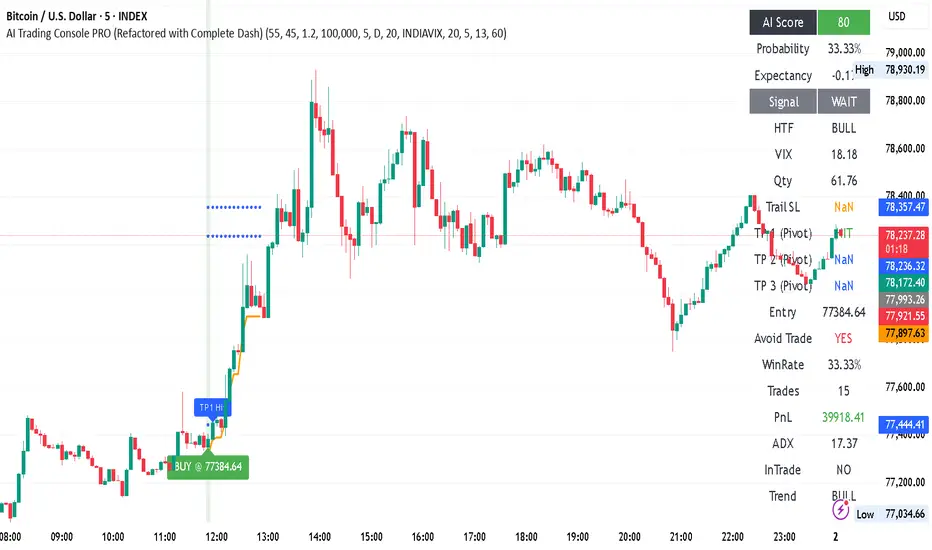
AI Trading Console PRO script. It operates as a complete, semi-automated trading system combining entry signals, institutional filters, dynamic profit targets, and live performance tracking.
1. The Signal Engine (When to Enter)
The core entry logic relies on a confluence of four technical parameters. A trade is only triggered when all active conditions align.
ORB (Opening Range Breakout): The script records the highest high and lowest low of the first 30 minutes of the trading day (9:15 AM to 9:45 AM). A Buy signal requires price to break above the ORB High; a Sell signal requires breaking below the ORB Low.
Trend Alignment (EMA): It checks the short-term trend using a Fast EMA (13) and Slow EMA (39). Buy entries only happen if the 13 EMA is above the 39 EMA (Bullish).
Momentum (RSI): It ensures momentum is on your side. Buy entries require the 14-period RSI to be above 55, while Sells require it to be below 45.
HTF Confirmation (Higher Time Frame): It looks at a higher timeframe (default is 60 minutes) to ensure you aren't trading against the macro trend. A 50 EMA on the 60m chart dictates the broader bull/bear bias.
2. Institutional Filters (When to Stay Out)
This is the "brain" of the console, designed to prevent trades in choppy or dangerous market conditions.
ADX (Average Directional Index): This measures trend strength, regardless of direction. The script requires ADX to be above 20. If ADX is below 20, the market is chopping sideways, and the script will block the trade.
India VIX (Volatility Index): It pulls live data from NSE:INDIAVIX. If the VIX spikes above 20 (indicating panic or extreme volatility), the script blocks new entries to protect your capital.
3. Dynamic Targets (Where to Take Profit)
Instead of fixed percentage targets, the script uses Standard Floor Pivots calculated from the previous day's High, Low, and Close.
Institutional Levels: These pivots (R1, R2, R3 for Resistance; S1, S2, S3 for Support) act as hidden liquidity zones where large players take profits.
Dynamic Assignment: When a trade triggers, the script looks at your entry price. If you buy above R1, it intelligently assigns R2 as Target 1 (TP1) and R3 as Target 2 (TP2).
Visual Tracking: Once price touches a target level, the script stops plotting that specific line to keep the chart clean and changes the dashboard text to a green "HIT."
4. Risk Management (How to Protect Capital)
The script automates position sizing and stop-loss trailing so you don't have to calculate it manually.
ATR Stop Loss: The initial Stop Loss is placed 1.5x the Average True Range (ATR) away from your entry. This ensures your stop is based on current market volatility, not an arbitrary number.
Trailing Stop: As the trade moves in your favor, the Stop Loss trails behind the price by 1.2x the ATR, locking in profits while giving the trade room to breathe.
Position Sizing: You input your Capital (e.g., ₹100,000) and Risk % per trade (e.g., 2%). The script calculates exactly how many shares/contracts you should buy based on the distance to your ATR Stop Loss.
5. The Live Dashboard
The table in the top right acts as your command center. Here are the most advanced metrics it tracks:
AI Score (0-100): A real-time confidence metric. It awards 20 points each for Trend alignment, Momentum, Trend Strength (ADX), Volatility Safety (VIX), and HTF alignment. A score of 80+ is colored green, indicating a high-probability setup.
Expectancy: A mathematical proxy telling you if the strategy has a positive edge. An expectancy above 0.20 generally means the system is highly profitable over a large sample size.
Live PnL & WinRate: The script silently tracks every signal it generates in the background. It calculates your simulated Profit and Loss (PnL) and Win Rate based on your actual position sizing and where the trailing stop takes you out.
Avoid Trade: If the VIX is too high or the ADX is too low, this will flash red "YES," warning you that current market conditions are unfavorable for breakout trading.
Key Changes Made:
Pivot Calculation Engine: Added a request.security call using lookahead_on to pull the previous day's high, low, and close without repainting. This powers the standard Floor Pivots (R1/R2/R3 and S1/S2/S3).
Dynamic Target Assignment: When a signal fires, the script checks where the close price is relative to the pivots. If you buy above R1, it intelligently assigns R2 as your TP1 and R3 as your TP2.
Visual Tracking: Hit targets are visually tracked. When price touches a TP level, it drops a label on the chart and stops plotting the circle line for that specific target to keep your chart clean.
Upgraded Dashboard: Expanded the data table from 10 rows to 14. It now displays your active Entry, Stop Loss, and all three TP levels in real time. It will also switch the text to "HIT" in green once a target is reached during a trade.
1. The Signal Engine (When to Enter)
The core entry logic relies on a confluence of four technical parameters. A trade is only triggered when all active conditions align.
ORB (Opening Range Breakout): The script records the highest high and lowest low of the first 30 minutes of the trading day (9:15 AM to 9:45 AM). A Buy signal requires price to break above the ORB High; a Sell signal requires breaking below the ORB Low.
Trend Alignment (EMA): It checks the short-term trend using a Fast EMA (13) and Slow EMA (39). Buy entries only happen if the 13 EMA is above the 39 EMA (Bullish).
Momentum (RSI): It ensures momentum is on your side. Buy entries require the 14-period RSI to be above 55, while Sells require it to be below 45.
HTF Confirmation (Higher Time Frame): It looks at a higher timeframe (default is 60 minutes) to ensure you aren't trading against the macro trend. A 50 EMA on the 60m chart dictates the broader bull/bear bias.
2. Institutional Filters (When to Stay Out)
This is the "brain" of the console, designed to prevent trades in choppy or dangerous market conditions.
ADX (Average Directional Index): This measures trend strength, regardless of direction. The script requires ADX to be above 20. If ADX is below 20, the market is chopping sideways, and the script will block the trade.
India VIX (Volatility Index): It pulls live data from NSE:INDIAVIX. If the VIX spikes above 20 (indicating panic or extreme volatility), the script blocks new entries to protect your capital.
3. Dynamic Targets (Where to Take Profit)
Instead of fixed percentage targets, the script uses Standard Floor Pivots calculated from the previous day's High, Low, and Close.
Institutional Levels: These pivots (R1, R2, R3 for Resistance; S1, S2, S3 for Support) act as hidden liquidity zones where large players take profits.
Dynamic Assignment: When a trade triggers, the script looks at your entry price. If you buy above R1, it intelligently assigns R2 as Target 1 (TP1) and R3 as Target 2 (TP2).
Visual Tracking: Once price touches a target level, the script stops plotting that specific line to keep the chart clean and changes the dashboard text to a green "HIT."
4. Risk Management (How to Protect Capital)
The script automates position sizing and stop-loss trailing so you don't have to calculate it manually.
ATR Stop Loss: The initial Stop Loss is placed 1.5x the Average True Range (ATR) away from your entry. This ensures your stop is based on current market volatility, not an arbitrary number.
Trailing Stop: As the trade moves in your favor, the Stop Loss trails behind the price by 1.2x the ATR, locking in profits while giving the trade room to breathe.
Position Sizing: You input your Capital (e.g., ₹100,000) and Risk % per trade (e.g., 2%). The script calculates exactly how many shares/contracts you should buy based on the distance to your ATR Stop Loss.
5. The Live Dashboard
The table in the top right acts as your command center. Here are the most advanced metrics it tracks:
AI Score (0-100): A real-time confidence metric. It awards 20 points each for Trend alignment, Momentum, Trend Strength (ADX), Volatility Safety (VIX), and HTF alignment. A score of 80+ is colored green, indicating a high-probability setup.
Expectancy: A mathematical proxy telling you if the strategy has a positive edge. An expectancy above 0.20 generally means the system is highly profitable over a large sample size.
Live PnL & WinRate: The script silently tracks every signal it generates in the background. It calculates your simulated Profit and Loss (PnL) and Win Rate based on your actual position sizing and where the trailing stop takes you out.
Avoid Trade: If the VIX is too high or the ADX is too low, this will flash red "YES," warning you that current market conditions are unfavorable for breakout trading.
Key Changes Made:
Pivot Calculation Engine: Added a request.security call using lookahead_on to pull the previous day's high, low, and close without repainting. This powers the standard Floor Pivots (R1/R2/R3 and S1/S2/S3).
Dynamic Target Assignment: When a signal fires, the script checks where the close price is relative to the pivots. If you buy above R1, it intelligently assigns R2 as your TP1 and R3 as your TP2.
Visual Tracking: Hit targets are visually tracked. When price touches a TP level, it drops a label on the chart and stops plotting the circle line for that specific target to keep your chart clean.
Upgraded Dashboard: Expanded the data table from 10 rows to 14. It now displays your active Entry, Stop Loss, and all three TP levels in real time. It will also switch the text to "HIT" in green once a target is reached during a trade.
Open-source script
In true TradingView spirit, the creator of this script has made it open-source, so that traders can review and verify its functionality. Kudos to the author! While you can use it for free, remember that republishing the code is subject to our House Rules.

Disclaimer
The information and publications are not meant to be, and do not constitute, financial, investment, trading, or other types of advice or recommendations supplied or endorsed by TradingView. Read more in the Terms of Use.
Open-source script
In true TradingView spirit, the creator of this script has made it open-source, so that traders can review and verify its functionality. Kudos to the author! While you can use it for free, remember that republishing the code is subject to our House Rules.
Disclaimer
The information and publications are not meant to be, and do not constitute, financial, investment, trading, or other types of advice or recommendations supplied or endorsed by TradingView. Read more in the Terms of Use.