Updated
Devtrader Dynamic Trading Windows
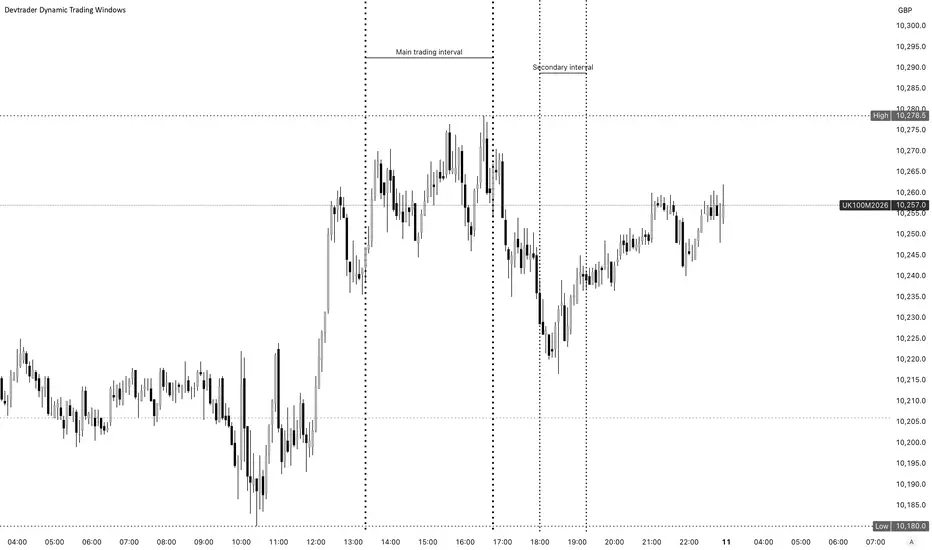
Devtrader Dynamic Trading Windows
Devtrader Dynamic Trading Windows is an intraday session-mapping tool designed to help traders visually mark their preferred trading windows directly on the chart.
The indicator allows traders to configure multiple ticker-specific profiles and define custom time intervals for each symbol. When the chart symbol matches one of the configured profiles, the indicator automatically applies that ticker’s specific trading windows and draws vertical start/end markers on the chart.
This is useful for traders who focus on specific instruments at specific times of day, such as index killzones, equity opening windows, futures session windows, or personal backtested execution periods.
Main Features
• Multiple ticker profiles
Configure separate profiles for symbols such as GER40, NQ, UK100, INTC, or any custom ticker.
• Ticker-aware behavior
The indicator checks the active chart symbol and only displays the windows configured for the matching ticker profile.
• Multiple intervals per ticker
Each ticker profile can contain multiple editable time intervals, allowing traders to map different trading windows throughout the day.
• Custom vertical lines
Each interval draws vertical markers at the start and end of the configured window.
• Fully editable line style
Customize the color, width, and style of the vertical markers.
• Editable labels
Each interval can display custom labels such as “NQ Open”, “GER40 Main”, “London Window”, or any other preferred text.
• Timezone support
Each ticker profile has its own timezone setting, so the configured sessions can be interpreted correctly for the selected market.
• Intraday-focused design
The script is designed for intraday charts such as 1m, 5m, 15m, and similar timeframes.
• Status label
A small status label shows which ticker profile is currently active and which timezone is being used.
How It Works
1. Add the indicator to an intraday chart.
2. Open the indicator settings.
3. Enable the ticker profile you want to use.
4. Set the ticker match text, for example:
- GER40
- NQ
- UK100
- INTC
5. Define one or more session intervals.
6. Customize the marker text, color, line width, and line style.
7. When the chart symbol matches the profile, the indicator automatically draws the configured window markers.
Example Use Cases
• GER40 / DAX trading window:
Mark the main execution window between 11:20 and 14:00.
• NQ / Nasdaq futures trading window:
Mark the New York open window and afternoon execution window.
• UK100 trading window:
Map the preferred London-session trading period.
• Individual stocks:
Mark opening range, momentum window, or preferred intraday execution periods for stocks such as INTC.
Important Notes
This indicator does not generate buy or sell signals.
It does not predict price direction.
It is not a strategy and does not place trades.
Its purpose is to help traders stay disciplined by visually marking the exact periods when they prefer to focus, observe, or execute trades.
Recommended Usage
Use this indicator as part of a structured trading plan:
• Define your best-performing execution windows.
• Mark only the periods you have backtested or personally validated.
• Avoid overtrading outside your planned windows.
• Combine the window markers with your own market structure, liquidity, volume, price action, or strategy rules.
• Review your trades later to see whether your best results come from specific time intervals.
Why This Indicator Exists
Many intraday traders perform better during specific market periods. For example, some traders prefer the London session, New York open, futures opening range, index killzones, or specific volatility windows.
This tool was created to make those windows visible, consistent, and symbol-specific.
Instead of manually remembering different time windows for each market, traders can configure them once and let the indicator automatically display the correct windows based on the active chart symbol.
Best For
• Intraday traders
• Futures traders
• Index traders
• Stock traders
• Killzone-based traders
• Session-based traders
• Traders who use backtested time windows
• Traders who want more discipline around when they trade
Devtrader Dynamic Trading Windows is an intraday session-mapping tool designed to help traders visually mark their preferred trading windows directly on the chart.
The indicator allows traders to configure multiple ticker-specific profiles and define custom time intervals for each symbol. When the chart symbol matches one of the configured profiles, the indicator automatically applies that ticker’s specific trading windows and draws vertical start/end markers on the chart.
This is useful for traders who focus on specific instruments at specific times of day, such as index killzones, equity opening windows, futures session windows, or personal backtested execution periods.
Main Features
• Multiple ticker profiles
Configure separate profiles for symbols such as GER40, NQ, UK100, INTC, or any custom ticker.
• Ticker-aware behavior
The indicator checks the active chart symbol and only displays the windows configured for the matching ticker profile.
• Multiple intervals per ticker
Each ticker profile can contain multiple editable time intervals, allowing traders to map different trading windows throughout the day.
• Custom vertical lines
Each interval draws vertical markers at the start and end of the configured window.
• Fully editable line style
Customize the color, width, and style of the vertical markers.
• Editable labels
Each interval can display custom labels such as “NQ Open”, “GER40 Main”, “London Window”, or any other preferred text.
• Timezone support
Each ticker profile has its own timezone setting, so the configured sessions can be interpreted correctly for the selected market.
• Intraday-focused design
The script is designed for intraday charts such as 1m, 5m, 15m, and similar timeframes.
• Status label
A small status label shows which ticker profile is currently active and which timezone is being used.
How It Works
1. Add the indicator to an intraday chart.
2. Open the indicator settings.
3. Enable the ticker profile you want to use.
4. Set the ticker match text, for example:
- GER40
- NQ
- UK100
- INTC
5. Define one or more session intervals.
6. Customize the marker text, color, line width, and line style.
7. When the chart symbol matches the profile, the indicator automatically draws the configured window markers.
Example Use Cases
• GER40 / DAX trading window:
Mark the main execution window between 11:20 and 14:00.
• NQ / Nasdaq futures trading window:
Mark the New York open window and afternoon execution window.
• UK100 trading window:
Map the preferred London-session trading period.
• Individual stocks:
Mark opening range, momentum window, or preferred intraday execution periods for stocks such as INTC.
Important Notes
This indicator does not generate buy or sell signals.
It does not predict price direction.
It is not a strategy and does not place trades.
Its purpose is to help traders stay disciplined by visually marking the exact periods when they prefer to focus, observe, or execute trades.
Recommended Usage
Use this indicator as part of a structured trading plan:
• Define your best-performing execution windows.
• Mark only the periods you have backtested or personally validated.
• Avoid overtrading outside your planned windows.
• Combine the window markers with your own market structure, liquidity, volume, price action, or strategy rules.
• Review your trades later to see whether your best results come from specific time intervals.
Why This Indicator Exists
Many intraday traders perform better during specific market periods. For example, some traders prefer the London session, New York open, futures opening range, index killzones, or specific volatility windows.
This tool was created to make those windows visible, consistent, and symbol-specific.
Instead of manually remembering different time windows for each market, traders can configure them once and let the indicator automatically display the correct windows based on the active chart symbol.
Best For
• Intraday traders
• Futures traders
• Index traders
• Stock traders
• Killzone-based traders
• Session-based traders
• Traders who use backtested time windows
• Traders who want more discipline around when they trade
Release Notes
Fix additional intervals displayRelease Notes
Adjust the line separator to be more visibleRelease Notes
Adjusting the script with latest technology
Disclaimer
The information and publications are not meant to be, and do not constitute, financial, investment, trading, or other types of advice or recommendations supplied or endorsed by TradingView. Read more in the Terms of Use.
Disclaimer
The information and publications are not meant to be, and do not constitute, financial, investment, trading, or other types of advice or recommendations supplied or endorsed by TradingView. Read more in the Terms of Use.