Updated
Momentum Stream Checklist
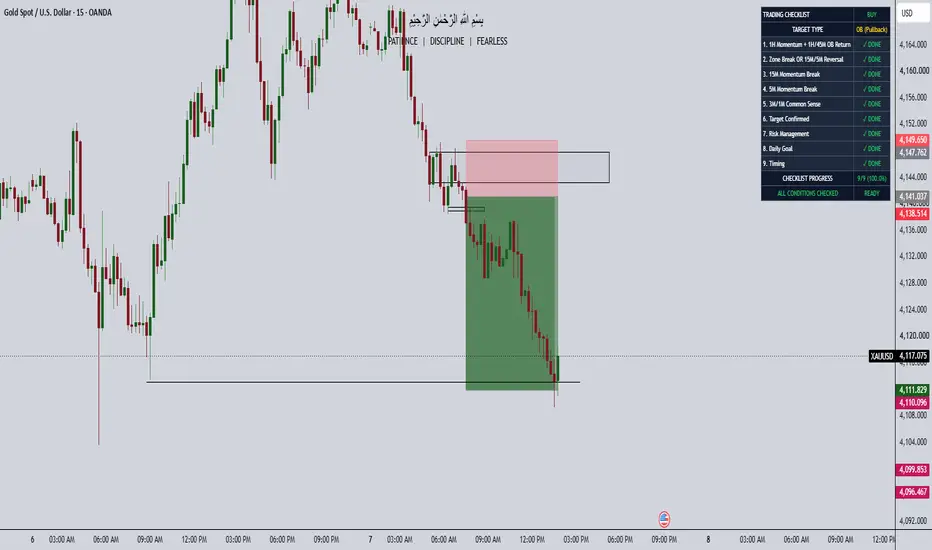
Custom Manual Trading Checklist | OB & Momentum
Overview
Custom Manual Trading Checklist is a customizable TradingView indicator designed to help traders follow a structured trading plan, confirm their setups, and maintain discipline before entering a trade.
The indicator provides an on-chart checklist dashboard where traders can manually track their trading conditions, including higher-timeframe momentum, Order Blocks (OB), lower-timeframe momentum breaks, Common Sense confirmation, liquidity targets, risk management, and trading sessions.
Unlike automated trading indicators, this tool does not generate BUY or SELL signals. Instead, it helps traders organize their analysis and make decisions based on their own trading rules.
Key Features
1. Fully Customizable Checklist
Nine customizable trading conditions.
Rename each checklist item.
Enable or disable individual rules.
Manually mark conditions as completed.
Track completed and pending conditions.
Automatically calculate checklist progress.
2. Multi-Timeframe Trading Workflow
The default checklist follows a structured top-down trading approach:
1H Momentum + 1H/45M OB: Identify momentum and wait for price to return to the Order Block.
15M Momentum Break: Confirm a momentum break on the 15-minute timeframe.
5M Momentum Break: Confirm a momentum break on the 5-minute timeframe.
3M/1M Common Sense: Apply manual entry confirmation on the lower timeframes.
Targets: Select liquidity for an impulsive setup or an Order Block for a pullback setup.
Zone Rule: Wait for a zone break OR confirm a 15M/5M momentum reversal.
Risk Management: Review stop-loss, risk exposure, and trade management.
Daily Goal: Check daily trading objectives and limits.
Timing: Confirm that the trade matches the planned trading session.
These conditions are default examples and can be renamed to match different trading strategies.
3. Manual Trading Dashboard
The dashboard displays:
BUY or SELL trade direction.
Custom checklist conditions.
Completed and pending statuses.
Selected target type.
Number of completed conditions.
Overall completion percentage.
Final checklist status.
4. Dashboard Appearance
Customize the dashboard with:
Nine screen positions.
Four text sizes.
Custom background colors.
Custom text colors.
Completed and pending status colors.
Accent colors.
Optional rule numbering.
Optional target display.
Optional progress display.
5. Checklist Progress Tracking
The indicator automatically calculates progress based on enabled checklist items.
For example:
3/9 conditions completed — 33.3%
6/9 conditions completed — 66.7%
9/9 conditions completed — 100%
When all enabled conditions are manually checked, the dashboard displays "ALL CHECKED" and "READY."
These labels indicate checklist completion only, not a validated trading opportunity.
How to Use
Add the indicator to your TradingView chart.
Open the indicator settings.
Select BUY or SELL direction.
Customize the checklist names if needed.
Enable or disable the trading conditions you want to use.
Analyze the market using your own trading strategy.
Mark each condition as completed when it meets your rules.
Monitor your checklist progress directly on the chart.
Review your risk management before making any trading decision.
Who Is This Indicator For?
This indicator is suitable for:
Price Action Traders
Smart Money Concepts (SMC) Traders
Order Block Traders
Liquidity-Based Traders
Intraday Traders
Scalpers
Traders who use multiple timeframes
Traders who want to improve consistency and discipline
Important Notes
This is a manual checklist indicator, not an automated trading system.
The indicator does not automatically detect Order Blocks, momentum breaks, liquidity, or Common Sense confirmations.
Checklist items are marked through TradingView indicator settings, not by clicking directly on the dashboard.
The indicator does not execute trades or provide automatic entry and exit signals.
The checklist is not automatically reset after each trade or trading day.
Completing all conditions does not guarantee trade success or profitability.
Users remain responsible for their own analysis and risk management.
Conclusion
Custom Manual Trading Checklist | OB & Momentum helps traders organize their trading process, stay consistent with their rules, and reduce impulsive decision-making.
Follow Your Plan. Check Your Rules. Trade With Discipline.
This tool is provided for educational and organizational purposes only and does not constitute financial advice.
Overview
Custom Manual Trading Checklist is a customizable TradingView indicator designed to help traders follow a structured trading plan, confirm their setups, and maintain discipline before entering a trade.
The indicator provides an on-chart checklist dashboard where traders can manually track their trading conditions, including higher-timeframe momentum, Order Blocks (OB), lower-timeframe momentum breaks, Common Sense confirmation, liquidity targets, risk management, and trading sessions.
Unlike automated trading indicators, this tool does not generate BUY or SELL signals. Instead, it helps traders organize their analysis and make decisions based on their own trading rules.
Key Features
1. Fully Customizable Checklist
Nine customizable trading conditions.
Rename each checklist item.
Enable or disable individual rules.
Manually mark conditions as completed.
Track completed and pending conditions.
Automatically calculate checklist progress.
2. Multi-Timeframe Trading Workflow
The default checklist follows a structured top-down trading approach:
1H Momentum + 1H/45M OB: Identify momentum and wait for price to return to the Order Block.
15M Momentum Break: Confirm a momentum break on the 15-minute timeframe.
5M Momentum Break: Confirm a momentum break on the 5-minute timeframe.
3M/1M Common Sense: Apply manual entry confirmation on the lower timeframes.
Targets: Select liquidity for an impulsive setup or an Order Block for a pullback setup.
Zone Rule: Wait for a zone break OR confirm a 15M/5M momentum reversal.
Risk Management: Review stop-loss, risk exposure, and trade management.
Daily Goal: Check daily trading objectives and limits.
Timing: Confirm that the trade matches the planned trading session.
These conditions are default examples and can be renamed to match different trading strategies.
3. Manual Trading Dashboard
The dashboard displays:
BUY or SELL trade direction.
Custom checklist conditions.
Completed and pending statuses.
Selected target type.
Number of completed conditions.
Overall completion percentage.
Final checklist status.
4. Dashboard Appearance
Customize the dashboard with:
Nine screen positions.
Four text sizes.
Custom background colors.
Custom text colors.
Completed and pending status colors.
Accent colors.
Optional rule numbering.
Optional target display.
Optional progress display.
5. Checklist Progress Tracking
The indicator automatically calculates progress based on enabled checklist items.
For example:
3/9 conditions completed — 33.3%
6/9 conditions completed — 66.7%
9/9 conditions completed — 100%
When all enabled conditions are manually checked, the dashboard displays "ALL CHECKED" and "READY."
These labels indicate checklist completion only, not a validated trading opportunity.
How to Use
Add the indicator to your TradingView chart.
Open the indicator settings.
Select BUY or SELL direction.
Customize the checklist names if needed.
Enable or disable the trading conditions you want to use.
Analyze the market using your own trading strategy.
Mark each condition as completed when it meets your rules.
Monitor your checklist progress directly on the chart.
Review your risk management before making any trading decision.
Who Is This Indicator For?
This indicator is suitable for:
Price Action Traders
Smart Money Concepts (SMC) Traders
Order Block Traders
Liquidity-Based Traders
Intraday Traders
Scalpers
Traders who use multiple timeframes
Traders who want to improve consistency and discipline
Important Notes
This is a manual checklist indicator, not an automated trading system.
The indicator does not automatically detect Order Blocks, momentum breaks, liquidity, or Common Sense confirmations.
Checklist items are marked through TradingView indicator settings, not by clicking directly on the dashboard.
The indicator does not execute trades or provide automatic entry and exit signals.
The checklist is not automatically reset after each trade or trading day.
Completing all conditions does not guarantee trade success or profitability.
Users remain responsible for their own analysis and risk management.
Conclusion
Custom Manual Trading Checklist | OB & Momentum helps traders organize their trading process, stay consistent with their rules, and reduce impulsive decision-making.
Follow Your Plan. Check Your Rules. Trade With Discipline.
This tool is provided for educational and organizational purposes only and does not constitute financial advice.
Release Notes
What's New & Improved1. Reorganized Checklist Order
Moved Zone Rule directly below 1H Momentum + OB Return.
Updated all nine checklist items to follow the correct trading workflow.
2. Simplified Manual Checkboxes
Grouped all nine checkboxes under 01 - QUICK CHECKLIST.
Users can quickly mark conditions as completed from Indicator Settings → Inputs.
Removed the need to navigate multiple sections to complete the checklist.
3. Customizable Checklist
Added custom names for all nine trading rules.
Users can rename conditions to match their personal trading strategy.
4. Improved Dashboard
Added BUY/SELL direction display.
Added target selection: Liquidity (Impulsive) or OB (Pullback).
Shows ✓ DONE for completed conditions.
Shows ○ WAIT for pending conditions.
Displays checklist progress and completion percentage.
Shows READY when all nine conditions are manually checked.
5. Appearance Customization
Nine dashboard positions.
Four text sizes.
Custom background, text, border, and status colors.
Options to show or hide rule numbers, target type, progress, percentage, and final status.
6. Manual Trading Control
No automatic trading signals.
No automatic OB or momentum detection.
All checklist conditions are confirmed manually by the trader.
Final Checklist Order
1H Momentum + OB Return
Zone Rule
15M Momentum Break
5M Momentum Break
3M/1M Common Sense
Targets: LIQ / OB
Risk Management
Daily Goal
Timing
Result: A cleaner, easier-to-use, fully customizable manual trading checklist that helps traders organize their analysis, track confirmations, and follow their trading plan consistently.

Disclaimer
The information and publications are not meant to be, and do not constitute, financial, investment, trading, or other types of advice or recommendations supplied or endorsed by TradingView. Read more in the Terms of Use.
Disclaimer
The information and publications are not meant to be, and do not constitute, financial, investment, trading, or other types of advice or recommendations supplied or endorsed by TradingView. Read more in the Terms of Use.