OPEN-SOURCE SCRIPT
Updated Trend Pro Master Suite
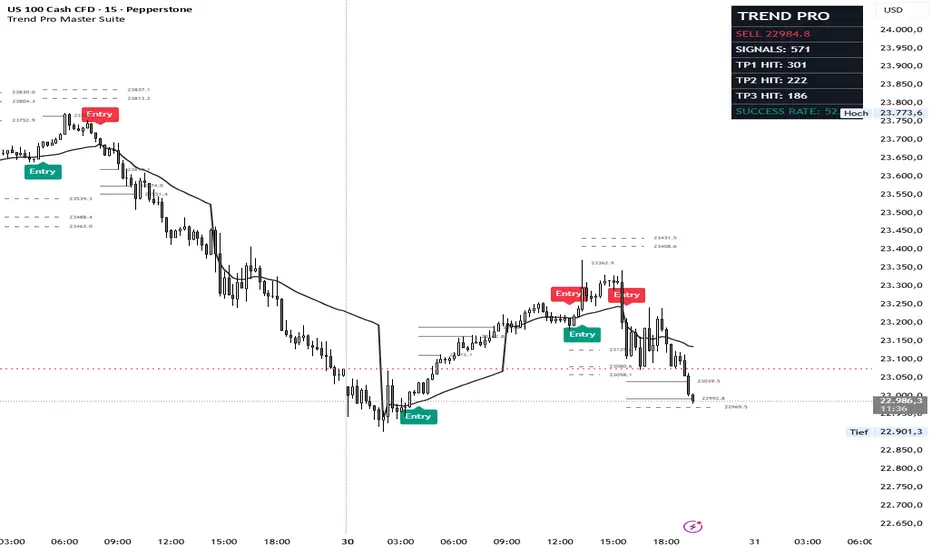
Trend Pro Master - Advanced Trend & Target Suite
Description:
Overview
Trend Pro Master is a comprehensive trend-following indicator designed to provide high-precision entry signals and dynamic, pro-active target management. Based on a refined HalfTrend core, it filters market noise to provide a clean, stepped visualization of market momentum, making it suitable for Scalping, Day Trading, and Swing Trading across all asset classes.
Core Methodology
The indicator utilizes price action pivots and ATR-based offsets to identify trend reversals with minimal lag.
Cyan Line/Arrows: Indicate a confirmed Bullish Trend.
Red Line/Arrows: Indicate a confirmed Bearish Trend.
Key Features
🚀 Pro-Active Take Profit Projections
Unlike traditional indicators that show targets after the fact, Trend Pro Master draws horizontal TP1 and TP2 projection lines the instant a signal appears. These lines help traders visualize their exit strategy immediately upon entry. Once a target is hit, the line solidifies and marks the exact hit-bar.
🎯 4 Take Profit Calculation Modes
Custom-tailor your targets to your specific strategy:
Points: Fixed point distance (ideal for standard pip targets).
ATR Multiple: Dynamic targets that expand and contract with market volatility.
Risk:Reward: Targets calculated as a multiple of your Stop Loss distance.
Indicator Offset: Unique targets based on the current "width" of the trend line.
📊 Dynamic Performance Dashboard
A fully customizable, real-time stats table that tracks:
Current Trade Status & Entry Price.
Total number of signals generated.
TP1 Hit count and percentage.
Success Rate: Live win-probability calculation based on target hits.
Customizable: Change the position (9 different spots) and size (Tiny to Large) to fit your chart layout.
🔔 Professional Push Alerts
Integrated alert() function support for high-quality push notifications. Get entry signals and target prices sent directly to your phone or browser in a clear format:
Example: "Buy Signal EURUSD (H1) TP1: 1.08550 TP2: 1.09200"
Settings Guide
Amplitude: Controls the sensitivity. Higher values = smoother trend, fewer signals. Lower values = more sensitive, more signals.
Channel Deviation: Adjusts the offset of the trend line from price.
Visuals & Styling: Full control over Trend Line thickness, TP Marker colors, and Label sizes.
How to Use
Entry: Enter a trade when an "Entry" arrow appears.
Targets: Aim for TP1 for consistent wins or TP2 for higher reward-to-risk ratios.
Exit: Exit the remainder of your position if the trend line changes color (reversal).
Description:
Overview
Trend Pro Master is a comprehensive trend-following indicator designed to provide high-precision entry signals and dynamic, pro-active target management. Based on a refined HalfTrend core, it filters market noise to provide a clean, stepped visualization of market momentum, making it suitable for Scalping, Day Trading, and Swing Trading across all asset classes.
Core Methodology
The indicator utilizes price action pivots and ATR-based offsets to identify trend reversals with minimal lag.
Cyan Line/Arrows: Indicate a confirmed Bullish Trend.
Red Line/Arrows: Indicate a confirmed Bearish Trend.
Key Features
🚀 Pro-Active Take Profit Projections
Unlike traditional indicators that show targets after the fact, Trend Pro Master draws horizontal TP1 and TP2 projection lines the instant a signal appears. These lines help traders visualize their exit strategy immediately upon entry. Once a target is hit, the line solidifies and marks the exact hit-bar.
🎯 4 Take Profit Calculation Modes
Custom-tailor your targets to your specific strategy:
Points: Fixed point distance (ideal for standard pip targets).
ATR Multiple: Dynamic targets that expand and contract with market volatility.
Risk:Reward: Targets calculated as a multiple of your Stop Loss distance.
Indicator Offset: Unique targets based on the current "width" of the trend line.
📊 Dynamic Performance Dashboard
A fully customizable, real-time stats table that tracks:
Current Trade Status & Entry Price.
Total number of signals generated.
TP1 Hit count and percentage.
Success Rate: Live win-probability calculation based on target hits.
Customizable: Change the position (9 different spots) and size (Tiny to Large) to fit your chart layout.
🔔 Professional Push Alerts
Integrated alert() function support for high-quality push notifications. Get entry signals and target prices sent directly to your phone or browser in a clear format:
Example: "Buy Signal EURUSD (H1) TP1: 1.08550 TP2: 1.09200"
Settings Guide
Amplitude: Controls the sensitivity. Higher values = smoother trend, fewer signals. Lower values = more sensitive, more signals.
Channel Deviation: Adjusts the offset of the trend line from price.
Visuals & Styling: Full control over Trend Line thickness, TP Marker colors, and Label sizes.
How to Use
Entry: Enter a trade when an "Entry" arrow appears.
Targets: Aim for TP1 for consistent wins or TP2 for higher reward-to-risk ratios.
Exit: Exit the remainder of your position if the trend line changes color (reversal).
Release Notes
Trend Pro Master - Advanced Trend & Target SuiteDescription:
Overview
Trend Pro Master is a comprehensive trend-following indicator designed to provide high-precision entry signals and dynamic, pro-active target management. Based on a refined HalfTrend core, it filters market noise to provide a clean, stepped visualization of market momentum, making it suitable for Scalping, Day Trading, and Swing Trading across all asset classes.
Core Methodology
The indicator utilizes price action pivots and ATR-based offsets to identify trend reversals with minimal lag.
Cyan Line/Arrows: Indicate a confirmed Bullish Trend.
Red Line/Arrows: Indicate a confirmed Bearish Trend.
Key Features
🚀 Pro-Active Take Profit Projections
Unlike traditional indicators that show targets after the fact, Trend Pro Master draws horizontal TP1 and TP2 projection lines the instant a signal appears. These lines help traders visualize their exit strategy immediately upon entry. Once a target is hit, the line solidifies and marks the exact hit-bar.
🎯 4 Take Profit Calculation Modes
Custom-tailor your targets to your specific strategy:
Points: Fixed point distance (ideal for standard pip targets).
ATR Multiple: Dynamic targets that expand and contract with market volatility.
Risk:Reward: Targets calculated as a multiple of your Stop Loss distance.
Indicator Offset: Unique targets based on the current "width" of the trend line.
📊 Dynamic Performance Dashboard
A fully customizable, real-time stats table that tracks:
Current Trade Status & Entry Price.
Total number of signals generated.
TP1 Hit count and percentage.
Success Rate: Live win-probability calculation based on target hits.
Customizable: Change the position (9 different spots) and size (Tiny to Large) to fit your chart layout.
🔔 Professional Push Alerts
Integrated alert() function support for high-quality push notifications. Get entry signals and target prices sent directly to your phone or browser in a clear format:
Example: "Buy Signal EURUSD (H1) TP1: 1.08550 TP2: 1.09200"
Settings Guide
Amplitude: Controls the sensitivity. Higher values = smoother trend, fewer signals. Lower values = more sensitive, more signals.
Channel Deviation: Adjusts the offset of the trend line from price.
Visuals & Styling: Full control over Trend Line thickness, TP Marker colors, and Label sizes.
How to Use
Entry: Enter a trade when an "Entry" arrow appears.
Targets: Aim for TP1 for consistent wins or TP2 for higher reward-to-risk ratios.
Exit: Exit the remainder of your position if the trend line changes color (reversal).
*****Added (Session) VWAP, Summer- / Wintertime calculation******
Open-source script
In true TradingView spirit, the creator of this script has made it open-source, so that traders can review and verify its functionality. Kudos to the author! While you can use it for free, remember that republishing the code is subject to our House Rules.

Disclaimer
The information and publications are not meant to be, and do not constitute, financial, investment, trading, or other types of advice or recommendations supplied or endorsed by TradingView. Read more in the Terms of Use.
Open-source script
In true TradingView spirit, the creator of this script has made it open-source, so that traders can review and verify its functionality. Kudos to the author! While you can use it for free, remember that republishing the code is subject to our House Rules.
Disclaimer
The information and publications are not meant to be, and do not constitute, financial, investment, trading, or other types of advice or recommendations supplied or endorsed by TradingView. Read more in the Terms of Use.