OPEN-SOURCE SCRIPT
Every Trader's Tic-Tac-Toe vs Computer
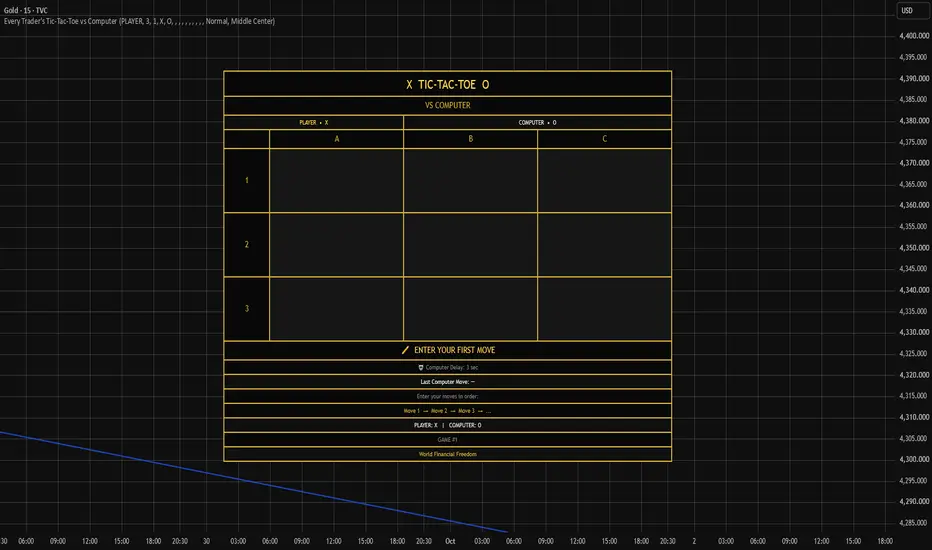
Every Trader's Tic-Tac-Toe vs Computer
Sometimes watching the markets means waiting.
Waiting for a setup.
Waiting for confirmation.
Waiting for the next candle.
So why not have a little fun while you wait?
Every Trader's Tic-Tac-Toe vs Computer brings the classic game of Tic-Tac-Toe directly onto your TradingView chart, giving you a simple, interactive game to play without leaving your chart.
Built with the same attention to detail as the World Financial Freedom trading tools, this isn't just a basic Tic-Tac-Toe board. It was designed to feel like a small, polished game that belongs on your trading screen.
🎮 PLAY AGAINST THE COMPUTER
Challenge the computer in a classic Tic-Tac-Toe game. You make your move, and the computer responds. The game keeps track of the board, recognizes wins, losses, and draws, and clearly displays the current game status.
The computer isn't simply placing symbols randomly. It plays strategically, creating an actual opponent rather than just filling empty squares.
Can you beat it?
SIMPLE MOVE SYSTEM
Your moves are entered through the TradingView indicator settings using a familiar coordinate system:
A1 · B1 · C1
A2 · B2 · C2
A3 · B3 · C3
Simply enter your moves in order:
Move 1 → Move 2 → Move 3 → ...
The board automatically reconstructs the game from your selected moves and displays the resulting position directly on the chart.
This keeps the game simple to understand while still giving you complete control over every move you make.
🎭 CHOOSE YOUR SYMBOLS
You aren't limited to traditional X and O.
Choose your own symbol for both sides from a variety of options,
including:X · O · 👑 · 🤖 · ⭐ · 🔥 · 🐱 · 🐶 · 🟢 · 🔵 · 🦦 · 🦅
Want the classic look?
X vs O
Want something different?
👑 vs 🤖
Or create your own combinations. The player and computer symbols can be selected independently, giving each game its own personality. And yes... you can even use the legendary World Financial Freedom eagle 🦅.
🏆 CLEAR GAME STATUS
The game clearly tells you what's happening at every stage. You'll see messages such as: YOUR TURN / YOU WIN! / COMPUTER WINS! / DRAW!
The game also detects invalid situations, including attempting to use an occupied square or selecting the same symbol for both players.
🤖 COMPUTER MOVE DISPLAY
After the computer plays, its most recent move is displayed beneath the board.
For example: Last Computer Move: B2
This makes it easy to follow the game and see exactly where the computer has played.
⏱️ ADJUSTABLE COMPUTER DELAY
You can select a computer delay from 1 to 5 seconds. This allows you to customize the game experience depending on how you prefer to play.
📐 ADJUSTABLE BOARD SIZE
The board can be displayed in four different sizes: Tiny · Small · Normal · Large
This gives you flexibility depending on how much space you want the game to occupy on your TradingView chart. Keep it small and out of the way while you're trading, or make it larger when you want to focus on the game.
📍 NINE BOARD POSITIONS
One of the features I wanted to include was flexibility. The game can be positioned in nine different locations on the chart:
This makes it easy to place the game wherever it works best with your chart layout without unnecessarily covering the area you're watching.

🔄 HOW TO START A NEW GAME
Finished your game and ready for a rematch? Starting over is easy.
1️⃣ Open the indicator Settings
Click the ⚙️ gear icon next to the indicator on your TradingView chart.
2️⃣ Reset the settings
Inside the indicator settings, use Reset settings. This clears the Move 1–9 selections and returns the game settings to their default values.
3️⃣ Start playing again
Once the previous moves have been cleared, enter your new game beginning with:
Move 1 → Move 2 → Move 3 → ...
You can also change your Game Number to keep track of your new game.
💡 Tip
An important limitation is if you want to keep your preferred name, symbols, board size, board position, or other settings, you may need to select them again after resetting the settings.
New game. New board. New chance to beat the computer.

🕹️ A LITTLE FUN BETWEEN TRADES 🕹️
The idea behind this indicator is simple: Trading can involve a lot of waiting. Instead of constantly switching between tabs or leaving TradingView while waiting for the market, you can have a small game available directly on your chart. It's designed for those moments when the market isn't giving you a setup and you simply want something interactive to do. Of course, when your trading setup appears...The game can wait. The market comes first.😉
Enjoy the game, have fun, and good luck beating the computer!
💬 YOUR FEEDBACK MATTERS
This is the first version of the game, and we're always looking for ways to make our tools better. Your feedback can help shape future updates and new games.
Thanks for playing — and good luck!
WFF
-------------------------------------------------------------------------------------------------------------------
Traducción al español: Every Trader's Tic-Tac-Toe vs Computer
A veces el trading significa esperar.
Esperar una entrada. Esperar confirmación. Esperar la próxima vela.
¿Por qué no divertirte un poco mientras esperas?
Every Trader's Tic-Tac-Toe vs Computer lleva el clásico Tic-Tac-Toe directamente a tu gráfico de TradingView, para que puedas jugar sin salir de tu pantalla. Diseñado con el mismo cuidado que las herramientas de trading de World Financial Freedom, es mucho más que un simple tablero: es un pequeño juego diseñado para formar parte de tu pantalla de trading.
🎮 JUEGA CONTRA EL ORDENADOR
Juega una partida clásica de Tic-Tac-Toe contra el ordenador. Tú haces tu movimiento y el ordenador responde. El juego reconoce victorias, derrotas y empates y muestra el estado de la partida. El ordenador no juega al azar: toma decisiones estratégicas para convertirse en un rival real.
¿Puedes vencerlo?
SIMPLE SISTEMA DE MOVIMIENTOS
Introduce tus movimientos desde los ajustes del indicador utilizando:
A1 · B1 · C1
A2 · B2 · C2
A3 · B3 · C3
Introduce los movimientos en orden:
Movimiento 1 → Movimiento 2 → Movimiento 3 → ...
El tablero reconstruye automáticamente la partida y muestra la posición directamente en el gráfico.
🎭 ELIGE TUS SÍMBOLOS
No estás limitado a X y O. Elige símbolos diferentes para cada jugador:
X · O · 👑 · 🤖 · ⭐ · 🔥 · 🐱 · 🐶 · 🟢 · 🔵 · 🦦 · 🦅
¿Prefieres lo clásico?
X vs O
¿Algo diferente?
👑 vs 🤖
Puedes crear tus propias combinaciones e incluso utilizar el legendario águila de World Financial Freedom 🦅.
🏆 ESTADO DE LA PARTIDA
El juego muestra claramente lo que está ocurriendo:
TU TURNO / ¡GANASTE! / ¡GANA EL ORDENADOR! / ¡EMPATE!
También detecta movimientos inválidos, como elegir una casilla ocupada o utilizar el mismo símbolo para ambos jugadores.
🤖 MOVIMIENTO DEL ORDENADOR
Después de cada movimiento, se muestra debajo del tablero. Ejemplo: Último movimiento: B2 Así puedes seguir fácilmente dónde ha jugado el ordenador.
⏱️ TIEMPO DE ESPERA AJUSTABLE
Elige un retraso de 1 a 5 segundos antes del movimiento del ordenador.
📐 TAMAÑO DEL TABLERO
Elige entre cuatro tamaños: Tiny · Small · Normal · Large
Mantén el juego pequeño mientras haces trading o amplíalo cuando quieras concentrarte en la partida.
📍 NUEVE POSICIONES
Coloca el tablero en cualquiera de estas nueve posiciones:
[] Top Left
[] Top Center
[] Top Right
[] Middle Left
[] Middle Center
[] Middle Right
[] Bottom Left
[] Bottom Center
* Bottom Right
Así puedes colocarlo donde mejor encaje con tu gráfico sin cubrir innecesariamente la zona que estás observando.
🔄 CÓMO EMPEZAR UNA NUEVA PARTIDA
¿Terminaste y quieres la revancha? Es fácil empezar de nuevo.
1️⃣ Abre los ajustes del indicador
Haz clic en el icono ⚙️ junto al indicador en tu gráfico de TradingView.
2️⃣ Restablece los ajustes
Utiliza Reset settings. Esto elimina los movimientos introducidos y devuelve los ajustes a sus valores predeterminados.
3️⃣ Comienza una nueva partida
Introduce los nuevos movimientos:
Movimiento 1 → Movimiento 2 → Movimiento 3 → ...
También puedes cambiar el Game Number para identificar tu nueva partida.
💬 TU OPINIÓN IMPORTA
Esta es la primera versión del juego y siempre buscamos formas de mejorar nuestras herramientas. Tus comentarios pueden ayudar a dar forma a futuras actualizaciones y nuevos juegos. ¡Gracias por jugar y buena suerte!
WFF
Sometimes watching the markets means waiting.
Waiting for a setup.
Waiting for confirmation.
Waiting for the next candle.
So why not have a little fun while you wait?
Every Trader's Tic-Tac-Toe vs Computer brings the classic game of Tic-Tac-Toe directly onto your TradingView chart, giving you a simple, interactive game to play without leaving your chart.
Built with the same attention to detail as the World Financial Freedom trading tools, this isn't just a basic Tic-Tac-Toe board. It was designed to feel like a small, polished game that belongs on your trading screen.
🎮 PLAY AGAINST THE COMPUTER
Challenge the computer in a classic Tic-Tac-Toe game. You make your move, and the computer responds. The game keeps track of the board, recognizes wins, losses, and draws, and clearly displays the current game status.
The computer isn't simply placing symbols randomly. It plays strategically, creating an actual opponent rather than just filling empty squares.
Can you beat it?
SIMPLE MOVE SYSTEM
Your moves are entered through the TradingView indicator settings using a familiar coordinate system:
A1 · B1 · C1
A2 · B2 · C2
A3 · B3 · C3
Simply enter your moves in order:
Move 1 → Move 2 → Move 3 → ...
The board automatically reconstructs the game from your selected moves and displays the resulting position directly on the chart.
This keeps the game simple to understand while still giving you complete control over every move you make.
🎭 CHOOSE YOUR SYMBOLS
You aren't limited to traditional X and O.
Choose your own symbol for both sides from a variety of options,
including:X · O · 👑 · 🤖 · ⭐ · 🔥 · 🐱 · 🐶 · 🟢 · 🔵 · 🦦 · 🦅
Want the classic look?
X vs O
Want something different?
👑 vs 🤖
Or create your own combinations. The player and computer symbols can be selected independently, giving each game its own personality. And yes... you can even use the legendary World Financial Freedom eagle 🦅.
🏆 CLEAR GAME STATUS
The game clearly tells you what's happening at every stage. You'll see messages such as: YOUR TURN / YOU WIN! / COMPUTER WINS! / DRAW!
The game also detects invalid situations, including attempting to use an occupied square or selecting the same symbol for both players.
🤖 COMPUTER MOVE DISPLAY
After the computer plays, its most recent move is displayed beneath the board.
For example: Last Computer Move: B2
This makes it easy to follow the game and see exactly where the computer has played.
⏱️ ADJUSTABLE COMPUTER DELAY
You can select a computer delay from 1 to 5 seconds. This allows you to customize the game experience depending on how you prefer to play.
📐 ADJUSTABLE BOARD SIZE
The board can be displayed in four different sizes: Tiny · Small · Normal · Large
This gives you flexibility depending on how much space you want the game to occupy on your TradingView chart. Keep it small and out of the way while you're trading, or make it larger when you want to focus on the game.
📍 NINE BOARD POSITIONS
One of the features I wanted to include was flexibility. The game can be positioned in nine different locations on the chart:
- * Top Left
* Top Center
* Top Right
* Middle Left
* Middle Center
* Middle Right
* Bottom Left
* Bottom Center
* Bottom Right
This makes it easy to place the game wherever it works best with your chart layout without unnecessarily covering the area you're watching.
🔄 HOW TO START A NEW GAME
Finished your game and ready for a rematch? Starting over is easy.
1️⃣ Open the indicator Settings
Click the ⚙️ gear icon next to the indicator on your TradingView chart.
2️⃣ Reset the settings
Inside the indicator settings, use Reset settings. This clears the Move 1–9 selections and returns the game settings to their default values.
3️⃣ Start playing again
Once the previous moves have been cleared, enter your new game beginning with:
Move 1 → Move 2 → Move 3 → ...
You can also change your Game Number to keep track of your new game.
💡 Tip
An important limitation is if you want to keep your preferred name, symbols, board size, board position, or other settings, you may need to select them again after resetting the settings.
New game. New board. New chance to beat the computer.
🕹️ A LITTLE FUN BETWEEN TRADES 🕹️
The idea behind this indicator is simple: Trading can involve a lot of waiting. Instead of constantly switching between tabs or leaving TradingView while waiting for the market, you can have a small game available directly on your chart. It's designed for those moments when the market isn't giving you a setup and you simply want something interactive to do. Of course, when your trading setup appears...The game can wait. The market comes first.😉
Enjoy the game, have fun, and good luck beating the computer!
💬 YOUR FEEDBACK MATTERS
This is the first version of the game, and we're always looking for ways to make our tools better. Your feedback can help shape future updates and new games.
Thanks for playing — and good luck!
WFF
-------------------------------------------------------------------------------------------------------------------
Traducción al español: Every Trader's Tic-Tac-Toe vs Computer
A veces el trading significa esperar.
Esperar una entrada. Esperar confirmación. Esperar la próxima vela.
¿Por qué no divertirte un poco mientras esperas?
Every Trader's Tic-Tac-Toe vs Computer lleva el clásico Tic-Tac-Toe directamente a tu gráfico de TradingView, para que puedas jugar sin salir de tu pantalla. Diseñado con el mismo cuidado que las herramientas de trading de World Financial Freedom, es mucho más que un simple tablero: es un pequeño juego diseñado para formar parte de tu pantalla de trading.
🎮 JUEGA CONTRA EL ORDENADOR
Juega una partida clásica de Tic-Tac-Toe contra el ordenador. Tú haces tu movimiento y el ordenador responde. El juego reconoce victorias, derrotas y empates y muestra el estado de la partida. El ordenador no juega al azar: toma decisiones estratégicas para convertirse en un rival real.
¿Puedes vencerlo?
SIMPLE SISTEMA DE MOVIMIENTOS
Introduce tus movimientos desde los ajustes del indicador utilizando:
A1 · B1 · C1
A2 · B2 · C2
A3 · B3 · C3
Introduce los movimientos en orden:
Movimiento 1 → Movimiento 2 → Movimiento 3 → ...
El tablero reconstruye automáticamente la partida y muestra la posición directamente en el gráfico.
🎭 ELIGE TUS SÍMBOLOS
No estás limitado a X y O. Elige símbolos diferentes para cada jugador:
X · O · 👑 · 🤖 · ⭐ · 🔥 · 🐱 · 🐶 · 🟢 · 🔵 · 🦦 · 🦅
¿Prefieres lo clásico?
X vs O
¿Algo diferente?
👑 vs 🤖
Puedes crear tus propias combinaciones e incluso utilizar el legendario águila de World Financial Freedom 🦅.
🏆 ESTADO DE LA PARTIDA
El juego muestra claramente lo que está ocurriendo:
TU TURNO / ¡GANASTE! / ¡GANA EL ORDENADOR! / ¡EMPATE!
También detecta movimientos inválidos, como elegir una casilla ocupada o utilizar el mismo símbolo para ambos jugadores.
🤖 MOVIMIENTO DEL ORDENADOR
Después de cada movimiento, se muestra debajo del tablero. Ejemplo: Último movimiento: B2 Así puedes seguir fácilmente dónde ha jugado el ordenador.
⏱️ TIEMPO DE ESPERA AJUSTABLE
Elige un retraso de 1 a 5 segundos antes del movimiento del ordenador.
📐 TAMAÑO DEL TABLERO
Elige entre cuatro tamaños: Tiny · Small · Normal · Large
Mantén el juego pequeño mientras haces trading o amplíalo cuando quieras concentrarte en la partida.
📍 NUEVE POSICIONES
Coloca el tablero en cualquiera de estas nueve posiciones:
[] Top Left
[] Top Center
[] Top Right
[] Middle Left
[] Middle Center
[] Middle Right
[] Bottom Left
[] Bottom Center
* Bottom Right
Así puedes colocarlo donde mejor encaje con tu gráfico sin cubrir innecesariamente la zona que estás observando.
🔄 CÓMO EMPEZAR UNA NUEVA PARTIDA
¿Terminaste y quieres la revancha? Es fácil empezar de nuevo.
1️⃣ Abre los ajustes del indicador
Haz clic en el icono ⚙️ junto al indicador en tu gráfico de TradingView.
2️⃣ Restablece los ajustes
Utiliza Reset settings. Esto elimina los movimientos introducidos y devuelve los ajustes a sus valores predeterminados.
3️⃣ Comienza una nueva partida
Introduce los nuevos movimientos:
Movimiento 1 → Movimiento 2 → Movimiento 3 → ...
También puedes cambiar el Game Number para identificar tu nueva partida.
💬 TU OPINIÓN IMPORTA
Esta es la primera versión del juego y siempre buscamos formas de mejorar nuestras herramientas. Tus comentarios pueden ayudar a dar forma a futuras actualizaciones y nuevos juegos. ¡Gracias por jugar y buena suerte!
WFF
Open-source script
In true TradingView spirit, the creator of this script has made it open-source, so that traders can review and verify its functionality. Kudos to the author! While you can use it for free, remember that republishing the code is subject to our House Rules.

World Financial Freedom is here to help new traders with educational content and indicators.
⚜️Exclusively trading indicators
💎 Our website: worldfinancialfreedom.com/
WFF ofrece material educaciónal y nuestros exclusivos indicadores
⚜️Exclusively trading indicators
💎 Our website: worldfinancialfreedom.com/
WFF ofrece material educaciónal y nuestros exclusivos indicadores
Disclaimer
The information and publications are not meant to be, and do not constitute, financial, investment, trading, or other types of advice or recommendations supplied or endorsed by TradingView. Read more in the Terms of Use.
Open-source script
In true TradingView spirit, the creator of this script has made it open-source, so that traders can review and verify its functionality. Kudos to the author! While you can use it for free, remember that republishing the code is subject to our House Rules.
World Financial Freedom is here to help new traders with educational content and indicators.
⚜️Exclusively trading indicators
💎 Our website: worldfinancialfreedom.com/
WFF ofrece material educaciónal y nuestros exclusivos indicadores
⚜️Exclusively trading indicators
💎 Our website: worldfinancialfreedom.com/
WFF ofrece material educaciónal y nuestros exclusivos indicadores
Disclaimer
The information and publications are not meant to be, and do not constitute, financial, investment, trading, or other types of advice or recommendations supplied or endorsed by TradingView. Read more in the Terms of Use.