OPEN-SOURCE SCRIPT
Gutale Sessions and Purges
# Gutale Sessions and Purges
## Overview
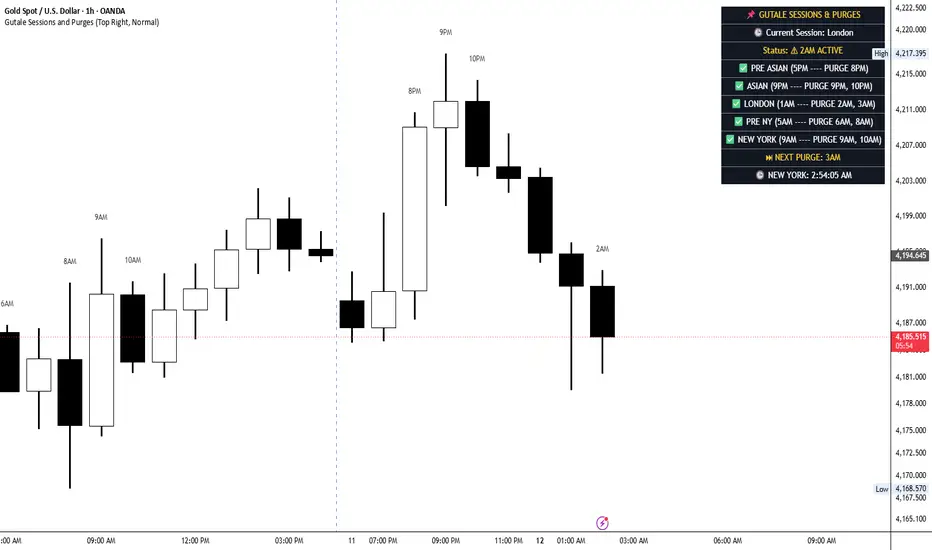
Gutale Sessions and Purges is a Pine Script v6 overlay indicator designed to help traders monitor key trading sessions and selected purge times directly on their charts. It combines a session dashboard, a live New York clock, purge status information, and the next scheduled purge time in one organized display.
The indicator is intended to support structured intraday market analysis by helping traders keep track of important time windows and observe price behavior during their preferred trading sessions.
## Key Features
**1. Trading Session Monitoring**
The dashboard displays five session periods: Pre-Asian, Asian, London, Pre-New York, and New York. This helps traders follow their trading schedule and identify the current session according to New York time.
**2. Purge Time Tracking**
The indicator monitors selected purge hours: 8 PM, 9 PM, 10 PM, 2 AM, 3 AM, 6 AM, 8 AM, and 9 AM and 10 AM. The dashboard displays the current purge status when the chart's candle time falls within one of these hours.
**3. Next Purge Time**
The dashboard displays the next scheduled purge time based on the current New York clock. This gives traders a convenient reference for preparing to observe upcoming time windows.
**4. Purge Labels Above Candles**
On the 1-hour timeframe, the indicator can display time labels such as 8PM, 9PM, 10PM, 2AM, 3AM, 6AM, 8AM, 9AM, and 10AM above the relevant candles. Labels are limited to the most recent five days and can be enabled or disabled in the settings.
**5. New York Clock**
A live clock displays New York time, including hours, minutes, seconds, and AM/PM. This helps traders coordinate their chart analysis with the indicator's scheduled session and purge times.
**6. Customizable Dashboard**
Users can choose the dashboard position from four chart corners and adjust the text size to suit their preferred layout. These settings help maintain a clear and organized chart display.
**7. Alert Condition**
The indicator includes an alert condition for the defined purge hours. Traders can use this condition to configure alerts in TradingView and monitor their selected time windows.
## How to Use
1. Add Gutale Sessions and Purges to your TradingView chart.
2. Check the dashboard to identify the current session and purge status.
3. Review the Next Purge field to see the next scheduled purge hour.
4. Switch to the 1-hour timeframe to view the purge labels above relevant candles.
5. Adjust the dashboard position and text size in the indicator settings.
6. Enable or disable purge labels according to your preferences.
7. Observe price action during the marked periods and combine the timing information with your own trading analysis.
## Originality and Practical Usefulness
Gutale Sessions and Purges brings session monitoring, scheduled purge-time tracking, a New York clock, next-purge information, and configurable dashboard controls into one dedicated chart overlay.
Its purpose is to provide a convenient visual reference for traders who follow a structured session-based trading routine. By keeping relevant time information in one place, the indicator can help reduce the need to track each time window manually.
The indicator focuses on time organization and chart monitoring rather than generating automated trading signals. Its usefulness depends on how traders incorporate the displayed information into their own analysis.
## Important Limitations
This indicator is a time-based chart analysis tool. It does not confirm that a liquidity sweep, market structure shift, reversal, breakout, or other price-action event has occurred.
A marked purge hour represents a scheduled time window, not a guarantee of a trading opportunity. Market behavior can vary across instruments, trading sessions, and market conditions.
The indicator uses the America/New_York time zone for its session and purge calculations. Users should understand the displayed schedule and verify that it aligns with their intended trading routine.
The candle labels are designed for the 1-hour timeframe and are limited to the most recent five days. The dashboard and time labels should be used as references alongside independent price-action analysis and appropriate risk management.
## Disclaimer
Gutale Sessions and Purges is provided for educational and analytical purposes only. It does not provide financial advice, guarantee trading results, or replace independent market analysis. Traders are responsible for their own trading decisions and risk management.
## Overview
Gutale Sessions and Purges is a Pine Script v6 overlay indicator designed to help traders monitor key trading sessions and selected purge times directly on their charts. It combines a session dashboard, a live New York clock, purge status information, and the next scheduled purge time in one organized display.
The indicator is intended to support structured intraday market analysis by helping traders keep track of important time windows and observe price behavior during their preferred trading sessions.
## Key Features
**1. Trading Session Monitoring**
The dashboard displays five session periods: Pre-Asian, Asian, London, Pre-New York, and New York. This helps traders follow their trading schedule and identify the current session according to New York time.
**2. Purge Time Tracking**
The indicator monitors selected purge hours: 8 PM, 9 PM, 10 PM, 2 AM, 3 AM, 6 AM, 8 AM, and 9 AM and 10 AM. The dashboard displays the current purge status when the chart's candle time falls within one of these hours.
**3. Next Purge Time**
The dashboard displays the next scheduled purge time based on the current New York clock. This gives traders a convenient reference for preparing to observe upcoming time windows.
**4. Purge Labels Above Candles**
On the 1-hour timeframe, the indicator can display time labels such as 8PM, 9PM, 10PM, 2AM, 3AM, 6AM, 8AM, 9AM, and 10AM above the relevant candles. Labels are limited to the most recent five days and can be enabled or disabled in the settings.
**5. New York Clock**
A live clock displays New York time, including hours, minutes, seconds, and AM/PM. This helps traders coordinate their chart analysis with the indicator's scheduled session and purge times.
**6. Customizable Dashboard**
Users can choose the dashboard position from four chart corners and adjust the text size to suit their preferred layout. These settings help maintain a clear and organized chart display.
**7. Alert Condition**
The indicator includes an alert condition for the defined purge hours. Traders can use this condition to configure alerts in TradingView and monitor their selected time windows.
## How to Use
1. Add Gutale Sessions and Purges to your TradingView chart.
2. Check the dashboard to identify the current session and purge status.
3. Review the Next Purge field to see the next scheduled purge hour.
4. Switch to the 1-hour timeframe to view the purge labels above relevant candles.
5. Adjust the dashboard position and text size in the indicator settings.
6. Enable or disable purge labels according to your preferences.
7. Observe price action during the marked periods and combine the timing information with your own trading analysis.
## Originality and Practical Usefulness
Gutale Sessions and Purges brings session monitoring, scheduled purge-time tracking, a New York clock, next-purge information, and configurable dashboard controls into one dedicated chart overlay.
Its purpose is to provide a convenient visual reference for traders who follow a structured session-based trading routine. By keeping relevant time information in one place, the indicator can help reduce the need to track each time window manually.
The indicator focuses on time organization and chart monitoring rather than generating automated trading signals. Its usefulness depends on how traders incorporate the displayed information into their own analysis.
## Important Limitations
This indicator is a time-based chart analysis tool. It does not confirm that a liquidity sweep, market structure shift, reversal, breakout, or other price-action event has occurred.
A marked purge hour represents a scheduled time window, not a guarantee of a trading opportunity. Market behavior can vary across instruments, trading sessions, and market conditions.
The indicator uses the America/New_York time zone for its session and purge calculations. Users should understand the displayed schedule and verify that it aligns with their intended trading routine.
The candle labels are designed for the 1-hour timeframe and are limited to the most recent five days. The dashboard and time labels should be used as references alongside independent price-action analysis and appropriate risk management.
## Disclaimer
Gutale Sessions and Purges is provided for educational and analytical purposes only. It does not provide financial advice, guarantee trading results, or replace independent market analysis. Traders are responsible for their own trading decisions and risk management.
Open-source script
In true TradingView spirit, the creator of this script has made it open-source, so that traders can review and verify its functionality. Kudos to the author! While you can use it for free, remember that republishing the code is subject to our House Rules.

Disclaimer
The information and publications are not meant to be, and do not constitute, financial, investment, trading, or other types of advice or recommendations supplied or endorsed by TradingView. Read more in the Terms of Use.
Open-source script
In true TradingView spirit, the creator of this script has made it open-source, so that traders can review and verify its functionality. Kudos to the author! While you can use it for free, remember that republishing the code is subject to our House Rules.
Disclaimer
The information and publications are not meant to be, and do not constitute, financial, investment, trading, or other types of advice or recommendations supplied or endorsed by TradingView. Read more in the Terms of Use.