OPEN-SOURCE SCRIPT
Updated G Trade Sessions
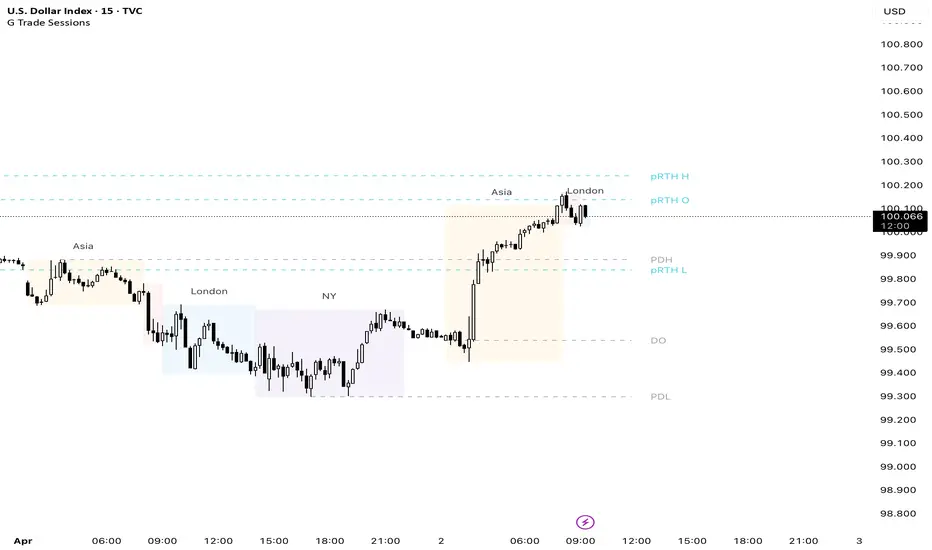
We built this indicator because we was tired of guessing when major markets open and close. It draws simple boxes around each trading session so you can instantly see where the action is.
What it does:
Shows you the four key sessions — Asia, Frankfurt, London, and New York — as transparent boxes right on your chart. Each box marks the high and low of that session, which is super useful for spotting support/resistance levels.
Why I like it:
No clutter — boxes are subtle and don't get in the way
Labels switch from black to white automatically depending on your chart theme (dark or light)
Sessions don't overlap, so the chart stays clean
You can turn off any session you don't care about
Hope you find it useful!
What it does:
Shows you the four key sessions — Asia, Frankfurt, London, and New York — as transparent boxes right on your chart. Each box marks the high and low of that session, which is super useful for spotting support/resistance levels.
Why I like it:
No clutter — boxes are subtle and don't get in the way
Labels switch from black to white automatically depending on your chart theme (dark or light)
Sessions don't overlap, so the chart stays clean
You can turn off any session you don't care about
Hope you find it useful!
Release Notes
We built this indicator because we was tired of guessing when major markets open and close. It draws simple boxes around each trading session so you can instantly see where the action is.What it does:
Shows you the four key sessions — Asia, Frankfurt, London, and New York — as transparent boxes right on your chart. Each box marks the high and low of that session, which is super useful for spotting support/resistance levels.
Why I like it:
No clutter — boxes are subtle and don't get in the way
Labels switch from black to white automatically depending on your chart theme (dark or light)
Sessions don't overlap, so the chart stays clean
You can turn off any session you don't care about
Hope you find it useful!
Release Notes
Hello!Release Notes
- Added fractals (disabled by default)- Session frames are now disabled by default
- Improved caption positioning
Release Notes
Updated fractalsRelease Notes
Updated NY session timing.Release Notes
PWL and PWH addedRelease Notes
RTH added.Release Notes
microupdatesRelease Notes
MicrochangesRelease Notes
Update v1.1:- Added RTH levels (US Indices): Previous RTH Open, High, Low (9:30-16:00 NY time with auto DST adjustment)
- Added PWH/PWL (Previous Week High/Low) with lines starting from exact candle where high/low occurred
- Fixed fractals: now using plotshape() instead of labels - fractals stay anchored to bars when zooming
- Fixed runtime error: added maxLookback limit to prevent historical buffer overflow
- RTH labels renamed to pRTH O, pRTH H, pRTH L to indicate "previous" session
- All RTH options disabled by default (enable in settings for US indices trading)
Release Notes
Updated fractal sizeRelease Notes
Updated fractals position(again)Release Notes
.Release Notes
Updated fractals size and position(again)Release Notes
Updated timing to summer time.Open-source script
In true TradingView spirit, the creator of this script has made it open-source, so that traders can review and verify its functionality. Kudos to the author! While you can use it for free, remember that republishing the code is subject to our House Rules.

Disclaimer
The information and publications are not meant to be, and do not constitute, financial, investment, trading, or other types of advice or recommendations supplied or endorsed by TradingView. Read more in the Terms of Use.
Open-source script
In true TradingView spirit, the creator of this script has made it open-source, so that traders can review and verify its functionality. Kudos to the author! While you can use it for free, remember that republishing the code is subject to our House Rules.
Disclaimer
The information and publications are not meant to be, and do not constitute, financial, investment, trading, or other types of advice or recommendations supplied or endorsed by TradingView. Read more in the Terms of Use.