OPEN-SOURCE SCRIPT
HOD Break Markers
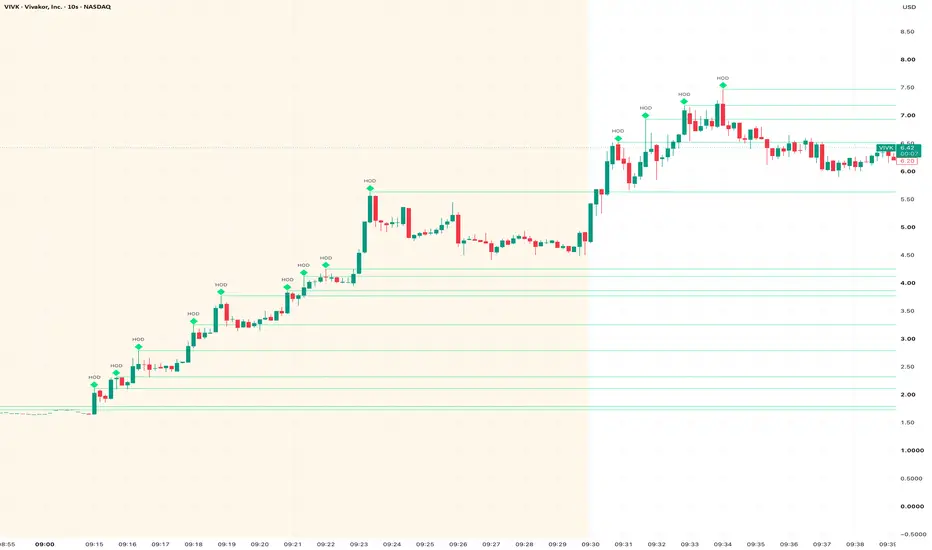
This indicator identifies and tracks successive intraday highs of day on fast charts such as 10-second and 1-minute timeframes.
A new HOD is confirmed when:
1. A candle reaches the highest price of the tracking period.
2. The following candle closes with a lower high.
Once confirmed, the indicator places an outlined marker and an `HOD` label above the candle. If a later candle trades above that price—even briefly with its wick—the marker becomes filled and the horizontal level changes to its “broken” colour.
Customization
You can adjust:
- Marker shape: diamond, square, circle, triangle, or none.
- Marker size and `HOD` text size independently.
- Marker, text, and level colours.
- Custom label text, such as `HOD` or `High of Day`.
- Horizontal line style, width, and visibility.
- Whether levels stop at the end of the day or extend across future days.
Tracking windows
- Exchange day: Uses every visible chart bar and resets each exchange day.
- Custom session: Tracks only a selected session, such as `0400-2000` for US extended hours or `0930-1600` for the regular session.
Premarket highs require extended-hours bars to be enabled on the TradingView chart.
Alerts
The script provides alert conditions for:
- A newly confirmed HOD.
- Price breaking a confirmed HOD.
A new HOD is confirmed when:
1. A candle reaches the highest price of the tracking period.
2. The following candle closes with a lower high.
Once confirmed, the indicator places an outlined marker and an `HOD` label above the candle. If a later candle trades above that price—even briefly with its wick—the marker becomes filled and the horizontal level changes to its “broken” colour.
Customization
You can adjust:
- Marker shape: diamond, square, circle, triangle, or none.
- Marker size and `HOD` text size independently.
- Marker, text, and level colours.
- Custom label text, such as `HOD` or `High of Day`.
- Horizontal line style, width, and visibility.
- Whether levels stop at the end of the day or extend across future days.
Tracking windows
- Exchange day: Uses every visible chart bar and resets each exchange day.
- Custom session: Tracks only a selected session, such as `0400-2000` for US extended hours or `0930-1600` for the regular session.
Premarket highs require extended-hours bars to be enabled on the TradingView chart.
Alerts
The script provides alert conditions for:
- A newly confirmed HOD.
- Price breaking a confirmed HOD.
Open-source script
In true TradingView spirit, the creator of this script has made it open-source, so that traders can review and verify its functionality. Kudos to the author! While you can use it for free, remember that republishing the code is subject to our House Rules.

Disclaimer
The information and publications are not meant to be, and do not constitute, financial, investment, trading, or other types of advice or recommendations supplied or endorsed by TradingView. Read more in the Terms of Use.
Open-source script
In true TradingView spirit, the creator of this script has made it open-source, so that traders can review and verify its functionality. Kudos to the author! While you can use it for free, remember that republishing the code is subject to our House Rules.
Disclaimer
The information and publications are not meant to be, and do not constitute, financial, investment, trading, or other types of advice or recommendations supplied or endorsed by TradingView. Read more in the Terms of Use.