Internal & External MSS
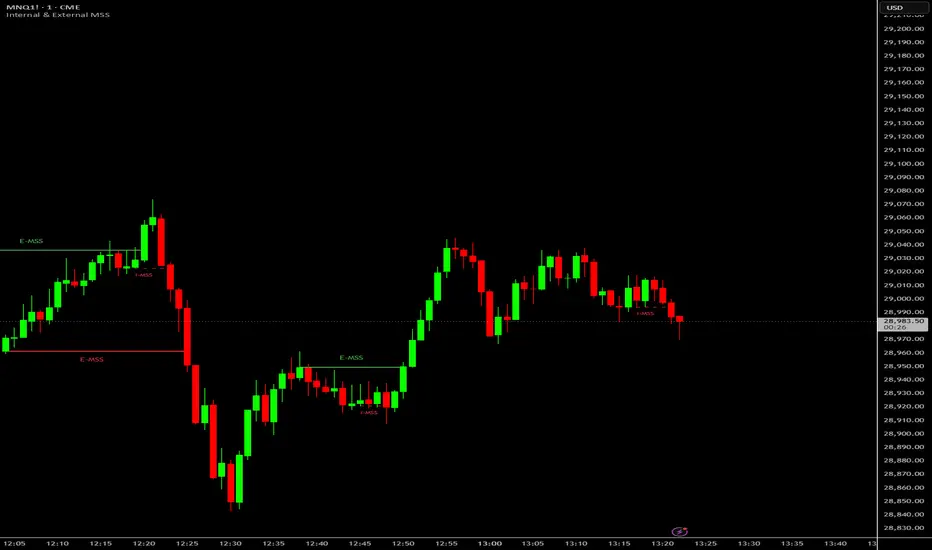
Here is a quick breakdown of what it does and its key features:
Dual Tracking (Internal vs. External): It calculates two different sets of market swings simultaneously. It tracks smaller, short-term price movements (Internal MSS) and larger, structural price movements (External MSS).
Overlap Prevention: To keep your chart clean, if a short-term Internal shift and a long-term External shift occur at the exact same price level, the script is programmed to only draw the more significant External level.
Wick vs. Body Calculation: You can toggle the settings to define market structure using either the extreme highs/lows of the candle wicks, or the real bodies (open/close) of the candles.
Smart Label Placement: Breakout lines are drawn horizontally from the broken swing point, and text labels (like "E-MSS" or "i-MSS") automatically float above or below the lines so they don't collide with the drawings.
Fully Customizable Visuals: Through the settings menu, you can easily change the line colors, thickness, dashed/solid styles, and the exact text used for the labels without needing to edit the code again.
Dual Tracking (Internal vs. External): It calculates two different sets of market swings simultaneously. It tracks smaller, short-term price movements (Internal MSS) and larger, structural price movements (External MSS).
Overlap Prevention: To keep your chart clean, if a short-term Internal shift and a long-term External shift occur at the exact same price level, the script is programmed to only draw the more significant External level.
Wick vs. Body Calculation: You can toggle the settings to define market structure using either the extreme highs/lows of the candle wicks, or the real bodies (open/close) of the candles.
Smart Label Placement: Breakout lines are drawn horizontally from the broken swing point, and text labels (like "E-MSS" or "i-MSS") automatically float above or below the lines so they don't collide with the drawings.
Fully Customizable Visuals: Through the settings menu, you can easily change the line colors, thickness, dashed/solid styles, and the exact text used for the labels without needing to edit the code again.

Disclaimer
The information and publications are not meant to be, and do not constitute, financial, investment, trading, or other types of advice or recommendations supplied or endorsed by TradingView. Read more in the Terms of Use.
Disclaimer
The information and publications are not meant to be, and do not constitute, financial, investment, trading, or other types of advice or recommendations supplied or endorsed by TradingView. Read more in the Terms of Use.