Position Size & R-Multiple Calculator & Lot Size Calculator
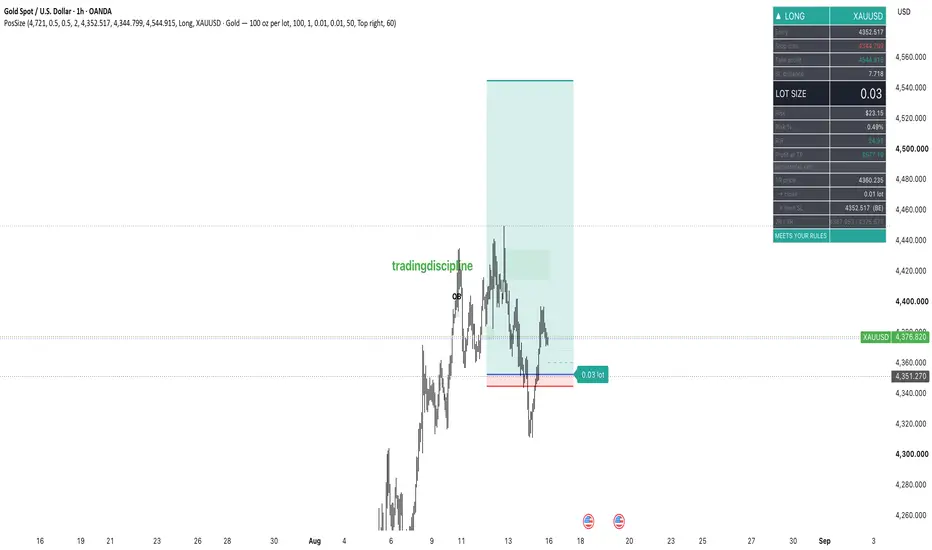
Calculates your lot size from a fixed percentage of account risk, so position size is never a decision you make in the heat of a setup.
Drag Entry, Stop Loss and Take Profit on the chart. The script returns the exact lot to trade, the dollar and percentage risk, the R:R, and a mechanical exit plan — all recalculating live as you move the levels.
What it shows
Lot size — derived from account balance, risk %, and stop distance. Always rounded down to your broker's lot step, so you can never accidentally size above your limit.
Risk in $ and % — turns red if the trade breaches your hard cap.
R:R — flagged if it falls below your minimum.
1R / 2R / 3R levels drawn on the chart, plus the exact half-lot to close at 1R and the breakeven stop that follows.
Verdict bar — a single green/orange/red line telling you whether the trade meets your own rules before you click buy.
Setup
Set your account balance and risk % once in Settings. Choose a contract preset (gold, silver, FX major) or enter a custom contract size. For non-USD-quoted symbols, set the quote conversion rate.
Why fixed risk
Inconsistent position sizing is what turns a run of small losses into a hole. Sizing every trade to the same percentage means your worst trade costs the same as your best one — and a losing streak stays survivable.
Not financial advice. This is a sizing tool, not a signal generator; it takes no view on whether a trade is worth taking.
Drag Entry, Stop Loss and Take Profit on the chart. The script returns the exact lot to trade, the dollar and percentage risk, the R:R, and a mechanical exit plan — all recalculating live as you move the levels.
What it shows
Lot size — derived from account balance, risk %, and stop distance. Always rounded down to your broker's lot step, so you can never accidentally size above your limit.
Risk in $ and % — turns red if the trade breaches your hard cap.
R:R — flagged if it falls below your minimum.
1R / 2R / 3R levels drawn on the chart, plus the exact half-lot to close at 1R and the breakeven stop that follows.
Verdict bar — a single green/orange/red line telling you whether the trade meets your own rules before you click buy.
Setup
Set your account balance and risk % once in Settings. Choose a contract preset (gold, silver, FX major) or enter a custom contract size. For non-USD-quoted symbols, set the quote conversion rate.
Why fixed risk
Inconsistent position sizing is what turns a run of small losses into a hole. Sizing every trade to the same percentage means your worst trade costs the same as your best one — and a losing streak stays survivable.
Not financial advice. This is a sizing tool, not a signal generator; it takes no view on whether a trade is worth taking.

Disclaimer
The information and publications are not meant to be, and do not constitute, financial, investment, trading, or other types of advice or recommendations supplied or endorsed by TradingView. Read more in the Terms of Use.
Disclaimer
The information and publications are not meant to be, and do not constitute, financial, investment, trading, or other types of advice or recommendations supplied or endorsed by TradingView. Read more in the Terms of Use.