Gaps 15s-15m Final - Forex Fixed
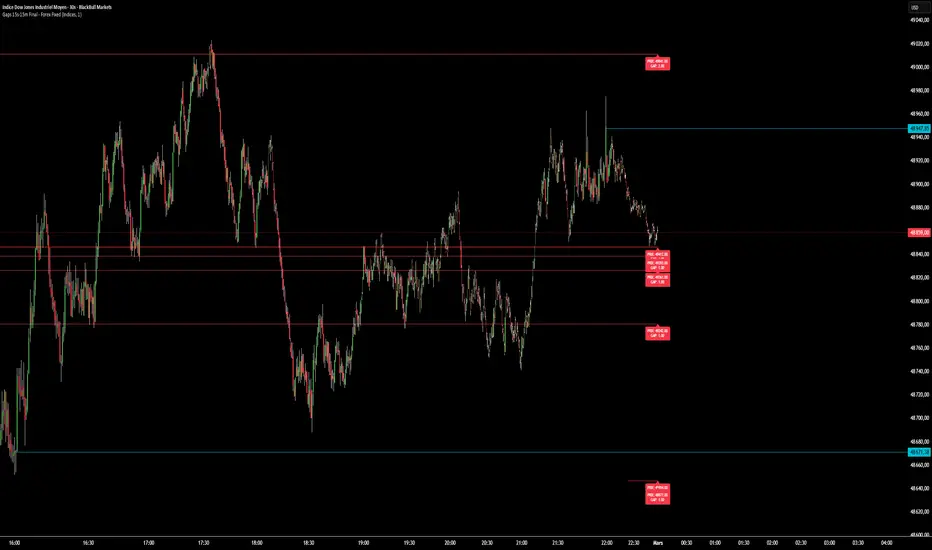
This indicator is designed for precision scalping. It identifies liquidity gaps between two candles on the 15-second timeframe and projects them as horizontal support or resistance zones.
Fill Logic: Unlike traditional indicators, this one automatically cleans your chart.
As soon as a candle wick closes the gap, the zone and its price label disappear instantly to avoid any visual confusion.
Multi-Timeframe Visibility: Once detected in 15 seconds, the levels remain fixed and visible if you move to 1m, 5m, or 15m charts, allowing you to see institutional rebound zones on broader timeframes.
Numerical Settings (Configuration): To access these settings, click on the indicator's gear icon.
Here are the exact numbers to enter depending on what you are trading: 1.
For Indices (NASDAQ, DAX, S&P 500)
The indices move in whole points. The setting should be less sensitive than for Forex.
Parameter Recommended Value
Effect Asset Type Indices Enables point calculation mode.
Sensitivity 1.0 Detects gaps of 0.1 pip. Sensitivity (Alternative) 5.0 Only shows large gaps of 0.5 pip (more reliable). 2. For Forex (EUR/USD, GBP/USD, etc.)
Forex moves in micro-fractions (pips). Without these settings, the indicator will not be displayed. Parameter Recommended Value Effect Asset Type Forex Enables fractional pip calculation mode. Sensitivity 1.0 Detects gaps of 0.1 pip (0.00001). Sensitivity (Filter) 3.0 Detects gaps of 0.3 pip (filters out spread noise).
Quick Start Guide: On the 15-second timeframe: Use a sensitivity of 1.0.
This is where the indicator is most responsive. On the 15-minute timeframe: If you find there are too many small residual areas, increase the sensitivity to 2.0 or higher to retain only the major imbalance zones that have not yet been filled. Visual Errors: If no zones appear on EUR/USD, double-check that you have selected Forex in the indicator's dropdown menu.
Fill Logic: Unlike traditional indicators, this one automatically cleans your chart.
As soon as a candle wick closes the gap, the zone and its price label disappear instantly to avoid any visual confusion.
Multi-Timeframe Visibility: Once detected in 15 seconds, the levels remain fixed and visible if you move to 1m, 5m, or 15m charts, allowing you to see institutional rebound zones on broader timeframes.
Numerical Settings (Configuration): To access these settings, click on the indicator's gear icon.
Here are the exact numbers to enter depending on what you are trading: 1.
For Indices (NASDAQ, DAX, S&P 500)
The indices move in whole points. The setting should be less sensitive than for Forex.
Parameter Recommended Value
Effect Asset Type Indices Enables point calculation mode.
Sensitivity 1.0 Detects gaps of 0.1 pip. Sensitivity (Alternative) 5.0 Only shows large gaps of 0.5 pip (more reliable). 2. For Forex (EUR/USD, GBP/USD, etc.)
Forex moves in micro-fractions (pips). Without these settings, the indicator will not be displayed. Parameter Recommended Value Effect Asset Type Forex Enables fractional pip calculation mode. Sensitivity 1.0 Detects gaps of 0.1 pip (0.00001). Sensitivity (Filter) 3.0 Detects gaps of 0.3 pip (filters out spread noise).
Quick Start Guide: On the 15-second timeframe: Use a sensitivity of 1.0.
This is where the indicator is most responsive. On the 15-minute timeframe: If you find there are too many small residual areas, increase the sensitivity to 2.0 or higher to retain only the major imbalance zones that have not yet been filled. Visual Errors: If no zones appear on EUR/USD, double-check that you have selected Forex in the indicator's dropdown menu.

Disclaimer
The information and publications are not meant to be, and do not constitute, financial, investment, trading, or other types of advice or recommendations supplied or endorsed by TradingView. Read more in the Terms of Use.
Disclaimer
The information and publications are not meant to be, and do not constitute, financial, investment, trading, or other types of advice or recommendations supplied or endorsed by TradingView. Read more in the Terms of Use.