OPEN-SOURCE SCRIPT
Updated ZeroGEX Daily Gamma Levels
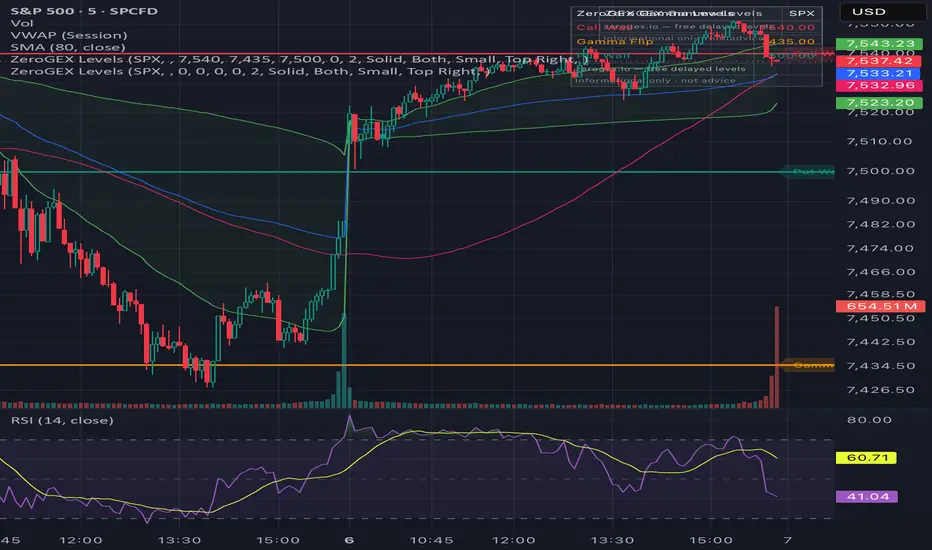
Manually plot key options-positioning levels on your chart: Gamma Flip,
Call Wall, Put Wall, and Max Gamma / Pin.
These levels are used by SPY, SPX, and QQQ traders to identify potential
support, resistance, pinning zones, and volatility-regime shifts.
HOW TO USE
1. Add the indicator.
2. Open Settings and enter today's Gamma Flip, Call Wall, Put Wall, and
Max Gamma / Pin. Each draws as a horizontal line with a price label,
plus an on-chart info box. Set any level to 0 to hide it. Optional
price-cross alerts are included.
This script is manual-entry only — it does not pull data. Daily gamma
levels are published for free at zerogex.io.
For informational and educational purposes only. Not financial advice.
Call Wall, Put Wall, and Max Gamma / Pin.
These levels are used by SPY, SPX, and QQQ traders to identify potential
support, resistance, pinning zones, and volatility-regime shifts.
HOW TO USE
1. Add the indicator.
2. Open Settings and enter today's Gamma Flip, Call Wall, Put Wall, and
Max Gamma / Pin. Each draws as a horizontal line with a price label,
plus an on-chart info box. Set any level to 0 to hide it. Optional
price-cross alerts are included.
This script is manual-entry only — it does not pull data. Daily gamma
levels are published for free at zerogex.io.
For informational and educational purposes only. Not financial advice.
Release Notes
The label background was 82% transparent, so the same-colored line showed through the text. The fix is a near-opaque chip behind the text.Release Notes
Renamed the 4th level from "Max Gamma / Pin" to "Max Pain."Open-source script
In true TradingView spirit, the creator of this script has made it open-source, so that traders can review and verify its functionality. Kudos to the author! While you can use it for free, remember that republishing the code is subject to our House Rules.

Disclaimer
The information and publications are not meant to be, and do not constitute, financial, investment, trading, or other types of advice or recommendations supplied or endorsed by TradingView. Read more in the Terms of Use.
Open-source script
In true TradingView spirit, the creator of this script has made it open-source, so that traders can review and verify its functionality. Kudos to the author! While you can use it for free, remember that republishing the code is subject to our House Rules.
Disclaimer
The information and publications are not meant to be, and do not constitute, financial, investment, trading, or other types of advice or recommendations supplied or endorsed by TradingView. Read more in the Terms of Use.