Updated
[blackcat] L1 Main Force Monitor
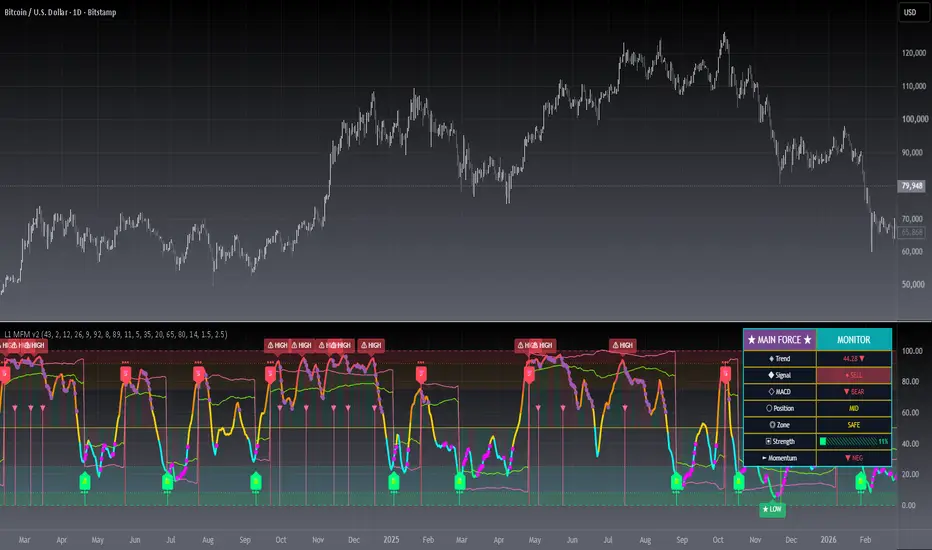
█ OVERVIEW
The Main Force Monitor is a comprehensive oscillator-based indicator designed to track institutional money flow and identify optimal entry and exit points. It combines price position analysis with MACD divergence detection to generate high-probability trading signals.
█ CONCEPTS
This indicator utilizes a dual-smoothed price position algorithm combined with MACD histogram divergence analysis to identify main force accumulation and distribution phases.
Key principles:
• Price position relative to range extremes reveals institutional activity
• MACD divergence signals potential trend reversals
• Multi-condition confirmation reduces false signals
• Zone-based analysis identifies high-probability entry areas
█ HOW TO USE
1 — Add the indicator to your chart from the indicators menu
2 — Observe the main trend line for overall market direction
3 — Watch for B signals in oversold zones for potential long entries
4 — Watch for S signals in overbought zones for potential exit/short opportunities
5 — Use the status table for quick reference of current market conditions
Input Parameters
Trend Settings
• Trend Length: Period for calculating price range extremes - default 43
• Smooth Length: Smoothing factor for the main trend line - default 2
MACD Settings
• MACD Fast Length: Fast EMA period for MACD calculation - default 12
• MACD Slow Length: Slow EMA period for MACD calculation - default 26
• MACD Signal Length: Signal line period for MACD - default 9
Threshold Settings
• Overbought Level: Upper threshold for overbought condition - default 92
• Oversold Level: Lower threshold for oversold condition - default 8
• Trend High Threshold: High zone threshold for sell signals - default 89
• Trend Low Threshold: Low zone threshold for buy signals - default 11
Signal Settings
• Min Bars Between Signals: Minimum candle spacing between signals - default 5
Visual Settings
• Show Status Table: Toggle the information panel display
• Show BS Labels: Toggle buy/sell signal labels
• Show Zone Fills: Toggle colored zone backgrounds
• Show Trend Colors: Toggle dynamic trend line coloring
• Show Momentum Bars: Toggle momentum histogram display
█ SIGNALS
Visual Elements
• B Label: Buy signal triggered when trend is oversold and conditions align
• S Label: Sell signal triggered when trend is overbought and conditions align
• ▲ Arrow: Trend crossed above oversold level - potential bullish transition
• ▼ Arrow: Trend crossed below overbought level - potential bearish transition
• ★ LOW Label: Price entering oversold zone - watch for reversal opportunity
• ⚠ HIGH Label: Price entering overbought zone - exercise caution
Color Coding
• Green zone 0-8: Oversold territory - potential buy opportunity
• Cyan zone 8-25: Low opportunity area
• Gold zone 25-75: Neutral trading range
• Orange zone 75-92: High risk area
• Red zone 92-100: Overbought territory - potential sell opportunity
Status Table Information
• Trend: Current trend value with direction indicator
• Signal: Current signal status - BUY, SELL, or NEUTRAL
• MACD: MACD histogram bias - BULL or BEAR
• Position: Current price position - HIGH, MID, or LOW
• Zone: Market zone classification
• Strength: Visual strength bar showing trend intensity
• Momentum: Current momentum direction
█ LIMITATIONS
• Best suited for trending markets - may produce false signals in choppy conditions
• Signals are based on historical data and may lag during rapid market moves
• Default parameters are optimized for general use - adjustment may be needed for specific assets
• Does not account for fundamental analysis or external market factors
• Should be used in conjunction with other analysis methods for confirmation
█ NOTES
• The indicator uses a signal frequency control to prevent consecutive signals
• Buy signals use a relaxed OR logic for more frequent opportunities
• Sell signals require ALL conditions to be met for stricter confirmation
• The main trend line changes color based on its position in the 0-100 range
• Works on all timeframes but recommended for 15-minute and above
═════════════════════════════════════════════════════════════════════════
For questions or feedback, use comments section below.
The Main Force Monitor is a comprehensive oscillator-based indicator designed to track institutional money flow and identify optimal entry and exit points. It combines price position analysis with MACD divergence detection to generate high-probability trading signals.
█ CONCEPTS
This indicator utilizes a dual-smoothed price position algorithm combined with MACD histogram divergence analysis to identify main force accumulation and distribution phases.
Key principles:
• Price position relative to range extremes reveals institutional activity
• MACD divergence signals potential trend reversals
• Multi-condition confirmation reduces false signals
• Zone-based analysis identifies high-probability entry areas
█ HOW TO USE
1 — Add the indicator to your chart from the indicators menu
2 — Observe the main trend line for overall market direction
3 — Watch for B signals in oversold zones for potential long entries
4 — Watch for S signals in overbought zones for potential exit/short opportunities
5 — Use the status table for quick reference of current market conditions
Input Parameters
Trend Settings
• Trend Length: Period for calculating price range extremes - default 43
• Smooth Length: Smoothing factor for the main trend line - default 2
MACD Settings
• MACD Fast Length: Fast EMA period for MACD calculation - default 12
• MACD Slow Length: Slow EMA period for MACD calculation - default 26
• MACD Signal Length: Signal line period for MACD - default 9
Threshold Settings
• Overbought Level: Upper threshold for overbought condition - default 92
• Oversold Level: Lower threshold for oversold condition - default 8
• Trend High Threshold: High zone threshold for sell signals - default 89
• Trend Low Threshold: Low zone threshold for buy signals - default 11
Signal Settings
• Min Bars Between Signals: Minimum candle spacing between signals - default 5
Visual Settings
• Show Status Table: Toggle the information panel display
• Show BS Labels: Toggle buy/sell signal labels
• Show Zone Fills: Toggle colored zone backgrounds
• Show Trend Colors: Toggle dynamic trend line coloring
• Show Momentum Bars: Toggle momentum histogram display
█ SIGNALS
Visual Elements
• B Label: Buy signal triggered when trend is oversold and conditions align
• S Label: Sell signal triggered when trend is overbought and conditions align
• ▲ Arrow: Trend crossed above oversold level - potential bullish transition
• ▼ Arrow: Trend crossed below overbought level - potential bearish transition
• ★ LOW Label: Price entering oversold zone - watch for reversal opportunity
• ⚠ HIGH Label: Price entering overbought zone - exercise caution
Color Coding
• Green zone 0-8: Oversold territory - potential buy opportunity
• Cyan zone 8-25: Low opportunity area
• Gold zone 25-75: Neutral trading range
• Orange zone 75-92: High risk area
• Red zone 92-100: Overbought territory - potential sell opportunity
Status Table Information
• Trend: Current trend value with direction indicator
• Signal: Current signal status - BUY, SELL, or NEUTRAL
• MACD: MACD histogram bias - BULL or BEAR
• Position: Current price position - HIGH, MID, or LOW
• Zone: Market zone classification
• Strength: Visual strength bar showing trend intensity
• Momentum: Current momentum direction
█ LIMITATIONS
• Best suited for trending markets - may produce false signals in choppy conditions
• Signals are based on historical data and may lag during rapid market moves
• Default parameters are optimized for general use - adjustment may be needed for specific assets
• Does not account for fundamental analysis or external market factors
• Should be used in conjunction with other analysis methods for confirmation
█ NOTES
• The indicator uses a signal frequency control to prevent consecutive signals
• Buy signals use a relaxed OR logic for more frequent opportunities
• Sell signals require ALL conditions to be met for stricter confirmation
• The main trend line changes color based on its position in the 0-100 range
• Works on all timeframes but recommended for 15-minute and above
═════════════════════════════════════════════════════════════════════════
For questions or feedback, use comments section below.
Release Notes
█ OVERVIEWblackcat L1 Main Force Monitor is an oscillator that maps price position and momentum into a 0-100 scale to highlight institutional buying and selling pressure. It plots a smoothed Main Force Trend line plus clear Buy and Sell signals to help traders time reversals and trend continuations.
█ CONCEPTS
The script transforms the price range into a normalized 0-100 position, then double-smooths it into a Main Force Trend. A MACD histogram and recent price structure are combined with the trend to filter signals. Signals are governed by a state machine with edge triggering and a cooldown so each Buy or Sell fires once per opportunity.
Key principles:
• Trend normalization: price position is expressed on a 0-100 scale
• Dual confirmation: trend, MACD and price action must agree
• Symmetric logic: Buy and Sell use mirrored conditions for balanced signals
• Signal governance: edge-trigger plus cooldown reduces whipsaws
█ HOW TO USE
1 — Add the indicator to any chart; it appears in its own pane below price.
2 — Read the Main Force Trend line: above 80 signals strong overheating, below 20 signals deep weakness.
3 — Act on labels: B marks a Buy opportunity, S marks a Sell opportunity.
Input Parameters
• Trend Length: lookback for price-range normalization (default 43)
• Smooth Length: smoothing passes for the trend line (default 2)
• MACD Fast / Slow / Signal: confirmation settings (12 / 26 / 9)
• Overbought / Oversold: zone boundaries (92 / 8)
• Trend High / Low Threshold: strict-signal trigger levels (89 / 11)
• Min Bars Between Signals: cooldown between repeated signals (default 5)
• Alternate Buy/Sell: enforce alternating signals via state machine (on)
• Secondary Buy/Sell Zone: relaxed signal band for more frequent signals
• Stop / Target (xATR): distance of reference levels from the signal
• Show Target/Stop, Zone Fills, Trend Colors, Momentum, State Bg, Table: visual toggles
█ FEATURES
• Main Force Trend line with dynamic gradient coloring by strength
• Buy (B) and Sell (S) labels plus histogram markers
• ATR-based Target and Stop reference lines on the oscillator scale
• Optional background tint reflecting the current signal bias
• Vibrant zone fills for overbought / oversold / risk / opportunity
• Momentum bars and a live status dashboard table
• Full alertcondition set: Buy, Sell, Cross, Zone, Target, Stop
█ SIGNALS
Visual Elements
• B label (green): potential Buy when the trend is low and turning up
• S label (red): potential Sell when the trend is high and turning down
• ▲ / ▼ markers: trend crossing above oversold or below overbought
• Target (lime) / Stop (pink) lines: reference levels after a signal
• Status table: trend value, signal, MACD, zone, strength, momentum
█ IMPLEMENTATION NOTES
Open-source: built with ta.rma for smoothing, ta.ema for MACD, ta.atr for the Target/Stop bands and ta.crossover / ta.crossunder for zone transitions. All calculations use closed-bar values, so signals do not repaint intrabar. Signals are edge-triggered and pass through a cooldown and an optional alternating state machine.
█ LIMITATIONS
• Oscillator signals can lag at fast turning points
• May produce more signals in choppy, range-bound markets
• Best on timeframes from 15m to daily; weaker below 5m
• Not a standalone trading system - use with price action and risk control
█ NOTES
• Free and open source; use and modify freely, attribution appreciated
• All inputs are exposed so behavior can be tuned per market
════════════════════════════════════════════════════════════════════════
For questions or feedback, please use the comments section below.
Feel free to use and modify - attribution appreciated.

Don't miss out! The first and most important thing to do is to join my Discord chat now! Click here to start your adventure: discord.com/invite/ZTGpQJq My new github for more pine development soon: github.com/wxt-coder
Disclaimer
The information and publications are not meant to be, and do not constitute, financial, investment, trading, or other types of advice or recommendations supplied or endorsed by TradingView. Read more in the Terms of Use.
Don't miss out! The first and most important thing to do is to join my Discord chat now! Click here to start your adventure: discord.com/invite/ZTGpQJq My new github for more pine development soon: github.com/wxt-coder
Disclaimer
The information and publications are not meant to be, and do not constitute, financial, investment, trading, or other types of advice or recommendations supplied or endorsed by TradingView. Read more in the Terms of Use.