VWAP [D/W/M]
VWAP Suite [D/W/M]
OVERVIEW
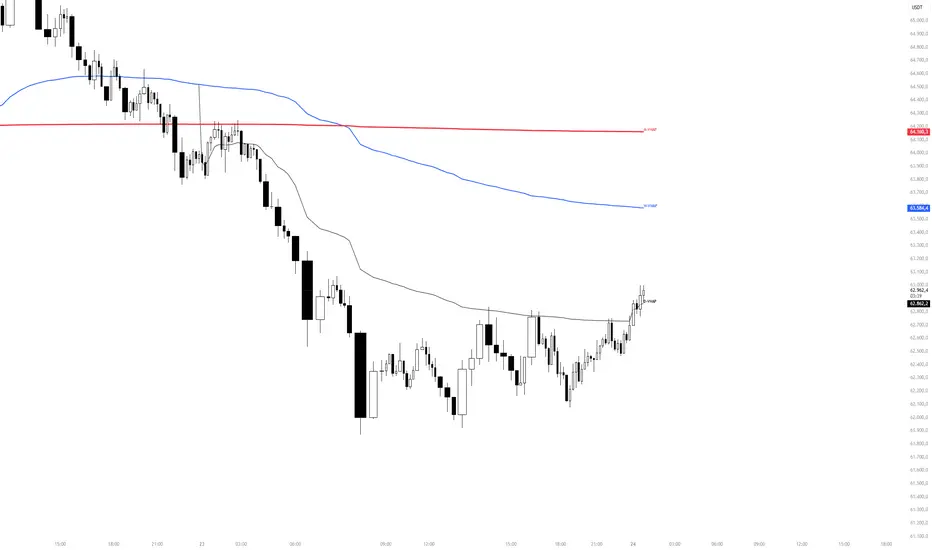
VWAP Suite [D/W/M] plots Daily, Weekly, and Monthly Volume-Weighted Average Price on a single chart, with independent visibility, color, and line width for each. It's built for traders who use multiple VWAP anchors at once (e.g., daily VWAP for intraday context alongside weekly/monthly VWAP for higher-timeframe bias) without needing three separate indicators.
HOW IT WORKS
Each VWAP (Daily/Weekly/Monthly) is calculated as a running sum of typical price (hlc3) × volume, divided by cumulative volume, reset at the start of each new day/week/month. The calculation can run either on the chart's own timeframe or on an independently selected timeframe via request.security(), so a Daily VWAP can, for example, be calculated from 1-minute data even while viewing a 4-hour chart for a smoother, more accurate line.
To keep higher-timeframe charts uncluttered, each VWAP line has its own maximum display timeframe — once the chart timeframe exceeds that threshold, the corresponding line is automatically hidden (e.g., Daily VWAP only shows up to 30m by default, since a daily VWAP has little meaning on a weekly chart).
The script also includes a configurable alert system: it can fire when price comes within a chosen percentage distance of any of the three VWAPs, optionally restricted to a specific hour-range time window in a selectable timezone.
SETTINGS
- VWAP Display: toggle, color, and line width for Daily/Weekly/Monthly VWAP.
- Calculation Timeframe: per VWAP, choose "Chart" (use the chart's own timeframe) or an independent timeframe (seconds to 4h, or Daily) the VWAP is computed from.
- Display Timeframe Filter: maximum chart timeframe at which each VWAP line is still shown.
- Alerts: global time-window filter (active hours + timezone), minimum distance to VWAP (%) required to trigger, and individual enable switches for Daily/Weekly/Monthly alerts plus a combined "any VWAP" alert condition.
USAGE
Use the Daily VWAP as an intraday fair-value reference, and the Weekly/Monthly VWAPs as higher-timeframe trend/bias levels. Price holding above/below a VWAP is commonly read as directional bias; reactions at a VWAP (rejection, reclaim) are often used as confluence with other levels. The built-in alerts let you get notified when price approaches any of these levels without watching the chart continuously.
LIMITATIONS
- VWAP values calculated on a different (lower) timeframe via request.security() rely on that timeframe's data being available for the symbol.
- Like any cumulative VWAP, daily/weekly/monthly resets depend on the exchange's session and calendar data; behavior can vary slightly across symbols/exchanges with non-standard sessions.
- Alerts only evaluate while the script is running on an open chart, or via TradingView's standard alert infrastructure once configured from this indicator.
OVERVIEW
VWAP Suite [D/W/M] plots Daily, Weekly, and Monthly Volume-Weighted Average Price on a single chart, with independent visibility, color, and line width for each. It's built for traders who use multiple VWAP anchors at once (e.g., daily VWAP for intraday context alongside weekly/monthly VWAP for higher-timeframe bias) without needing three separate indicators.
HOW IT WORKS
Each VWAP (Daily/Weekly/Monthly) is calculated as a running sum of typical price (hlc3) × volume, divided by cumulative volume, reset at the start of each new day/week/month. The calculation can run either on the chart's own timeframe or on an independently selected timeframe via request.security(), so a Daily VWAP can, for example, be calculated from 1-minute data even while viewing a 4-hour chart for a smoother, more accurate line.
To keep higher-timeframe charts uncluttered, each VWAP line has its own maximum display timeframe — once the chart timeframe exceeds that threshold, the corresponding line is automatically hidden (e.g., Daily VWAP only shows up to 30m by default, since a daily VWAP has little meaning on a weekly chart).
The script also includes a configurable alert system: it can fire when price comes within a chosen percentage distance of any of the three VWAPs, optionally restricted to a specific hour-range time window in a selectable timezone.
SETTINGS
- VWAP Display: toggle, color, and line width for Daily/Weekly/Monthly VWAP.
- Calculation Timeframe: per VWAP, choose "Chart" (use the chart's own timeframe) or an independent timeframe (seconds to 4h, or Daily) the VWAP is computed from.
- Display Timeframe Filter: maximum chart timeframe at which each VWAP line is still shown.
- Alerts: global time-window filter (active hours + timezone), minimum distance to VWAP (%) required to trigger, and individual enable switches for Daily/Weekly/Monthly alerts plus a combined "any VWAP" alert condition.
USAGE
Use the Daily VWAP as an intraday fair-value reference, and the Weekly/Monthly VWAPs as higher-timeframe trend/bias levels. Price holding above/below a VWAP is commonly read as directional bias; reactions at a VWAP (rejection, reclaim) are often used as confluence with other levels. The built-in alerts let you get notified when price approaches any of these levels without watching the chart continuously.
LIMITATIONS
- VWAP values calculated on a different (lower) timeframe via request.security() rely on that timeframe's data being available for the symbol.
- Like any cumulative VWAP, daily/weekly/monthly resets depend on the exchange's session and calendar data; behavior can vary slightly across symbols/exchanges with non-standard sessions.
- Alerts only evaluate while the script is running on an open chart, or via TradingView's standard alert infrastructure once configured from this indicator.

Disclaimer
The information and publications are not meant to be, and do not constitute, financial, investment, trading, or other types of advice or recommendations supplied or endorsed by TradingView. Read more in the Terms of Use.
Disclaimer
The information and publications are not meant to be, and do not constitute, financial, investment, trading, or other types of advice or recommendations supplied or endorsed by TradingView. Read more in the Terms of Use.