OPEN-SOURCE SCRIPT
Updated Daily Vertical Lines
Here's a clean, publish-ready description:
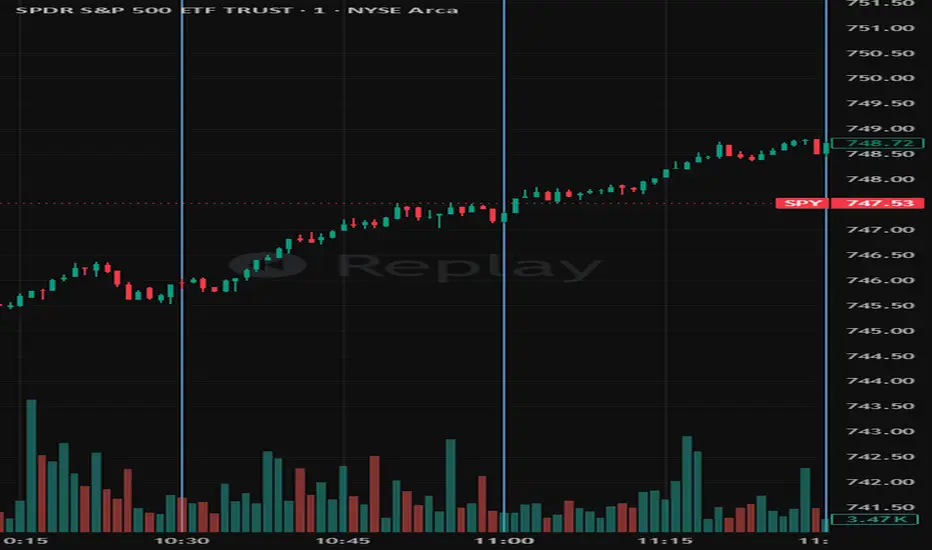
Daily Vertical Lines (ET) — Session Time Markers
Mark key intraday times directly on your chart with up to 10 fully configurable vertical lines, all anchored to Eastern Time (America/New_York) with automatic DST handling.
Purpose
Designed for traders who work off fixed intraday time levels — open auctions, macro releases, session midpoints, settlement windows, or any recurring time-based setup. Each line fires once per trading day at its configured ET time and is automatically cleared and redrawn fresh every day at 4:00 AM ET.
Features
10 independent vertical lines, each fully configurable
Per-line controls: enable/disable line, enable/disable label, time (hour + minute in ET), color, label text, line style (Solid / Dashed / Dotted), and line width
Lines and labels are independently toggleable — run clean lines with no text, or labels only, or both
Full-height vertical lines that extend across the entire chart regardless of price scale or zoom level
Automatic daily reset at 4:00 AM ET — previous day's objects are deleted and a fresh set is drawn for the current day
Duplicate prevention — each line can only fire once per day regardless of bar replays or real-time ticks
DST-aware via Pine's native America/New_York timezone — no manual offset adjustments needed
Default Times
9:50 · 10:00 · 10:30 · 11:00 · 12:00 · 12:30 · 1:00 · 1:30 · 2:00 · 3:48
Compatibility
Works on any intraday timeframe. For best results use a resolution fine enough that each configured time has a matching candle (e.g. a 1-minute or 5-minute chart). Not designed for daily or higher timeframes.
Notes
All times are Eastern Time. The script handles EST/EDT transitions automatically.
The 4:00 AM reset means lines from a prior session are always removed before the pre-market open.
Label text is fully editable — rename any line to match your own session labels, news events, or strategy terminology.
Daily Vertical Lines (ET) — Session Time Markers
Mark key intraday times directly on your chart with up to 10 fully configurable vertical lines, all anchored to Eastern Time (America/New_York) with automatic DST handling.
Purpose
Designed for traders who work off fixed intraday time levels — open auctions, macro releases, session midpoints, settlement windows, or any recurring time-based setup. Each line fires once per trading day at its configured ET time and is automatically cleared and redrawn fresh every day at 4:00 AM ET.
Features
10 independent vertical lines, each fully configurable
Per-line controls: enable/disable line, enable/disable label, time (hour + minute in ET), color, label text, line style (Solid / Dashed / Dotted), and line width
Lines and labels are independently toggleable — run clean lines with no text, or labels only, or both
Full-height vertical lines that extend across the entire chart regardless of price scale or zoom level
Automatic daily reset at 4:00 AM ET — previous day's objects are deleted and a fresh set is drawn for the current day
Duplicate prevention — each line can only fire once per day regardless of bar replays or real-time ticks
DST-aware via Pine's native America/New_York timezone — no manual offset adjustments needed
Default Times
9:50 · 10:00 · 10:30 · 11:00 · 12:00 · 12:30 · 1:00 · 1:30 · 2:00 · 3:48
Compatibility
Works on any intraday timeframe. For best results use a resolution fine enough that each configured time has a matching candle (e.g. a 1-minute or 5-minute chart). Not designed for daily or higher timeframes.
Notes
All times are Eastern Time. The script handles EST/EDT transitions automatically.
The 4:00 AM reset means lines from a prior session are always removed before the pre-market open.
Label text is fully editable — rename any line to match your own session labels, news events, or strategy terminology.
Release Notes
Single build block replaces per-bar checksRelease Notes
Daily Vertical Lines (ET) — Session Time MarkersMark key intraday times directly on your chart with up to 10 fully configurable vertical lines, all anchored to Eastern Time (America/New_York) with automatic DST handling.
Purpose
Designed for traders who work off fixed intraday time levels — open auctions, macro releases, session midpoints, settlement windows, or any recurring time-based setup. Each line fires once per trading day at its configured ET time and is automatically cleared and redrawn fresh every day at 4:00 AM ET.
Features
10 independent vertical lines, each fully configurable
Per-line controls: enable/disable line, enable/disable label, time (hour + minute in ET), color, label text, line style (Solid / Dashed / Dotted), and line width
Lines and labels are independently toggleable — run clean lines with no text, or labels only, or both
Full-height vertical lines that extend across the entire chart regardless of price scale or zoom level
Automatic daily reset at 4:00 AM ET — previous day's objects are deleted and a fresh set is drawn for the current day
Duplicate prevention — each line can only fire once per day regardless of bar replays or real-time ticks
DST-aware via Pine's native America/New_York timezone — no manual offset adjustments needed
Default Times
9:50 · 10:00 · 10:30 · 11:00 · 12:00 · 12:30 · 1:00 · 1:30 · 2:00 · 3:48
Compatibility
Works on any intraday timeframe. For best results use a resolution fine enough that each configured time has a matching candle (e.g. a 1-minute or 5-minute chart). Not designed for daily or higher timeframes.
Notes
All times are Eastern Time. The script handles EST/EDT transitions automatically.
The 4:00 AM reset means lines from a prior session are always removed before the pre-market open.
Label text is fully editable — rename any line to match your own session labels, news events, or strategy terminology.
Open-source script
In true TradingView spirit, the creator of this script has made it open-source, so that traders can review and verify its functionality. Kudos to the author! While you can use it for free, remember that republishing the code is subject to our House Rules.

Disclaimer
The information and publications are not meant to be, and do not constitute, financial, investment, trading, or other types of advice or recommendations supplied or endorsed by TradingView. Read more in the Terms of Use.
Open-source script
In true TradingView spirit, the creator of this script has made it open-source, so that traders can review and verify its functionality. Kudos to the author! While you can use it for free, remember that republishing the code is subject to our House Rules.
Disclaimer
The information and publications are not meant to be, and do not constitute, financial, investment, trading, or other types of advice or recommendations supplied or endorsed by TradingView. Read more in the Terms of Use.