Chartman Range Commander
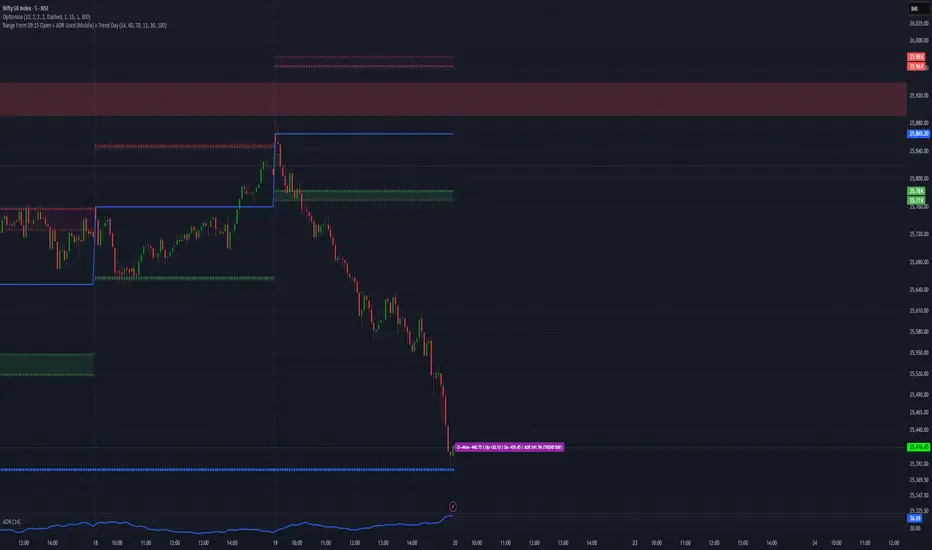
⚔️ Chartman Range Commander
Command the Range. Control the Day.
Chartman Range Commander is a market-state command module designed for serious intraday traders who trade with structure — not emotion.
It delivers real-time control over:
• 09:15 session reference
• Points moved from open
• Upside & downside range dominance
• ADR (Average Daily Range) consumption
• Early ADR Break detection for TREND DAY identification
This is not a signal generator.
This is a market control system.
🔎 What It Commands
📍 09:15 Open Anchor
Establishes the session battlefield from the official market open.
Instantly see:
• Points from open
• Intraday directional strength
• Range expansion from session start
📊 ADR Capacity Meter
Tracks how much of the Average Daily Range has been used.
🟢 LOW – Expansion potential remains
🟠 MID – Controlled engagement zone
🔴 HIGH – Range largely consumed
🟣 TREND DAY – ADR broken early (momentum command mode)
This prevents late-day overtrading and highlights genuine trend sessions.
🚨 TREND DAY Lock
If ADR is broken early in the session, the indicator shifts into Trend Command Mode and remains locked for the rest of the day.
This helps you:
• Hold winners with confidence
• Avoid fading strong directional moves
• Scale into pullbacks
• Stop reacting emotionally to noise
📱 Mobile-Optimized Display
A compact, color-coded label positioned near the current price gives one-glance clarity:
Points from open | Up/Down range | ADR % used | Market state
Built for decision speed.
🎯 Designed For
• NIFTY / BANKNIFTY intraday traders
• Index futures & options traders
• Momentum & expansion-based systems
• Structured discretionary traders
⚔️ Chartman Doctrine
Don’t trade randomly.
Don’t chase exhaustion.
Don’t fade strength blindly.
Command the range — or stand down.
Command the Range. Control the Day.
Chartman Range Commander is a market-state command module designed for serious intraday traders who trade with structure — not emotion.
It delivers real-time control over:
• 09:15 session reference
• Points moved from open
• Upside & downside range dominance
• ADR (Average Daily Range) consumption
• Early ADR Break detection for TREND DAY identification
This is not a signal generator.
This is a market control system.
🔎 What It Commands
📍 09:15 Open Anchor
Establishes the session battlefield from the official market open.
Instantly see:
• Points from open
• Intraday directional strength
• Range expansion from session start
📊 ADR Capacity Meter
Tracks how much of the Average Daily Range has been used.
🟢 LOW – Expansion potential remains
🟠 MID – Controlled engagement zone
🔴 HIGH – Range largely consumed
🟣 TREND DAY – ADR broken early (momentum command mode)
This prevents late-day overtrading and highlights genuine trend sessions.
🚨 TREND DAY Lock
If ADR is broken early in the session, the indicator shifts into Trend Command Mode and remains locked for the rest of the day.
This helps you:
• Hold winners with confidence
• Avoid fading strong directional moves
• Scale into pullbacks
• Stop reacting emotionally to noise
📱 Mobile-Optimized Display
A compact, color-coded label positioned near the current price gives one-glance clarity:
Points from open | Up/Down range | ADR % used | Market state
Built for decision speed.
🎯 Designed For
• NIFTY / BANKNIFTY intraday traders
• Index futures & options traders
• Momentum & expansion-based systems
• Structured discretionary traders
⚔️ Chartman Doctrine
Don’t trade randomly.
Don’t chase exhaustion.
Don’t fade strength blindly.
Command the range — or stand down.

Disclaimer
The information and publications are not meant to be, and do not constitute, financial, investment, trading, or other types of advice or recommendations supplied or endorsed by TradingView. Read more in the Terms of Use.
Disclaimer
The information and publications are not meant to be, and do not constitute, financial, investment, trading, or other types of advice or recommendations supplied or endorsed by TradingView. Read more in the Terms of Use.