OPEN-SOURCE SCRIPT
PDHLC Previous Day High, Low, and Close
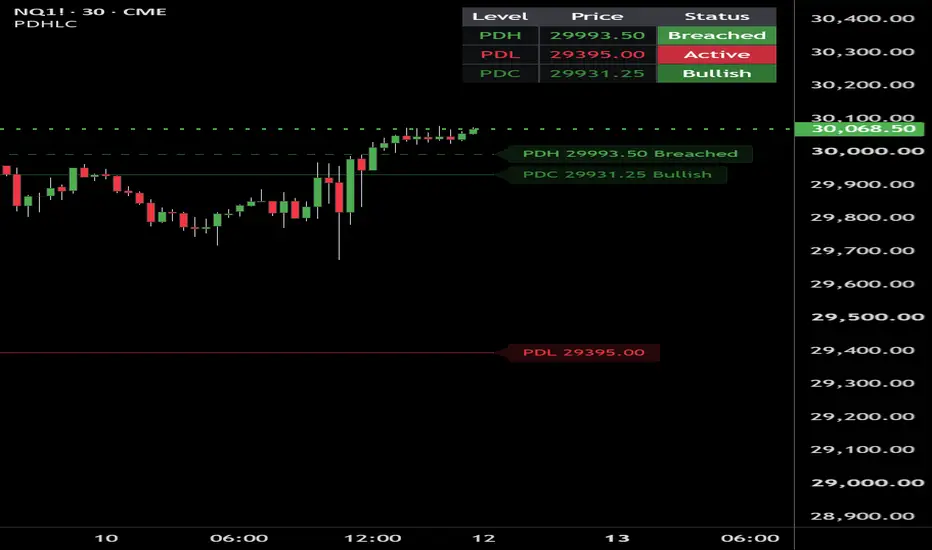
## PDHLC — Previous Day High, Low, and Close
PDHLC is a customizable market-reference indicator that displays the previous trading day’s high, low, and close.
It was designed primarily for futures traders, but the user-defined trading-day start time allows it to be adapted to different instruments, sessions, and trading methodologies.
The indicator tracks three key reference levels:
* **PDH — Previous Day High**
* **PDL — Previous Day Low**
* **PDC — Previous Day Close**
## Key Features
### Custom Trading-Day Start Time
Users can define exactly when a new trading day begins using Eastern Time.
The default setting is:
* **6:00 PM ET**
* **18:00 using the 24-hour clock**
This matches the standard futures-session rollover used by many CME futures markets.
The start hour and minute can be changed independently, allowing the indicator to support:
* Different futures sessions
* Regular trading hours
* Overnight sessions
* Custom trading plans
* Non-futures instruments
The new trading day begins on the first chart bar at or after the selected start time.
### Previous Day High and Low
PDHLC calculates and displays the completed prior trading day’s:
* Highest traded price
* Lowest traded price
* Closing price
Each line begins at the opening bar of the current user-defined trading day.
### Confirmed PDH and PDL Breaches
PDH and PDL are not considered breached merely because price trades through them intrabar.
A confirmed breach requires:
* A candle close above PDH
* A candle close below PDL
Once a breach is confirmed, the corresponding line automatically changes to a dashed style for the remainder of the trading day.
This creates an immediate visual distinction between:
* Active, unbreached liquidity levels
* Levels that have already been closed through
The breach status resets when the next user-defined trading day begins.
### Directional PDC Coloring
The Previous Day Close dynamically changes color based on the current price relationship to PDC:
* **Bullish:** Price is above PDC
* **Bearish:** Price is below PDC
* **Neutral:** Price is equal to PDC
Bullish, bearish, and neutral PDC colors can be configured independently.
The original PDC directional logic remains separate from the PDH and PDL breach logic.
### Customizable Labels
Users can control:
* Label visibility
* Label size
* Label offset from the current bar
Available label sizes include:
* Small
* Normal
* Large
### Customizable Information Table
The built-in information table displays the current value and status of each level:
* **PDH:** Active or Breached
* **PDL:** Active or Breached
* **PDC:** Bullish, Bearish, or Neutral
## Why PDHLC Is Unique
Many previous-day indicators rely on fixed calendar days, automatically extend lines across the chart, or treat any temporary move beyond a level as a confirmed breakout.
PDHLC is different because it combines:
* A fully customizable trading-day start time
* A futures-compatible default of 6:00 PM ET
* Candle-close confirmation for PDH and PDL breaches
* Automatic dashed styling after confirmed breaches
* Separate directional logic for PDC
* Lines that begin at the current trading-day open
* Lines that end exactly at their labels
* Adjustable label distance from current price
* Fully customizable table size and location
This makes PDHLC useful for traders who incorporate previous-day liquidity, session structure, breakout confirmation, directional bias, and daily reference levels into their analysis.
## Intended Use
PDHLC can be used to identify:
* Previous-day liquidity targets
* Potential support and resistance
* Confirmed high or low breaks
* Current price location relative to the prior close
* Daily directional context
* Untouched versus breached prior-day levels
This indicator does not generate trade-entry signals and does not guarantee future results. It is intended as a market-structure, session-reference, and discretionary trading-analysis tool.
PDHLC is a customizable market-reference indicator that displays the previous trading day’s high, low, and close.
It was designed primarily for futures traders, but the user-defined trading-day start time allows it to be adapted to different instruments, sessions, and trading methodologies.
The indicator tracks three key reference levels:
* **PDH — Previous Day High**
* **PDL — Previous Day Low**
* **PDC — Previous Day Close**
## Key Features
### Custom Trading-Day Start Time
Users can define exactly when a new trading day begins using Eastern Time.
The default setting is:
* **6:00 PM ET**
* **18:00 using the 24-hour clock**
This matches the standard futures-session rollover used by many CME futures markets.
The start hour and minute can be changed independently, allowing the indicator to support:
* Different futures sessions
* Regular trading hours
* Overnight sessions
* Custom trading plans
* Non-futures instruments
The new trading day begins on the first chart bar at or after the selected start time.
### Previous Day High and Low
PDHLC calculates and displays the completed prior trading day’s:
* Highest traded price
* Lowest traded price
* Closing price
Each line begins at the opening bar of the current user-defined trading day.
### Confirmed PDH and PDL Breaches
PDH and PDL are not considered breached merely because price trades through them intrabar.
A confirmed breach requires:
* A candle close above PDH
* A candle close below PDL
Once a breach is confirmed, the corresponding line automatically changes to a dashed style for the remainder of the trading day.
This creates an immediate visual distinction between:
* Active, unbreached liquidity levels
* Levels that have already been closed through
The breach status resets when the next user-defined trading day begins.
### Directional PDC Coloring
The Previous Day Close dynamically changes color based on the current price relationship to PDC:
* **Bullish:** Price is above PDC
* **Bearish:** Price is below PDC
* **Neutral:** Price is equal to PDC
Bullish, bearish, and neutral PDC colors can be configured independently.
The original PDC directional logic remains separate from the PDH and PDL breach logic.
### Customizable Labels
Users can control:
* Label visibility
* Label size
* Label offset from the current bar
Available label sizes include:
* Small
* Normal
* Large
### Customizable Information Table
The built-in information table displays the current value and status of each level:
* **PDH:** Active or Breached
* **PDL:** Active or Breached
* **PDC:** Bullish, Bearish, or Neutral
## Why PDHLC Is Unique
Many previous-day indicators rely on fixed calendar days, automatically extend lines across the chart, or treat any temporary move beyond a level as a confirmed breakout.
PDHLC is different because it combines:
* A fully customizable trading-day start time
* A futures-compatible default of 6:00 PM ET
* Candle-close confirmation for PDH and PDL breaches
* Automatic dashed styling after confirmed breaches
* Separate directional logic for PDC
* Lines that begin at the current trading-day open
* Lines that end exactly at their labels
* Adjustable label distance from current price
* Fully customizable table size and location
This makes PDHLC useful for traders who incorporate previous-day liquidity, session structure, breakout confirmation, directional bias, and daily reference levels into their analysis.
## Intended Use
PDHLC can be used to identify:
* Previous-day liquidity targets
* Potential support and resistance
* Confirmed high or low breaks
* Current price location relative to the prior close
* Daily directional context
* Untouched versus breached prior-day levels
This indicator does not generate trade-entry signals and does not guarantee future results. It is intended as a market-structure, session-reference, and discretionary trading-analysis tool.
Open-source script
In true TradingView spirit, the creator of this script has made it open-source, so that traders can review and verify its functionality. Kudos to the author! While you can use it for free, remember that republishing the code is subject to our House Rules.

Disclaimer
The information and publications are not meant to be, and do not constitute, financial, investment, trading, or other types of advice or recommendations supplied or endorsed by TradingView. Read more in the Terms of Use.
Open-source script
In true TradingView spirit, the creator of this script has made it open-source, so that traders can review and verify its functionality. Kudos to the author! While you can use it for free, remember that republishing the code is subject to our House Rules.
Disclaimer
The information and publications are not meant to be, and do not constitute, financial, investment, trading, or other types of advice or recommendations supplied or endorsed by TradingView. Read more in the Terms of Use.