Updated
Open Legacy Scoreboard
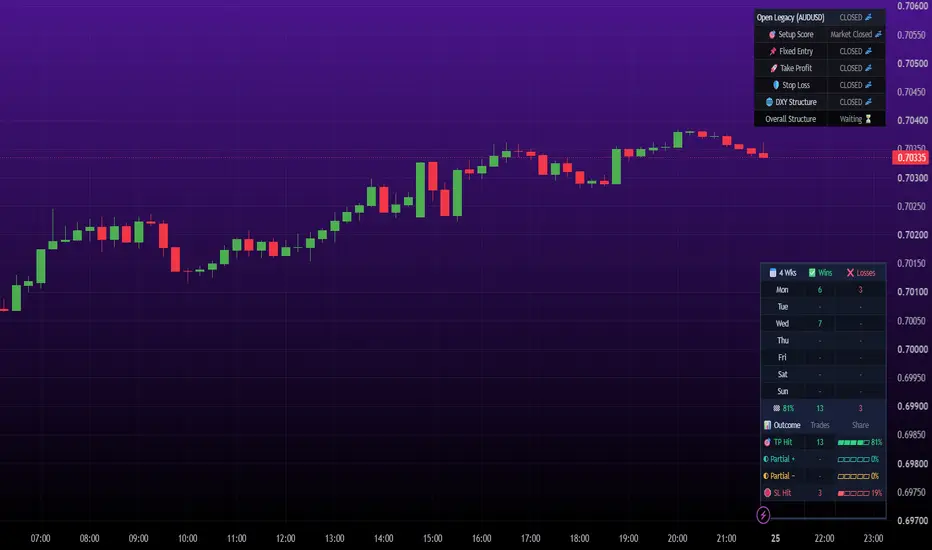
Open Legacy Scoreboard — a weekly win/loss tally for the Open Legacy signals,
read straight off the chart. Backtest-style feedback without leaving mobile.
WHAT IT DOES
Runs the Open Legacy entry logic and tracks every signal through to its
outcome, then displays the results as a HUD in the bottom-right corner:
📅 Day | ✅ S1 | ❌ S1 | ✅ S2 | ❌ S2
Mon | 3 | 1 | 2 | 0
...
🏁 62% | 12 | 7 | 5 | 3
Take profits in green, stop losses in red, split by which session window the
trade opened in. Today's row is highlighted. The bottom row gives the week's
win percentage and per-session totals.
WEEKS BACK
Keeps the last 8 weeks in a rolling buffer. Set Weeks Back to 1 to review last
week, 2 for the week before, and so on. The header shows which week you are
looking at. History lives in the script's memory, so reloading the chart or
changing symbol rebuilds it from whatever chart history is available.
HOW A TRADE IS SETTLED
Whichever comes first:
- its take profit or stop loss, at the pip distances you enter
- a reversal signal
- session end, if Close Trades at Session End is on
When a single candle reaches both levels, the minute bars inside it are read
to see which came first, so tight targets are not wrongly recorded as losses.
SETTINGS TO CHECK — THESE MUST MATCH THE STRATEGY
The scoreboard is a separate script with its own settings panel. If any of
these differ, it is measuring a different strategy and the tally will not
agree with your chart:
☑ Entry Method and Signal Sensitivity
☑ Wait For Candle Close
☑ One Trade 1 Per Direction
☑ Enable Layers, Max Trade Layers, Scale-In Strictness
☑ Require Correct Correlation
☑ Session Hours, day checkboxes, Session Timezone
☑ Enable Second Session — tick this if your strategy uses two windows, or the
S2 columns stay empty and those trades are filed under S1
☑ Close Trades at Session End
☑ Preferred Timeframe, and the chart must be on it
☑ Exits: Take Profit and Stop Loss pips, and Points Per Pip (10 suits gold,
indices, crypto and 5-decimal FX)
☑ Pyramiding — match your strategy's Properties value
☑ One Position At A Time — match the strategy's setting
AUDITING THE TALLY
Two display options make the counts checkable rather than opaque:
- Show Counted Signals marks every signal counted, triangles for first
entries and circles for layers.
- Show Settled Outcomes marks each trade where it closed, ✓ TP or ✗ SL, and
flags ties where one candle reached both levels.
If a number looks wrong, turn these on and compare against your own chart.
WHAT IT IS NOT
It tracks its own signals — Pine scripts cannot read each other, so it is not
reading your strategy's trades or your broker account. It knows nothing of
spread, slippage or commission. Read it as signal quality over time, not as a
statement of account performance.
DISCLAIMER
For educational and informational purposes only. Not financial advice, not a
recommendation, and not a solicitation to trade. Past results shown here do
not indicate future performance. Trading carries risk of loss.
read straight off the chart. Backtest-style feedback without leaving mobile.
WHAT IT DOES
Runs the Open Legacy entry logic and tracks every signal through to its
outcome, then displays the results as a HUD in the bottom-right corner:
📅 Day | ✅ S1 | ❌ S1 | ✅ S2 | ❌ S2
Mon | 3 | 1 | 2 | 0
...
🏁 62% | 12 | 7 | 5 | 3
Take profits in green, stop losses in red, split by which session window the
trade opened in. Today's row is highlighted. The bottom row gives the week's
win percentage and per-session totals.
WEEKS BACK
Keeps the last 8 weeks in a rolling buffer. Set Weeks Back to 1 to review last
week, 2 for the week before, and so on. The header shows which week you are
looking at. History lives in the script's memory, so reloading the chart or
changing symbol rebuilds it from whatever chart history is available.
HOW A TRADE IS SETTLED
Whichever comes first:
- its take profit or stop loss, at the pip distances you enter
- a reversal signal
- session end, if Close Trades at Session End is on
When a single candle reaches both levels, the minute bars inside it are read
to see which came first, so tight targets are not wrongly recorded as losses.
SETTINGS TO CHECK — THESE MUST MATCH THE STRATEGY
The scoreboard is a separate script with its own settings panel. If any of
these differ, it is measuring a different strategy and the tally will not
agree with your chart:
☑ Entry Method and Signal Sensitivity
☑ Wait For Candle Close
☑ One Trade 1 Per Direction
☑ Enable Layers, Max Trade Layers, Scale-In Strictness
☑ Require Correct Correlation
☑ Session Hours, day checkboxes, Session Timezone
☑ Enable Second Session — tick this if your strategy uses two windows, or the
S2 columns stay empty and those trades are filed under S1
☑ Close Trades at Session End
☑ Preferred Timeframe, and the chart must be on it
☑ Exits: Take Profit and Stop Loss pips, and Points Per Pip (10 suits gold,
indices, crypto and 5-decimal FX)
☑ Pyramiding — match your strategy's Properties value
☑ One Position At A Time — match the strategy's setting
AUDITING THE TALLY
Two display options make the counts checkable rather than opaque:
- Show Counted Signals marks every signal counted, triangles for first
entries and circles for layers.
- Show Settled Outcomes marks each trade where it closed, ✓ TP or ✗ SL, and
flags ties where one candle reached both levels.
If a number looks wrong, turn these on and compare against your own chart.
WHAT IT IS NOT
It tracks its own signals — Pine scripts cannot read each other, so it is not
reading your strategy's trades or your broker account. It knows nothing of
spread, slippage or commission. Read it as signal quality over time, not as a
statement of account performance.
DISCLAIMER
For educational and informational purposes only. Not financial advice, not a
recommendation, and not a solicitation to trade. Past results shown here do
not indicate future performance. Trading carries risk of loss.
Release Notes
Quality of performance improvements...Release Notes
Finishing touches...Release Notes
Replaced by open legacy bot... Release Notes
Outdated, utilise newer version...Release Notes
Bug fixes...Release Notes
OPEN LEGACY SCOREBOARDOpen Legacy Scoreboard is a results tracker for traders who use the Open Legacy indicator. It replays the indicator's BUY and SELL signals with the same strategy, sessions, news pauses and pip-based take profit and stop loss. It then counts how each trade ended, so you can review results by day and week without running a strategy.
HOW IT WORKS WITH OPEN LEGACY
It uses the same signal engine as the Open Legacy indicator: the same Entry Method (FVG Pullback or EMA Trend), Sensitivity filter, two sessions with their own days, and two news pauses. Use the same settings as your indicator, and the scoreboard tracks the trades you see on the chart.
HOW TRADES ARE REPLAYED
- A trade opens at the close of a signal candle.
- One trade at a time. A signal in the same direction is ignored while a trade is open, and an opposite signal closes it and opens the new one.
- From the next candle on, it checks whether TP or SL was reached. If one candle touches both, it uses 1-minute data to decide which came first.
HOW RESULTS ARE COUNTED
- TP Hit: the take profit was reached.
- SL Hit: the stop loss was reached.
- Partial +: closed early in profit by an opposite signal.
- Partial -: closed early at a loss by an opposite signal.
TP Hit and Partial + count as wins. SL Hit and Partial - count as losses.
THE TABLE
- Wins and losses for each weekday, with today highlighted.
- Totals and an overall win %.
- An outcome breakdown showing how many trades ended each way, with each outcome's share.
- Show Results For: This Week, Last Week, 2-4 Weeks Ago, Last 2/4/8/12 Weeks, or All Time.
- Optional chart markers show each counted entry and where it settled.
SETTINGS
- Strategy: Entry Method and Sensitivity.
- Targets: Stop Loss and Take Profit in pips, plus Points Per Pip (10 suits gold, indices, BTC and 5-decimal FX).
- Filters: Session 1 and Session 2 (each with its own hours and days), News 1 and News 2 (date and time) with the minutes to pause either side, and your Timezone.
- Display: show or hide the table, choose the period, and turn trade markers on or off.
LIMITATIONS
- This is a replay, not live trading. It assumes fills at the candle close with no spread, slippage or commission, so real results will differ.
- It only counts trades within the chart history TradingView has loaded. The 1-minute data used to break ties also has limited history on long charts.
- Older trade markers can drop off the chart because of TradingView's label limit. The table totals are not affected.
- Weeks and days follow the Timezone setting.
- Past results don't predict future results.
This script is for education and review. It is not financial advice. Test on a demo account first.
Release Notes
Bug fixes, with additional improvements!
Disclaimer
The information and publications are not meant to be, and do not constitute, financial, investment, trading, or other types of advice or recommendations supplied or endorsed by TradingView. Read more in the Terms of Use.
Disclaimer
The information and publications are not meant to be, and do not constitute, financial, investment, trading, or other types of advice or recommendations supplied or endorsed by TradingView. Read more in the Terms of Use.