OPEN-SOURCE SCRIPT
COT: Noncommercial Net (Futures)
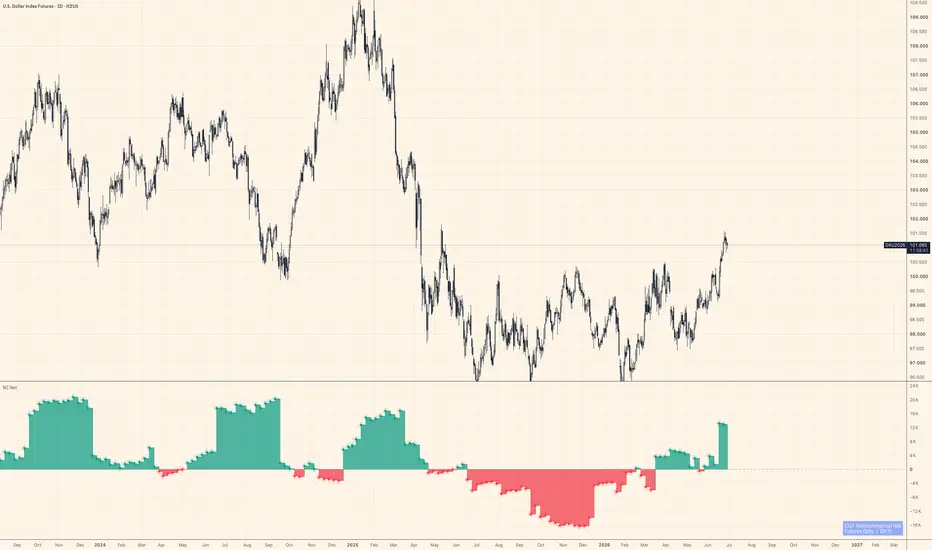
The CFTC publishes Commitment of Traders data every Friday. Inside that report, the "Noncommercial" category — large speculators, managed money, trend-followers — is the one most traders actually want to watch. This script strips everything else away and shows their net stance: Long minus Short, futures contracts only.
Positive values mean large speculators are net long. Negative means net short. A move across zero often marks a meaningful shift in positioning, not just noise.
How it works
The indicator auto-detects the correct CFTC code from the chart's symbol using TradingView's official LibraryCOT, so you don't need to configure anything. Open it on BTC futures, gold, crude oil, the yen — it resolves the code and pulls the right data automatically.
A teal/red histogram shows whether net positioning is positive or negative. A step-line sits on top for precise bar-by-bar reading. Zero is marked with a dashed reference line.
What it doesn't do
It doesn't tell you when to buy or sell. COT data is released weekly and lags several days behind the reporting cutoff — it's positioning context, not a signal. Use it alongside price action and other tools to understand who is leaning which way, not as a standalone trigger.
Notes
Futures only (not futures + options combined)
Noncommercial Long − Noncommercial Short = Net
Data source: CFTC Legacy report via TradingView's LibraryCOT v6
Works on any symbol that has a CFTC code in TradingView's database
Not financial advice. Position sizing and risk management are your responsibility.
Positive values mean large speculators are net long. Negative means net short. A move across zero often marks a meaningful shift in positioning, not just noise.
How it works
The indicator auto-detects the correct CFTC code from the chart's symbol using TradingView's official LibraryCOT, so you don't need to configure anything. Open it on BTC futures, gold, crude oil, the yen — it resolves the code and pulls the right data automatically.
A teal/red histogram shows whether net positioning is positive or negative. A step-line sits on top for precise bar-by-bar reading. Zero is marked with a dashed reference line.
What it doesn't do
It doesn't tell you when to buy or sell. COT data is released weekly and lags several days behind the reporting cutoff — it's positioning context, not a signal. Use it alongside price action and other tools to understand who is leaning which way, not as a standalone trigger.
Notes
Futures only (not futures + options combined)
Noncommercial Long − Noncommercial Short = Net
Data source: CFTC Legacy report via TradingView's LibraryCOT v6
Works on any symbol that has a CFTC code in TradingView's database
Not financial advice. Position sizing and risk management are your responsibility.
Open-source script
In true TradingView spirit, the creator of this script has made it open-source, so that traders can review and verify its functionality. Kudos to the author! While you can use it for free, remember that republishing the code is subject to our House Rules.

If you've ever wondered why gold and Bitcoin sometimes move with dollar liquidity and sometimes don't, that's basically all I post about here — Fed balance sheet, funding stress, and stablecoin flows, read against price.
Disclaimer
The information and publications are not meant to be, and do not constitute, financial, investment, trading, or other types of advice or recommendations supplied or endorsed by TradingView. Read more in the Terms of Use.
Open-source script
In true TradingView spirit, the creator of this script has made it open-source, so that traders can review and verify its functionality. Kudos to the author! While you can use it for free, remember that republishing the code is subject to our House Rules.
If you've ever wondered why gold and Bitcoin sometimes move with dollar liquidity and sometimes don't, that's basically all I post about here — Fed balance sheet, funding stress, and stablecoin flows, read against price.
Disclaimer
The information and publications are not meant to be, and do not constitute, financial, investment, trading, or other types of advice or recommendations supplied or endorsed by TradingView. Read more in the Terms of Use.