Updated
MTF FVG / iFVG + Volume Profile LVN
MTF FVG / iFVG + Volume Profile LVN
OVERVIEW
This indicator detects Fair Value Gaps (FVGs) on up to five higher timeframes and filters them with a composite volume profile built from the chart's own candles. The idea is simple: a gap that forms over a Low Volume Node (LVN) is an area the market moved through quickly with little participation, so it is more likely to act as an inefficiency worth watching. Gaps that form over high-volume areas are filtered out by default, which removes a lot of noise compared to a plain FVG indicator.
HOW IT WORKS
1) Composite volume profile
- The profile is built from the chart candles, covering today plus a configurable number of previous sessions.
- Each candle's volume is spread evenly across the price rows it traded through.
- Row size is automatic (daily ATR / 40, fixed at the start of the chart history) or can be set manually in points.
- The oldest session is removed as new sessions are added, so the profile always covers a rolling window.
2) Multi-timeframe FVG detection
- FVGs are detected on up to 5 timeframes (default: 15m, 1H, 4H, Daily, with 30m optional).
- Only closed candles of each timeframe are used, so zones do not repaint.
- A minimum gap size, measured in ATR of the gap's own timeframe, removes tiny gaps.
- Timeframes lower than the chart timeframe are ignored.
3) LVN confirmation (relative volume)
- Each gap gets a relative volume score: the average volume per row inside the gap divided by the average volume per row of the whole profile.
- The edge rows are excluded when the gap is large enough, because they belong to the candles that form the gap, not to the gap itself.
- If the score is at or below the LVN threshold (default 0.6), the gap is considered LVN-confirmed.
- A score of 1.0 means the gap traded the same volume as an average row. A score of 0.6 means it traded 40% less.
- Gaps outside the profile's price range are labeled "no VP". Increase the number of sessions to cover older 4H/Daily gaps.
4) Inversion (iFVG)
- An FVG becomes an iFVG when a candle of its own timeframe closes beyond it:
- A bullish FVG closed below becomes resistance (orange).
- A bearish FVG closed above becomes support (blue).
- An iFVG is removed when a candle of its timeframe closes back through it.
- By default, iFVGs are only created from LVN-confirmed FVGs. This can be changed to all FVGs.
WHAT YOU SEE ON THE CHART
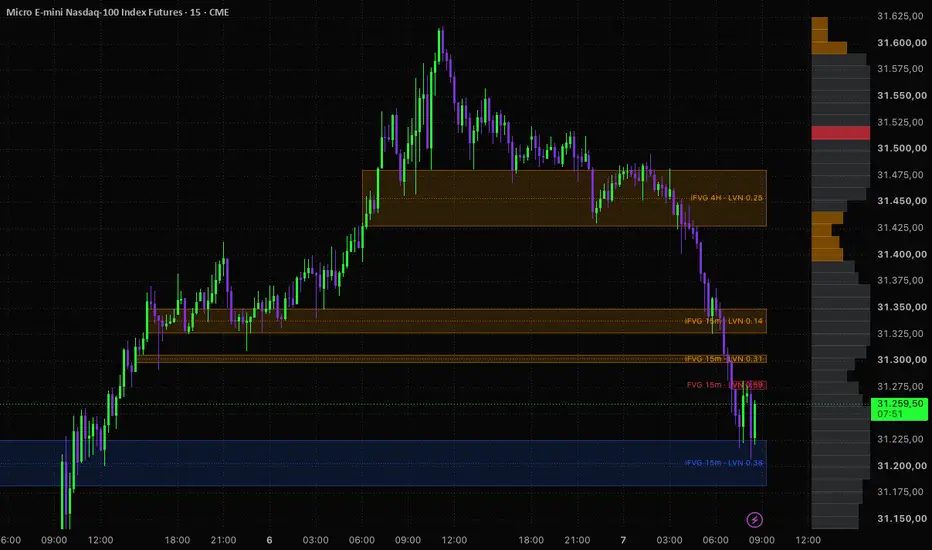
- FVG and iFVG zones with their timeframe and relative volume score (e.g. "FVG 1H · LVN 0.42").
- Optional CE (50%) line inside each zone.
- The composite volume profile drawn to the right of price, with the POC and LVN rows highlighted.
HOW TO USE IT
- Use a 1m to 5m chart so the profile has enough resolution. Higher timeframe charts produce a coarse profile.
- Treat LVN-confirmed higher timeframe FVGs as areas of interest, not as standalone entry signals. Combine them with your own market structure, session and risk management rules.
- iFVGs can be used as potential support/resistance after the original gap has failed.
- Adjust the LVN threshold to be stricter (lower value) or looser (higher value).
ALERTS
- Bullish FVG on LVN
- Bearish FVG on LVN
- iFVG support
- iFVG resistance
- Any FVG / iFVG event
LIMITATIONS
- The volume profile is an approximation built from OHLCV candles, not tick or bid/ask data. Volume is distributed evenly across each candle's range.
- The profile depends on the chart history loaded and on the volume data provided by the symbol's exchange.
- The indicator does not generate buy or sell signals and does not guarantee any trading result.
This script is for educational purposes only and is not financial advice.
OVERVIEW
This indicator detects Fair Value Gaps (FVGs) on up to five higher timeframes and filters them with a composite volume profile built from the chart's own candles. The idea is simple: a gap that forms over a Low Volume Node (LVN) is an area the market moved through quickly with little participation, so it is more likely to act as an inefficiency worth watching. Gaps that form over high-volume areas are filtered out by default, which removes a lot of noise compared to a plain FVG indicator.
HOW IT WORKS
1) Composite volume profile
- The profile is built from the chart candles, covering today plus a configurable number of previous sessions.
- Each candle's volume is spread evenly across the price rows it traded through.
- Row size is automatic (daily ATR / 40, fixed at the start of the chart history) or can be set manually in points.
- The oldest session is removed as new sessions are added, so the profile always covers a rolling window.
2) Multi-timeframe FVG detection
- FVGs are detected on up to 5 timeframes (default: 15m, 1H, 4H, Daily, with 30m optional).
- Only closed candles of each timeframe are used, so zones do not repaint.
- A minimum gap size, measured in ATR of the gap's own timeframe, removes tiny gaps.
- Timeframes lower than the chart timeframe are ignored.
3) LVN confirmation (relative volume)
- Each gap gets a relative volume score: the average volume per row inside the gap divided by the average volume per row of the whole profile.
- The edge rows are excluded when the gap is large enough, because they belong to the candles that form the gap, not to the gap itself.
- If the score is at or below the LVN threshold (default 0.6), the gap is considered LVN-confirmed.
- A score of 1.0 means the gap traded the same volume as an average row. A score of 0.6 means it traded 40% less.
- Gaps outside the profile's price range are labeled "no VP". Increase the number of sessions to cover older 4H/Daily gaps.
4) Inversion (iFVG)
- An FVG becomes an iFVG when a candle of its own timeframe closes beyond it:
- A bullish FVG closed below becomes resistance (orange).
- A bearish FVG closed above becomes support (blue).
- An iFVG is removed when a candle of its timeframe closes back through it.
- By default, iFVGs are only created from LVN-confirmed FVGs. This can be changed to all FVGs.
WHAT YOU SEE ON THE CHART
- FVG and iFVG zones with their timeframe and relative volume score (e.g. "FVG 1H · LVN 0.42").
- Optional CE (50%) line inside each zone.
- The composite volume profile drawn to the right of price, with the POC and LVN rows highlighted.
HOW TO USE IT
- Use a 1m to 5m chart so the profile has enough resolution. Higher timeframe charts produce a coarse profile.
- Treat LVN-confirmed higher timeframe FVGs as areas of interest, not as standalone entry signals. Combine them with your own market structure, session and risk management rules.
- iFVGs can be used as potential support/resistance after the original gap has failed.
- Adjust the LVN threshold to be stricter (lower value) or looser (higher value).
ALERTS
- Bullish FVG on LVN
- Bearish FVG on LVN
- iFVG support
- iFVG resistance
- Any FVG / iFVG event
LIMITATIONS
- The volume profile is an approximation built from OHLCV candles, not tick or bid/ask data. Volume is distributed evenly across each candle's range.
- The profile depends on the chart history loaded and on the volume data provided by the symbol's exchange.
- The indicator does not generate buy or sell signals and does not guarantee any trading result.
This script is for educational purposes only and is not financial advice.
Release Notes
Fix: hidden (non-LVN) FVGs no longer use up the "Max zones kept per timeframe" limit.When "Show only LVN-confirmed FVGs" is on, unconfirmed gaps are now discarded instead of being stored invisibly. Before, several hidden gaps could push a valid confirmed FVG out of the list early. Now every kept zone is one you actually see.
Note: "Create iFVG from: All FVGs" now requires turning off "Show only LVN-confirmed FVGs".

Disclaimer
The information and publications are not meant to be, and do not constitute, financial, investment, trading, or other types of advice or recommendations supplied or endorsed by TradingView. Read more in the Terms of Use.
Disclaimer
The information and publications are not meant to be, and do not constitute, financial, investment, trading, or other types of advice or recommendations supplied or endorsed by TradingView. Read more in the Terms of Use.