Updated
Dynamic Previous Period Highs and Lows + Sessions + Macros
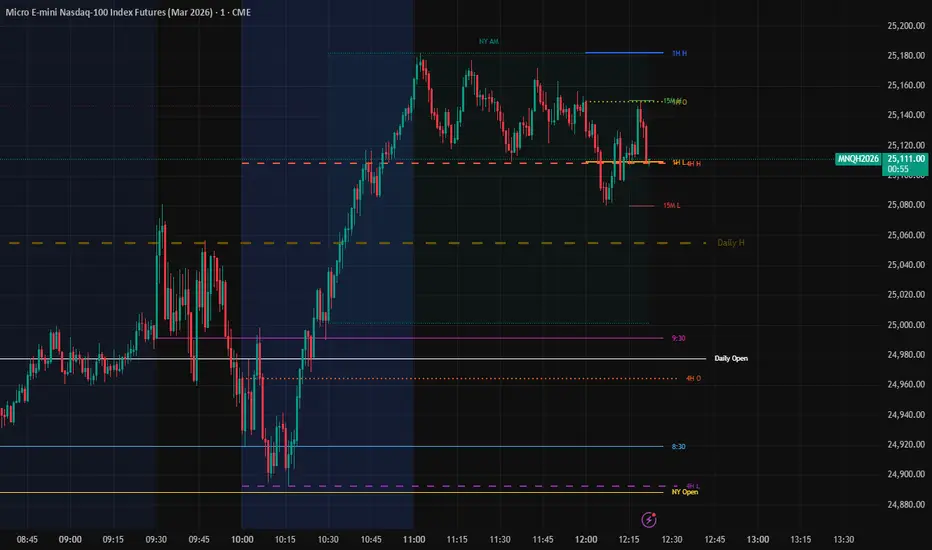
Institutional Liquidity & Multi-Timeframe Open Levels
This comprehensive institutional trading tool is designed for day traders who rely on high-probability liquidity levels and key institutional opening prices. It automates the tracking of previous period highs and lows across multiple timeframes while providing precise visualization of New York session opens and critical trading macros.
Key Features
1. Dynamic HTF Liquidity Levels
The indicator automatically plots the High and Low of the previous period for the following timeframes:
15-Minute (15M)
1-Hour (1H)
4-Hour (4H)
Daily (D)
These levels serve as primary targets for liquidity runs (Buy-side/Sell-side liquidity) and are essential for identifying "Previous Day High/Low" (PDH/PDL) setups.
2. Institutional Opening Prices
Opening prices act as magnets and "fair price" anchors. This script tracks the most significant New York opens:
NY Midnight Open: The true start of the institutional day.
8:30 AM Open: Often associated with high-impact news releases and the start of the pre-market volatility.
9:30 AM Open: The equities market open (NYSE), frequently a catalyst for the day's trend or a "Judas Swing."
Note: These lines automatically clean up at 18:00 (6:00 PM) NY time to prepare your chart for the next trading day.
3. Session & Macro Tracking
The indicator includes deep integration for session-based trading:
Sessions & Killzones: Visualizes Asia, London, NY AM, and NY PM sessions with integrated library support for "Kill Zone" detection.
NY Macros: Highlights critical macro windows (02:00-03:00, 10:00-11:00, and 15:00-16:00 NY Time) where algorithmic activity typically spikes.
4. Clean & Intelligent Visuals
Text-Only Labels: To avoid chart clutter, labels are rendered as text-only (transparent backgrounds), color-matched to their respective lines.
Timeframe Filters: Higher-frequency levels (like 15M and 1H) are automatically hidden on higher timeframes to keep your analysis focused and professional.
How to Use
Liquidity Purge: Look for price to sweep the Previous Period High or Low before seeking a reversal.
Premium/Discount: Use the Daily Open and NY Opens to determine if you are buying in a discount (below open) or selling in a premium (above open).
Session Confluence: Look for setups that occur within the highlighted Macro windows or during the start of the NY AM/PM sessions.
Settings
Toggle Levels: Individually show or hide any HTF level or Open price.
Custom Colors: Fully customizable colors for all sessions, macros, and opening lines.
Timezone Logic: The script uses America/New_York timezone for all time-based opens, ensuring accuracy regardless of your local time settings.
This comprehensive institutional trading tool is designed for day traders who rely on high-probability liquidity levels and key institutional opening prices. It automates the tracking of previous period highs and lows across multiple timeframes while providing precise visualization of New York session opens and critical trading macros.
Key Features
1. Dynamic HTF Liquidity Levels
The indicator automatically plots the High and Low of the previous period for the following timeframes:
15-Minute (15M)
1-Hour (1H)
4-Hour (4H)
Daily (D)
These levels serve as primary targets for liquidity runs (Buy-side/Sell-side liquidity) and are essential for identifying "Previous Day High/Low" (PDH/PDL) setups.
2. Institutional Opening Prices
Opening prices act as magnets and "fair price" anchors. This script tracks the most significant New York opens:
NY Midnight Open: The true start of the institutional day.
8:30 AM Open: Often associated with high-impact news releases and the start of the pre-market volatility.
9:30 AM Open: The equities market open (NYSE), frequently a catalyst for the day's trend or a "Judas Swing."
Note: These lines automatically clean up at 18:00 (6:00 PM) NY time to prepare your chart for the next trading day.
3. Session & Macro Tracking
The indicator includes deep integration for session-based trading:
Sessions & Killzones: Visualizes Asia, London, NY AM, and NY PM sessions with integrated library support for "Kill Zone" detection.
NY Macros: Highlights critical macro windows (02:00-03:00, 10:00-11:00, and 15:00-16:00 NY Time) where algorithmic activity typically spikes.
4. Clean & Intelligent Visuals
Text-Only Labels: To avoid chart clutter, labels are rendered as text-only (transparent backgrounds), color-matched to their respective lines.
Timeframe Filters: Higher-frequency levels (like 15M and 1H) are automatically hidden on higher timeframes to keep your analysis focused and professional.
How to Use
Liquidity Purge: Look for price to sweep the Previous Period High or Low before seeking a reversal.
Premium/Discount: Use the Daily Open and NY Opens to determine if you are buying in a discount (below open) or selling in a premium (above open).
Session Confluence: Look for setups that occur within the highlighted Macro windows or during the start of the NY AM/PM sessions.
Settings
Toggle Levels: Individually show or hide any HTF level or Open price.
Custom Colors: Fully customizable colors for all sessions, macros, and opening lines.
Timezone Logic: The script uses America/New_York timezone for all time-based opens, ensuring accuracy regardless of your local time settings.
Release Notes
Institutional Liquidity & Multi-Timeframe Open LevelsThis comprehensive institutional trading tool is designed for day traders who rely on high-probability liquidity levels and key institutional opening prices. It automates the tracking of previous period highs and lows across multiple timeframes while providing precise visualization of New York session opens and critical trading macros.
Key Features
1. Dynamic HTF Liquidity Levels
The indicator automatically plots the High and Low of the previous period for the following timeframes:
15-Minute (15M)
1-Hour (1H)
4-Hour (4H)
Daily (D)
These levels serve as primary targets for liquidity runs (Buy-side/Sell-side liquidity) and are essential for identifying "Previous Day High/Low" (PDH/PDL) setups.
2. Institutional Opening Prices
Opening prices act as magnets and "fair price" anchors. This script tracks the most significant New York opens:
NY Midnight Open: The true start of the institutional day.
8:30 AM Open: Often associated with high-impact news releases and the start of the pre-market volatility.
9:30 AM Open: The equities market open (NYSE), frequently a catalyst for the day's trend or a "Judas Swing."
Note: These lines automatically clean up at 18:00 (6:00 PM) NY time to prepare your chart for the next trading day.
3. Session & Macro Tracking
The indicator includes deep integration for session-based trading:
Sessions & Killzones: Visualizes Asia, London, NY AM, and NY PM sessions with integrated library support for "Kill Zone" detection.
NY Macros: Highlights critical macro windows (02:00-03:00, 10:00-11:00, and 15:00-16:00 NY Time) where algorithmic activity typically spikes.
4. Clean & Intelligent Visuals
Text-Only Labels: To avoid chart clutter, labels are rendered as text-only (transparent backgrounds), color-matched to their respective lines.
Timeframe Filters: Higher-frequency levels (like 15M and 1H) are automatically hidden on higher timeframes to keep your analysis focused and professional.
How to Use
Liquidity Purge: Look for price to sweep the Previous Period High or Low before seeking a reversal.
Premium/Discount: Use the Daily Open and NY Opens to determine if you are buying in a discount (below open) or selling in a premium (above open).
Session Confluence: Look for setups that occur within the highlighted Macro windows or during the start of the NY AM/PM sessions.
Settings
Toggle Levels: Individually show or hide any HTF level or Open price.
Custom Colors: Fully customizable colors for all sessions, macros, and opening lines.
Timezone Logic: The script uses America/New_York timezone for all time-based opens, ensuring accuracy regardless of your local time settings.

Disclaimer
The information and publications are not meant to be, and do not constitute, financial, investment, trading, or other types of advice or recommendations supplied or endorsed by TradingView. Read more in the Terms of Use.
Disclaimer
The information and publications are not meant to be, and do not constitute, financial, investment, trading, or other types of advice or recommendations supplied or endorsed by TradingView. Read more in the Terms of Use.