OPEN-SOURCE SCRIPT
Crypto Trade Plan Overlay Lite v1
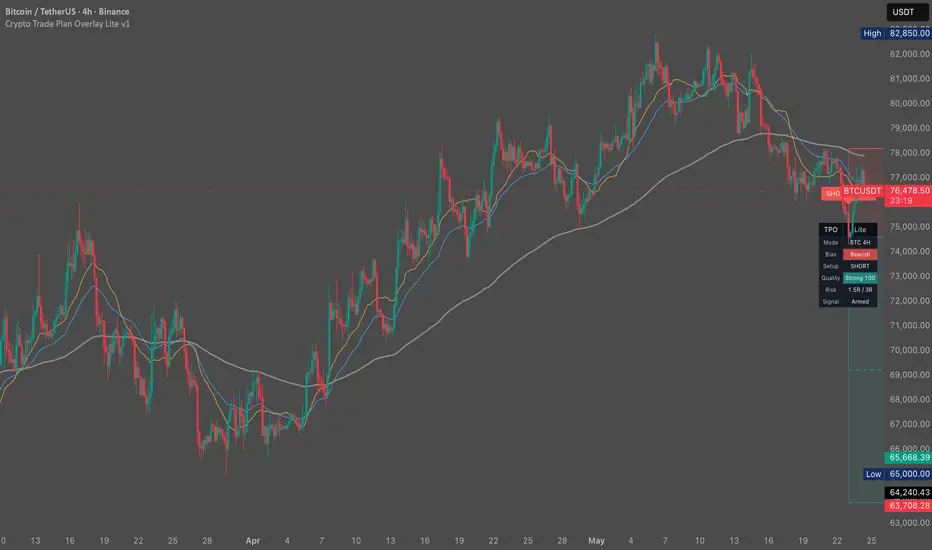
Crypto Trade Plan Overlay Lite is a BTC/ETH chart-planning overlay that shows bias, setup state, stop/invalidation, TP1, TP2, setup quality, and alert readiness.
What it shows:
- Bias: bullish, bearish, mixed, or avoid
- Setup: LONG, SHORT, WAIT, or CHECK
- Quality: wait, weak, okay, or strong
- Risk: TP1/TP2 R plan
- Signal: armed, fired, waiting, or check preset
When a confirmed setup appears, the overlay can draw entry, stop/invalidation, TP1, and TP2 planning levels. It is meant to make a trade idea easier to inspect, not to guarantee the result.
Lite presets:
- BTC 15m Active
- BTC 1H Day
- BTC 4H Swing
- ETH 15m Active
How to use:
1. Open BTCUSDT or ETHUSDT.
2. Select the matching preset.
3. Read the dashboard first.
4. If the dashboard says WAIT, no clean setup is active.
5. If the dashboard says CHECK, fix symbol/timeframe/preset.
6. If LONG or SHORT appears, inspect entry, stop, TP1, and TP2.
7. Set alerts only after understanding invalidation.
Alerts:
- CTPO Lite Long Setup
- CTPO Lite Short Setup
- Optional JSON alert payload for journaling or webhook workflows
Educational chart tool. Not financial advice. No profit guarantee. Historical examples do not guarantee future results. Signals confirm after candle close. Users control their own risk.
What it shows:
- Bias: bullish, bearish, mixed, or avoid
- Setup: LONG, SHORT, WAIT, or CHECK
- Quality: wait, weak, okay, or strong
- Risk: TP1/TP2 R plan
- Signal: armed, fired, waiting, or check preset
When a confirmed setup appears, the overlay can draw entry, stop/invalidation, TP1, and TP2 planning levels. It is meant to make a trade idea easier to inspect, not to guarantee the result.
Lite presets:
- BTC 15m Active
- BTC 1H Day
- BTC 4H Swing
- ETH 15m Active
How to use:
1. Open BTCUSDT or ETHUSDT.
2. Select the matching preset.
3. Read the dashboard first.
4. If the dashboard says WAIT, no clean setup is active.
5. If the dashboard says CHECK, fix symbol/timeframe/preset.
6. If LONG or SHORT appears, inspect entry, stop, TP1, and TP2.
7. Set alerts only after understanding invalidation.
Alerts:
- CTPO Lite Long Setup
- CTPO Lite Short Setup
- Optional JSON alert payload for journaling or webhook workflows
Educational chart tool. Not financial advice. No profit guarantee. Historical examples do not guarantee future results. Signals confirm after candle close. Users control their own risk.
Open-source script
In true TradingView spirit, the creator of this script has made it open-source, so that traders can review and verify its functionality. Kudos to the author! While you can use it for free, remember that republishing the code is subject to our House Rules.

Disclaimer
The information and publications are not meant to be, and do not constitute, financial, investment, trading, or other types of advice or recommendations supplied or endorsed by TradingView. Read more in the Terms of Use.
Open-source script
In true TradingView spirit, the creator of this script has made it open-source, so that traders can review and verify its functionality. Kudos to the author! While you can use it for free, remember that republishing the code is subject to our House Rules.
Disclaimer
The information and publications are not meant to be, and do not constitute, financial, investment, trading, or other types of advice or recommendations supplied or endorsed by TradingView. Read more in the Terms of Use.