OPEN-SOURCE SCRIPT
Updated Auto-Support v 0.2
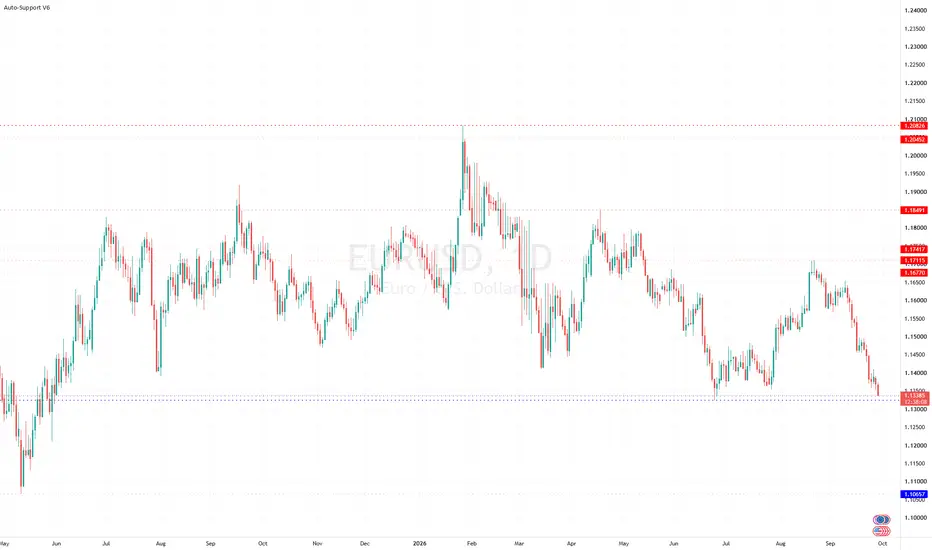
Same script as the previous version with a slight twist
Have added (lines) "Transparency" to the settings to avoid having to edit every line individually ...
Cheers
Have added (lines) "Transparency" to the settings to avoid having to edit every line individually ...
Cheers
Release Notes
*** Bug Fix version after today's error message issues ****Anyone using previous versions is strongly advised to update
> Removed some higher s/r levels from the code
> Sensitivity can now only be set between 1 - 10, higher numbers cause the script to fail to load
***********************************************************************
Fairly simple script that automatically draws highs and lows for the past X periods at various intervals.
3 Settings :
"Sensitivity" which amounts to the horizontal separation from one high to the next high (default multiplicator : 10)
"Transparency" ... Multiple lines piling up at the same level will cause the s/r levels to be more or less visible.
Variable "b" which is the HEX color for resistances (default : red)
Variable "c" which is the HEX color for supports (default : blue)
More HEX color codes on hexcolortool.com/ (not my webpage :)
Feel free to edit the script to your taste.
Release Notes
Hi folks,After a long while, I did a major update on my quite popular "Auto-support" script.
Comments/suggestions welcome.
Changelog:
● Script updated to Pline Version 5 (hence the V0.5)
● Settings window "cleaned-up" as there are now 'only' two settings available for the support/resistance colors (Previous version showed one option per line)
● Number of S/R lines limited to 15 each (Pline script limitations)
● Default 'Sensitivity' increased to 25 to compensate for the limitation in # S/R lines (Previously 10).
Note that the S/R lines will update with every new candle (as with any indicator).
Release Notes
With correct Screenshot.Changelog: See above.
Open-source script
In true TradingView spirit, the creator of this script has made it open-source, so that traders can review and verify its functionality. Kudos to the author! While you can use it for free, remember that republishing the code is subject to our House Rules.

Disclaimer
The information and publications are not meant to be, and do not constitute, financial, investment, trading, or other types of advice or recommendations supplied or endorsed by TradingView. Read more in the Terms of Use.
Open-source script
In true TradingView spirit, the creator of this script has made it open-source, so that traders can review and verify its functionality. Kudos to the author! While you can use it for free, remember that republishing the code is subject to our House Rules.
Disclaimer
The information and publications are not meant to be, and do not constitute, financial, investment, trading, or other types of advice or recommendations supplied or endorsed by TradingView. Read more in the Terms of Use.