TapeVitals - Float, RVOL & RSI [MohaveTrader]
WHAT TAPEVITALS IS
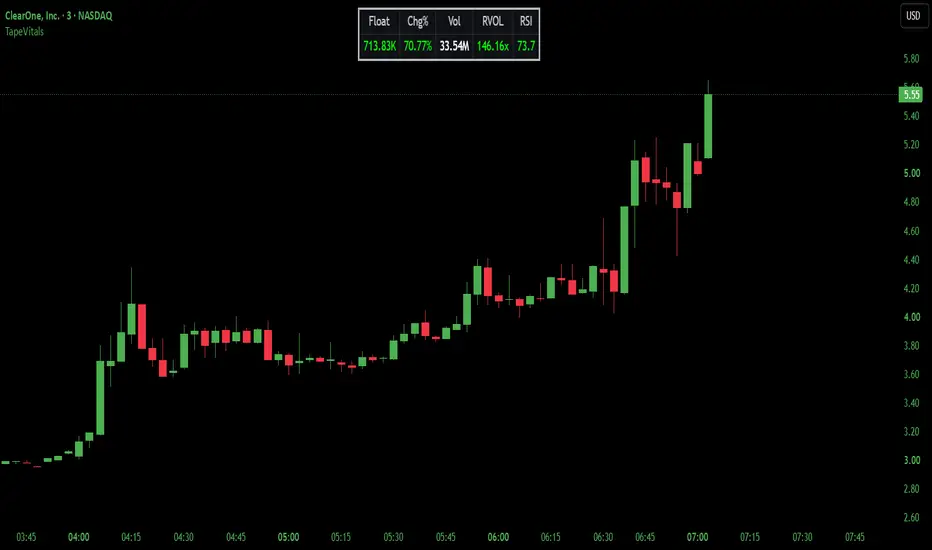
TapeVitals shows five values for the symbol on the chart: Float, Chg%, Vol, RVOL and RSI. It runs on any ticker and is especially useful for momentum traders in stocks and ETFs, where float, relative volume and the day's change matter most. The values appear in two places at once: in the status line next to the script name, where they take up minimal space on the chart, and in an optional table with headers that can be turned off once the order is familiar.
Nothing is drawn on the price chart and the price scale is not affected.
WHAT MAKES IT DIFFERENT
RVOL is measured by time of day. Relative volume is usually calculated as today's volume against an average full day, which reads low all morning and only becomes fair near the close. TapeVitals compares the volume traded so far today with the average volume traded by this same time of day over the prior days. For example, if a stock has traded twice its usual volume by 10 AM, RVOL reads approximately 2x instead of waiting until the end of the session.
The status line values follow the cursor. Hover any bar and the status line shows that bar's Chg%, running volume, RVOL and RSI, so the session can be read back bar by bar. The table always shows the latest bar.
Colors make the readings easier to interpret. Green highlights favorable momentum conditions, red indicates a negative price change or weak RSI, and gray or silver indicates quiet or neutral conditions. RSI is not flagged as overbought simply because it is high.
THE FIVE VALUES
Float is the number of shares available to trade, shown in K, M or B. It reads TradingView's current float first and falls back to the latest report figures only when the current one is unavailable. Float at or under the Low Float level shows bright green. The Low Float level is 20M by default and can be set to any size in the settings to match your own definition of a low float.
Chg% is the change from the prior day's close. It works in premarket, the regular session and after hours. Green is up, red is down.
Vol is the volume traded so far today, counted from the chart's own bars. With extended hours on, premarket volume is included. Because it adds up the chart's bars, it can differ slightly from the daily volume figure, which also counts prints such as the closing auction.
RVOL is today's volume so far against the average volume by the same time of day over the prior days, 10 by default. Under 1.5 reads gray, 1.5 to 2 reads white, 2 to 5 reads amber, and 5 and up reads bright green. All levels are adjustable: small cap momentum traders often look for 5 or more, while for large caps and ETFs 1.5 to 2 is already meaningful. On daily and higher charts, RVOL compares the current bar's volume against the average of the prior bars on that timeframe.
RSI is RSI(14) on the chart timeframe. Above 55 reads green, below 45 reads red, and the band between reads silver so the color does not flip on every bar near 50. Because it is calculated on the chart timeframe, its reading changes when switching timeframes.
STATUS LINE AND TABLE
The status line shows the five values in this order: Float, Chg%, Vol, RVOL, RSI. The status line cannot carry labels, so the table's headers serve as the key. The table uses the same order and colors, with headers over the values, and can be placed at the top or bottom of the chart, left, center or right. Top Center is the default; move it if another script's label or panel already sits there.
If the values do not appear next to the script name, open Chart settings, go to the Status line tab and check Values.
KEEPING THE STATUS LINE CLEAN
Turning on Values shows the values for every indicator on the chart, and some indicators print long rows of numbers. To keep only TapeVitals' values, open the settings of each other indicator, go to its Style tab and uncheck Values in status line. To keep that choice on new charts, use the Defaults button at the bottom of the settings and choose Save as default.
ALERTS
TapeVitals provides two RVOL alerts: In Play and Strong. Each alert fires at most once per trading day, when RVOL meets or exceeds its threshold and the minimum volume requirement has been satisfied. Alerts are independent, so both can trigger on the same bar. They use the RVOL In Play At and RVOL Strong At levels, 2x and 5x by default. Neither alert fires until the day's volume reaches Alert Min Volume, 50,000 shares by default, so a few early premarket prints cannot trigger them; set it to 0 to turn this check off. Alert Min Volume affects the alerts only, not the displayed values or colors. An alert keeps the settings in place when it was created, so after changing a level, recreate the alert.
LIMITATIONS
Float is primarily available for stocks and ETFs and shows N/A when TradingView has no float data for the symbol.
RVOL needs prior days on the chart to compare against. The first, partial day on the chart is not used, and RVOL becomes available once a full day has been recorded. On very short timeframes, such as 1 minute and below, fewer prior days may be loaded than the RVOL Days setting, and RVOL then averages the days available, so its reading can differ slightly between timeframes.
On instruments without real volume, such as forex, Vol and RVOL carry little meaning.
TapeVitals is informational only and does not generate buy or sell signals.
LICENSE
TapeVitals is published open-source under the Mozilla Public License 2.0.
DISCLAIMER
TapeVitals' values and colors are derived from market data by the rules described above and are not recommendations to buy or sell any instrument. You remain solely responsible for every trading decision.
TapeVitals shows five values for the symbol on the chart: Float, Chg%, Vol, RVOL and RSI. It runs on any ticker and is especially useful for momentum traders in stocks and ETFs, where float, relative volume and the day's change matter most. The values appear in two places at once: in the status line next to the script name, where they take up minimal space on the chart, and in an optional table with headers that can be turned off once the order is familiar.
Nothing is drawn on the price chart and the price scale is not affected.
WHAT MAKES IT DIFFERENT
RVOL is measured by time of day. Relative volume is usually calculated as today's volume against an average full day, which reads low all morning and only becomes fair near the close. TapeVitals compares the volume traded so far today with the average volume traded by this same time of day over the prior days. For example, if a stock has traded twice its usual volume by 10 AM, RVOL reads approximately 2x instead of waiting until the end of the session.
The status line values follow the cursor. Hover any bar and the status line shows that bar's Chg%, running volume, RVOL and RSI, so the session can be read back bar by bar. The table always shows the latest bar.
Colors make the readings easier to interpret. Green highlights favorable momentum conditions, red indicates a negative price change or weak RSI, and gray or silver indicates quiet or neutral conditions. RSI is not flagged as overbought simply because it is high.
THE FIVE VALUES
Float is the number of shares available to trade, shown in K, M or B. It reads TradingView's current float first and falls back to the latest report figures only when the current one is unavailable. Float at or under the Low Float level shows bright green. The Low Float level is 20M by default and can be set to any size in the settings to match your own definition of a low float.
Chg% is the change from the prior day's close. It works in premarket, the regular session and after hours. Green is up, red is down.
Vol is the volume traded so far today, counted from the chart's own bars. With extended hours on, premarket volume is included. Because it adds up the chart's bars, it can differ slightly from the daily volume figure, which also counts prints such as the closing auction.
RVOL is today's volume so far against the average volume by the same time of day over the prior days, 10 by default. Under 1.5 reads gray, 1.5 to 2 reads white, 2 to 5 reads amber, and 5 and up reads bright green. All levels are adjustable: small cap momentum traders often look for 5 or more, while for large caps and ETFs 1.5 to 2 is already meaningful. On daily and higher charts, RVOL compares the current bar's volume against the average of the prior bars on that timeframe.
RSI is RSI(14) on the chart timeframe. Above 55 reads green, below 45 reads red, and the band between reads silver so the color does not flip on every bar near 50. Because it is calculated on the chart timeframe, its reading changes when switching timeframes.
STATUS LINE AND TABLE
The status line shows the five values in this order: Float, Chg%, Vol, RVOL, RSI. The status line cannot carry labels, so the table's headers serve as the key. The table uses the same order and colors, with headers over the values, and can be placed at the top or bottom of the chart, left, center or right. Top Center is the default; move it if another script's label or panel already sits there.
If the values do not appear next to the script name, open Chart settings, go to the Status line tab and check Values.
KEEPING THE STATUS LINE CLEAN
Turning on Values shows the values for every indicator on the chart, and some indicators print long rows of numbers. To keep only TapeVitals' values, open the settings of each other indicator, go to its Style tab and uncheck Values in status line. To keep that choice on new charts, use the Defaults button at the bottom of the settings and choose Save as default.
ALERTS
TapeVitals provides two RVOL alerts: In Play and Strong. Each alert fires at most once per trading day, when RVOL meets or exceeds its threshold and the minimum volume requirement has been satisfied. Alerts are independent, so both can trigger on the same bar. They use the RVOL In Play At and RVOL Strong At levels, 2x and 5x by default. Neither alert fires until the day's volume reaches Alert Min Volume, 50,000 shares by default, so a few early premarket prints cannot trigger them; set it to 0 to turn this check off. Alert Min Volume affects the alerts only, not the displayed values or colors. An alert keeps the settings in place when it was created, so after changing a level, recreate the alert.
LIMITATIONS
Float is primarily available for stocks and ETFs and shows N/A when TradingView has no float data for the symbol.
RVOL needs prior days on the chart to compare against. The first, partial day on the chart is not used, and RVOL becomes available once a full day has been recorded. On very short timeframes, such as 1 minute and below, fewer prior days may be loaded than the RVOL Days setting, and RVOL then averages the days available, so its reading can differ slightly between timeframes.
On instruments without real volume, such as forex, Vol and RVOL carry little meaning.
TapeVitals is informational only and does not generate buy or sell signals.
LICENSE
TapeVitals is published open-source under the Mozilla Public License 2.0.
DISCLAIMER
TapeVitals' values and colors are derived from market data by the rules described above and are not recommendations to buy or sell any instrument. You remain solely responsible for every trading decision.

@MohaveTrader
Context First — Signals Second
Precision Trading Tools
Structure • Flow • Momentum
Context First — Signals Second
Precision Trading Tools
Structure • Flow • Momentum
Disclaimer
The information and publications are not meant to be, and do not constitute, financial, investment, trading, or other types of advice or recommendations supplied or endorsed by TradingView. Read more in the Terms of Use.
@MohaveTrader
Context First — Signals Second
Precision Trading Tools
Structure • Flow • Momentum
Context First — Signals Second
Precision Trading Tools
Structure • Flow • Momentum
Disclaimer
The information and publications are not meant to be, and do not constitute, financial, investment, trading, or other types of advice or recommendations supplied or endorsed by TradingView. Read more in the Terms of Use.